

Can I Use Anker Iphone Charger With Ipad And Airpods?
The world of charging cables and adapters can feel confusing. Every new device brings a new charger, and sometimes even a different connector. If you use Apple products, you may have wondered: Can I use my Anker iPhone charger for my iPad and AirPods? Is it safe? Will it charge as quickly as the original charger? Or could it cause problems?
Let’s clear up the confusion. We’ll look at what makes a charger compatible, what to check before plugging in, and how to get the best charging experience for all your Apple devices. This guide will explain in simple terms, with helpful examples and real-life tips.

36% off Today’s Exclusive Deals
Limited-time Exclusive Deals. Check current discount on Amazon.
Check Price on Amazon As an Amazon Associate I earn from qualifying purchases.Understanding Anker Chargers
Anker is one of the most popular brands for phone chargers and accessories. Many people choose Anker because the products are affordable, well-built, and have strong safety features. But not all Anker chargers are the same. Some are tiny cubes, some have multiple ports, and others support fast charging.
Most importantly, Anker offers two main types of charging accessories for Apple devices:
- Wall adapters (charging bricks) – These plug into your wall and have a USB port for your cable.
- Cables – Usually USB-A to Lightning, USB-C to Lightning, or USB-C to USB-C.
When we talk about “using an Anker iPhone charger,” it usually means using an Anker wall adapter and cable to charge your Apple device.
Anker Vs. Apple Chargers
Many Apple users wonder if third-party brands like Anker are as safe as Apple’s own chargers. The answer is yes—when you use a high-quality, certified charger. Anker is known for following strict safety standards, like MFi (Made for iPhone/iPad) certification for cables. That means Apple has tested and approved those products.
But, there are differences in wattage (power output), cable type, and features like fast charging. These details matter when charging iPhones, iPads, or AirPods.
How Charging Works: The Basics
Before plugging anything in, it helps to know how device charging actually works. Each device—iPhone, iPad, AirPods—has a battery and a built-in charging circuit. This circuit controls how much power the battery can safely take at one time.
The wall adapter (charger) has a power rating, measured in watts (W). The cable connects the charger to the device and sometimes limits how much power flows.
Here’s the key: The device pulls only as much power as it needs, even if the charger can give more. That means a high-wattage charger usually won’t damage a small device, but the device will only charge at its maximum supported speed.
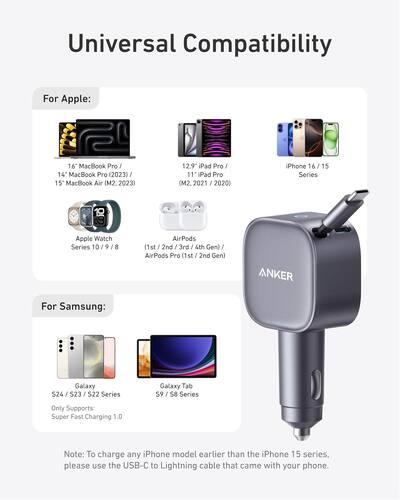
Compatibility: Can You Use Anker Iphone Charger With Ipad And Airpods?
Let’s look at each Apple device and see if you can safely use an Anker iPhone charger.
Ipad
Most iPads need more power than iPhones, especially for fast charging. Older iPads often came with a 10W or 12W charger, while newer ones support 20W or higher with USB-C.
Can you use an Anker iPhone charger (often 5W, 12W, or 20W) for your iPad?
- Yes, but charging speed depends on the charger’s power output.
- If your Anker iPhone charger is 5W, an iPad will charge very slowly.
- If your Anker charger is 12W or higher, most iPads will charge at a normal or fast speed.
Airpods
AirPods (including Pro and Max) have very small batteries. They do not need much power. Apple’s own AirPods charger is usually 5W, the same as a basic iPhone charger.
- Yes, you can use any Anker iPhone charger for AirPods.
- AirPods will not charge faster with a high-wattage charger. The charging case limits the power to a safe level.
Which Anker Chargers Work Best?
Let’s compare some common Anker charger models and see which are best for iPhone, iPad, and AirPods.
| Charger Model | Power Output (W) | iPhone | iPad | AirPods |
|---|---|---|---|---|
| Anker Nano (20W) | 20W | Fast charge | Fast charge (for new iPads) | Normal speed |
| Anker PowerPort Mini (12W) | 12W | Normal speed | Normal speed | Normal speed |
| Anker 511 Charger (5W) | 5W | Slow charge | Very slow charge | Normal speed |
| Anker Nano II (30W) | 30W | Fast charge | Fast charge | Normal speed |
Key tip: If you want one charger for all devices, choose an Anker model with at least 20W and a USB-C port.
Important Details: Wattage, Cable Type, And Fast Charging
Not all chargers and cables are created equal. Let’s look at the three main things you should check before charging multiple Apple devices with an Anker charger.
1. Wattage Matters
The power output (wattage) decides how quickly your device can charge. Here’s what you need to know:
- AirPods: 5W is enough.
- IPhone (older models): 5W is enough, but 12W or 20W charges faster if the phone supports it.
- IPhone (newer models): 20W for fast charging.
- IPad (old models): 10W–12W.
- IPad (newer models with USB-C): 20W–30W for best speed.
If you use a lower-wattage charger, it will still work, but charging will be slower.
2. Cable Compatibility
Apple uses different connectors on its devices:
- Lightning: Used for most iPhones, older iPads, and AirPods.
- USB-C: Used for newer iPads, some iPhones (from iPhone 15), and some AirPods Pro (2nd gen).
You need the right cable type for your device and charger port. For example, if your Anker charger has a USB-C port, and your iPhone uses Lightning, you need a USB-C to Lightning cable.
If your cable is not certified (MFi), it might not work well or could damage your device.
3. Fast Charging Support
Many newer Apple devices support fast charging. To use this feature, you need:
- A charger with enough power (at least 18W for iPhone, 20W for iPad).
- The right cable (USB-C to Lightning or USB-C to USB-C, depending on your device).
If your Anker charger and cable meet these requirements, you’ll get much faster charging than old 5W adapters.
Real-world Examples
Let’s look at some common scenarios to see how this works in everyday life.
Scenario 1: Charging Iphone, Ipad, And Airpods On Vacation
You’re packing for a trip. You want to carry as few chargers as possible. Can you use your Anker Nano 20W USB-C charger for all your Apple devices?
- IPhone 13: Charges at full speed with USB-C to Lightning cable.
- IPad Air (2020, USB-C): Charges at full speed with USB-C to USB-C cable.
- AirPods Pro: Charges at normal speed with USB-C to Lightning cable.
You only need to pack one charger and two cables. Everything charges safely.
Scenario 2: Charging Older Ipad With 5w Anker Charger
You have an old iPad (2016) and an Anker 5W charger from your iPhone.
- The iPad will charge, but very slowly. It might take 8–10 hours for a full charge.
- This is not harmful, but it’s not convenient. If you use the iPad while charging, the battery might not increase at all.
Scenario 3: Fast Charging Airpods With 30w Charger
You have a powerful 30W Anker Nano II charger. Can you charge your AirPods faster?
- No. AirPods charging speed is limited by the case’s internal circuit.
- Even with a 30W charger, AirPods will charge at their normal speed (about 1 hour for a full charge).
Scenario 4: Using One Charger For Everything At Your Desk
You want to simplify your desk setup. You buy an Anker PowerPort III Duo (with two USB-C ports, 36W total).
- You can plug in both your iPhone and iPad at the same time.
- Both will charge quickly, as long as you use the correct cables.
- AirPods can also be charged on this, but only one device will get “fast charge” if both are plugged in.
Comparing Charging Speeds
How much time does each charger save? Here’s a quick look at average charging times:
| Device | Charger Power | 0–50% Charge Time | 0–100% Charge Time |
|---|---|---|---|
| iPhone 13 | 5W | ~60 min | ~2.5 hrs |
| iPhone 13 | 20W | ~30 min (fast charge) | ~1.5 hrs |
| iPad Air (2020) | 12W | ~45 min | ~3 hrs |
| iPad Air (2020) | 20W | ~30 min (fast charge) | ~2 hrs |
| AirPods Pro | Any (5W+) | ~30 min | ~1 hr |
Insight: Fast charging makes a big difference for iPhones and iPads, but not for AirPods.
Safety: Is It Really Safe To Use Anker Chargers?
Safety is the top concern for many users. Will charging with an Anker device harm your battery or device? Let’s look at the facts:
- Reputable brands like Anker use strong safety features: Overvoltage protection, heat control, and short-circuit prevention.
- Apple’s MFi certification ensures cables and adapters meet Apple’s requirements.
- Your device controls how much power it accepts. The charger cannot “force” too much power.
- Using a charger with higher wattage than needed is safe. The device only takes what it needs.
However, problems can happen if you use:
- Cheap, fake, or uncertified chargers/cables.
- Damaged or frayed cables.
- Chargers that do not support the right voltage for your country.
Practical tip: Always check the charger’s label for safety marks, and buy from trusted brands or retailers.
Common Charging Mistakes To Avoid
Many people make mistakes when mixing chargers and cables. Here are the most common:
- Using the wrong cable type: A USB-C charger will not work with a regular USB-A to Lightning cable. Match the port and cable.
- Ignoring wattage: Using a 5W charger for an iPad leads to very slow charging.
- Mixing cheap, uncertified cables: These can fail quickly or cause damage.
- Expecting fast charging for all devices: AirPods and older iPhones/iPads will not fast charge, no matter the charger.
- Leaving devices plugged in all night every night: Modern devices stop charging at 100%, but constant high-heat charging can reduce battery health over years.

Multi-port Chargers: Can You Charge Multiple Devices At Once?
Anker makes chargers with two, three, or even five ports. Can you plug in your iPhone, iPad, and AirPods at the same time?
- Yes, but the total power is divided among all ports.
- If your charger says “36W total,” two devices might get 18W each, or one device gets 20W and the other 16W.
- AirPods draw so little power that they don’t affect charging speed for larger devices.
Here’s how a typical Anker dual-port charger handles power:
| Ports Used | Total Power | Device 1 (W) | Device 2 (W) |
|---|---|---|---|
| One port | 36W | 36W | — |
| Two ports | 36W | 18W | 18W |
| One iPad, one AirPods | 36W | 35W (iPad) | 1W (AirPods) |
Tip: For the best speeds, charge one device at a time, or use a high-output charger if charging multiple devices.
Durability And Long-term Effects
Some users worry that using non-Apple chargers will damage batteries over time. Here’s what you need to know:
- Battery health depends mostly on heat and charge cycles, not the charger’s brand.
- Using a certified charger (like Anker) is safe for daily charging.
- Avoid using your device in very hot places while charging (like in a car on a sunny day).
- Replace cables when they show signs of wear—exposed wires, fraying, or loose connections.
Non-obvious insight: Sometimes, a higher-wattage charger (like 30W) will run cooler and more efficiently than a cheap 5W charger, which may get hot and charge slowly.
When Should You Avoid Using An Anker Iphone Charger?
There are a few rare cases where you should not use an Anker iPhone charger:
- If your iPad or device needs more power than the charger can provide. For example, the 12.9-inch iPad Pro (2021) supports up to 30W charging. Using a 5W charger is possible but very slow.
- If your charger or cable is damaged. Stop using it immediately.
- If your device needs a special feature (like MagSafe or wireless charging). Most Anker iPhone chargers are wired; check compatibility for wireless options.
Otherwise, nearly all current Anker iPhone chargers are safe and effective for iPads and AirPods.
Tips For Getting The Best Charging Experience
- Use the right cable for your device and charger port.
- Pick a charger with enough power for your largest device (usually 20W+ for newer iPads).
- Buy certified cables (MFi for Apple devices) to avoid connection or charging errors.
- Charge overnight only occasionally to avoid extra heat cycles.
- If you lose your original charger, an Anker model with the correct power and cable will work just as well.
When To Choose Apple’s Charger Instead
There are times when the Apple charger is a better choice:
- If your device is still under warranty and you want to avoid any issues with Apple Support.
- If you need specialized features like MagSafe wireless charging (not all Anker models support this).
- If you want to match Apple’s color and design.
But for most users, Anker chargers are an excellent, safe, and cost-effective alternative.
Where To Find Reliable Anker Chargers
Buy from trusted retailers—either direct from Anker, the Apple Store, or well-known electronics stores. Avoid street markets or unknown online shops, as fake chargers may look like the real thing but lack safety features.
For more technical details about USB charging standards and compatibility, you can read the official Apple Support Guide.
Frequently Asked Questions
Is It Safe To Use An Anker Iphone Charger With My Ipad?
Yes, as long as your Anker charger provides enough power (at least 12W for older iPads, 20W+ for new models). The iPad will only draw as much power as it needs, so there’s no risk of damage.
Will My Airpods Charge Faster With A Higher-wattage Anker Charger?
No. AirPods charging speed is limited by the case, not the charger. Using a 20W or 30W Anker charger will not charge AirPods faster than a 5W charger.
Do Anker Chargers Support Apple’s Fast Charging For Iphone And Ipad?
Yes, many Anker USB-C chargers (18W, 20W, 30W, etc. ) Support fast charging for compatible iPhones and iPads. You also need the correct cable, such as USB-C to Lightning for iPhones.
Can I Use One Anker Charger For Iphone, Ipad, And Airpods At The Same Time?
Yes, if your charger has multiple ports and enough total power. Multi-port Anker chargers are a good solution for charging several devices at once.
What Happens If I Use A Low-wattage Anker Charger With My Ipad?
The iPad will charge very slowly, or not at all if you are using it while charging. It’s not harmful, but it’s not efficient. For best results, use at least a 12W charger for older iPads, or 20W+ for newer models.
Final Thoughts
You can confidently use most Anker iPhone chargers with your iPad and AirPods. The key is to match the charger’s power to your device’s needs and use the right certified cable. Anker’s products are safe, reliable, and often deliver the same performance as Apple’s own chargers—sometimes with extra features like multi-port charging or compact size.
If you want a simple setup, choose a modern Anker charger with at least 20W and a USB-C port. Remember, your device controls the power it takes, so you don’t have to worry about damaging your battery with a higher-wattage Anker charger.
Just avoid cheap or uncertified accessories, and you’ll enjoy fast, safe charging for all your Apple devices.

