

Many people struggle with bright alarm clocks at night. You might wake up, see a glowing display, and find it hard to fall asleep again. If you own or are thinking about buying an Anjank alarm clock, you may wonder: *Can you dim the display?* This question matters not just for comfort, but for better sleep and less eye strain. Let’s look at how Anjank alarm clocks handle display brightness, why dimming matters, and how to make the most of this feature.
Why Display Brightness Matters On Alarm Clocks
A bright clock display can seem like a small thing, but it can affect your rest. Blue light from screens, even from alarm clocks, can suppress melatonin. This hormone helps your body know it’s time to sleep. When a clock is too bright, it may disturb your natural sleep cycle.

36% off Today’s Exclusive Deals
Limited-time Exclusive Deals. Check current discount on Amazon.
Check Price on Amazon As an Amazon Associate I earn from qualifying purchases.For people who are sensitive to light, or who keep their alarm clock near their bed, being able to dim the display is a must-have feature. Dimming allows you to set the brightness to a level that’s easy on your eyes, especially in a dark room.
Display Dimming Features On Anjank Alarm Clocks
Anjank produces several alarm clocks, and most models offer some form of display dimming. The way you adjust brightness can vary, so it’s important to know how your specific model works.
Manual Dimming Options
Most Anjank alarm clocks come with manual dimming controls. You can usually adjust the display brightness by pressing a button or sliding a switch. Many models offer three or four levels of brightness, including a very dim or even completely off mode.
Here’s a quick look at how the display dimming options compare between popular Anjank models:
| Anjank Model | Dimming Levels | Lowest Brightness | How to Adjust |
|---|---|---|---|
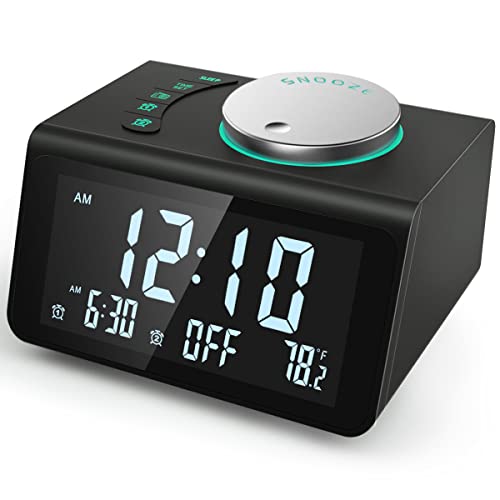
| ANJANK Small Digital Alarm Clock | 3 | Display Off | Dedicated button |
| ANJANK Wooden Digital Alarm Clock | 4 | Very Dim | Touch or button |
| ANJANK Radio Alarm Clock | 6 | Display Off | Rotary dial |
As you can see, most Anjank clocks give you several choices, so you can set the brightness to your liking.
Auto Dimming And Sensor Features
Some newer Anjank alarm clocks include an auto-dimming sensor. This feature adjusts the display brightness automatically based on the room light. If your bedroom gets dark, the clock will dim the display to avoid disturbing your sleep. In the morning, as the room brightens, the display gets brighter so you can read it easily.
This is a helpful feature for people who want a “set and forget” experience. However, not every model includes it, so check the product details before buying.
Turning The Display Off Completely
Many users want the option to turn the display off at night. Some Anjank clocks let you do this with a long press on the dimming button or by cycling through the brightness levels. In this mode, the display is off until you touch a button or the alarm rings.
This is especially useful for people who are very sensitive to light or want a completely dark room.
How To Dim The Display On Popular Anjank Models
Let’s break down how to adjust brightness on some of the most common Anjank alarm clocks.
Anjank Small Digital Alarm Clock
- Dimming: Tap the “DIMMER” button to cycle through three levels: bright, medium, and off.
- Tip: The lowest setting turns the display off, but the alarm will still function.
Anjank Wooden Digital Alarm Clock
- Dimming: Press the “DOWN” or “UP” button to change between four brightness levels.
- Sensor Mode: Some versions have a “SENSOR” mode, which dims the display automatically when the room is dark.
- Tip: For total darkness, use the lowest level or sensor mode.
Anjank Radio Alarm Clock
- Dimming: Adjust the rotary dimmer on the side to set the display anywhere from full bright to off.
- Tip: The dial gives you more precise control, which is good for finding the perfect setting.
If you’re unsure how to find your dimmer control, check the manual or look for symbols on the clock, like a sun or light bulb.
Practical Benefits Of Dimming The Display
You might wonder if dimming the display is really necessary. Here are some real-world benefits:
- Improved sleep quality: Less light in your room means better sleep, especially for light-sensitive people.
- Less eye strain: A dim display is easier on your eyes when you wake up at night.
- Longer clock life: Lower brightness can help the LEDs last longer.
- Energy savings: Dimmer displays use less power, especially important if your clock is battery-powered.
Many users don’t realize that even a small amount of light can keep your brain alert. That’s why experts recommend removing all sources of blue light from your sleeping area.

Common Mistakes When Using Display Dimming
Even with simple controls, it’s easy to make mistakes when using the dimming feature on your Anjank alarm clock. Here are a few to watch out for:
- Not exploring all settings: Some people leave the display bright because they don’t know about the dimming button or dial. Try all the options.
- Forgetting to save settings: On some models, you need to press and hold a button to save your brightness preference.
- Confusing sensor mode: If your clock has auto-dimming, covering the sensor accidentally (like with a book or pillow) may keep the display too bright.
- Not using display-off mode: If you are very sensitive to light, use the “off” setting for total darkness instead of the dimmest setting.
A non-obvious tip: If you want to check the time quickly during the night, some clocks let you “wake” the display by touching any button—no need to keep it bright all night.
How Anjank Clocks Compare To Other Brands
You may be curious how Anjank alarm clocks stack up against other brands when it comes to display dimming. Here’s a quick comparison with two popular competitors:
| Brand | Dimming Levels | Sensor Mode | Display Off Option |
|---|---|---|---|
| Anjank | 3-6 | Some models | Yes |
| Philips | 2-4 | Some models | Rare |
| DreamSky | 3 | No | Yes |
Anjank offers more flexibility than many budget brands, and often includes a true “display off” mode, which isn’t always found in other models.
Troubleshooting Display Dimming Issues
If your Anjank clock’s display isn’t dimming as you expect, here are a few steps to try:
- Check the power source: Some dimmer features work only when the clock is plugged in, not on battery.
- Reset the clock: Unplug, wait 10 seconds, and plug it back in. Sometimes settings get stuck.
- Consult the manual: Each model is slightly different. Look for the dimming or sensor section.
- Update firmware: Rare, but some advanced models allow software updates for bug fixes.
If you still have trouble, contact Anjank support or check reviews online. You might find that a specific setting or hidden feature solves the problem.
Other Helpful Features On Anjank Alarm Clocks
Display dimming isn’t the only feature to consider. Many Anjank clocks also offer:
- USB charging ports: Charge your phone or tablet while you sleep.
- FM radio: Wake up to your favorite station.
- Dual alarms: Set different times for weekdays and weekends.
- Snooze button: Extra sleep with a simple tap.
Here’s how some features compare in popular models:
| Model | USB Ports | FM Radio | Dual Alarms | Auto Dimming |
|---|---|---|---|---|
| Small Digital Clock | Yes | No | Yes | No |
| Wooden Digital Clock | No | No | Yes | Yes |
| Radio Alarm Clock | Yes | Yes | Yes | No |
If display dimming is your main concern, make sure to choose a model with easy controls and, if possible, a sensor mode for automatic adjustment.
Expert Tips For Using Your Anjank Alarm Clock
- Set your lowest brightness at night: Even if you don’t notice the light, your brain might. The dimmest setting is usually enough to see the time.
- Use auto-dimming if you move the clock often: If you sometimes keep your clock in different rooms, auto-dimming adapts to the light without extra effort.
- Clean the sensor regularly: If your model uses a light sensor, dust or fingerprints can block it, causing brightness problems.
- Test the “display off” feature before bedtime: Some people find it hard to turn the display back on in the dark. Practice first so you don’t get frustrated in the middle of the night.
- Combine with blackout curtains: Even with a dim display, outside light can disrupt sleep. Dark curtains plus a dimmed clock offer the best rest.
A practical insight: Many users overlook the value of a well-placed clock. If your display is still too bright, try moving the clock to a shelf or spot where it’s less direct.
Where To Find More Information
For the latest features and model details, visit the official Anjank website. You can also find user manuals, troubleshooting tips, and customer support there.

Frequently Asked Questions
How Do I Know If My Anjank Alarm Clock Has A Dimmer?
Most models have a dimmer button or a small dial on the side or top. Check for a button labeled “DIMMER,” or look in your manual for brightness settings. If you can’t find one, try pressing and holding the clock’s main buttons to see if a hidden dimmer function appears.
Can I Turn The Display Off Completely?
Yes, many Anjank clocks allow you to turn off the display. Usually, you cycle through the brightness settings until the display goes dark. The alarm will still work, and you can press any button to check the time if needed.
Does Auto-dimming Work In Every Room?
Auto-dimming uses a light sensor. If the sensor is blocked or the room has unusual lighting (like colored bulbs), the dimming might not work perfectly. Try keeping the sensor area clean and free from obstructions for best results.
Will Dimming The Display Save Battery?
Yes. Lowering the brightness or turning off the display reduces power use. This is especially important for battery-powered clocks, which will last longer on dim settings.
Are Anjank Clocks Better Than Other Brands For Dimming?
Anjank clocks are known for flexible dimming options, including true “display off” and sensor modes in some models. While some brands offer similar features, Anjank usually provides more control and is a good choice if display brightness is a priority.
Choosing the right alarm clock can make your nights more restful and your mornings smoother. With the right Anjank model, you can enjoy just the right amount of light—no more, no less—for a better start every day.

