

Running Facebook Ads can change the way your business grows online. Whether you’re selling products, building your brand, or reaching new customers, Facebook Ads let you target people with amazing precision. But for many beginners, Facebook Ads seem confusing. There are so many options, settings, and decisions.
If you’re unsure where to start, or how to get results, you’re not alone.

36% off Today’s Exclusive Deals
Limited-time Exclusive Deals. Check current discount on Amazon.
Check Price on Amazon As an Amazon Associate I earn from qualifying purchases.This guide explains how to run Facebook Ads step by step. You’ll learn how to set up your first campaign, target your audience, design your ads, and measure success. By the end, you’ll understand the process and common mistakes to avoid.
Ready to turn clicks into customers? Let’s get started.
Understanding Facebook Ads
Facebook Ads are paid messages shown to people on Facebook, Instagram, Messenger, and the Audience Network. Businesses use them to reach new customers, boost sales, and grow their brand. Ads can appear in different places, such as news feeds, stories, or the right column.
Why use Facebook Ads? Facebook has over 2.9 billion active users worldwide. You can reach almost any audience, from teenagers to seniors, in any country. The platform offers powerful targeting tools, so your ads reach people most likely to buy from you.
Types of Facebook Ads:
- Image ads: Simple ads with a photo and text.
- Video ads: Short videos to grab attention.
- Carousel ads: Multiple images or videos in one ad.
- Slideshow ads: Animated images with music.
- Collection ads: Showcase products in a grid.
Each format fits different goals. For example, use video ads to tell a story or collection ads to display products.
Setting Up Your Facebook Ads Manager
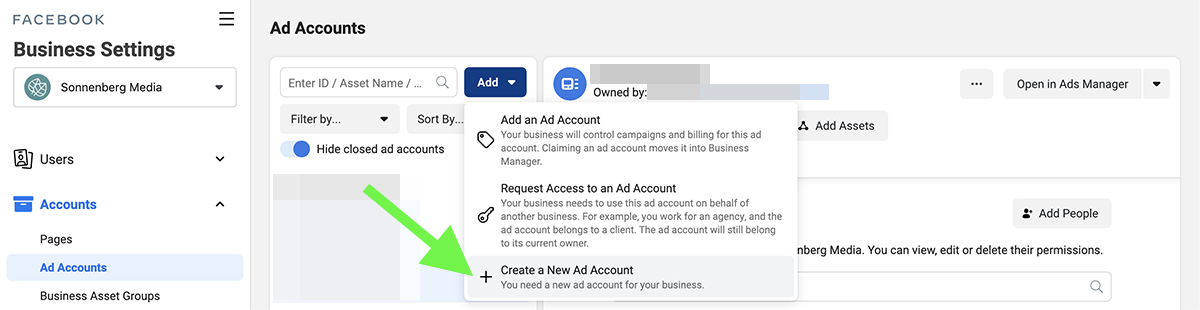
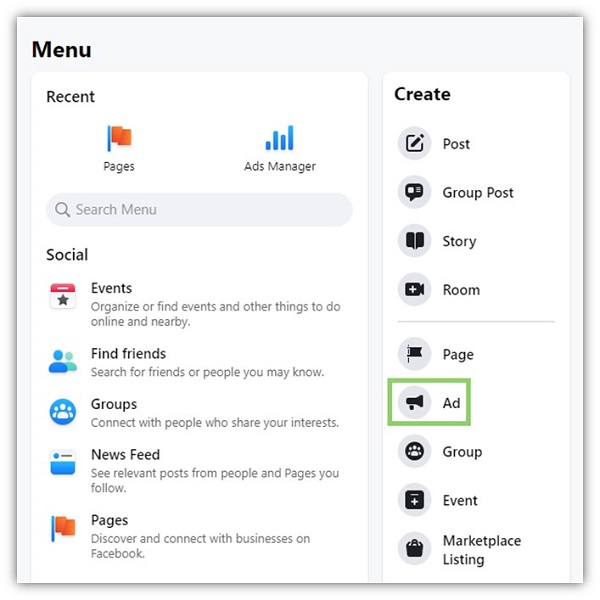
Before you create ads, you need to set up Facebook Ads Manager, the platform’s main tool for ad creation and tracking. You’ll also need a Facebook Business Page.
- Go to Facebook and click “Create” to set up a Business Page if you don’t have one.
- Visit Ads Manager at www.facebook.com/adsmanager.
- Link your Business Page to Ads Manager.
- Add a payment method—credit card, PayPal, or direct debit.
You’re now ready to start. Ads Manager is where you choose your campaign settings, budget, target audience, and design your ads.
Choosing Your Campaign Objective
The first step in creating an ad is picking your campaign objective. This tells Facebook what you want to achieve. Objectives are grouped in three categories:
- Awareness: Reach as many people as possible.
- Consideration: Get people to visit your website, watch a video, or interact with your page.
- Conversion: Drive sales, sign-ups, or other actions.
Popular objectives:
- Brand awareness
- Traffic
- Engagement
- App installs
- Video views
- Lead generation
- Conversions
- Catalog sales
For example, if you want people to buy from your website, choose “Conversions. ” If you want more people to know your brand, pick “Brand Awareness. ” Selecting the right objective is crucial because Facebook uses it to show your ads to the best people.
Targeting Your Audience
One of Facebook Ads’ biggest strengths is targeting. You can reach users based on age, gender, location, interests, behaviors, or connections.
Audience Types
- Core Audiences: Target by demographics, interests, and behaviors.
- Custom Audiences: Reach people who already know you, like website visitors, email subscribers, or app users.
- Lookalike Audiences: Target people similar to your best customers.
Setting Up Targeting
- In Ads Manager, go to the “Audience” section.
- Select location, age, gender, and language.
- Add interests and behaviors—like “online shopping,” “fitness,” or “travel.”
- Choose connections—such as people who like your page or friends of fans.
Practical Tips
- Start broad: Don’t over-target. Let Facebook’s algorithm learn who responds.
- Use Lookalike Audiences: This is a powerful, often overlooked tool. Facebook finds new users similar to your existing customers.
- Exclude uninterested groups: For example, exclude people who already bought your product.
Here’s a quick comparison of audience types:
| Audience Type | Description | Best For |
|---|---|---|
| Core Audience | Targeting based on demographics, interests | New customer acquisition |
| Custom Audience | People who interacted with your business | Retargeting, upselling |
| Lookalike Audience | Users similar to existing customers | Scaling campaigns |
Budgeting And Bidding
Facebook Ads let you control how much you spend. You can set a daily budget (amount spent per day) or a lifetime budget (total spent over a period). You also choose how Facebook bids for ad placements.
Budget Types
- Daily budget: Good for ongoing campaigns. Facebook spends up to your limit each day.
- Lifetime budget: Useful for short campaigns. Facebook spreads spending across the campaign duration.
Bidding Options
- Automatic bidding: Facebook chooses the best bid to get results.
- Manual bidding: You set the maximum amount you’ll pay per action (like click or conversion).
How Much Should You Spend?
Start small—$5 to $20 per day is enough to learn. Increase your budget as you see results. Watch performance closely. Spending too much without testing can waste money.
Common Beginner Mistakes
- Setting a high budget before testing.
- Not tracking results, so money is spent with no clear outcome.
- Ignoring manual bidding—sometimes it brings better results for experienced users.
Here’s a sample budget table for new advertisers:
| Budget Type | Recommended Amount | When to Use |
|---|---|---|
| Daily | $5–$20 | Learning, ongoing campaigns |
| Lifetime | $50–$200 | Short-term promotions |
Designing Your Ad Creative
The ad creative includes your image, video, headline, text, and call-to-action (CTA). It’s what people see and respond to.
Elements Of A Good Ad
- Visuals: Use clear, bright images. Faces and products work well.
- Headline: Grab attention in 5–10 words.
- Text: Explain benefits simply. Avoid jargon.
- CTA: Tell people what to do—“Shop Now,” “Learn More,” or “Sign Up.”
Practical Tips
- Keep text short. Facebook cuts off long text.
- Use high-quality images or videos. Poor visuals reduce clicks.
- Test different creatives. Run two or more ads to see which performs best (A/B testing).
Common Mistakes
- Using too much text on images. Facebook limits text—use the 20% rule.
- Forgetting the CTA. Ads without a clear action perform worse.
- Choosing generic images—stock photos rarely perform as well as real photos.
Here’s a sample table comparing ad formats:
| Ad Format | Best Use | Key Feature |
|---|---|---|
| Image | Quick messages | Simple, easy to create |
| Video | Storytelling, product demos | High engagement |
| Carousel | Multiple products | Scroll through images |
| Collection | Product catalogs | Shop directly |
Setting Placements
Ad placements decide where your ads show. Facebook lets you pick automatic placements (Facebook, Instagram, Messenger, Audience Network) or manual placements.
Automatic Vs. Manual
- Automatic placements: Facebook decides, maximizing reach.
- Manual placements: You choose locations—like only Instagram Stories or Facebook News Feed.
Practical Advice
- Beginners should use automatic placements. Facebook’s algorithm often finds the best spots.
- If you notice poor results on a platform (e.g., Audience Network), exclude it in future campaigns.
- For visuals designed for stories, select only story placements.
Writing Effective Ad Copy
Your ad copy is your message. It should be clear, direct, and benefit-focused.
Tips For Strong Copy
- Start with the customer’s problem. For example: “Tired of slow internet?”
- Show the solution: “Upgrade to lightning-fast speeds today.”
- Use numbers and facts. “Save 20% this week only.”
- Avoid complicated language. Simple words get more clicks.
Example
Bad: “our Company Offers State-of-the-art Solutions For Home Connectivity.”
Good: “get Fast Wi-fi At Home. No More Buffering.”
Non-obvious Insight
Many beginners focus only on features, not benefits. Always ask: How does this help the customer? Also, try to match the tone of your target audience. If you’re targeting young people, use casual language.
Setting Up Tracking And Analytics
Tracking is essential. Without it, you don’t know if your ads work.
Facebook Pixel
The Facebook Pixel is a small piece of code added to your website. It tracks actions like page views, purchases, or sign-ups.
- Go to Ads Manager, select “Pixels.”
- Click “Create Pixel.”
- Add the code to your website (most platforms like Shopify or WordPress make this easy).
With Pixel, you can:
- Retarget visitors who didn’t buy.
- Measure conversions.
- Build Custom Audiences.
Analytics In Ads Manager
Ads Manager shows performance metrics:
- Impressions: Times your ad was shown.
- Clicks: How many clicked your ad.
- CTR (Click-Through Rate): Clicks divided by impressions.
- CPC (Cost Per Click): How much you paid per click.
- Conversions: Actions taken, like purchases.
Check these daily. Adjust your ads if results are poor.
Practical Tips
- Don’t ignore Pixel setup. Without it, you miss key data.
- Use conversion tracking to measure real results, not just clicks.
- Watch for low CTR or high CPC—they signal problems with your ad creative or targeting.
Optimizing Your Campaigns
Optimization means improving your ads based on data. Facebook’s algorithm learns over time, but you must help it.
A/b Testing
Run multiple versions of your ads. Change one thing—like the image or headline. See which performs better.
Adjusting Targeting
If your CTR is low, try a different audience. Maybe your ad isn’t relevant to the people you’re targeting.
Changing Budget
Increase budget for ads that work well. Pause or reduce spending on poor performers.
Scaling Up
Once you find a winning ad, scale it. Increase your budget, use Lookalike Audiences, and expand placements.
Non-obvious Insight
Many advertisers change too many things at once. Always change one variable at a time, so you know what caused improvement. Also, let your ads run for at least 3–5 days before making big changes. Facebook needs time to learn.
Common Mistakes To Avoid
- Skipping pixel setup: Without tracking, you don’t know what works.
- Over-targeting: Too narrow audiences limit reach and learning.
- Ignoring ad creative: Poor visuals or weak copy kill performance.
- Setting high budgets too soon: Test first, scale later.
- Not testing: Always try different versions to improve results.
- Neglecting mobile users: Most Facebook users are on mobile. Design ads for phones.
- Forgetting to set objectives: Wrong objectives waste money.
Measuring Success
Success depends on your goals. For most, it’s sales or leads. But you can also measure:
- Website traffic
- App installs
- Video views
- Engagement (likes, shares, comments)
Key Metrics
- ROAS (Return on Ad Spend): Revenue divided by ad spend.
- Conversion rate: Percentage of people who took action.
- CPC: Cost per click.
If you spend $100 and earn $500 in sales, your ROAS is 5. This is a common benchmark. Aim for ROAS above 3 for most products.
Real Example
A local coffee shop runs ads with $10/day. They target people living within 5 miles. After one week, they see:
- 2,000 impressions
- 120 clicks (CTR 6%)
- 30 new customers (conversion rate 25%)
- $300 in extra sales
They spent $70, earned $300. ROAS is 4. 3. The campaign is a success.
Advanced Features And Strategies
Once you master basics, try advanced tools:
- Retargeting: Show ads to people who visited your website but didn’t buy.
- Dynamic Ads: Facebook automatically shows products to people based on their interests.
- Offline conversions: Track sales that happen in-store, not online.
- Custom events: Track specific actions, like sign-ups or downloads.
Non-obvious Insight
Retargeting often gives the highest ROI. Many beginners overlook this. Set up Custom Audiences with Pixel, and run retargeting ads to people who added to cart but didn’t buy.
Real Data And Trends
According to Facebook, small businesses see average CTRs of 0. 9%. Video ads often get higher engagement than image ads—sometimes up to 2%. Mobile placements make up more than 80% of impressions.
Statista reports that Facebook ad revenue reached $113 billion in 2022, showing its continued growth. If you want more detailed statistics, check Statista.
Frequently Asked Questions
What Is The Minimum Budget For Facebook Ads?
You can start with as little as $1 per day, but most campaigns work best with $5–$10 per day. This lets you test and get enough data to see what works.
How Long Should I Run A Facebook Ad Campaign?
Run campaigns for at least 3–5 days to let Facebook’s algorithm optimize. Longer campaigns (2–4 weeks) help you gather more data and improve results.
Can I Target People In Other Countries?
Yes. Facebook lets you target any location worldwide. Just set your desired country, region, or city in the audience section.
What Is Facebook Pixel And Why Is It Important?
The Facebook Pixel is a code that tracks user actions on your website. It helps you measure conversions, retarget visitors, and improve your ads.
How Do I Know If My Ads Are Working?
Check key metrics like CTR, conversions, ROAS, and CPC in Ads Manager. If you’re meeting your goals and getting a positive return, your ads are working.
Running Facebook Ads is a journey. You’ll learn by doing—testing, adjusting, and improving. Start small, focus on your goals, and pay attention to your data. Avoid common mistakes, and use Facebook’s powerful targeting and tracking tools. With the right approach, you can reach new customers, boost sales, and grow your business faster than you imagined.

