

Fingerprint door locks in 2026 offer reliable access control with user-friendly features and enhanced durability.
Imagine coming home with your arms full of groceries, only to fumble for your keys as the clock ticks down to an important meeting. In these moments, every second counts and traditional locks can slow you down.

36% off Today’s Exclusive Deals
Limited-time Exclusive Deals. Check current discount on Amazon.
Check Price on Amazon As an Amazon Associate I earn from qualifying purchases.Fingerprint door locks offer a simple solution by letting you unlock your door with just a touch—no more lost keys or frantic searches. Next, we’ll share our expert recommendations to help you choose the perfect fit for your needs.
Expert Picks For Best Fingerprint Door Locks 2026
Switchbot Lock Ultra Touch Combo
Effortless security meets versatility—this pick stands out among the Best Fingerprint Door Locks 2026 for its speed and wide compatibility.

The SwitchBot Lock Ultra Touch Combo is a modern smart lock designed for European doors, offering fingerprint access, a touchscreen keypad, and multiple unlocking options. Its ultra-compact, all-metal design installs over most existing locks without drilling, and it blends seamlessly with home decor. With support for Matter, Alexa, Google, and Apple Home, it fits right into almost any smart home setup.
In daily use, the SwitchBot Ultra stands out for its speed and quietness—unlocking takes less than two seconds, and it barely makes a sound. The battery system is thoughtfully built, with both rechargeable and backup options, so you’re unlikely to find yourself locked out. Managing users, checking access history, and receiving alerts are straightforward through the app. It’s a practical, stress-free upgrade for anyone who wants more secure, flexible door access without complicated installation.
Pros:
- Extremely fast and silent unlocking (under 2 seconds, 20 dB noise)
- 18 different unlocking methods, including fingerprint and NFC
- Triple power system minimizes lockout risk
- Installs without drilling or damaging existing locks
- Local fingerprint storage for better privacy
- Real-time status updates and security alerts
- Works with major smart home platforms (Matter, Alexa, Google, Apple Home)
Cons:
- Optional accessory kit needed for some non-standard locks
- Battery needs periodic recharging
- Premium price compared to basic smart locks
Who Should Choose This
This lock is a great fit for homeowners and renters who value convenience, security, and easy integration with their smart home devices. Beginners will appreciate the no-drill installation, while experienced users can take advantage of the advanced features and flexible unlocking methods. For peace of mind, the triple power system and local data storage stand out—just remember to recharge the battery when prompted. If you want a fingerprint lock that “just works” and won’t wake the whole house at night, this is a strong, reliable choice.
Personally, I like how the SwitchBot balances everyday simplicity with serious security. For anyone unsure about smart locks, this one makes the transition smooth and low-stress.
| Best for | Why |
|---|---|
| Smart home enthusiasts | Seamless integration with Matter, Alexa, Google, and Apple Home |
| Families & roommates | Multiple access options and detailed access logs |
| Renters & DIYers | No-drill, tool-free installation that doesn’t damage existing doors |
| Security-conscious users | Local fingerprint data storage and real-time alerts |
Switchbot Wifi Smart Lock Pro
A top contender for Best Fingerprint Door Locks 2026, perfect for anyone seeking seamless smart home integration and reliable everyday security.

The SwitchBot WiFi Smart Lock Pro is a versatile retrofit lock designed to upgrade your existing door with smart features in minutes—no drilling required. It supports Matter over WiFi, making it compatible with Apple Home, Alexa, Google, and other major platforms, so you can unlock your door with your voice, phone, or even an Apple Watch. The lock’s robust aluminum design fits a range of door types, and its rechargeable dual-battery system means you won’t be left stranded if one battery runs low.
Day-to-day, this lock is all about convenience and reliability. Automatic locking gives you peace of mind when leaving or returning home, and real-time notifications keep you updated on your door’s status. I appreciate that you can expand its capabilities with a keypad (sold separately) to unlock with fingerprints, one-time codes, and more. It’s a straightforward upgrade for renters, homeowners, or anyone wanting smarter access without the hassle.
- Works with major smart home systems, including Matter and voice assistants
- Retrofit design—no drilling or damage to your existing lock
- Dual rechargeable batteries for uninterrupted use
- Real-time notifications on lock and door status
- Supports up to 15 unlocking methods with optional keypad
- Solid aluminum construction for durability
- Keypad for fingerprint unlocking sold separately
- Must confirm compatibility with your specific door type
- Some features require pairing with other SwitchBot devices
The SwitchBot WiFi Smart Lock Pro is ideal for people who want smarter home access without replacing their existing locks or hiring a professional. If you’re new to smart home devices, setup is approachable and doesn’t require advanced skills. Experienced users will appreciate deep integration with Apple Home, Google, and Alexa, plus the flexibility to unlock in multiple ways.
For the most convenience, consider pairing it with the SwitchBot Keypad Touch if fingerprint access is a must. Automatic locking and real-time alerts mean you won’t have to double-check if your door is secure. My tip: test the fit on your door before purchasing to ensure easy installation and full compatibility.
If you want a smart lock upgrade with minimal fuss and reliable performance, this is a practical choice.
| Best for | Why |
|---|---|
| Renters & apartment dwellers | Installs without drilling or permanent changes |
| Smart home enthusiasts | Works with Matter, Alexa, Google, Apple Home |
| Families needing flexible access | Supports multiple unlocking methods and real-time alerts |
| Anyone seeking easy, reliable security | Automatic locking and dual battery for peace of mind |
Xybkey Tuya Smart Fingerprint Door Lock
Reliable pick for Best Fingerprint Door Locks 2026 thanks to its versatile unlocking methods and user-friendly setup.

The XYBkey Tuya Smart Fingerprint Door Lock combines biometric security with everyday convenience, making it a practical upgrade for homes, apartments, or offices. This lock gives you flexibility with five different unlocking options—fingerprint, IC card, passcode, mechanical key, and app control—so you can always get in the way that suits you best. Its sleek black design and sturdy handle blend in easily with modern doors.
In daily use, the lock stands out for its reliability and ease of operation. Setup is straightforward, and managing access is simple with the companion app, which lets you add or remove fingerprints and codes as needed. Features like real-time unlock records and emergency USB power offer extra peace of mind, while the auto-lock and Wi-Fi options make everyday security feel seamless. It’s an easy fit for most standard doors, and the installation process is approachable even for first-timers.
Pros:
- Five unlocking methods for maximum flexibility
- Intuitive app with real-time unlock records
- Emergency USB power ensures access if batteries die
- Quick, hassle-free installation
- Supports auto-lock and Wi-Fi configuration
- Suitable for a wide range of door thicknesses
Cons:
- Requires careful measurement to ensure door compatibility
- No included Wi-Fi bridge (may be needed for some remote features)
- Bulkier than some compact smart locks
My Honest Take
This smart lock is best for those who value multiple access options and want to manage their security from anywhere. Whether you’re setting it up for a family home, a rental, or a small office, the flexibility and easy management stand out. Beginners will appreciate the straightforward installation and app, while experienced smart home users will find the security features solid.
If you’re on the fence about smart locks, start by measuring your existing door hardware to ensure compatibility—this step makes the swap much smoother. The emergency USB power option is a nice peace-of-mind feature, especially if you worry about battery life. Personally, I like having the option to check unlock history in real time, which is handy for busy households or rentals.
| Best for | Why |
|---|---|
| Families or shared households | Multiple unlock methods and easy user management |
| Small offices & rentals | App access control and real-time unlock records |
| Tech beginners | Simple installation and intuitive app interface |
| Anyone wanting backup entry options | Emergency USB and mechanical key access |
All Home Basics Invisible Security Door Lock
A top contender in Best Fingerprint Door Locks 2026 for its invisible, remote-controlled security and easy installation.

The All Home Basics Invisible Security Door Lock is designed for those who want discreet, reliable protection for their home or office. This lock installs inside your door, staying out of sight from potential intruders, and operates with a simple remote control. It works as a complementary lock to your existing setup, providing an extra layer of security without the need for visible modifications or complicated wiring.
In day-to-day use, this lock is refreshingly straightforward. Locking and unlocking with the remote is quick and responsive, and the manual override offers reassurance if you prefer hands-on control. There are no messy cables, and it’s suitable for both wooden and metal doors. Battery-powered operation adds flexibility, and helpful alerts warn you before the batteries run low—so you’re never caught off guard.
- Completely invisible from outside for enhanced security
- Remote control operation—no keys needed
- Easy, no-drill installation on most doors
- Works as an additional lock alongside your main one
- Fits internal and external doors, including reinforced doors
- Battery-powered with low-battery audible alerts
- Solid steel construction for durability
- Requires regular battery checks and replacement
- No smartphone or smart home integration
- May not be suitable for renters if landlord approval is needed
Who Should Choose This
This lock is a strong fit for homeowners and office managers who want a discreet, secondary layer of protection. Installation is approachable for beginners, and there’s no need for special tools or technical know-how. If peace of mind is a priority, the invisible design and remote access are practical assets.
For best results, keep a spare set of batteries handy and familiarize yourself with the manual override. Personally, I find the absence of visible hardware calming—it doesn’t draw attention yet adds meaningful security.
| Best for | Why |
|---|---|
| Those seeking invisible security | Lock is hidden inside the door, deterring break-ins |
| People wanting an easy upgrade | No drilling or wiring required for installation |
| Homes or offices needing extra protection | Functions as a secondary, robust lock |
| Users preferring remote access | Unlock and lock doors easily via remote control |
Welock U81 Ultra Smart Fingerprint Lock
This versatile pick stands out among the Best Fingerprint Door Locks 2026 for those needing robust, multi-user access and simple installation.

The WELOCK U81 Ultra is a smart fingerprint lock that provides six different unlocking methods, including fingerprint, password, RFID card, app, mechanical key, and optional WiFi integration. Designed for European-style doors between 50–90mm thick, it’s a straightforward upgrade for homeowners who want to add digital security without changing the entire lock system. With room for up to 200 users, it’s a practical choice for families, small offices, or rental spaces.
In daily use, the lock proves reliable and easy to operate. Setting up access for family or guests is quick via the app, and the temporary password feature is handy for visitors or deliveries. The lock feels sturdy and weather-resistant, making it suitable even for exterior doors. Installation is genuinely simple—swapping out the cylinder takes just a few minutes without drilling, which is a relief if you’re not particularly handy.
Pros:
- Six unlocking methods cover nearly every access scenario
- Supports up to 200 users—ideal for busy homes or small offices
- Temporary password sharing for guests or service people
- Weather-resistant (IP65) for outdoor installation
- Easy, tool-free installation on compatible doors
- Remote app control when paired with optional WiFi box
Cons:
- WiFi control requires a separate Welock WiFi box
- Only fits EU-style doors within a specific size range
- No built-in smart home platform integration
My Experience With This
The WELOCK U81 Ultra is best for anyone who wants digital convenience without a complicated installation. Even if you’ve never swapped a lock before, the process is beginner-friendly and doesn’t require special tools. It’s especially useful for people who frequently host guests or manage short-term rentals, thanks to the flexible access options.
One tip: if you want to control the lock remotely, plan to add the WiFi box from the start. This makes it easy to let in cleaners, dog walkers, or visitors when you’re not home. The lock brings peace of mind for everyday use—no more worrying about lost keys or copying spares.
If you want a balance of smart features and simplicity, this lock is a solid, no-fuss choice.
| Best for | Why |
|---|---|
| Frequent hosts and Airbnb owners | Easy guest access with temporary codes and app control |
| Families and shared households | Multiple user profiles and flexible unlock methods |
| DIYers seeking simple upgrades | Installs quickly without drilling or changing door hardware |
| Anyone needing weatherproof security | IP65 rating protects against outdoor elements |
Yosoo Health Gear Smart Fingerprint Door Lock
One of the Best Fingerprint Door Locks 2026 for those seeking secure, keyless convenience with versatile unlocking options.

The Yosoo Health Gear Smart Fingerprint Door Lock is a modern solution designed to make your home or office more secure and convenient. With five unlocking methods—fingerprint, IC card, password, mechanical key, and app—this lock offers flexibility for anyone who wants to avoid carrying keys. Its anti-peep password feature and WiFi connectivity mean you can monitor access and manage users with peace of mind.
In everyday use, the lock stands out for its ease of installation and straightforward operation. You don’t need special tools or wiring, so setting it up is quick even for first-timers. The touch screen is responsive, and I appreciate the backup USB emergency power option if the batteries run low. Whether you’re tech-savvy or just want a hassle-free entry, this lock provides reliable performance and simple management through its app and onboard controls.
Pros:
- Multiple unlocking methods (fingerprint, card, password, key, app)
- Anti-peep password for added security
- No wiring or drilling required for installation
- Emergency USB power option if batteries die
- App-based access history and user management
- Supports remote unlock with WiFi and Tuya integration
Cons:
- Limited to indoor use (apartments, offices, etc.)
- Must check door compatibility before purchase
- Color options may not match all interiors
Who This Is Best For
This lock is a solid choice for renters, families, or small office owners who want to upgrade security without complicated installation. If you’ve never installed a smart lock before, you’ll find the setup process approachable, and the app guides you through managing fingerprints or codes. For experienced users, the remote features and multiple unlock options give additional control and peace of mind.
A practical tip: keep a mechanical key or power bank handy just in case you forget to change the batteries. The anti-peep password and access logs add a layer of security, making this lock feel trustworthy for everyday life. Personally, I like knowing I can check unlock history and not worry about lost keys.
| Best for | Why |
|---|---|
| Renters & Apartment Dwellers | No wiring or drilling required, easy to move |
| Families with Kids | Multiple entry methods and emergency power option |
| Small Offices | Access logs and user management via app |
| First-time Smart Lock Buyers | Simple installation and intuitive controls |
Reaiokbii Tuya 5-in-1 Smart Door Lock
A top contender for Best Fingerprint Door Locks 2026 with flexible unlocking methods and smart features for secure entry.
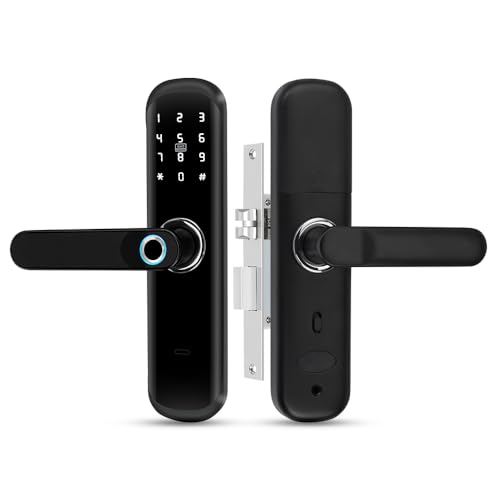
The ReaIOKbii TUYA 5-in-1 Smart Door Lock is a versatile door security solution that combines advanced fingerprint recognition, IC card access, digital password entry, mechanical keys, and mobile app control in a single, modern unit. Its simple handle design and sleek black finish help it blend into a variety of home or office settings, while the WiFi-enabled Graffiti Smart feature lets you manage access remotely and view unlock history right from your phone.
In daily use, this lock stands out for its convenience and adaptability. Whether you’re coming in with groceries, managing access for guests, or need to quickly add a new fingerprint or password, the process is straightforward. I especially appreciate that, if the batteries run out, you’re not locked out—an emergency USB power option is there as a backup. Installation is quick, and managing user access is intuitive, making it suitable for both tech-savvy users and those new to smart home upgrades.
Pros:
- Five unlocking methods, including fingerprint, app, and mechanical key
- Remote access and activity history via WiFi/app
- Emergency USB power for dead batteries
- Easy to install and set up
- Auto-lock and customizable access modes
- Discreet, modern design suitable for various doors
Cons:
- Requires WiFi for remote features
- May be over-featured for users who want a simple lock
- Smart functions depend on app updates and phone compatibility
How I’d Use This
This smart lock is best for homeowners, small offices, or anyone who needs flexible, secure door access without the hassle of carrying keys. If you’re new to smart locks, you’ll find the setup straightforward and the app easy to navigate. For families or rental properties, being able to add or remove access codes and fingerprints on the fly brings peace of mind.
A practical tip: keep a mechanical key or USB power bank handy for extra backup. The lock’s multiple access options mean you’re rarely caught off guard, making it reliable for everyday security. For me, the reassurance of always having a way in—no matter what—makes it stand out.
| Best for | Why |
|---|---|
| Families and shared households | Multiple users can have unique fingerprints or codes for easy, keyless access |
| Short-term rentals and Airbnb hosts | Easily add or remove access for guests and track entry history remotely |
| Homeowners upgrading security | Advanced biometric features and emergency power for reliable, secure entry |
| Small offices | Convenient for managing staff access without physical keys |
How To Choose Best Fingerprint Door Locks 2026 For Your Needs
Choosing the best fingerprint door lock in 2026 means finding a balance between security, convenience, and compatibility with your home. Focus on features that fit your daily routine and entry points.
- Is the lock compatible with your existing door?
- Does it offer backup entry methods in case the fingerprint sensor fails?
- Can you easily add or remove fingerprints for multiple users?
- How long does the battery last, and is it easy to replace?
- Is the installation process straightforward or will you need professional help?
- Does the lock integrate with your smart home system, if you have one?
If you need more details, check out the FAQs section next.
Faqs Of Best Fingerprint Door Locks 2026
How safe are fingerprint door locks in 2026?
Fingerprint door locks in 2026 use advanced sensors for strong security. They help keep your home safe from unwanted entry.
Will a fingerprint door lock fit my current door?
Most fingerprint door locks fit standard doors. Check the size guide for your door’s thickness before buying.
How do I clean a fingerprint door lock?
Gently wipe the sensor with a soft, dry cloth. Avoid harsh cleaners to keep the fingerprint reader working well.
Is using a fingerprint lock easy for daily entry?
Yes, using a fingerprint lock is quick and simple. You just touch the sensor to unlock, making daily use fast.
What happens if the fingerprint sensor does not work?
If the sensor fails, most locks have backup keys or codes. Check the user manual for alternate entry methods.
Can multiple people use the same fingerprint door lock?
Yes, most fingerprint door locks can store many fingerprints. This allows different family members to unlock the door easily.
Final Verdict: Best Fingerprint Door Locks 2026 For Most People
Fingerprint door locks bring a welcome blend of convenience and security to daily life. As you compare your options, consider factors like installation style, backup entry methods, and how well the lock integrates with your home setup. It’s also wise to think about the number of users and the reliability of the fingerprint sensor in varied conditions.
Pay attention to build quality and customer support, as these can make a difference in long-term satisfaction. The right choice often comes down to your priorities—whether that’s ease of use, advanced features, or budget. Take your time weighing what matters most for your space and your peace of mind.
Choose what feels secure and simple for your everyday life.

