

Most Roomba i3 EVO issues come from clogs, dirty sensors, weak charging, or app glitches.
If you own an iRobot Roomba i3 EVO, you already know how helpful it can be when it runs smoothly. But like any smart vacuum, it can hit a few bumps along the way. This guide walks you through iRobot Roomba i3 EVO Robot Vacuum troubleshooting in a clear, practical way so you can fix the most common problems fast and get back to clean floors with less stress.

36% off Today’s Exclusive Deals
Limited-time Exclusive Deals. Check current discount on Amazon.
Check Price on Amazon As an Amazon Associate I earn from qualifying purchases.
Common signs your Roomba i3 EVO needs troubleshooting
When a Roomba starts acting up, it usually sends small clues first. The trick is knowing what those clues mean before the issue gets worse. In my experience, most problems start with something simple, like a full bin, tangled brush, or a weak battery connection.
Watch for these common signs:
- The robot stops cleaning before finishing a job
- It keeps returning to the dock too early
- The app says it is offline
- The vacuum makes unusual noises
- The brushes spin poorly or not at all
- Dirt is left behind even after a full run
- Error messages appear on the robot or in the app
These symptoms usually point to airflow problems, sensor issues, charging trouble, or software hiccups. The good news is that most iRobot Roomba i3 EVO Robot Vacuum troubleshooting steps are easy to handle at home.
Start with the fastest fixes first
When a Roomba acts strange, I always begin with the basics. That saves time and often solves the issue right away. Think of it like checking if a lamp is plugged in before assuming the bulb is broken.
Try these simple steps first:
- Empty the dustbin
- Clean the filter
- Remove hair from the main brush and edge brush
- Wipe the cliff sensors and charging contacts
- Restart the robot
- Confirm the dock is plugged in firmly
If the robot still behaves badly, move to deeper iRobot Roomba i3 EVO Robot Vacuum troubleshooting. Many users skip the simple stuff and jump straight to reset steps, but a quick cleaning usually fixes the real cause.
Fixing charging and battery problems
One of the most common complaints is that the Roomba i3 EVO will not charge, charges slowly, or dies too soon. I have seen this happen when the charging contacts were dusty or the dock was placed on an uneven surface. A weak connection can make the robot look “dead” even when the battery itself is fine.
Try the following:
- Clean the charging contacts on both the robot and dock with a dry cloth
- Make sure the dock sits on a hard, flat floor
- Check that the power cord is fully connected
- Leave the robot on the dock for at least 2 hours
- Use the app to verify battery status if it connects properly
If the battery drains too fast, lower the cleaning load by clearing debris from the brushes and filter. A clogged vacuum works harder, and that can shorten runtime. If charging still fails after those steps, the battery may need replacement.
Solving connectivity and app issues
The Roomba i3 EVO uses Wi-Fi and the iRobot Home app for smart features, scheduling, and status updates. When that connection fails, it can feel like the vacuum forgot how to be smart. Usually, the problem is the network, not the robot.
Try these fixes:
- Confirm your Wi-Fi is 2.4 GHz, not 5 GHz only
- Move the dock closer to the router if possible
- Restart your phone, router, and robot
- Log out of the app and sign in again
- Reinstall the app if it freezes or crashes
- Update the robot firmware when prompted
I once helped a friend who thought his Roomba was broken because it kept dropping offline. The real issue was a mesh network setting that blocked the initial setup. After switching the robot to a stable 2.4 GHz network, it connected without trouble. That is a good reminder that iRobot Roomba i3 EVO Robot Vacuum troubleshooting often starts with the home network.
Cleaning clogs, brushes, and rollers
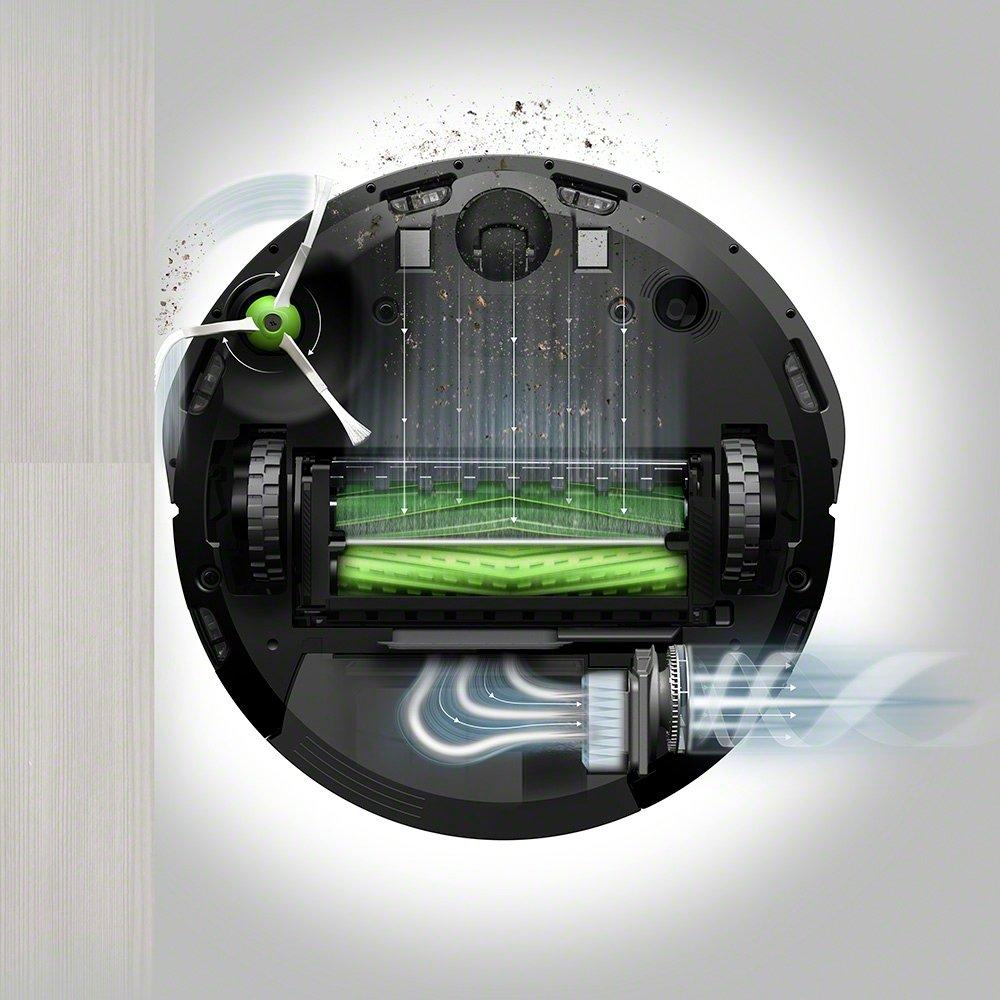
If your Roomba sounds louder than usual or leaves debris behind, airflow is probably restricted. Hair, dust, and string can wrap around the brushes and cut cleaning power fast. Even a small clog can make the vacuum feel weak.
Check these parts carefully:
- Main brush for hair and thread
- Edge brush for wrapped debris
- Bin inlet for stuck dirt
- Filter for dust buildup
- Suction path for hidden blockages
A simple cleaning routine makes a big difference:
- Remove the dustbin
- Take out the filter
- Pull out the main brush
- Cut away tangled hair with scissors
- Tap out dust from the bin
- Reassemble everything firmly
This is one of the most effective parts of iRobot Roomba i3 EVO Robot Vacuum troubleshooting because it improves both suction and battery life. A clean vacuum is like an open road for dirt.

Understanding error messages and what they mean
Error alerts can look scary, but they are usually helpful. The Roomba i3 EVO uses them to point you toward the problem area, such as a wheel jam, sensor issue, or brush obstruction. Instead of guessing, check the alert and respond to the likely cause.
Common causes behind alerts include:
- A wheel stuck on carpet fringe or a cord
- Sensors blocked by dust
- Brushes unable to turn
- The robot lifted off the floor too often
- The bin not seated correctly
If you see repeated alerts, clean the related part before restarting the robot. If the message returns, try a full power reset. In many cases, the error is not a major failure but a small mechanical jam that the robot cannot clear on its own.
When the Roomba i3 EVO does not clean well
Poor cleaning performance can be frustrating, especially when the robot runs for a full cycle and the floor still looks messy. I have found that the cause is often not suction alone. It can also be pathing, brush wear, or a full bin.
Check these areas:
- Clean the filter and replace it if it looks worn
- Inspect the brushes for bending or wear
- Make sure the floor is clear of cords and small objects
- Run the robot in a room with better lighting and less clutter
- Use scheduled cleanings more often for heavy dirt buildup
The Roomba i3 EVO does best in predictable spaces. If the room is crowded, performance drops because the robot spends more time maneuvering than cleaning. That is why good floor prep is part of effective iRobot Roomba i3 EVO Robot Vacuum troubleshooting.
Resetting and restarting the robot safely
A restart can solve small software glitches and temporary freezes. It is one of the easiest tools in your troubleshooting kit. Think of it as giving the robot a fresh start, like rebooting a phone that starts acting slow.
Use a restart when:
- The robot is unresponsive
- The app shows old or incorrect status
- Cleaning pauses for no clear reason
- Wi-Fi connection keeps failing
Before resetting, try a normal restart first. If that does not work, follow the model’s reset instructions from the app or official support guidance. Be careful not to overuse factory resets, since they erase settings and make setup more time-consuming.
Preventive care that avoids most problems
The best troubleshooting is the kind you never need. A little maintenance goes a long way with the Roomba i3 EVO. In my own experience, regular cleaning prevents most of the annoying issues people think are “random.”
Good habits to keep:
- Empty the bin after each run if you have pets
- Clean the filter weekly
- Remove hair from brushes every few days
- Wipe sensors and charging contacts often
- Keep cords and loose objects off the floor
- Update the firmware when available
Here is a simple upkeep schedule:
- After every use: empty the bin
- Weekly: clean filter, brushes, and sensors
- Monthly: inspect wheels and dock contacts
- Every few months: check brush wear and battery health
This kind of routine makes iRobot Roomba i3 EVO Robot Vacuum troubleshooting much easier because you stop problems before they pile up.
When to contact support or replace parts
Not every issue can be fixed at home. If your Roomba i3 EVO keeps failing after cleaning, restarting, and checking the app, a worn part may be the real problem. Batteries, filters, brushes, and charging contacts all wear out over time.
It may be time to get help if:
- The robot will not charge after contact cleaning
- The battery drains far too fast
- Motors sound weak or grind loudly
- The app never connects after multiple network checks
- Error messages return after repeated cleaning
When that happens, replacement parts are often a better choice than repeated resets. I always recommend starting with the cheapest likely fix first, such as a new filter or brush, before assuming the main unit is faulty. That approach saves money and cuts frustration.
Frequently Asked Questions of iRobot Roomba i3 EVO Robot Vacuum troubleshooting
Why does my Roomba i3 EVO keep stopping during cleaning?
It usually stops because of a clogged brush, a full bin, a low battery, or a floor obstacle. Check the brushes, clean the filter, and make sure the dock is charging properly.
Why is my Roomba i3 EVO not connecting to Wi-Fi?
Most connection problems happen because the robot needs a stable 2.4 GHz network. Restart the router, robot, and app, then try setup again closer to the router.
How do I fix a Roomba i3 EVO that is not charging?
Clean both charging contacts and make sure the dock is on a flat surface. If it still does not charge, leave it on the dock for a few hours and check whether the battery may be worn out.
Why does my Roomba i3 EVO leave dirt behind?
This usually means the filter is dirty, the brush is tangled, or the floor path is too cluttered. Clean the vacuum parts and clear cords, socks, and other small items from the floor.
How often should I clean my Roomba i3 EVO?
For best results, empty the bin after each use and clean the filter and brushes at least weekly. If you have pets or heavy dust, you may need to clean it more often.
What should I do if my Roomba i3 EVO keeps showing the same error?
Clean the part linked to the error, then restart the robot. If the same message keeps coming back, the related part may need repair or replacement.
Conclusion
Most iRobot Roomba i3 EVO Robot Vacuum troubleshooting comes down to simple things: clean parts, strong charging, a stable app connection, and regular upkeep. Once you get into the habit of checking the filter, brushes, sensors, and dock, the robot becomes much more reliable and far less frustrating.
If your Roomba is acting up right now, start with the basics before assuming the worst. A few minutes of smart maintenance can save hours of guesswork, and it often brings the vacuum back to life. Keep this guide handy, try the steps one by one, and explore more repair tips or leave a comment with the issue you are seeing.

