

Most Jeron call light issues stem from power, wiring, or simple configuration errors—check those first.
I have spent years installing and fixing nurse call gear. This guide walks you through Jeron Call Light System troubleshooting with clear steps. You will learn how the system works, common causes of faults, step-by-step diagnostics, practical fixes, and when to call support. I write from hands-on experience with hospital installs, and I will show real tips that save time and reduce downtime.

36% off Today’s Exclusive Deals
Limited-time Exclusive Deals. Check current discount on Amazon.
Check Price on Amazon As an Amazon Associate I earn from qualifying purchases.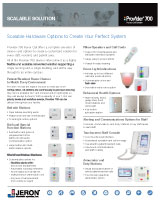
How the Jeron Call Light System Works
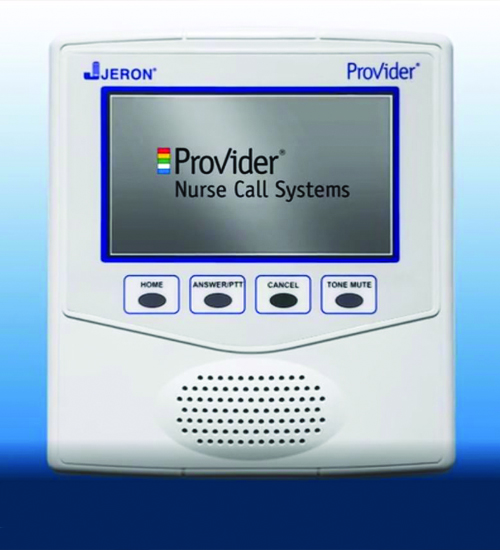
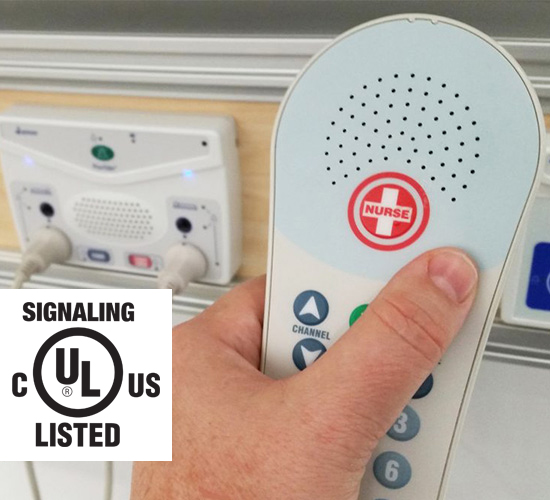
The Jeron Call Light System connects patient push buttons to a nurse station. It tells staff who needs help and where. Core parts include call buttons, pillow speakers, patient stations, master station, annunciator lights, and power supplies. Some systems are wired. Newer ones can be wireless. Understanding parts helps with Jeron Call Light System troubleshooting.

Common Problems and Likely Causes
Most problems repeat across sites. Spot the pattern. Below are typical faults and what usually causes them.
- No response at nurse station
- Power loss, fuse, or failed power supply.
- Intermittent calls
- Loose wiring, bad connector, or intermittent button.
- Wrong room displayed
- Miswired zones or configuration mismatch.
- Multiple false calls
- Short circuits, water ingress, or stuck switches.
- Wireless dropouts
- Interference, weak batteries, or placement issues.
These causes appear often during Jeron Call Light System troubleshooting. Knowing them shortens repair time.
Step-by-Step Jeron Call Light System Troubleshooting
Follow this checklist. Work calmly and test after each step. Always follow local safety rules.
- Verify power
- Confirm main power to the Jeron system is on.
- Check breakers and fuses at the rack or cabinet.
- Measure DC output at the power supply if accessible.
- Inspect visual indicators
- Look for LED faults on the master station and power modules.
- Note any error codes or blink patterns.
- Check wiring and connectors
- Inspect terminal blocks for loose screws.
- Look for corrosion or frayed wires at patient stations.
- Reseat any modular plugs.
- Test individual devices
- Press the patient call button and watch the annunciator.
- Swap a known-good pillow speaker to isolate a bad unit.
- Swap modules
- If a circuit card is suspected, swap with a matched spare.
- Verify whether the fault moves with the module.
- Examine grounding and bonding
- Ensure proper earth ground on the Jeron panel.
- Poor ground can cause noise and false calls.
- For wireless units
- Replace batteries first.
- Check signal strength and sources of RF interference.
- Document each change
- Record tests, voltages, and results.
- This speeds troubleshooting later.
These steps form a repeatable routine for Jeron Call Light System troubleshooting.

Advanced Diagnostics and Tools
When basic checks fail, use more advanced tools. These help find subtle faults fast.
- Multimeter
- Measure voltage, continuity, and shorts.
- Tone probe and tracer
- Follow cables through ceilings and walls.
- Oscilloscope
- Spot transient noise or intermittent signals.
- Portable annunciator or bench test kit
- Simulate patient units to test central electronics.
- Log files and event history
- Review system logs if the Jeron system supports logging.
Using these tools during Jeron Call Light System troubleshooting reduces guesswork. I have used a bench kit to recreate sporadic faults and found bad wiring at a junction box.
Maintenance Best Practices to Prevent Issues
Routine care cuts failures. Follow a schedule and keep records.
- Monthly checks
- Test a sample of patient buttons and nurse station lights.
- Quarterly inspections
- Open panels. Tighten terminals and inspect batteries.
- Battery care
- Replace wireless batteries annually or per manufacturer guidance.
- Environmental control
- Keep equipment dry and dust-free.
- Staff training
- Teach staff proper use of pillow speakers and how to report faults.
Regular maintenance drastically lowers the need for Jeron Call Light System troubleshooting.

When to Contact Support or Replace Components
Some faults need pro help. Know when to escalate.
- Replace components when repair fails
- If a module fails bench tests, replace it.
- Contact support for firmware or complex config
- Misconfigurations may need vendor tools or firmware updates.
- Use certified technicians for mains wiring
- Safety and code compliance matter.
- Consider system upgrade if failures are chronic
- Older Jeron systems may lack replacement parts.
If you are unsure, stop and call a certified service team. I once replaced a faulty power module after bench testing confirmed failure. That fixed a cluster of false calls immediately.

Troubleshooting Examples and Real-Life Scenarios
Simple scenarios help you learn fast. Here are two examples from my work.
Example 1: No calls from a wing
- Symptom: Entire wing did not register calls.
- Action: Checked breaker and found a tripped circuit. Reset and tested.
- Lesson: Power is often the culprit in Jeron Call Light System troubleshooting.
Example 2: Random false calls at night
- Symptom: Calls occurred only at night.
- Action: Inspected patient rooms and found a humidifier leaking near wiring. Drying and resealing fixed it.
- Lesson: Environmental factors cause intermittent faults.
Real examples build confidence. Keep notes of fixes so you can repeat successful repairs.

Related Concepts and Compatibility Notes
Understanding related ideas helps decision-making.
- Nurse call vs. emergency call
- Nurse call is routine. Emergency systems have stricter redundancy.
- Wired vs. wireless Jeron systems
- Wired is stable. Wireless offers flexibility but needs RF planning.
- Integration with EHR and paging
- Some Jeron systems pass events to other systems. This adds diagnostic complexity.
- Parts lifecycle
- Older Jeron components may become obsolete. Plan upgrades.
Knowing these concepts improves your Jeron Call Light System troubleshooting and long-term planning.
PAA-style Questions
What causes a Jeron call light to not register?
A power failure, blown fuse, or broken wiring often stops calls from registering. Check the power supply and terminal connections first.
How do you test a Jeron patient button?
Press the button while watching the master station or annunciator. Use a multimeter for continuity if the button does not signal.
Can wireless Jeron units interfere with Wi-Fi?
They can if frequencies overlap or if strong RF noise exists. Move devices or change channels to reduce interference.
How often should you replace batteries in wireless units?
Replace annually or per manufacturer guidance. Replace sooner if you see weak signals or frequent reconnects.
Is it safe to work on Jeron power supplies?
Turn off mains power and follow lockout/tagout rules. If you are not certified for mains work, call an electrician.
Frequently Asked Questions of Jeron Call Light System Troubleshooting
What is the first step in Jeron Call Light System troubleshooting?
Start by checking power and visible LEDs. A lot of faults begin with power or blown fuses.
How do I pinpoint intermittent call faults?
Log events, reproduce the issue, and inspect wiring connectors. Swap modules to isolate the fault.
Can software settings cause wrong room numbers?
Yes. Misconfigured zone maps or database changes can display wrong rooms. Verify system mapping.
When should I replace a module versus repair it?
Replace if bench tests fail or if repair parts are unavailable. Replacement is faster and often more reliable.
Are there quick fixes for false calls at night?
Check for environmental causes, moisture, and stuck buttons. Replace suspect switches and dry affected areas.
Conclusion
You can solve most Jeron Call Light System troubleshooting tasks with a calm, methodical approach. Start with power and simple checks, then move to wiring and device swaps. Keep records and follow maintenance routines to prevent repeat issues. If a problem exceeds your tools or comfort, contact certified support. Try one small change at a time, document the results, and you will fix issues faster over time. Share your experiences or questions below, subscribe for more guides, or reach out for hands-on help.

