

Creating a YouTube channel is one of the most effective ways to share your ideas, teach others, build a personal brand, or even start a new career. Today, over 2.5 billion users visit YouTube every month, making it the world’s largest video platform. But with so many channels already online, how do you start strong and stand out? This guide will walk you through every step—from planning your channel to publishing your first video, and even tips for growth. Whether you’re starting for fun or aiming to be the next big creator, you’ll find clear, practical advice here.
Why Start A Youtube Channel?
Many people wonder what makes YouTube so powerful. The answer is simple—video reaches people in a way text and images cannot. YouTube gives you the chance to:

36% off Today’s Exclusive Deals
Limited-time Exclusive Deals. Check current discount on Amazon.
Check Price on Amazon As an Amazon Associate I earn from qualifying purchases.- Teach and inspire others worldwide
- Build a loyal community
- Earn money through ads, sponsors, and products
- Express your ideas creatively
Some creators start as a hobby and end up making a living from their channels. Others use their channel to support their business or portfolio. YouTube is flexible, so you can choose what fits you best.
Getting Clear On Your Channel’s Purpose
Before you open YouTube, ask yourself: Why do I want to make videos? A clear purpose makes everything easier, from choosing a name to deciding what videos to make.
Common Youtube Channel Goals
- Education: Teaching a subject you know well (like math, languages, or cooking)
- Entertainment: Making people laugh, telling stories, or sharing music
- Vlogging: Sharing your daily life and experiences
- Reviews: Testing and recommending products
- Gaming: Streaming or making game-related content
Non-obvious insight: The best channels often mix two or more goals. For example, many gaming channels also teach, entertain, and review.
Finding Your Niche
A niche is a focused topic or audience. For example, “healthy recipes for busy students” is a niche, while “food” is very broad. Niche channels often grow faster because they attract a loyal group of viewers. Think about what makes you unique. What can you talk about for hours? What do people often ask you for advice about?
Tip: Check other channels in your niche. Notice what works, but also look for gaps—something people want but can’t find easily.
Setting Up Your Youtube Channel Step-by-step
Creating a channel is free and takes only a few minutes. But setting it up well gives you a big advantage.
Step 1: Sign In To Youtube With A Google Account
You need a Google account to start. If you already use Gmail or any Google service, you have one. If not, create a new account at accounts.google.com.
Step 2: Create A New Channel
- Go to YouTube.com and sign in
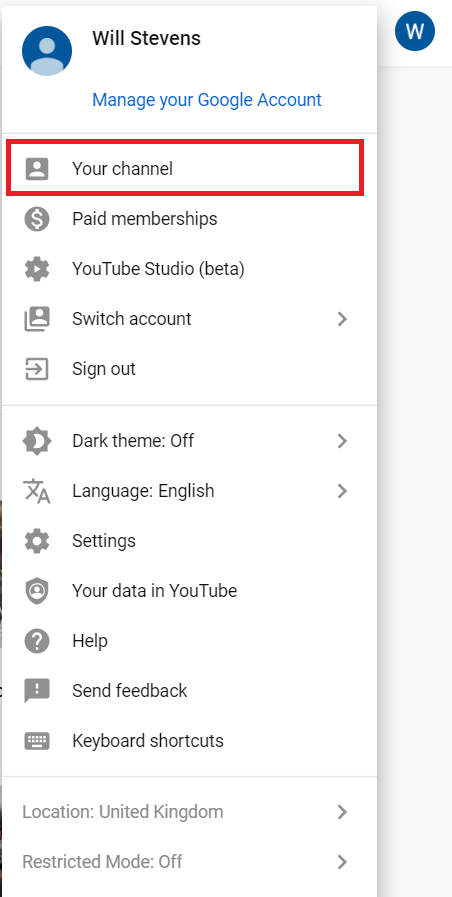
- Click your profile picture (top right) > “Create a channel”
- Choose “Use your name” or “Use a custom name” (recommended for brands or teams)
Step 3: Name Your Channel
Your channel name is important. It should be:
- Easy to remember
- Unique
- Related to your topic or brand
- Not too long (ideally under 20 characters)
Some creators use their real name, others pick a nickname or brand name. If your ideal name is taken, try adding a word (like “TV,” “Vlogs,” or “Official”).
Step 4: Add Channel Art
Your profile picture and banner are your first impression. Use a clear photo or logo for the profile. For the banner (the large image at the top), make it bold and simple—avoid too much text.
YouTube banner size: 2560 x 1440 pixels (safe area: 1546 x 423 pixels)
Step 5: Write Your Channel Description
Explain what your channel is about in a few sentences. Use clear language. Include keywords people might search for, but keep it natural.
Example:
“Hi! I’m Ana. I share simple, healthy recipes for busy college students. New videos every Monday and Thursday. ”
Step 6: Set Up Your Channel Links
You can add links to your social media, website, or store. These appear on your banner and in your About section.
Step 7: Organize Your Channel Layout
After you upload a few videos, you can group them into playlists. Playlists help viewers find similar content and keep watching.
Essential Equipment For Creating Youtube Videos
You do not need expensive tools to start. Many famous YouTubers began with just their phones. However, a few basic items can improve your video quality.
| Equipment | Entry-Level Option | Upgrade Option | Purpose |
|---|---|---|---|
| Camera | Smartphone | DSLR or Mirrorless | Records video |
| Microphone | Built-in phone mic | Lavalier or USB mic | Improves sound |
| Lighting | Natural light | Ring light or softbox | Makes video clear |
| Editing Software | iMovie, CapCut | Adobe Premiere, Final Cut | Polishes your video |
Non-obvious insight: Good audio matters more than video. People will forgive low video quality, but bad sound makes them leave fast.
Simple Setup Tips
- Record near a window for soft, natural light.
- Keep your phone or camera steady (use a stack of books if you don’t have a tripod).
- Test your sound—avoid noisy rooms.
Planning Your Content For Success
Success on YouTube is not just about making random videos. Planning helps you stay consistent and grow faster.
Decide On Video Types
Mix up your content to keep your channel interesting. Common types:
- How-to guides
- Product reviews
- Vlogs
- Top 10 lists
- Storytime or personal experiences
Make A Content Calendar
A content calendar is a plan for what videos you will upload and when. This keeps you organized. For beginners, aim for one video per week. As you gain confidence, you can do more.
Research Video Ideas
Use tools like YouTube search, Google Trends, and Answer the Public to find what people are searching for. Notice which videos in your niche have many views—what topics work best?
Script Your Videos
A script does not mean reading every word. It means planning your main points. This helps you stay on topic and avoid long pauses.
Practical tip: Write a simple outline:
- Hook (grab attention in the first 10 seconds)
- Main content (teach, show, or entertain)
- Call to action (“Like and subscribe!” or “What do you think?”)
Creating Your First Youtube Video
Your first video will probably not be perfect—and that’s normal. The key is to start and learn as you go.
Step 1: Set Up Your Filming Space
- Choose a quiet, tidy spot with good light
- Check your background—remove anything distracting
- Test your camera and microphone
Step 2: Record Your Video
- Speak clearly and look at the camera
- Don’t worry if you make mistakes—just pause and start again
- Smile and be yourself
Step 3: Edit Your Video
Editing makes your video smooth and professional. You can cut out mistakes, add music, or include text.
Popular editing apps:
- CapCut (free, mobile)
- IMovie (Mac)
- DaVinci Resolve (free, PC/Mac)
- Adobe Premiere Pro (paid, advanced)
Non-obvious insight: Keep your first video short (2-5 minutes). Shorter videos are easier to finish and more likely to be watched fully.
Step 4: Add Music And Graphics
Use copyright-free music and graphics. YouTube offers a free music library. Never use popular songs unless you have permission.
Uploading Your Video To Youtube
Uploading is easy, but a few small details make a big difference.
Step 1: Sign In And Click “create”
- Click the camera icon (top right) > “Upload video”
Step 2: Fill In Video Details
- Title: Make it clear and catchy (under 60 characters)
- Description: Explain what the video is about. Add links or credits.
- Tags: Use 5-10 keywords related to your video.
Step 3: Choose A Thumbnail
A thumbnail is the small image people see before clicking. Custom thumbnails get more clicks. Use bold images, large text, and bright colors.
Step 4: Select A Playlist
If you have playlists, add your video to one. This helps organize your channel and increases watch time.
Step 5: Set Audience And Privacy
YouTube will ask if your video is made for kids. Choose the correct option. Decide if your video is public (everyone can see), unlisted (only people with the link), or private (only you can see).
Step 6: Publish
Click “Publish” to make your video live.
Optimizing Your Channel For Growth
After uploading, your work is not over. Optimization helps more people find your videos.
Use Keywords Naturally
Keywords are words people search for. Include them in your title, description, and tags. But don’t stuff—they should fit naturally.
Improve Your Thumbnails
Thumbnails are like movie posters. Look at the most popular channels in your niche—what do their thumbnails have in common? Many use:
- Faces with strong emotion
- Big, easy-to-read text
- Bright backgrounds
Write Clear Video Titles
Strong titles get more clicks. Use numbers, questions, or strong adjectives.
Examples:
- “How to Bake Bread in 10 Minutes”
- “5 Secrets to Learning English Fast”
- “Is This The Best Budget Phone?”
Add Timestamps And Chapters
For longer videos, add timestamps in your description. This helps viewers find what they need and improves watch time.
Example:
0:00 Intro
0:45 Step 1
2:30 Step 2
Use End Screens And Cards
These tools let you promote other videos or ask viewers to subscribe. You can add them during the upload process or later in YouTube Studio.
Building An Audience And Community
Getting views and subscribers takes time. The key is patience and consistency.
Engage With Your Viewers
Reply to comments, ask questions, and listen to feedback. People are more likely to subscribe if they feel heard.
Collaborate With Others
Work with other small YouTubers in your niche. You can make guest videos, shout each other out, or share tips. This helps you reach new audiences.
Use Social Media
Share your videos on Instagram, Facebook, Twitter, or other platforms. Join online groups related to your topic.
Non-obvious insight: Sometimes, your first 100 subscribers will come from friends and family. Don’t be shy about asking them to share.
Understanding Youtube Analytics
YouTube gives you free tools to track your channel’s performance.
| Metric | What It Measures | Why It Matters |
|---|---|---|
| Views | How many times your video was watched | Shows what attracts attention |
| Watch Time | Minutes people spend watching | Key for YouTube’s algorithm |
| Click-Through Rate (CTR) | How often people click your thumbnail | Shows thumbnail and title strength |
| Audience Retention | % of video watched on average | Shows how engaging your content is |
| Subscribers | People who follow your channel | Long-term growth measure |
How To Use Analytics
- Look for which videos get more views and watch time
- Notice where viewers stop watching (audience retention)
- Test different thumbnails or titles and check CTR
- Focus on making more of what works
Practical tip: Don’t stress over numbers in the first few months. Use analytics as a learning tool, not a report card.
Monetizing Your Youtube Channel
YouTube can be a source of income, but not right away. You need to meet certain requirements:
- 1,000 subscribers
- 4,000 watch hours in the past 12 months
Once you reach these, you can join the YouTube Partner Program and start earning from ads.
Other Ways To Earn Money
- Brand deals: Companies pay you to mention their products
- Affiliate links: Earn a commission when viewers buy through your link
- Merchandise: Sell t-shirts, mugs, or digital products
- Patreon or memberships: Offer extra content for a small fee
Non-obvious insight: Many small channels earn more from these other sources than from ads, especially at the start.
Common Mistakes Beginners Make
Learning from others’ mistakes saves you time and frustration.
- Inconsistent uploads: Success comes from regular posting, not one viral hit.
- Ignoring sound quality: Poor audio drives viewers away.
- Not engaging with comments: Community matters more than you think.
- Copying others too closely: Get inspired, but add your own twist.
- Giving up too soon: Most channels grow slowly for the first year.
Practical tip: Set small goals—like “10 videos in 3 months”—instead of focusing only on subscribers.
Staying Motivated On Your Youtube Journey
Motivation can drop when growth is slow or you face criticism. Here’s how to stay on track:
- Remember your “why”—what made you start?
- Celebrate small wins (first comment, first 100 views)
- Connect with other creators for support
- Take breaks when needed, but don’t quit
Experience-based insight: Even big YouTubers felt discouraged at first. Persistence is more important than perfection.
Useful Resources For New Youtubers
There are many free tools and guides to help you improve:
- YouTube Creator Academy: Free official lessons from YouTube
- Canva: Easy graphics and thumbnail maker
- TubeBuddy: Browser tool for keyword research and channel management
- Epidemic Sound: For copyright-safe music
You can find more tips and resources on the official YouTube Help Center.
Frequently Asked Questions
What Equipment Do I Need To Start A Youtube Channel?
You only need a smartphone and basic editing software to start. As you grow, consider adding a better microphone, lighting, and camera. Many famous YouTubers still use simple setups.
How Often Should I Upload Videos?
Start with once per week. Consistency is more important than frequency. As you get comfortable, you can increase uploads, but keep a schedule you can maintain long-term.
How Can I Get More Subscribers?
Focus on making helpful, interesting videos. Ask viewers to subscribe in your videos. Engage with your audience through comments and social media. Collaborate with other creators to reach new viewers.
When Can I Start Earning Money From My Channel?
You can apply for monetization after reaching 1,000 subscribers and 4,000 watch hours in the past year. Before that, explore other ways to earn, like affiliate links or selling products.
What Are Some Common Mistakes New Youtubers Make?
New creators often upload inconsistently, ignore sound quality, copy others too much, or give up too soon. Focus on learning, improving, and connecting with your audience for long-term success.
Starting a YouTube channel is an exciting journey. The most important step is to begin—even if things feel imperfect. With patience and practice, you’ll find your voice, build a community, and unlock new opportunities. Good luck creating your channel!

