

Looking for a new job can be both exciting and stressful. One of the most important steps is creating a resume that gets attention. A strong resume can open the door to interviews and new opportunities, but many people find it hard to know where to start.
There are so many rules, formats, and tips available that it can feel overwhelming. Yet, writing a resume does not have to be complicated. With clear guidance, anyone can make a resume that shows skills and experience in the best way.

36% off Today’s Exclusive Deals
Limited-time Exclusive Deals. Check current discount on Amazon.
Check Price on Amazon As an Amazon Associate I earn from qualifying purchases.In this article, you will learn how to write a resume from scratch, even if you have never made one before. We will cover what to include, what to avoid, and how to make your resume stand out. You will also see practical examples, common mistakes, and expert tips that many beginners miss.
Whether you are a student, a professional changing careers, or someone returning to work after a break, this guide will help you create a resume that gets noticed.
Understanding The Purpose Of A Resume
A resume is more than just a list of jobs. It is a marketing document that sells you as the best candidate for a position. Employers spend an average of 6–8 seconds scanning each resume, so your information must be clear and easy to read.
The main goals of a resume are:
- To show your most relevant skills and achievements
- To match your experience with the job requirements
- To get the employer interested enough to invite you for an interview
Many people make the mistake of listing every job or skill they have. Instead, a good resume is focused, concise, and tailored for each job application.
Choosing The Right Resume Format
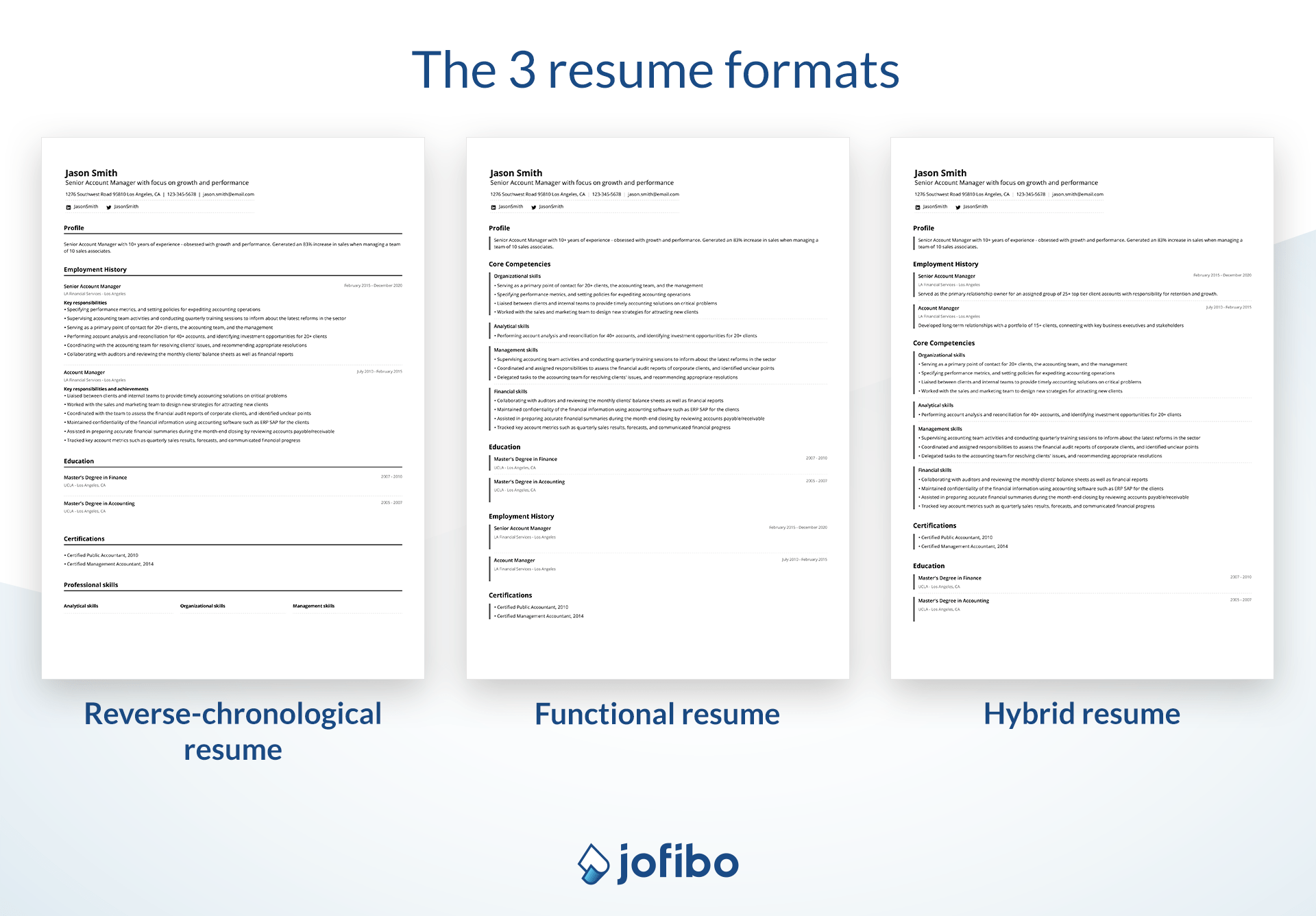
There are three main resume formats. Each one has its strengths and is best for different situations.
| Format | Best For | Key Features |
|---|---|---|
| Chronological | People with strong work history | Lists jobs in order from most recent to oldest |
| Functional | Career changers or those with gaps | Focuses on skills and abilities, not dates |
| Combination | Those with some experience and skills | Mix of skills and work history |
Chronological Format
This is the most popular style. It works well if your career has a clear path and few gaps. Employers like it because it is easy to follow.
Functional Format
A functional resume highlights what you can do, not just where you worked. This is helpful if you changed industries, had breaks in your job history, or are new to the workforce.
Combination Format
This format blends both worlds. It shows your skills first, then your job history. It is flexible and suitable for many situations.
Tip: For most job seekers, the chronological or combination format works best. Only use functional if you need to hide gaps or lack experience.

Key Sections Of A Resume
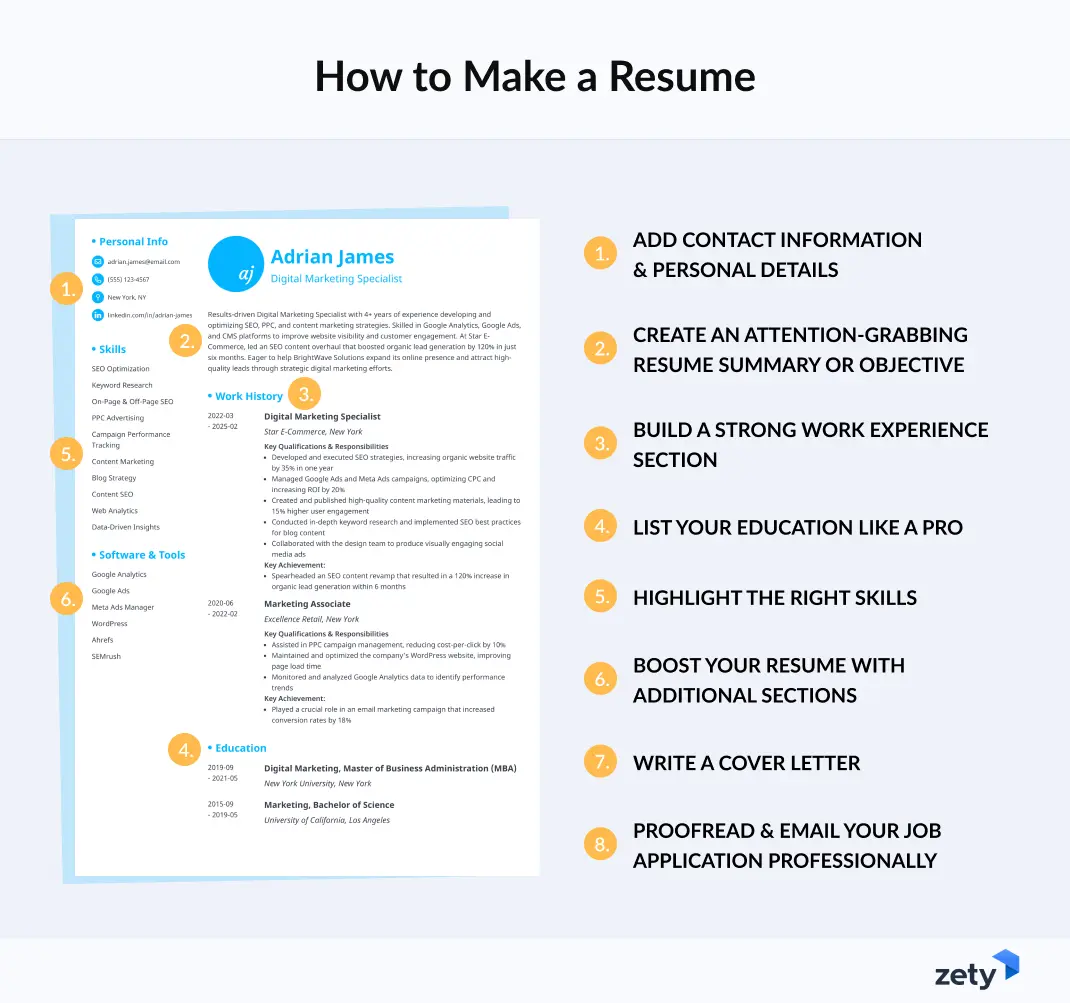
Every resume should include certain sections. Here are the must-haves:
- Contact Information
- Professional Summary or Objective
- Work Experience
- Education
- Skills
Optional sections can include:
- Certifications
- Projects
- Awards and Honors
- Volunteer Work
- Languages
Not every resume needs every section. Choose what fits your story best.
Writing Each Resume Section
Contact Information
Place your contact details at the top. Include:
- Full name
- Phone number
- Professional email address
- City and state (you can skip the full address)
- LinkedIn profile or personal website (if relevant)
Avoid using unprofessional emails like “cooldude123@gmail. com”. Always use a simple, clear address such as “firstname. lastname@gmail. com”.
Professional Summary Or Objective
This 2–3 line section at the top is your elevator pitch.
- Professional Summary: For experienced candidates. Highlights key achievements and skills.
- Objective: For students or career changers. States your career goal and what you offer.
Example (Summary):
“Results-driven sales manager with 5+ years of experience increasing revenue by up to 30% annually. Skilled in team leadership and client relations. ”
Example (Objective):
“Recent marketing graduate seeking an entry-level position to use communication and research skills to support the company’s growth. ”
Insight: Many beginners write generic statements. Make yours specific and targeted to each job.
Work Experience
This is often the most important section. List your jobs in reverse chronological order (most recent first). For each job, include:
- Job title
- Company name, city, and state
- Dates of employment (month/year)
- 3–5 bullet points showing your duties and achievements
How to Write Strong Bullet Points:
- Start with action verbs (led, managed, created, improved)
- Focus on results, not just tasks
- Include numbers or data when possible
Example:
- Led a team of 6 to complete projects 20% ahead of schedule.
- Increased sales by $50,000 in six months by launching new customer outreach.
Common Mistake: Many candidates list every task. Instead, show how you made a difference.
Education
List your most recent or highest degree first. Include:
- Degree (e.g., Bachelor of Science in Accounting)
- School name
- Graduation year (optional if you have much experience)
- Honors or relevant coursework (if you are a new graduate)
Example:
Bachelor Of Arts In Psychology
University Of Florida, 2019
Dean’s List, 2018–2019
Skills
This section highlights your top hard and soft skills. Focus on what is relevant to the job.
Hard skills are teachable (e.g., Excel, Python, project management).
Soft skills are personal traits (e.g., teamwork, communication).
List 6–10 skills. Be honest—do not list skills you cannot back up in an interview.
Advanced Tip: Many companies use Applicant Tracking Systems (ATS), which scan for keywords. Read the job description and include matching skills.
Additional Sections
Certifications
Add any professional certifications that fit the job (e. g. , PMP, CPA, Google Analytics).
Projects
If you have led important projects, list them with a short description and results.
Awards And Honors
Include recognition like “Employee of the Month,” scholarships, or industry awards.
Volunteer Work
List relevant volunteer roles, especially if you lack paid experience.
Languages
Mention any languages spoken and your level (fluent, conversational).
Non-obvious insight: For technical roles, including detailed projects can matter as much as work history. For students, volunteer work can show leadership and teamwork.
Resume Design And Formatting
How your resume looks matters. A clean, organized format is easier to read.
- Use a simple, professional font (e.g., Arial, Calibri, Times New Roman)
- Keep the font size 10–12 points for body text; 14–16 for headings
- Use bold or italics for headings, but do not overuse colors or graphics
- Leave enough white space for easy scanning
- Keep it to one page (two pages only if you have 10+ years’ experience)
Example Of Good Vs. Bad Formatting
| Good Formatting | Poor Formatting |
|---|---|
| Consistent fonts Clear headings Bullet points for tasks Easy to scan |
Too many colors or fonts Dense paragraphs No sections Hard to find info |
Tip: Unless you are a designer, avoid using creative templates from the internet. Many of them are not ATS-friendly.
Customizing Your Resume For Each Job
One resume does not fit all jobs. To increase your chances, you should tailor your resume for each application.
- Read the job description carefully.
- Identify required skills and keywords.
- Match your skills and experience.
- Add keywords from the job ad to your resume.
- Highlight relevant achievements.
- Move the most important points to the top of each section.
Example:
If a job asks for “project management” and you have this skill, make it stand out in your summary and skills section.
Non-obvious insight: Some companies use software to filter resumes. If you do not use the right keywords, your resume might never be seen by a human.
Avoiding Common Resume Mistakes
Even strong candidates lose out because of small mistakes. Here are errors to watch for:
- Typos and grammar errors
- Using the same resume for every job
- Listing duties instead of achievements
- Including outdated or irrelevant jobs
- Using buzzwords without proof (e.g., “go-getter” or “hard worker”)
- Poor formatting or too much color
- Adding personal details (age, marital status, photo) unless required
Fact: According to a CareerBuilder study, 77% of employers reject resumes due to typos or bad grammar.
Tip: Ask a friend or use a tool like Grammarly to check your writing.
Using Numbers And Data To Show Impact
Employers love to see quantifiable achievements. Numbers make your work easy to understand.
- Instead of: “Managed social media accounts”
- Write: “Grew Instagram followers by 3,000 in six months”
Other examples:
- “Reduced costs by 15%”
- “Trained 20+ new employees”
- “Handled 50 customer requests per day”
Even if you do not work with data, you can use numbers for tasks (how many, how often, how much).
How To Write A Resume With No Experience
Many people worry about writing a resume with no formal job history. Focus on what you do have:
- School projects
- Volunteer work
- Extracurricular activities
- Internships
Show skills like teamwork, communication, responsibility, and leadership. Use the functional or combination format to highlight abilities.
Example:
Project Leader, School Science Fair
- Led a team of 4 to design and present an award-winning project
- Managed timelines and delegated tasks
Insight: Employers know entry-level applicants have less experience. They look for potential, attitude, and willingness to learn.
Updating And Maintaining Your Resume
Your resume is a living document. Update it every 6–12 months, even if you are not job hunting.
- Add new skills, courses, and achievements
- Remove outdated or less relevant information
- Review formatting and keep it modern
Tip: Keep a folder with examples of your work, awards, and positive feedback. These can help you update your resume quickly.
Resume Examples
It helps to see samples. Below are two short examples—one for an experienced professional, one for a student.
Experienced Professional
James Lee
Seattle, Wa | James.lee@email.com | (555) 222-1234 | Linkedin.com/in/jameslee
Professional Summary
Experienced IT manager with 8+ years in software development and team leadership. Improved system efficiency by 25% and managed budgets up to $1M.
Work Experience
It Manager | Bluetech Solutions, Seattle, Wa | 2017–2023
- Led team of 10 developers to deliver projects on time and under budget
- Reduced system downtime from 5% to 1% through process upgrades
Education
Bs In Computer Science, University Of Washington, 2015
Skills
Project Management, Sql, Agile, Leadership, Communication
Student Or Entry-level
Maria Gomez
Houston, Tx | Maria.gomez@email.com | (555) 555-7890
Objective
Motivated college senior seeking entry-level marketing role to use research and writing skills.
Education
Ba In Communications, University Of Houston, Expected 2024
- GPA: 3.8/4.0
- Marketing Club President
Projects
Organized Campus Event With 200+ Attendees, Raising $1,500 For Charity
Skills
Social Media, Writing, Teamwork, Microsoft Office
Top Resume Writing Tips
- Be concise. Keep your resume to one page (two max for experienced professionals).
- Use action verbs. Words like “achieved,” “developed,” and “improved” show you took initiative.
- Tailor for each job. Customize your resume to match the job description.
- Check for errors. Typos can cost you interviews.
- Focus on results. Show what you accomplished, not just what you did.
Fact: According to a study, resumes with clear, achievement-based bullet points get more interviews.
Digital And Online Resumes
Today, many employers want digital resumes. Some request a PDF, while others use online forms.
- Save your resume as PDF unless told otherwise (keeps formatting)
- Use standard file names (“FirstName_LastName_Resume.pdf”)
- For LinkedIn, update your profile to match your resume
External Resource: For more guidance, visit the US Department of Labor Resume Guide.
Resume Myths And Realities
There are many myths about resumes. Let’s clear up a few common ones.
| Myth | Reality |
|---|---|
| One page only, always | One page is ideal, but two is fine for senior roles |
| You must list every job | List only relevant jobs from the last 10–15 years |
| Creative designs get noticed | Simple, clean designs are best for most jobs |
| References must be on your resume | “References available on request” is enough |
Frequently Asked Questions
What Is The Best Resume Format For A Beginner?
For most beginners, a combination or functional format works well. These styles let you highlight skills, projects, or volunteer work, even if you have little job history. Focus on what you can do, not just where you have worked.
How Long Should My Resume Be?
A resume should ideally be one page. If you have over 10 years of experience or many relevant roles, two pages are acceptable. For students or entry-level jobs, one page is best.
Should I Include A Photo On My Resume?
In the US and many other countries, do not include a photo. Photos can lead to bias and are not expected by most employers. Only add a photo if the job description specifically asks for one.
Can I Use The Same Resume For Every Job?
No. You should customize your resume for each job application. Use keywords and skills from the job ad and adjust your summary or achievements to match what the employer wants.
How Do I Handle Employment Gaps On My Resume?
If you have gaps, use a combination or functional format to focus on skills and achievements. You can also mention any courses, volunteer work, or freelance projects you did during the gap. Be honest if asked in an interview.
Building a resume is an important skill that will help you throughout your career. With careful planning, the right format, and attention to detail, you can create a resume that shows your strengths and gets you interviews. Remember, your resume is always a work in progress—keep it updated as you grow and gain new experiences.
Good luck with your job search!

