

Anyone who owns a Kenmore Elite front load washer knows its reputation for reliability and performance. But even the best appliances can have problems. When your washer stops working correctly, it can disrupt your routine and leave you wondering what to do next. This guide will help you troubleshoot your Kenmore Elite front load washer, step by step. Whether your machine won’t start, won’t spin, or leaves clothes soaking wet, you’ll find clear solutions here. Plus, you’ll learn some tips and tricks most beginners miss, so you can fix issues faster and avoid common mistakes.
Understanding Your Kenmore Elite Front Load Washer
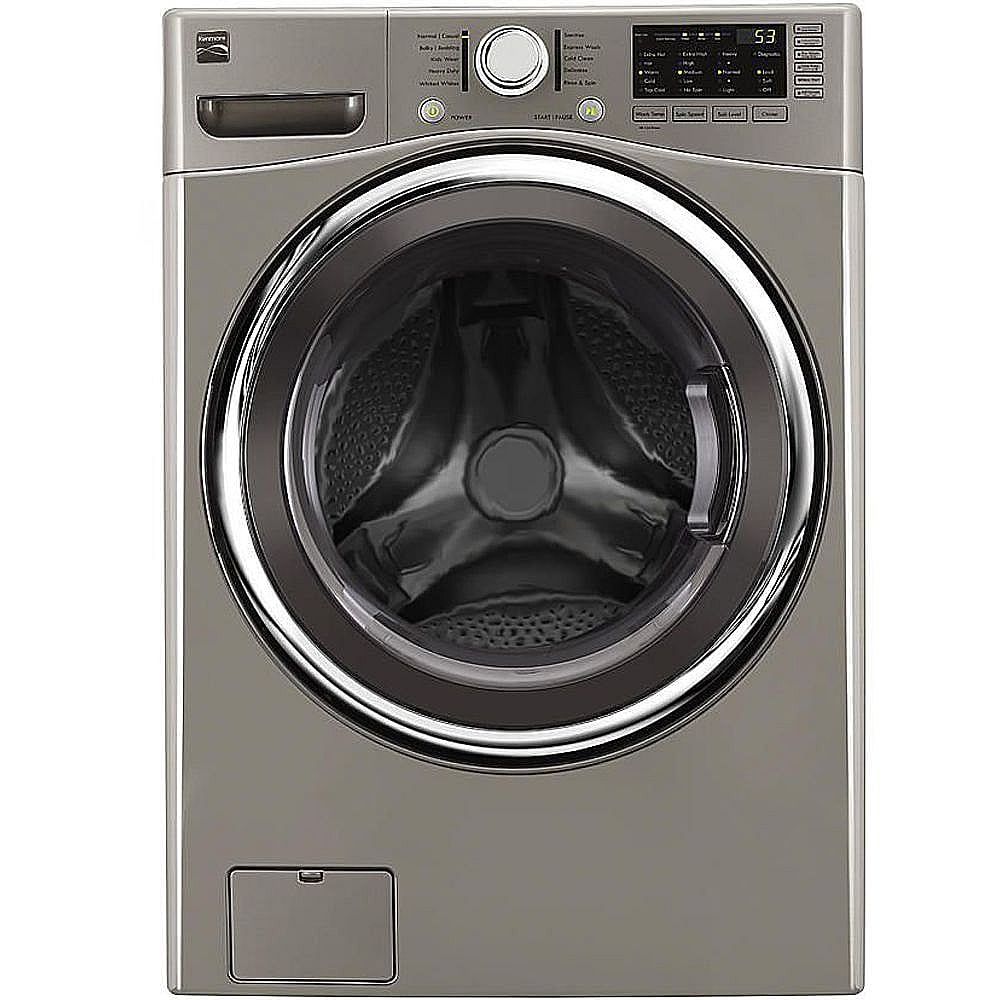
Before you dive into troubleshooting, it’s important to understand your washer’s design. The Kenmore Elite series is known for advanced features like steam cleaning, high spin speeds, and smart diagnostics. Most models include a digital control panel, multiple wash cycles, and sensors for water levels and temperature. These features help make laundry easier, but they also mean there are more parts that could malfunction.

36% off Today’s Exclusive Deals
Limited-time Exclusive Deals. Check current discount on Amazon.
Check Price on Amazon As an Amazon Associate I earn from qualifying purchases.Knowing the basics of how your washer operates will help you pinpoint problems faster. For example, if the washer uses a direct drive motor, it’s quieter but needs special checks when it won’t spin. If your model has a self-clean cycle, it may alert you when maintenance is needed. Always check your user manual for specifics about your model.
Common Problems And Solutions
Washer Won’t Start
If your washer doesn’t turn on, it can be frustrating. But many times, the fix is simple.
- Check Power Supply: Make sure the washer is plugged in and the outlet works. Try plugging another appliance in to test.
- Door Not Closed: Most front load washers won’t start unless the door is fully shut. Listen for a click when you close the door.
- Control Lock Activated: If the control panel is locked, the washer won’t respond. Look for a key icon and hold the appropriate button to unlock.
- Blown Fuse or Tripped Breaker: Check your home’s fuse box. Reset any tripped breakers or replace blown fuses.
Many beginners overlook the control lock feature. It’s easy to activate by accident, especially when cleaning the panel. If the washer still won’t start, try unplugging it for 60 seconds, then plug it back in to reset the electronics.
Washer Won’t Spin Or Drain
A washer that won’t spin or drain often leaves clothes soaking wet. This is one of the most common issues.
- Clogged Drain Pump: Small items like coins or socks can get stuck. Open the pump filter (usually at the bottom front), and clear debris.
- Unbalanced Load: If clothes are bunched together, the washer may not spin. Redistribute items evenly and restart the cycle.
- Drain Hose Issues: Make sure the hose isn’t kinked or blocked. Remove the hose and flush it with water if needed.
- Faulty Lid Switch: For some models, a malfunctioning lid switch can prevent spinning. Listen for a click when the door closes.
Here’s a quick comparison of possible causes for no spin/drain:
| Problem | Likely Cause | Quick Fix |
|---|---|---|
| Clothes wet | Drain pump clogged | Clean pump filter |
| No spin | Unbalanced load | Redistribute clothes |
| Water won’t drain | Drain hose blocked | Check and clear hose |
Many people forget to check the drain pump filter. It should be cleaned every few months, especially if you wash items with loose coins or small objects.
Washer Leaks Water
Water leaks can cause damage to your floor and lead to bigger problems. Here’s what to check:
- Door Seal/Gasket: Look for tears or debris on the rubber gasket. Clean it regularly with a damp cloth and check for damage.
- Detergent Drawer: Overfilling the drawer can cause leaks. Use the recommended amount of detergent.
- Drain Hose Connection: Make sure the hose is attached securely. Tighten clamps if needed.
- Tub Seal: If water leaks from underneath, the tub seal may be worn. This usually requires professional repair.
Most leaks come from the door gasket. Wipe it after every wash and check for lint or hair, which can stop the seal from working properly.
Washer Makes Strange Noises
Unusual sounds can be alarming. Your Kenmore Elite washer is usually quiet, so noises often mean something needs attention.
- Rattling or Clanking: Coins or buttons left in pockets can cause noise. Check the drum before and after every wash.
- Grinding or Squealing: This could mean a problem with the motor or bearings. If the noise is loud, call a technician.
- Thumping: Happens when the load is uneven. Pause the cycle, redistribute clothes, and restart.
- Whistling: Sometimes caused by water valves. Check hoses and connections.
Here’s a quick data table comparing noise types and their causes:
| Noise Type | Possible Cause | Action |
|---|---|---|
| Rattling | Objects in drum | Remove items |
| Thumping | Unbalanced load | Redistribute clothes |
| Grinding | Motor/bearing | Call technician |
A non-obvious insight: The washer’s suspension system can also cause thumping if worn. If your machine is older than five years, check the suspension rods.
Washer Won’t Fill With Water
If the washer doesn’t fill, your laundry stays dirty. Common causes include:
- Water Supply Turned Off: Make sure both hot and cold water valves are open.
- Water Inlet Valve Fault: If the valves are blocked or faulty, water won’t flow in. Inspect for debris and replace if needed.
- Low Water Pressure: If your home has low pressure, the washer may not fill. Ask a plumber if you notice weak flow elsewhere.
- Door Not Closed Properly: The washer won’t fill unless the door is securely shut.
Many users miss checking water inlet screens. These tiny filters can clog over time, especially in areas with hard water. Clean them with a toothbrush every six months.
Washer Stops Mid-cycle
A washer that stops in the middle of washing can leave you with half-clean clothes. Reasons include:
- Power Interruptions: If your electricity flickers, the washer may pause. Reset by unplugging and plugging back in.
- Overloaded Washer: Too many clothes can cause the motor to overheat. Remove some items and restart.
- Faulty Door Lock: If the door lock fails, the washer will stop. Check the lock for damage.
- Control Board Error: The digital controls may malfunction. Try resetting the washer.
A practical tip: If your washer stops and displays an error code, write down the code. Check your user manual or search online for its meaning.
Washer Smells Bad
Bad odors can build up in any washer, especially front load models. Here’s how to fix it:
- Mold in Gasket: The rubber door seal traps moisture and can grow mold. Clean it regularly with a bleach solution.
- Dirty Drum: Run the self-clean cycle or use washing machine cleaner tablets once a month.
- Blocked Drain: If water doesn’t drain fully, it can smell. Clean the drain pump filter.
- Using Too Much Detergent: Excess soap can build up and cause odors. Use the recommended amount for your load size.
Many beginners don’t realize that leaving the door open between washes helps dry out the drum and prevents mold.

Error Codes Explained
The Kenmore Elite front load washer uses error codes to help diagnose problems. Understanding these codes can save time and prevent unnecessary repairs.
Common Error Codes
- F21: Drain time too long. Clean the drain pump filter and check the hose.
- F22: Door lock error. Inspect and replace the door lock if needed.
- F23: Heater error. The washer can’t heat water. Check the heating element.
- F24: Temperature sensor problem. Inspect the sensor or wiring.
- F11: Communication error between control board and motor. Try resetting the washer.
Refer to your user manual for a full list of codes. If you see an unfamiliar code, search for it online or contact Kenmore customer support.
Resetting Error Codes
To clear most error codes, unplug the washer for one minute, then plug it back in. If the code returns, you may need to replace a faulty part. Always write down the code and steps you’ve tried before calling a technician.
Maintenance Tips For Prevention
Regular maintenance helps prevent problems and extends the life of your washer. Here are some practical tips:
- Clean Drum and Gasket: Wipe the gasket after each wash and run the self-clean cycle monthly.
- Check Drain Pump Filter: Clean every 3–6 months, depending on how often you use the washer.
- Inspect Hoses: Look for cracks or leaks every six months and replace if needed.
- Use Correct Detergent: Always use HE (high efficiency) detergent. Regular detergent can cause buildup and damage.
- Leave Door Open: After each wash, leave the door open to let the drum dry and prevent mold.
Most users skip cleaning the pump filter, leading to draining problems. Schedule regular maintenance to avoid costly repairs.
Advanced Troubleshooting Steps
If you’ve tried the basic solutions and your washer still isn’t working, it’s time for deeper troubleshooting.
Testing Electrical Components
- Check Power Cord: Inspect for damage. Replace if frayed or broken.
- Test Control Board: Look for burnt spots or loose wires. If the control board is faulty, it may need professional replacement.
- Inspect Door Lock Mechanism: Use a multimeter to test continuity. If the lock isn’t working, replace it.
Checking Mechanical Parts
- Examine Drum Bearings: If the drum is noisy or won’t spin, bearings may be worn.
- Test Motor: Listen for humming or clicking. If the motor is silent, it may be burnt out.
- Suspension System: Check rods and springs for wear. Replace if the washer shakes excessively.
Here’s a comparison table for common advanced repair needs:
| Component | Sign of Failure | Repair Needed |
|---|---|---|
| Door lock | Won’t start or error codes | Replace lock |
| Motor | No spin, humming sound | Replace motor |
| Control board | Won’t respond, multiple errors | Replace board |
If you’re not comfortable with electrical repairs, it’s best to call a professional. Incorrect repairs can cause more damage.
When To Call A Professional
While many issues can be fixed at home, some problems require an expert.
- Water Leaks Under Washer: This often means a tub seal is broken.
- Washer Won’t Power On After Reset: If the control board is dead, you’ll need a technician.
- Loud Grinding Noise: Bearing replacement is a complex job.
- Repeated Error Codes: If codes return after resetting, there’s likely a deeper issue.
Always get a quote before repairs. Kenmore Elite repairs can cost between $150 and $400 depending on the part and labor. For older models, consider the cost of repair versus replacement.
Real-world Examples
Sometimes, seeing examples can help you identify your problem more easily.
- Example 1: A user noticed their washer wouldn’t drain, and water was left in the drum. After opening the pump filter, they found a sock blocking the drain. Removing the sock fixed the problem.
- Example 2: Another user’s washer stopped mid-cycle and displayed an F22 error. They checked the door lock mechanism, found it wasn’t clicking into place, and replaced the lock. The washer worked again.
- Example 3: A machine was making loud thumping sounds. The suspension rods were worn out. Replacing the rods stopped the noise and shaking.
These examples show that most problems have simple solutions if you know where to look.
Parts Replacement Guide
If you need to replace parts, always use genuine Kenmore parts. Here’s a quick guide:
- Door Lock: Costs about $25–$50. Order the exact model number.
- Drain Pump: Prices range from $45–$90. Check for compatibility.
- Control Board: Can cost $120–$250. Installation may require a technician.
- Suspension Rods: Usually $20–$40 for a set.
Order parts directly from Kenmore or from reputable online retailers. Avoid used parts, as they may not last.

Smart Features And Troubleshooting
Many Kenmore Elite front load washers come with smart features like Smart Diagnosis. This lets you use your phone to scan error codes and get troubleshooting tips.
- Smart Diagnosis: Download the Kenmore app, follow the instructions to scan your washer, and receive instant help.
- Wi-Fi Connectivity: If your washer is connected to Wi-Fi, check for software updates.
If the smart features don’t work, restart your router and reconnect the washer.
Energy Efficiency And Washer Performance
Kenmore Elite washers are designed to save water and energy. But if you notice higher bills or poor washing results, check these points:
- Eco Mode: Make sure eco mode is enabled for regular loads.
- High Spin Speed: Use high spin for towels and bedding to reduce drying time.
- Water Usage: If the washer uses too much water, check for faulty sensors.
According to the US Department of Energy, front load washers can save up to 25% on water and energy compared to top load models. Proper troubleshooting keeps your machine running efficiently.
For more detailed technical information, you can visit the Kenmore official website.
Frequently Asked Questions
How Do I Reset My Kenmore Elite Front Load Washer?
To reset your washer, unplug it for 60 seconds and plug it back in. This clears most error codes and resets the electronics. If problems continue, check the user manual for model-specific instructions.
Why Does My Washer Smell Bad Even After Cleaning?
Bad smells often come from mold in the door gasket or leftover detergent. Clean the gasket with bleach, run the self-clean cycle, and leave the door open to dry. If the smell remains, check the drain pump filter for debris.
What Does The F21 Error Code Mean?
The F21 error means “Drain time too long. ” Clean the drain pump filter and check the hose for blockages. If the error persists, the pump may need replacement.
Can I Use Regular Detergent In My Kenmore Elite Washer?
No, always use HE (high efficiency) detergent. Regular detergent creates too many suds, which can lead to buildup, poor washing, and damage to the washer.
How Often Should I Clean The Drain Pump Filter?
Clean the drain pump filter every 3–6 months, or more often if you wash items with loose coins or small objects. Regular cleaning prevents draining issues and keeps your washer running smoothly.
A Kenmore Elite front load washer is a great investment for your home. With proper care and troubleshooting, you can keep it running for years. Always start with simple checks, follow maintenance routines, and use genuine parts for repairs. If you’re unsure about a problem, call a professional.
The more you understand your washer, the fewer surprises you’ll face. Now, you’re ready to tackle any issue and get back to clean, fresh laundry.

