

Samsung clothes washers are known for their modern features and reliable performance. But even advanced appliances like these can sometimes stop working as expected. If your Samsung washer is making strange noises, not draining, or showing confusing error codes, it can be frustrating—especially if you need clean clothes quickly. Understanding Samsung washer troubleshooting can save you time, money, and stress. This guide will help you diagnose common problems, explain what causes them, and offer practical solutions you can try at home.
You’ll also learn when it’s best to call for professional help and how to keep your washer running smoothly. Whether you’re dealing with a minor issue or a major malfunction, this article provides clear steps to get your laundry routine back on track.

36% off Today’s Exclusive Deals
Limited-time Exclusive Deals. Check current discount on Amazon.
Check Price on Amazon As an Amazon Associate I earn from qualifying purchases.Understanding How Samsung Clothes Washers Work
Before you start troubleshooting, it helps to know the basics of how a Samsung clothes washer operates. These washers go through several cycles: filling with water, washing, rinsing, and spinning. Sensors, motors, and a control board manage these steps. Many Samsung washers also have smart features like self-diagnosis and error code displays.
Knowing these basics will make it easier to pinpoint where a problem might be. For example, if your washer doesn’t start, the issue could be with the door lock, power supply, or control board.
Common Samsung Washer Problems And Solutions
Most Samsung washer issues fall into a few main categories. Here’s how to troubleshoot the most frequent problems.
Washer Not Starting
If your washer won’t turn on, check these areas first:
- Power supply: Make sure the washer is plugged in and the outlet works. Try plugging in another device to test.
- Circuit breaker: If the breaker has tripped, reset it and try again.
- Door lock: Samsung washers won’t start if the door isn’t closed properly. Check for obstructions or damage.
- Control panel: If buttons don’t respond, the panel could be faulty or locked. Some models have a child lock feature; look for a key or lock icon and hold it for 3 seconds to unlock.
Tip: Many beginners forget to check if the water supply valve is open, which can also prevent starting.
Washer Not Spinning
A washer that won’t spin leaves clothes soaking wet. Try these steps:
- Unbalanced load: If clothes are bunched up, the washer may pause the spin cycle. Open the door, redistribute laundry, and restart.
- Drainage issue: If water can’t drain, the washer won’t spin. Clean the drain filter (usually behind a small panel at the bottom front).
- Lid switch: If the lid or door switch is broken, the machine may not spin. This usually requires professional repair.
Washer Not Draining
Standing water in the drum is a common issue. Solutions include:
- Clogged drain hose: Disconnect the hose and check for blockages.
- Dirty drain pump filter: Remove and clean the filter. Be prepared for water spillage.
- Faulty drain pump: If you hear a humming sound but no water flows, the pump may need replacing.
Non-obvious insight: Sometimes, small socks or coins slip between the drum and tub, blocking the pump impeller.
Washer Making Loud Noises
Strange sounds often worry users. Common causes are:
- Objects in the drum: Coins, keys, or buttons can rattle.
- Unbalanced load: Heavy items, like towels, can cause banging during spin.
- Worn bearings: A deep rumbling noise during spin can mean bearing failure.
Practical tip: Remove any foreign objects immediately, as they can damage the drum and pump.
Washer Leaking Water
Leaks can come from several places:
- Door seal: Check for tears or dirt on the rubber gasket.
- Hoses: Inspect water inlet and drain hoses for cracks or loose fittings.
- Detergent drawer: Overfilling or using the wrong detergent creates excess foam and leaks.
Washer Not Filling With Water
If the drum stays dry:
- Water supply: Ensure the faucet is open and hoses are not kinked.
- Inlet filters: Small screens in hose connectors can clog.
- Faulty inlet valve: If the valve doesn’t open, water won’t enter.
Washer Displaying Error Codes
Samsung washers show error codes to help diagnose issues. Here are some common ones:
| Error Code | Meaning | Possible Solution |
|---|---|---|
| 4E/4C | Water supply problem | Check faucet, hoses, and inlet filter |
| 5E/5C | Drainage problem | Clean drain pump filter and hose |
| UE | Unbalanced load | Redistribute laundry evenly |
| LE | Water leak detected | Check hoses and door seal |
| DC | Door not closed | Close door firmly; check latch |
Non-obvious insight: If you see random error codes, a power reset (unplug for 1 minute) can sometimes clear glitches.
Step-by-step Troubleshooting Guide
Now, let’s walk through a systematic process for diagnosing and fixing your Samsung washer.
Step 1: Safety First
Always unplug the washer before inspecting or cleaning internal parts. Water and electricity together can be dangerous. Wear gloves if handling filters or hoses.
Step 2: Listen And Observe
Note the washer’s behavior. Does it beep, show codes, or make new sounds? These clues help you zero in on the issue.
Step 3: Check Simple Problems
Start with easy fixes:
- Is the washer level on the floor?
- Are the hoses connected tightly?
- Is the door or lid completely closed?
Step 4: Address Common Error Codes
Use the error code table above to match the code with a likely cause and solution.
Step 5: Investigate Water Issues
If your washer is not filling or draining, check water supply, hoses, and filters. For draining, also check the drain pump and pump filter.
Step 6: Examine The Drum And Load
Remove some laundry if the washer is overloaded. For unbalanced errors, rearrange clothes.
Step 7: Clean Filters Regularly
A blocked filter is a frequent cause of drainage and spin issues. Clean the filter every month to prevent build-up.
Step 8: Run A Diagnostic Or Calibration Cycle
Most Samsung washers have a self-diagnosis or calibration mode. Refer to your manual for steps. This can help identify hidden problems.
Maintenance Tips For Reliable Performance
Routine care prevents most washer troubles. Here are the best practices:
- Leave the door open after use to let the drum dry and prevent odor.
- Clean the detergent drawer monthly to avoid mold.
- Inspect hoses twice a year for leaks or cracks.
- Wipe the door gasket weekly to remove lint and prevent mildew.
- Run a drum clean cycle with hot water and no laundry every 40 washes.
Tip: Use only HE (High Efficiency) detergent to reduce suds and protect washer sensors.
When To Call A Professional
Some washer problems need expert help:
- Electrical issues: If the washer trips your circuit breaker or smells like burning plastic, stop using it.
- Drum not turning: Could mean a broken belt or motor.
- Water leaks inside the unit: Might be a faulty tub or seal.
- Persistent error codes: If troubleshooting doesn’t clear the code.
Trying to fix these yourself can void the warranty or cause more damage.
Comparing Samsung Washer Models: Troubleshooting Features
Not all Samsung washers are the same. Some have advanced diagnostics, while others are more basic. Here’s a quick comparison:
| Model Series | Self-Diagnosis | Smart App Support | Common Issues |
|---|---|---|---|
| Front Load (WF Series) | Yes (error codes) | Some models | Drain filter, door lock |
| Top Load (WA Series) | Basic (blinking lights) | No | Unbalanced load, lid switch |
| Smart Washers (FlexWash, AddWash) | Advanced (app alerts) | Yes | App connectivity, sensor errors |
Choosing a model with better self-diagnosis can make troubleshooting easier.
Key Parts And What Can Go Wrong
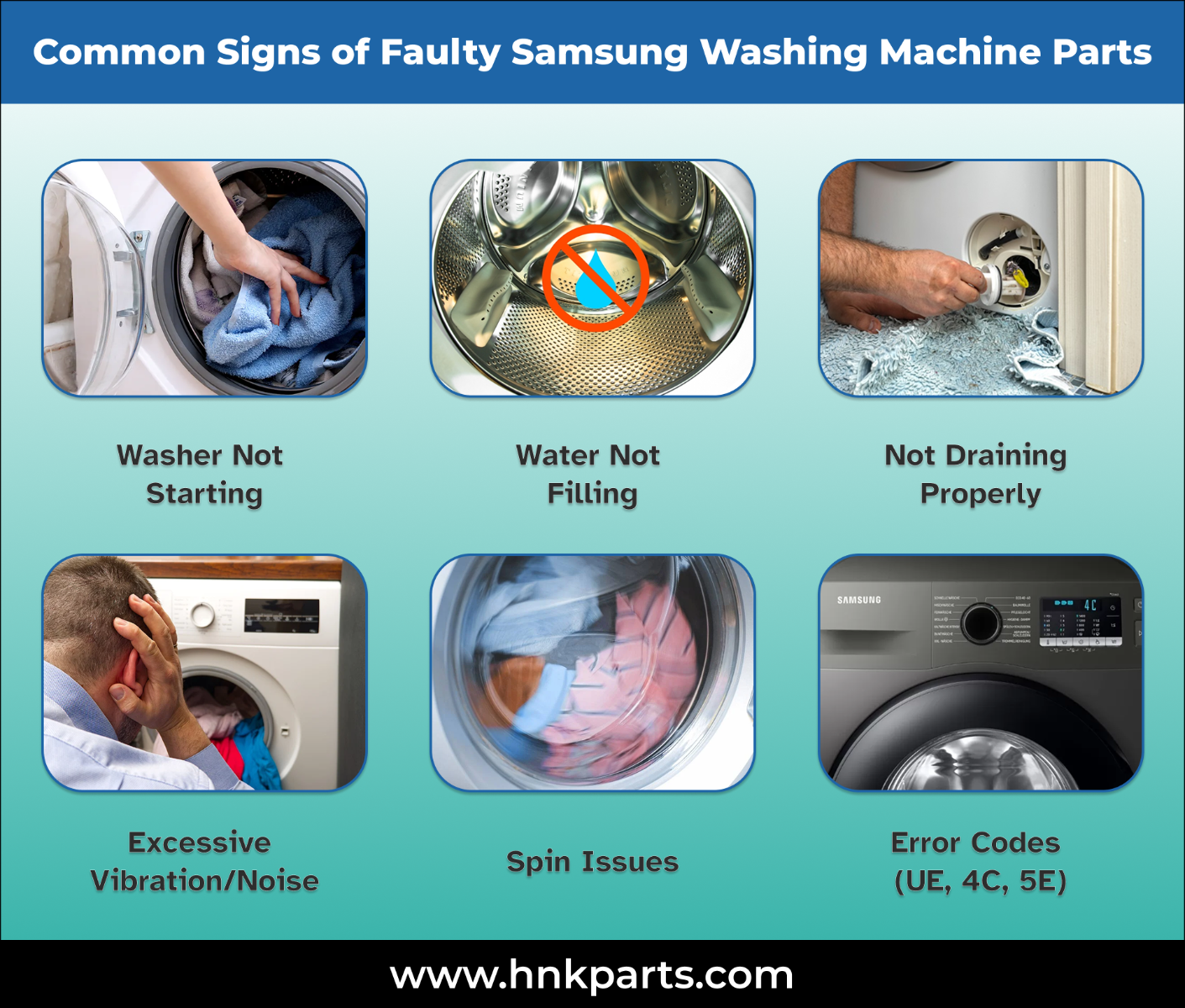
Understanding common washer parts helps you troubleshoot smarter. Here’s a rundown:
- Door latch: If broken, washer won’t start or may stop mid-cycle.
- Drain pump: Clogs or motor failure stop draining.
- Water inlet valve: If faulty, washer won’t fill.
- Control board: Software or hardware faults cause random errors.
- Drive belt: On belt-driven models, a snapped belt stops the drum.
Pro tip: Always use genuine Samsung parts for replacements. Generic parts can cause more frequent failures.
Troubleshooting Samsung Smart Washer Features
Many Samsung washers now connect to Wi-Fi and smartphone apps. If smart features fail:
- Check your router: Weak Wi-Fi causes lost connections.
- Update the app: Old app versions may not sync.
- Reset network settings: Unplug the washer for 1 minute, then reconnect to Wi-Fi.
If you see a “smart control” error, follow the app’s troubleshooting steps, or visit the official Samsung Support site.
Avoiding Common Mistakes
Even careful users can make mistakes that lead to washer problems:
- Using too much detergent: This creates excess suds, leading to poor rinsing and possible leaks.
- Ignoring filter cleaning: Blocked filters can stop draining and spinning.
- Overloading the drum: Leads to unbalanced loads and extra wear.
- Forgetting to check pockets: Small objects damage the drum or pump.
- Skipping regular maintenance: Shortens your washer’s lifespan.
Energy And Water Efficiency Tips
Modern Samsung washers are designed to save water and energy. To maximize efficiency:
- Wash full loads, but don’t overload.
- Use cold water for most cycles; it saves energy and protects fabrics.
- Select the right cycle for your load size and soil level.
- Clean filters to keep the washer running efficiently.
Did you know? Using a washer with an Energy Star rating can save about 25% on energy and 33% on water compared to older models.
How To Reset Your Samsung Washer
If your washer is acting strangely, a reset can often solve temporary glitches:
- Unplug the washer from the wall.
- Wait at least 1 minute.
- Plug the washer back in and turn it on.
This simple process can clear many electronic errors.
Troubleshooting Table: Symptoms And Solutions
This quick-reference guide matches common problems with likely causes and solutions.
| Problem | Likely Cause | Quick Fix |
|---|---|---|
| Washer won’t start | No power, door not shut | Check plug, door lock |
| No spin | Unbalanced or overloaded | Redistribute clothes |
| Water won’t drain | Clogged filter/hose | Clean filter, inspect hose |
| Loud noise | Foreign object, worn bearing | Remove object, call for service if needed |
| Leaking water | Loose hoses, bad gasket | Tighten hoses, clean/replace gasket |
Keep this table handy for quick checks.

Essential Tools For Basic Repairs
You can solve many issues with a few simple tools:
- Phillips and flathead screwdrivers
- Pliers
- A small bowl for screws
- Towels for water spills
- Flashlight for looking behind/under the washer
Pro tip: Always keep your washer’s manual nearby. It has model-specific troubleshooting steps.
Real-world Example: Fixing A Drain Problem
Imagine your washer shows a 5E error and won’t drain. Here’s how you might solve it:
- Unplug the washer.
- Open the small panel at the bottom front.
- Place a towel and shallow pan under the filter area.
- Twist out the filter—water will flow out.
- Remove lint, coins, or hair from the filter.
- Check the drain hose for blockages.
- Replace the filter, plug in, and run a rinse/spin cycle.
In most cases, this simple routine solves the issue.
Frequently Asked Questions
Why Does My Samsung Washer Smell Bad?
A musty smell is usually caused by mold or mildew growing inside the washer. Leave the door open after each use, clean the detergent drawer monthly, and run a hot drum clean cycle every 40 washes.
How Often Should I Clean The Drain Pump Filter?
Clean the drain pump filter at least once a month, or more often if you wash lots of pet bedding or sandy clothes. Regular cleaning prevents drainage problems and keeps the washer running smoothly.
What Should I Do If My Washer Shakes Violently?
Violent shaking usually means an unbalanced load. Pause the cycle, open the door, and rearrange the clothes. Make sure the washer is level on the floor—adjust the feet if needed.
Can I Use Regular Detergent In My Samsung Washer?
You should use HE (High Efficiency) detergent in all modern Samsung washers. Regular detergent creates too much suds, which can cause error codes and poor cleaning.
My Washer Shows An Error Code I Don’t Recognize. What Now?
Check your user manual for a list of error codes. If you can’t find the code or the solution doesn’t work, try unplugging the washer for 1 minute to reset it. If the error stays, contact Samsung support.
A Samsung clothes washer is a smart investment, but like any appliance, it needs care and the occasional fix. With the right knowledge, you can solve most common problems yourself—saving time, money, and hassle. Keep this guide handy, stay on top of regular maintenance, and your washer will serve you well for years to come.
If in doubt, don’t hesitate to call a professional or refer to trusted resources for help.

