

The Maytag Bravos washer is a trusted appliance in many homes. It’s known for its large capacity, energy efficiency, and strong cleaning power. But like all machines, even the reliable Bravos can run into problems. When your washer stops working as it should, laundry piles up and stress rises. The good news is, most issues with the Maytag Bravos washer can be solved without calling a technician. With a little guidance and patience, you can often get your washer running again on your own.
This article will guide you through troubleshooting common Maytag Bravos washer problems. You’ll learn how to spot symptoms, understand error codes, and fix issues step by step. We’ll cover everything from the washer not spinning to error messages on the display. You’ll find tables that compare error codes, lists of causes, and clear instructions for testing and repairs. Whether you’re a new owner or have used the Bravos for years, this guide will help you get the most from your washer and avoid unnecessary repair costs.

36% off Today’s Exclusive Deals
Limited-time Exclusive Deals. Check current discount on Amazon.
Check Price on Amazon As an Amazon Associate I earn from qualifying purchases.Understanding Your Maytag Bravos Washer
Before you start troubleshooting, it’s important to know the basics of your Bravos washer. These models are high-efficiency, top-loading machines. They use less water than traditional washers and rely on sensors to adjust each cycle. This design helps save energy and water, but it also means the washer is more sensitive to problems like imbalance or clogged filters.
Key features of Bravos washers include:
- Electronic control panel with error codes
- Direct drive motor for quiet operation
- Automatic load sensing
- Self-clean cycles
- High spin speed for better water extraction
Knowing these basics helps you understand why certain problems happen and what to check first.
Common Maytag Bravos Washer Problems And Solutions
Let’s look at the most common issues owners face and how you can fix them.
1. Washer Will Not Start
When you press the start button and nothing happens, it’s easy to panic. But many times, the solution is simple.
Possible causes:
- Power supply issue
- Faulty lid switch
- Control lock feature is on
- User interface problem
How to troubleshoot:
- Check if the washer is plugged in and the outlet works. Try another appliance to confirm.
- Inspect your home’s circuit breaker or fuse box. Reset or replace if needed.
- Make sure the lid is closed properly. If the lid switch is faulty, the washer will not start.
- Look at the control panel. If the Control Lock indicator is lit, press and hold the lock button for three seconds to unlock.
- If the display is blank, unplug the washer for five minutes to reset the electronics.
If none of these steps work, the issue could be with the control board or wiring. At this point, you may need a technician.
2. Washer Not Spinning Or Agitating
A common complaint with the Bravos is the washer filling with water but not spinning or agitating. This usually points to a problem with the drive system or sensors.
Main causes:
- Unbalanced load
- Faulty drive belt or actuator
- Lid lock issue
- Motor problems
Step-by-step diagnosis:
- Pause the cycle and redistribute clothes evenly. Too many items on one side can stop spinning.
- Close the lid firmly. The washer will not spin if the lid lock does not engage.
- Listen for a clicking sound when the spin cycle starts. No sound could mean a failed lid lock or actuator.
- Check for error codes on the control panel (more on this below).
- If comfortable, unplug the washer and remove the back panel. Inspect the drive belt for cracks or breaks.
3. Washer Not Draining
If you open the washer and find water still inside, the drain system is likely blocked.
Frequent causes:
- Clogged drain hose or pump
- Kinked hose behind the washer
- Faulty drain pump
- Coin, lint, or small item blocking the filter
What to do:
- Unplug the washer and pull it away from the wall.
- Remove the drain hose and check for clogs. Run water through it to confirm.
- Take off the lower access panel (if your model has one). Clean the drain filter of any lint or debris.
- Listen for the drain pump. If it buzzes but doesn’t move water, the pump could be jammed or burnt out.
4. Washer Leaking Water
Water leaks from a Bravos washer are usually easy to spot but can come from multiple places.
Typical sources:
- Loose or damaged fill hoses
- Faulty door seal (for top loader: Tub-to-hose seal)
- Over-sudsing (using too much detergent)
- Cracked tub or drain pump
Quick actions:
- Check the water supply hoses for tight connections and no cracks.
- Inspect the area around the pump and tub for drips.
- Use only HE (High Efficiency) detergent, and measure it carefully.
- Run a rinse and spin cycle with no clothes to see if the leak continues.
If you see damage to the tub or pump, these need to be replaced.
5. Washer Makes Unusual Noises
Loud banging, grinding, or humming can signal a problem. But not all noises are bad—some are normal.
Common causes of noise:
- Unbalanced load
- Foreign objects in the drum or pump
- Worn drum bearings
- Loose belt or pulley
How to diagnose:
- Open the washer and remove any coins, buttons, or debris.
- Run a cycle with no clothes to isolate the sound.
- If the noise only happens during spin, check the suspension rods or shocks.
Tip: Maytag Bravos washers are quieter than older models. Sudden new noises should be checked right away.
Decoding Maytag Bravos Washer Error Codes
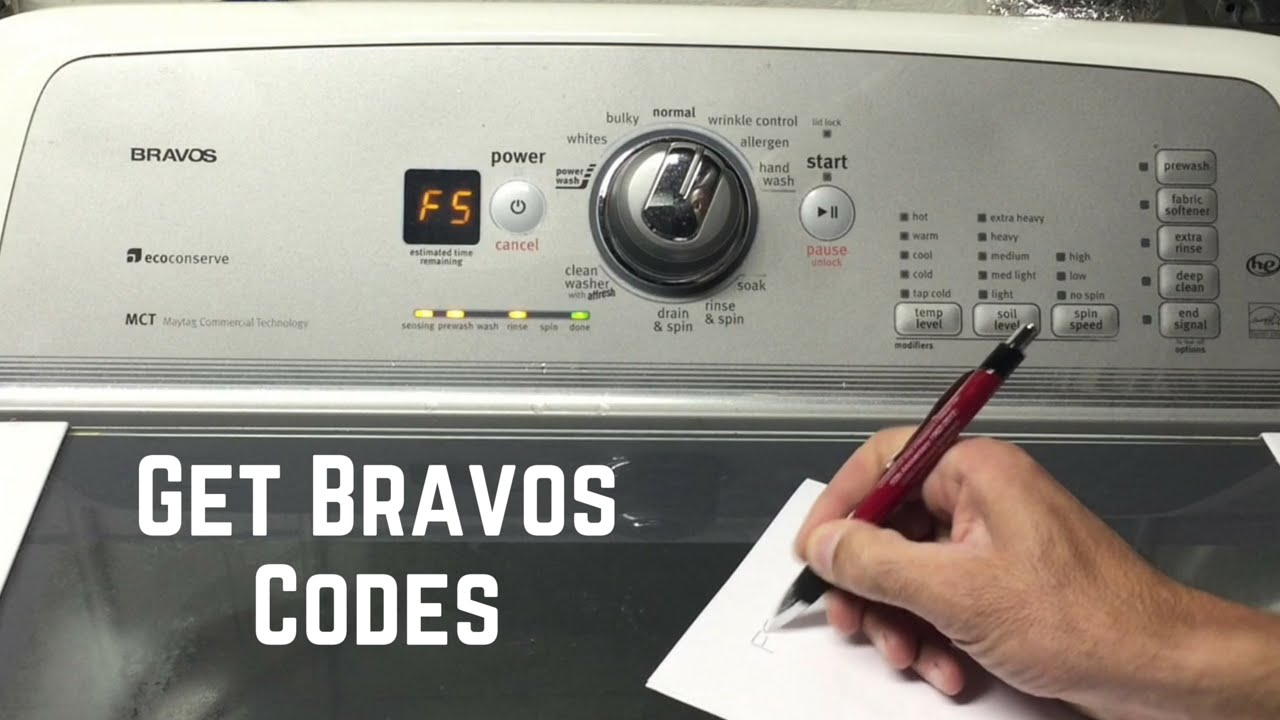
The Bravos uses error codes to help you find problems quickly. These codes appear as letters and numbers on the control panel. Here’s a reference to help you understand them:
| Error Code | Meaning | What to Check |
|---|---|---|
| F5 E2 | Lid lock fault | Make sure lid closes fully, check lid switch |
| F7 E1 | Basket speed sensor fault | Inspect drive motor, actuator, wiring |
| F8 E1 | Low water flow | Check water supply hoses, inlet valve |
| F9 E1 | Drain problem | Clean drain pump filter, check hose for clogs |
| F0 E5 | Unbalanced load | Redistribute clothes, avoid overloading |
Tip: Always unplug the washer before checking internal parts. If an error code keeps coming back after a reset, there may be a deeper electrical problem.
How To Reset A Maytag Bravos Washer
Sometimes, your washer may act strange or get stuck in a cycle. A simple reset can often clear minor faults.
To reset:
- Unplug the washer from the wall outlet.
- Wait for at least 5 minutes.
- Plug it back in.
- Open and close the lid six times within 12 seconds. This helps reset the control board on many Bravos models.
After the reset, run a rinse and spin cycle to test. If problems continue, look for specific error codes or symptoms.

Maytag Bravos Washer Maintenance Tips
Regular maintenance can prevent most problems with your washer. Here’s what you should do:
- Clean the washer tub every month with a washer cleaner or white vinegar. This prevents mold and smells.
- Check hoses for leaks or cracks every six months.
- Clean the drain filter (if your model has one) every three months.
- Use the right detergent—always choose HE detergent and avoid too much.
- Leave the lid open for a while after each use to let the interior dry.
These simple habits extend the washer’s life and reduce the chance of breakdowns.
When To Call A Professional
While many problems are easy to fix, some require a trained technician. Call for help if:
- The washer trips the circuit breaker often
- There’s a burning smell or visible smoke
- The control panel won’t light up after reset
- Internal parts (motor, control board) are damaged
A professional can safely check and replace complex parts.
Troubleshooting By Symptom
Sometimes, issues don’t show an error code. Here’s a quick guide to help you match symptoms to possible causes.
| Symptom | Likely Cause | DIY Fix |
|---|---|---|
| Washer shakes or moves | Unleveled washer, unbalanced load | Level the feet, redistribute clothes |
| Clothes still wet after spin | Drain pump blocked, overloaded washer | Clean drain filter, remove some clothes |
| Washer smells bad | Mold in tub, dirty dispenser | Run cleaning cycle, clean dispenser tray |
| Washer won’t fill with water | Closed water valves, kinked hoses | Open valves, straighten hoses |
| Display shows “LF” | Low water flow | Check supply, clean inlet screens |
Key Parts And What They Do
Knowing what each part does can help you troubleshoot confidently.
Essential Bravos washer parts:
- Lid lock: Keeps lid closed for safety. If it fails, washer won’t run.
- Drain pump: Removes water after wash and rinse cycles.
- Drive belt: Connects motor to drum. If broken, washer won’t spin.
- Control board: Brain of the washer. Controls all cycles and functions.
- Water inlet valve: Lets water enter during fill. Clogged valve means no fill.
If you need to replace a part, always use genuine Maytag parts for best results.
Practical Tips For Effective Troubleshooting
- Always unplug the washer before working on it.
- Take a photo of wire connections before disconnecting anything.
- Keep screws and small parts in a cup so you don’t lose them.
- Test after each step so you know what fixed the problem.
- Don’t ignore small problems; they often get worse with time.
Comparing Maytag Bravos To Other Washers
How does the Bravos stack up against other popular washers for troubleshooting?
| Feature | Maytag Bravos | LG Top Load | Samsung Top Load |
|---|---|---|---|
| Self-diagnosis codes | Yes, clear codes | Yes, but sometimes unclear | Yes |
| DIY repair access | Easy back panel | Often bottom panel | Back panel, but tighter fit |
| Parts cost | Moderate | Higher | Moderate |
| Online support | Extensive | Good | Good |
Insight: Maytag Bravos models are designed for easy DIY troubleshooting, with detailed manuals and strong online support. This makes them a smart choice for hands-on owners.
Preventing Common Bravos Washer Problems
Many issues can be prevented with good habits:
- Don’t overload the drum. Always leave space for clothes to move.
- Clean up detergent spills right away.
- Replace hoses every 5 years or at first sign of wear.
- Run a cleaning cycle monthly.
- Use the right cycle for heavy or bulky items.
Most breakdowns come from missed maintenance or using the wrong detergent.
Two Non-obvious Insights
- Control Lock Mistaken for Failure: Many users think their Bravos washer is broken when the Control Lock feature is active. This safety lock stops all buttons and makes the washer seem dead. Always check for a lock symbol before starting major repairs.
- Hidden Clogs in the Drain Hose: Sometimes, a washer that won’t drain or is slow to spin has a clog not at the pump, but inside the drain hose where it loops behind the washer. Lint and small socks can get stuck here and cause slow drainage. Always remove and flush the hose fully, not just check the ends.
Reliable Resources For Maytag Bravos Washer Owners
If you get stuck, Maytag’s official support site has manuals, diagrams, and a live chat. For more in-depth troubleshooting, you can check the well-documented guides at Repair Clinic.
Frequently Asked Questions
What Does The “lf” Error Mean On My Maytag Bravos Washer?
The “LF” code stands for “Long Fill.” It means the washer is not filling with water fast enough. Check your water supply valves, hoses for kinks, and the inlet screens for blockages. Cleaning or replacing these usually solves the issue.
Why Is My Maytag Bravos Washer Not Spinning Clothes Dry?
If your washer isn’t spinning, it could be an unbalanced load, a broken drive belt, or a faulty lid lock. Redistribute clothes and try again. If that fails, listen for the lid lock engaging and check for error codes. Replace any damaged parts as needed.
How Do I Reset My Maytag Bravos Washer?
To reset, unplug the washer for five minutes. Then plug it back in and open/close the lid six times within 12 seconds. This resets the control board on most Bravos models. After resetting, run a rinse and spin cycle to check if the problem is gone.
My Washer Is Leaking Water—where Should I Look First?
Start with the water supply hoses and connections for leaks or cracks. Next, check the area around the drain pump and tub. Make sure you’re not using too much detergent, as over-sudsing is a common cause. Replace any damaged parts you find.
What Should I Do If The Control Panel Won’t Respond?
First, check if the Control Lock is on (look for a lock icon). If not, unplug the washer for five minutes to reset the electronics. If the panel stays dead, you may have a faulty control board or power supply issue. At this point, consider calling a technician.
Every appliance has its challenges, but the Maytag Bravos washer stands out for its DIY-friendly design and strong support resources. By learning how to troubleshoot, you’ll save time, money, and avoid unnecessary frustration. With regular maintenance and the tips shared here, your Bravos washer can deliver reliable performance for years to come.

