

If your morning starts with a cup of coffee, an instant solo coffee maker can be your best friend. These machines promise speed, convenience, and a fresh cup with minimal effort. But nothing ruins the day faster than a coffee maker that won’t work. Instead of rushing to buy a new one, you can solve most problems yourself. This guide covers the most common issues, step-by-step solutions, and practical tips. Whether your coffee tastes strange, the machine won’t turn on, or you’re facing leaks, we’ll help you fix it quickly. With real examples and clear advice, you’ll soon enjoy your favorite brew again.
Understanding Your Instant Solo Coffee Maker
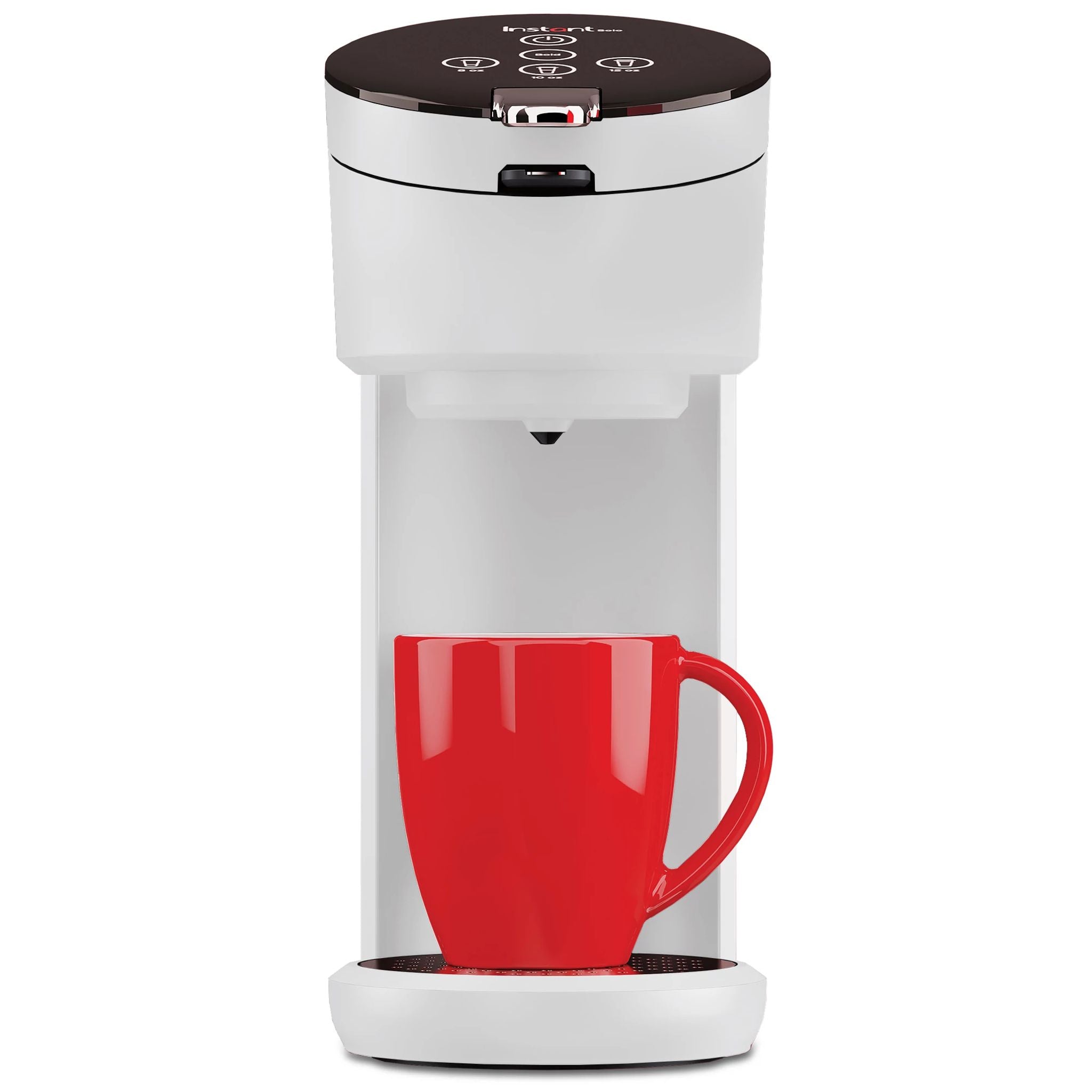
Before you start troubleshooting, it’s important to know how an instant solo coffee maker works. These machines are designed to brew a single cup quickly using hot water and coffee grounds or pods. Most models have a water reservoir, a heating element, a brew button, and a filter basket. Some allow you to use both ground coffee and pods, while others are pod-only.

36% off Today’s Exclusive Deals
Limited-time Exclusive Deals. Check current discount on Amazon.
Check Price on Amazon As an Amazon Associate I earn from qualifying purchases.The coffee maker heats water, pushes it through the grounds or pod, and dispenses brewed coffee into your cup. Problems can happen at any stage—water heating, brewing, or dispensing. Knowing your model’s features helps you identify the issue faster.
Common Features
- Water reservoir: Holds water for brewing.
- Heating element: Warms water to the right temperature.
- Pump: Moves water through coffee grounds or pod.
- Filter basket: Holds coffee grounds or pod.
- Brew button: Starts the brewing process.
Types Of Solo Coffee Makers
Different brands and models have small differences. Some have digital displays, others use simple buttons. Some need regular descaling, while others have self-cleaning features. Always check your user manual for details specific to your coffee maker.
Most Common Problems And Quick Fixes
Many issues with instant solo coffee makers can be solved quickly. Here are the most frequent problems and their solutions.
1. Coffee Maker Won’t Turn On
If your machine does not power up, check these steps:
- Power source: Make sure it’s plugged in securely.
- Outlet: Test with another device. If the outlet works, move to the next step.
- Power button: Hold the button for 2-3 seconds.
- Reset: Some models have a reset function—refer to your manual.
- Fuse: If your coffee maker has a fuse, check and replace it if needed.
If none of these steps work, the internal wiring or circuit board may be damaged. In this case, contact the manufacturer or a repair service.
2. Coffee Tastes Bad
When your coffee tastes bitter, sour, or weak, the problem might be:
- Old coffee grounds or pods
- Incorrect water temperature
- Dirty machine
Solutions:
- Use fresh coffee grounds or pods.
- Clean the filter basket and water reservoir.
- Descale the machine regularly. Mineral buildup affects taste.
- Adjust the amount of coffee. Too much or too little can change flavor.
3. Machine Is Leaking
Leaks are often caused by:
- Loose water reservoir
- Cracked reservoir or filter basket
- Blocked internal tubes
Try these steps:
- Ensure the water reservoir is fitted correctly.
- Check for cracks and replace damaged parts.
- Clean internal tubes using a descaling solution.
4. Brew Cycle Stops Midway
If your coffee maker stops brewing before finishing:
- Water level: Make sure there’s enough water.
- Clogged needle: The needle that pierces the pod can get blocked.
- Overheated machine: Let the machine cool for 5-10 minutes.
Clean the needle with a paper clip (follow manual instructions). Refill the reservoir and restart.
5. Coffee Maker Is Slow
If the brew process takes longer than usual:
- Mineral buildup: Descale the machine.
- Clogged filter: Clean or replace the filter basket.
- Low power supply: Plug into a different outlet.
Descaling every 1-2 months keeps your machine working fast.
Step-by-step Troubleshooting Guide
Let’s break down solutions for the most common solo coffee maker problems. Use these steps for safe and effective troubleshooting.
Power Problems
- Unplug the machine.
- Wait 2 minutes, then plug back in.
- Test the outlet with another appliance.
- Try a different outlet.
- Check for blown fuses in your machine or home circuit.
If your coffee maker still won’t turn on, it may need professional repair.
Water Heating Issues
If your machine brews cold coffee:
- Check if the heating element is working. Some models have an indicator light.
- Descale the machine. Mineral buildup can block heating.
- Make sure you’re not using ice-cold water. Room temperature water is best.
If the heating element is broken, contact customer support.
Blockages And Clogs
Blockages can stop water flow or make coffee taste bad.
- Remove the filter basket and clean it with warm, soapy water.
- Use a descaling solution in the water reservoir.
- Clean the needle that pierces pods (if your model uses pods).
Common mistake: Not cleaning the needle. This tiny part gets clogged easily and is often missed by beginners.
Brew Quality Issues
If coffee tastes weak or strange:
- Use fresh coffee. Old grounds taste stale.
- Adjust the grind size—too fine causes bitterness, too coarse makes weak coffee.
- Rinse the reservoir and filter basket before brewing.
Leaks And Spills
- Check for cracks in plastic parts.
- Tighten all removable parts.
- Don’t overfill the water reservoir.
If leaks continue, inspect the internal tube connections. You may need a technician.
Cleaning And Maintenance
Regular cleaning is the best way to prevent problems. Here’s how to maintain your instant solo coffee maker.
Daily Cleaning
- Rinse the filter basket and reservoir after every use.
- Wipe down the exterior with a damp cloth.
Weekly Cleaning
- Run a cycle with just water (no coffee).
- Clean the needle (for pod models).
Monthly Descaling
Descaling removes mineral deposits. Use a mix of equal parts water and white vinegar.
- Fill the reservoir with the solution.
- Run a brew cycle (without coffee).
- Repeat with clean water to rinse.
Descaling every month keeps your machine working well and improves coffee taste.
Cleaning Comparison Table
Here’s a table showing recommended cleaning frequencies:
| Cleaning Task | Frequency | Purpose |
|---|---|---|
| Rinse filter basket | Daily | Removes coffee residue |
| Wipe exterior | Daily | Keeps machine hygienic |
| Clean needle | Weekly | Prevents blockages |
| Descale | Monthly | Removes mineral buildup |

Solving Advanced Problems
Some issues are less obvious and need deeper troubleshooting.
Error Codes And Lights
Many solo coffee makers use lights or error codes to indicate problems. For example, a blinking light can mean low water or a blocked needle. Check your manual for code meanings.
If you see an error code:
- Look up the code in your user manual or online.
- Follow the recommended steps to fix it.
- Reset the machine after solving the issue.
Pump Failure
If the pump doesn’t work, water won’t move through the coffee grounds.
- Listen for pump noise. No sound means the pump isn’t working.
- Try running a brew cycle with just water. If nothing happens, the pump may need replacement.
Pump problems are rare but serious. Contact the manufacturer for help.
Internal Wiring Damage
If power and heating are fine but the machine won’t brew, wiring may be damaged.
- Don’t open the machine yourself. This can void the warranty.
- Take it to a certified repair center.
Comparing Common And Advanced Problems
Use this table to see how common and advanced issues differ:
| Problem Type | Symptoms | DIY Solution | Professional Help |
|---|---|---|---|
| Common | Bad taste, leaks, slow brew | Clean, descale, check parts | Rarely needed |
| Advanced | Error codes, pump failure, wiring issues | Check manual, reset machine | Often required |
Practical Tips For Reliable Brewing
Preventing problems is easier than fixing them. Here are practical tips to keep your solo coffee maker running well:
- Use filtered water: Reduces mineral buildup.
- Don’t overfill: Too much water can cause leaks.
- Check parts regularly: Look for cracks or loose parts.
- Store in a dry place: Moisture causes rust and mold.
- Use correct coffee: Pods or grounds as recommended.
- Clean after every brew: Keeps taste fresh.
- Descale monthly: Prevents slow brewing and heating issues.
- Keep manual handy: Error codes and troubleshooting steps are model-specific.
A non-obvious insight: Many users ignore the needle cleaning step. This tiny part is the main cause of slow brewing and bitter coffee in pod models. Cleaning it weekly prevents most issues.
Another tip: If your coffee maker has a removable water filter, replace it every three months. Filters trap minerals and dirt, improving taste and machine life.
Comparing Solo Coffee Maker Brands
Some brands are more reliable than others. Here’s a comparison of popular instant solo coffee makers:
| Brand | Features | Common Issues | Ease of Troubleshooting |
|---|---|---|---|
| Keurig | Pod-only, fast brew, digital display | Needle clogs, slow brewing | Easy, clear manual |
| Nespresso | Pod-only, strong coffee, automatic descaling | Pump failure, leaks | Moderate, needs manual |
| Hamilton Beach | Grounds or pods, simple buttons | Bad taste, heating issues | Easy, basic design |
| Black+Decker | Grounds only, large reservoir | Leaks, slow brew | Easy, clear manual |
Choose a brand with clear troubleshooting steps and easy access to customer support.
When To Seek Professional Help
Not every problem can be solved at home. Here’s when you should call for help:
- Repeated leaks after cleaning and tightening parts
- No power even after checking fuses and outlets
- Persistent error codes that don’t clear after resets
- Broken heating element (coffee stays cold)
- Pump failure (no water movement)
- Internal wiring issues (machine turns on but doesn’t brew)
A certified technician can fix these problems. Don’t try to open the machine yourself; you might void the warranty or cause more damage.
Warranty And Customer Support
Most instant solo coffee makers come with a warranty—usually 1-2 years. Check your manual or receipt for details. If your machine is still under warranty, contact customer support before trying repairs.
Manufacturers often have troubleshooting guides and videos online. For example, Keurig offers step-by-step solutions for common problems. If you need to buy replacement parts, use official sources to avoid quality issues.
For more information, you can check resources like Consumer Reports for unbiased reviews and troubleshooting tips.
Frequently Asked Questions
What Should I Do If My Instant Solo Coffee Maker Won’t Brew?
First, check if the water reservoir is filled and fitted correctly. Clean the filter basket and needle (for pod models). If the machine still won’t brew, try descaling. If the problem continues, check for error codes and consult the manual.
How Often Should I Clean My Solo Coffee Maker?
Rinse the filter basket and reservoir daily. Clean the needle weekly if you use pods. Descale the machine every month to remove mineral buildup. Regular cleaning prevents most issues and keeps coffee tasting fresh.
Why Does My Coffee Taste Bitter Or Burnt?
Bitter coffee can result from using old grounds, brewing with too fine a grind, or a dirty machine. Clean all parts, use fresh coffee, and adjust the grind size. Descale the machine monthly to avoid mineral buildup that affects taste.
Is It Safe To Fix Leaks Myself?
Yes, if the leak is from a loose reservoir or filter basket. Tighten and check for cracks. If leaks continue after cleaning and tightening, or if water comes from inside the machine, contact a technician.
Can I Use Tap Water In My Instant Solo Coffee Maker?
Tap water is safe, but it can cause mineral buildup over time. Using filtered or bottled water reduces deposits and improves taste. If you use tap water, descale the machine monthly.
Enjoying a quick cup of coffee should be easy and stress-free. With these troubleshooting steps and maintenance tips, your instant solo coffee maker will stay reliable. Don’t forget regular cleaning and descaling. Most problems can be solved at home, but know when to call for help.
With a little attention, your coffee maker will give you great coffee every day.


