

Running a food business or managing a busy kitchen can be stressful when your equipment breaks down. One device that often creates headaches is the Atosa ice maker. These machines are designed for reliability, but like any appliance, they sometimes fail. When your ice supply stops, it can bring service to a halt or upset customers quickly.
Understanding how to troubleshoot an Atosa ice maker can save you time, money, and frustration. You don’t always need to call a technician immediately. Many common issues can be solved with some basic knowledge, a few tools, and careful observation.

36% off Today’s Exclusive Deals
Limited-time Exclusive Deals. Check current discount on Amazon.
Check Price on Amazon As an Amazon Associate I earn from qualifying purchases.This guide explains how to diagnose and fix the most frequent problems, what signs to watch for, and when professional help is needed. Whether you’re a restaurant owner, hotel manager, or just want to keep your business running smoothly, this article gives you the confidence to tackle Atosa ice maker issues head-on.
How An Atosa Ice Maker Works
Before troubleshooting, it helps to know the basic parts and operation of your Atosa ice maker. These machines have several key components:
- Compressor: Compresses refrigerant to create cooling.
- Evaporator plate: Water freezes here to form ice.
- Water pump and inlet valve: Move water into the right places.
- Ice bin: Collects finished ice.
- Control board: The “brain” that manages cycles.
The basic cycle starts with water filling the reservoir. The compressor and evaporator freeze water into ice. Once a batch is ready, a harvest cycle releases ice into the bin. Sensors monitor the bin and water supply to prevent overflow or dry cycles.
Most problems happen during these steps.
Understanding these basics helps you locate issues faster. For example, if the ice bin is empty but the compressor is running, the issue is different than if the bin is full but not dispensing.
Common Problems And Quick Checks
Most Atosa ice maker problems fall into a few categories. Here’s how to spot them and do a first check.
Machine Doesn’t Power On
If your ice maker won’t turn on:
- Check the power cord and outlet. Plug in another device to confirm the outlet works.
- Look for tripped circuit breakers or blown fuses.
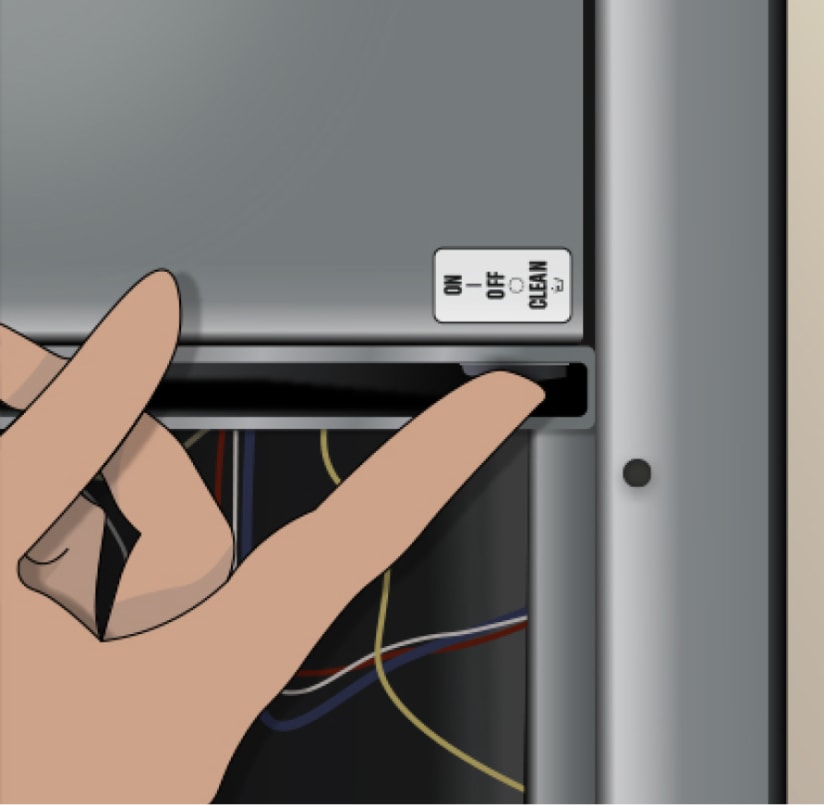
- Inspect the on/off switch and make sure it’s set to ON.
- Examine the control board for loose wires or visible damage.
Sometimes, a simple reset or plugging into a new outlet gets things working. If not, the problem may be internal.
Not Making Ice
When no ice forms, consider:
- Water supply: Is the water line connected and open? Kinked hoses or closed valves block water flow.
- Filter clog: Replace the water filter if it’s dirty.
- Low room temperature: If ambient temperature is below 50°F (10°C), some models won’t start.
- Faulty water inlet valve: Listen for a “click” when the cycle starts. No sound may mean the valve is bad.
Ice Too Small, Too Large, Or Misshapen
If ice cubes are the wrong size or shape:
- Water level issues: Check the float switch or water adjustment.
- Dirty evaporator plate: Mineral buildup can block proper freezing.
- High mineral content: Hard water causes problems; consider a water softener.
Machine Leaking Water
Leaks often come from:
- Loose water connections
- Cracked hoses
- Drain line blockages
Inspect for wet spots, check connections, and clear any blockages.
Machine Runs But No Ice Is Produced
If you hear the compressor and fan but no ice appears:
- Dirty condenser coil: Clean with a brush or vacuum.
- Low refrigerant: This needs a licensed technician.
- Faulty sensors: Check for error codes on the display (see the manual).
Troubleshooting Step-by-step
Now let’s walk through specific troubleshooting steps for each issue. Use the following sections to guide your diagnostics.
Power Issues
If your Atosa ice maker is completely dead, start with the basics. Confirm the power cord is tightly plugged in and the outlet supplies electricity. Use a multimeter to test the outlet voltage if you have one. Reset any tripped circuit breaker at your electrical panel.
Next, check the unit’s on/off switch. Sometimes, a switch gets bumped off during cleaning. Look at the control board for any visible signs of burning, corrosion, or loose connectors. If your model has a fuse inside, test or replace it.
If all else fails, the control board or power supply may be faulty. This is a common point of failure, especially in humid or greasy environments.
Ice Production Problems
When your machine is running but not making ice, check the water supply first. Inspect the water inlet valve for blockages or mineral buildup. If your area has hard water, calcium deposits often clog the valve.
Test the water pressure. Atosa ice makers usually need at least 20 psi (pounds per square inch). Less than that can cause slow fills or small ice cubes.
Inspect the water filter. A clogged filter restricts flow and should be replaced every six months, or more often in high-use environments.
If water is flowing properly, move on to the evaporator plate. This is the cold surface where ice forms. Mineral deposits or slime here can prevent proper freezing. Clean the plate with a soft brush and a manufacturer-approved cleaner.
If you find that water is freezing but won’t release, the problem may be with the harvest cycle or the ice thickness sensor. Adjust the sensor according to the manual. If it’s dirty or out of alignment, ice won’t drop into the bin.
Ice Quality Issues
Ice that’s too small or misshapen is often a sign of water issues. Make sure the float switch is moving freely and not jammed. Adjust the water fill level if your model allows it.
Cloudy or white ice usually means air is trapped. This is often caused by rapid freezing or dirty water. Install a water filter if you haven’t already.
If you notice a “chemical” or unpleasant taste, clean the machine thoroughly. Odors can transfer from old food or dirty bins. Use a food-safe sanitizer.
Water Leaks
Leaks can be serious or simple to fix. Start by inspecting the back of the machine and the floor underneath. Tighten any loose hose connections. Replace hoses if they’re cracked or old. Check the drain line for blockages—food debris or ice can block the drain and cause overflow.
If you see water pooling inside the unit, the reservoir may be overfilling. Adjust the water inlet valve or float switch.
Machine Runs But Makes No Ice
If you hear the machine running but the ice bin is empty, the issue is likely with the refrigeration system. Clean the condenser coil, which is often found at the back or bottom of the machine. Use a stiff brush or compressed air to remove dust and grease.
Dirty coils make the compressor work harder and reduce efficiency.
If cleaning doesn’t help, check for error codes on the machine’s display. Many Atosa models provide diagnostic codes. Refer to your manual for specifics.
Low refrigerant, a failed compressor, or a faulty sensor will require professional service. Don’t try to open sealed refrigeration lines yourself—this is a safety hazard.
Error Codes And What They Mean
Most modern Atosa ice makers display error codes on their control panel. These codes help you pinpoint problems faster. Here are some common ones:
| Error Code | Meaning | Possible Solution |
|---|---|---|
| E1 | Water supply error | Check water line and filter |
| E2 | Ice full sensor error | Clean or replace sensor |
| E3 | Bin temperature error | Check probe or wiring |
| E4 | High temperature | Clean condenser, check ventilation |
| E5 | Compressor overload | Call technician |
Always refer to your specific model’s manual for the full list. Some codes may differ based on the year or version.
Cleaning And Maintenance
Regular maintenance is the best way to prevent ice maker problems. Atosa recommends cleaning and sanitizing your ice maker every 1-2 months, or more often if usage is heavy.
Basic Cleaning Steps
- Turn off and unplug the unit. Never clean while powered.
- Remove all ice from the bin.
- Take out removable parts (ice scoop, bin liner) and wash with warm, soapy water.
- Use a manufacturer-approved cleaner for the evaporator and water system. Do not use bleach unless the manual says it’s safe.
- Rinse thoroughly to remove all cleaner residue.
- Dry all parts before reassembling.
- Plug in and restart. Discard the first batch of ice to flush any chemicals.
Descaling
Hard water causes mineral buildup (scaling) inside your machine. Use a descaling solution if you notice white deposits. Follow the instructions carefully, as overuse can damage the machine.
Changing Water Filters
Replace the water filter every 6 months, or sooner if your area has hard water. This improves ice quality and helps prevent clogs.
Cleaning Schedule Table
Here’s a suggested cleaning frequency for different parts:
| Part | Frequency | Notes |
|---|---|---|
| Ice bin | Monthly | Use mild soap |
| Evaporator plate | Every 2 months | Use approved cleaner |
| Condenser coil | Every 3 months | Brush or vacuum |
| Water filter | Every 6 months | Change sooner if needed |
When To Call A Professional
Some problems require a certified technician. Don’t try to repair the following yourself:
- Refrigerant leaks: Only licensed professionals can handle refrigerants.
- Compressor failure: Replacing compressors requires special tools.
- Complex electrical issues: If fuses or control boards are bad, call for help.
- Persistent leaks: If leaks continue after tightening or replacing hoses, there may be a deeper problem.
Trying to fix these yourself can void the warranty or cause injury.
Atosa Ice Maker Vs. Other Brands
Understanding how Atosa compares to other brands helps with troubleshooting. Some brands have unique error codes or design quirks. Here’s a quick comparison of key features:
| Brand | Typical Error Codes | Ease of Cleaning | Common Issues |
|---|---|---|---|
| Atosa | Simple, displayed on panel | Easy | Water line, sensor errors |
| Hoshizaki | Complex, blinking lights | Medium | Scale, bin sensor |
| Manitowoc | Numbered codes, app support | Easy | Water filter, float switch |
| Scotsman | Flashing indicators | Medium | Freezing, bin errors |
Atosa machines are known for straightforward design and easy maintenance, but some models may have more basic sensors than premium brands.
Practical Tips For Reliable Performance
Getting the best from your Atosa ice maker means more than fixing problems when they happen. Here are some expert strategies:
- Install a surge protector. Power surges damage sensitive electronics.
- Use filtered water. Reduces mineral buildup and improves ice taste.
- Keep the area ventilated. Overheating shortens the life of components.
- Don’t overfill the bin. Let the ice drop naturally; don’t pack it down.
- Record maintenance. Keep a log of cleaning and filter changes. This helps spot patterns and improves resale value.
A detail beginners often miss: Ice makers are sensitive to temperature swings. Placing the machine near ovens, fryers, or in direct sunlight reduces efficiency and increases breakdowns. Choose a cool, dry location for installation.
Another non-obvious insight: Some Atosa models have a “clean” cycle. Run this regularly—it’s not just for deep cleaning, but also resets some sensors and keeps the system calibrated.
Avoiding Common Mistakes
Even experienced users make errors with commercial ice makers. Here are some to avoid:
- Skipping filter changes: This leads to clogs and scale.
- Ignoring small leaks: Minor leaks often become big problems.
- Using harsh chemicals: Only use approved cleaners. Bleach or ammonia can corrode parts.
- Forgetting to reset after cleaning: Some models need a manual reset to resume normal operation.
- Neglecting airflow: Storing boxes or supplies near the intake blocks cooling.
Paying attention to these details can add years to your machine’s lifespan.
Sourcing Replacement Parts
If you need new parts, use genuine Atosa replacements when possible. Off-brand parts may not fit perfectly and can void the warranty. Always check your model number and order from reputable suppliers.
Common parts you might need:
- Water inlet valves
- Sensors
- Ice thickness probes
- Control boards
- Bin switches
Keep spare parts for high-use machines to minimize downtime.
Helpful Resources
If you need more guidance, Atosa offers manuals on their official website. You can also find troubleshooting videos on YouTube and forums where other users share tips.
For technical specifications and installation instructions, the official Atosa USA site is a reliable resource.
Frequently Asked Questions
Why Does My Atosa Ice Maker Keep Shutting Off?
Frequent shut-offs can be caused by a full ice bin sensor, a dirty condenser, or power supply problems. Clean sensors and check for error codes. If the problem continues, a technician should inspect the control board or wiring.
How Often Should I Clean My Atosa Ice Maker?
For most locations, clean and sanitize every 1–2 months. Busy restaurants or places with hard water may need monthly cleaning. Always replace water filters at least twice a year.
What Should I Do If The Ice Tastes Or Smells Bad?
Bad-tasting ice usually means the machine or water supply is dirty. Clean the ice bin, replace the water filter, and sanitize the machine. If the problem persists, check for plumbing issues or stagnant water in the supply line.
Can I Use Vinegar To Descale My Atosa Ice Maker?
Vinegar is not recommended unless specified by the manual. Atosa machines should be descaled with approved commercial products to avoid damaging internal parts.
Is It Normal For My Ice Maker To Make Noise?
Some noise is expected during operation, like clicking, humming, or water filling sounds. However, loud banging, grinding, or squealing is not normal and signals a problem with the compressor, fan, or pump.
Keeping your Atosa ice maker in top condition is a mix of careful use, regular cleaning, and quick troubleshooting. With the right knowledge, you can keep ice flowing smoothly and avoid costly downtime. If you ever feel unsure, reach out to a certified technician to protect your investment and maintain food safety.


