

Hotpoint Washer Troubleshooting: Your Complete Guide
A washing machine is one of the most important appliances in the home. When your Hotpoint washer stops working, it can disrupt your daily routine and cause stress. But many problems with Hotpoint washers can be fixed without calling a professional. Knowing how to troubleshoot common issues can save you time, money, and frustration. This guide will help you understand, diagnose, and solve the most frequent Hotpoint washer problems with clear steps, practical advice, and real examples. Whether you’re dealing with leaks, spinning problems, or error codes, you’ll find the answers here.
Understanding Hotpoint Washer Basics
Before you start troubleshooting, it’s helpful to know how Hotpoint washers work. These machines use a combination of water, detergent, and mechanical action to clean clothes. The main components include:

36% off Today’s Exclusive Deals
Limited-time Exclusive Deals. Check current discount on Amazon.
Check Price on Amazon As an Amazon Associate I earn from qualifying purchases.- Control panel: Where you set the cycle and options.
- Door or lid: Keeps water inside during washing.
- Drum: Holds the laundry.
- Pump: Removes water during spin and drain cycles.
- Motor: Powers the drum’s movement.
- Sensors: Detect water level, temperature, and errors.
Most Hotpoint washers are either top-loading or front-loading. Each type has its own common issues, but many problems are similar.
Diagnosing Common Hotpoint Washer Problems
Hotpoint washers can show many symptoms when something goes wrong. Here are the most frequent issues and how to spot them.
Washer Won’t Start
If your Hotpoint washer won’t turn on, check these points first:
- Power supply: Make sure the washer is plugged in and the outlet works.
- Door/lid lock: Most models won’t start if the door or lid isn’t closed properly.
- Control settings: Check if you set the cycle correctly.
- Child lock: Some washers have a child lock feature that can stop the machine from starting.
Washer Not Filling With Water
When the washer doesn’t fill, it’s often due to:
- Water supply: Valves must be fully open.
- Hoses: Look for kinks or blockages.
- Filter screens: These can clog over time and block water flow.
- Water inlet valve: This part can fail and stop water from entering.
Washer Leaking Water
Leaks can come from several places:
- Door seal/gasket: Worn or dirty seals let water escape.
- Hoses: Cracked or loose hoses are a common cause.
- Detergent drawer: Overfilling or buildup can cause leaks.
- Pump: If damaged, the pump can leak during draining.
Washer Not Spinning Or Draining
If your Hotpoint washer won’t spin or drain, check for:
- Blocked drain pump: Coins, hair, or fabric can block the pump.
- Drain hose: Kinks or clogs prevent water from leaving.
- Unbalanced load: Too many or too few clothes can cause spin problems.
- Lid/door lock: The machine may not spin if the lid or door isn’t secure.
Excessive Vibrations Or Noise
Loud noises often mean:
- Unbalanced load: Rearrange clothes for even distribution.
- Machine not level: Use a level tool and adjust the feet.
- Loose parts: Screws, bolts, or drum paddles can become loose.
- Foreign objects: Coins or buttons inside the drum can make noise.
Washing Cycle Takes Too Long
If your washer is running longer than usual:
- Water pressure: Low pressure slows filling.
- Sensor issues: Faulty sensors can affect cycle times.
- Overloaded machine: Too many clothes cause longer cycles.
Error Codes On Hotpoint Washers
Modern Hotpoint washers display error codes to help identify problems. Here are some common codes and their meanings:
| Error Code | Meaning | Possible Fix |
|---|---|---|
| F01 | Electronic circuit board fault | Reset washer, check connections |
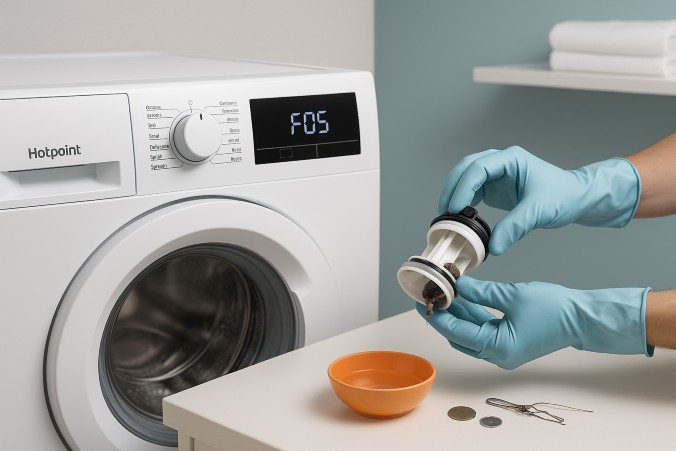
| F05 | Waste water pump failure | Check pump for blockages |
| F11 | Heater circuit fault | Check wiring, replace heater |
| F18 | Communication error | Reset machine, check connections |
Always check your Hotpoint washer’s manual for specific codes and instructions.
Step-by-step Troubleshooting For Hotpoint Washers
Now let’s look at how to fix each problem. Follow these steps for safe and effective troubleshooting.
1. Washer Won’t Start
- Check power: Test the outlet with another appliance. If it works, the issue is likely inside the washer.
- Inspect door/lid lock: Open and close the door firmly. Listen for a clicking sound. If the lock is broken, it must be replaced.
- Reset controls: Unplug the washer for one minute, then plug it back in. This can reset the electronics.
- Check fuse or circuit breaker: If tripped, reset the breaker.
2. Washer Not Filling With Water
- Open water valves: Make sure both hot and cold valves are fully open.
- Check hoses: Straighten any kinks. Remove hoses and flush them to clear blockages.
- Clean filter screens: Use a small brush to clear debris from screens inside the hose connections.
- Test inlet valve: If water still won’t flow, the valve may need replacement.
3. Washer Leaking Water
- Inspect door seal: Clean it with a soft cloth. Look for cracks or mold. Replace if damaged.
- Check hoses: Tighten connections. Replace hoses if cracked or worn.
- Clean detergent drawer: Remove buildup and avoid overfilling.
- Examine pump: If leak comes from underneath, check the pump for damage.
4. Washer Not Spinning Or Draining
- Check drain pump: Open the pump filter and remove debris. Use gloves for safety.
- Inspect drain hose: Remove the hose and flush with water to clear blockages.
- Balance the load: Remove or add clothes to balance weight in the drum.
- Test lid/door lock: If the machine stops mid-cycle, the lock may need replacement.
5. Excessive Vibrations Or Noise
- Level the washer: Adjust the feet so the machine sits flat.
- Check drum: Spin by hand to feel for resistance or noise.
- Tighten loose parts: Use a screwdriver to check bolts and paddles.
- Remove foreign objects: Check inside the drum and filter for coins or small items.
6. Washing Cycle Takes Too Long
- Check water pressure: Run other taps. If pressure is low, contact your water supplier.
- Clean sensors: Wipe sensors inside the drum with a soft cloth.
- Reduce load size: Wash fewer clothes at a time.
7. Error Codes: Reset And Fix
- Reset washer: Unplug for one minute, then plug back in.
- Check manual: Look up the code for specific guidance.
- Inspect wiring: If codes persist, check for loose connections.
- Call for service: If resets and checks don’t work, contact Hotpoint support.
Hotpoint Washer Maintenance Tips
Preventing problems is easier than fixing them. Regular maintenance will extend your washer’s life and improve performance.
- Clean door seal: Wipe after each use to prevent mold.
- Flush detergent drawer: Remove buildup monthly.
- Check hoses: Inspect every 6 months for cracks or leaks.
- Run cleaning cycles: Use washing machine cleaner once a month.
- Avoid overloading: Follow the recommended load size.
Comparison: Hotpoint Vs. Other Washer Brands
Hotpoint washers are known for reliability and affordability. But how do they compare to other brands in terms of common problems?
| Brand | Common Issues | Ease of Repair |
|---|---|---|
| Hotpoint | Door lock, drain pump, error codes | Moderate |
| Whirlpool | Water inlet valve, motor problems | Easy |
| Samsung | Sensor faults, drainage issues | Complex |
| LG | Noise, vibration, electronics | Easy |
Hotpoint’s parts are easier to find and most repairs can be done by owners with basic tools.
Hotpoint Washer Error Codes: Detailed Guide
Many users struggle with error codes. Here’s a deeper look at what these codes mean and how to deal with them.
F01: Electronic Circuit Board Fault
This code means there’s a problem with the washer’s main control board. Try unplugging the washer for one minute to reset it. If the code returns, check for loose wires inside the control panel. Replacing the board is sometimes necessary, but this is best left to professionals.
F05: Waste Water Pump Failure
When the pump fails, the washer won’t drain. Open the pump filter, remove any blockages, and try running the drain cycle again. If the pump motor is damaged, you’ll need a replacement.
F11: Heater Circuit Fault
This code signals an issue with the heater. Clothes may not wash properly in cold water. Check wires and connections. Replacing the heater is possible, but requires skill.
F18: Communication Error
This code is often fixed by unplugging and resetting the washer. If it keeps appearing, inspect all wiring and connections between control boards.
Practical Troubleshooting Examples
Let’s look at real situations from Hotpoint users.
Example 1: Sarah’s Hotpoint washer stopped spinning. She checked the drum and found a sock stuck in the pump filter. After removing it, the washer worked normally.
Example 2: John’s washer leaked water from the door. Cleaning the seal solved the problem, but he also noticed small cracks and replaced the gasket for a permanent fix.
Example 3: Maria saw an F05 code. She cleaned the pump filter, but the code stayed. After checking the drain hose, she found it was clogged with lint and hair. Once cleared, the washer drained perfectly.
These examples show that simple checks often solve big problems.
Hotpoint Washer Troubleshooting Table
Here’s a quick reference for common issues and solutions:
| Problem | Possible Cause | Quick Fix |
|---|---|---|
| Washer won’t start | No power, door lock | Check outlet, reset washer, inspect lock |
| Not filling with water | Valve, hoses, filter | Open valves, clear hoses/filters |
| Leaking water | Door seal, hoses, pump | Clean/replace seal, tighten hoses |
| Not spinning/draining | Pump, hose, load | Clear pump/hoses, balance load |
| Excessive noise | Load, level, objects | Balance load, level washer, remove objects |
| Cycle too long | Pressure, sensors, load | Check pressure, clean sensors, reduce load |
When To Call A Professional
Some issues require expert help. If you notice:
- Burning smell
- Electrical faults
- Repeated error codes
- Water pooling under washer
Stop using the washer and call a certified technician. Trying to fix electrical or complex problems yourself can be dangerous.
Cost Of Common Hotpoint Washer Repairs
Understanding repair costs helps you decide whether to fix or replace your washer.
- Door lock replacement: $50–$150
- Drain pump: $80–$200
- Control board: $150–$300
- Heater element: $100–$180
These prices include parts and labor. Repairs are often cheaper than buying a new washer, especially for simple parts.
Preventing Common Hotpoint Washer Mistakes
Many users make mistakes that lead to washer problems. Avoid these to keep your machine running smoothly:
- Using too much detergent: Causes buildup and leaks.
- Overloading the drum: Damages motor and bearings.
- Ignoring regular cleaning: Leads to mold and odors.
- Not checking pockets: Coins and small items can block pumps.
- Skipping maintenance: Shortens washer lifespan.
One non-obvious tip: Clean the pump filter every 3 months, even if no problem shows. Most blockages start slowly and cause bigger issues later.

Extra Insight: Hotpoint Washer’s Self-diagnostic Mode
Many newer Hotpoint washers have a self-diagnostic mode. This feature lets the machine check itself for faults. To use it, follow the instructions in your manual. Usually, you press a combination of buttons to enter the mode. The washer will then show error codes or blink lights to guide you.
This feature is powerful for early detection of problems, but many owners never use it. If your washer has this function, try it before calling for help.
Useful Resources For Hotpoint Washer Owners
For more information, visit the official Hotpoint support site. You can find manuals, troubleshooting guides, and repair videos. For technical details and error code explanations, check Hotpoint Official Support.
Frequently Asked Questions
How Do I Reset My Hotpoint Washer?
To reset most Hotpoint washers, unplug the machine for one minute. Plug it back in and start a new cycle. This simple reset often clears error codes and electronic glitches.
What Should I Do If My Washer Is Leaking?
First, check the door seal for dirt or cracks. Clean or replace as needed. Next, inspect hoses for leaks and tighten any loose connections. Make sure the detergent drawer isn’t overfilled. If leaks come from underneath, check the pump.
Why Won’t My Hotpoint Washer Spin?
Common reasons include an unbalanced load, a blocked drain pump, or a faulty lid/door lock. Balance the clothes, clear the pump filter, and check the lock. If these steps don’t help, the motor or control board may be faulty.
How Often Should I Clean My Washer?
Clean the door seal and drum after every wash. Flush the detergent drawer monthly. Run a cleaning cycle with washer cleaner every month. Check and clean the pump filter every 3 months.
Can I Fix Hotpoint Washer Errors Myself?
Many errors can be fixed with simple steps: resetting the washer, cleaning filters, and checking hoses. For electrical or repeated error codes, it’s safer to call a professional.
Hotpoint washers are reliable, but like all machines, they need care and attention. By following these troubleshooting steps and maintenance tips, you can solve most problems yourself and keep your washer running smoothly for years. Remember, regular cleaning and quick action when issues arise are the keys to avoiding costly repairs.
If you ever feel unsure, don’t hesitate to reach out to experts or official support for help.

