

The most common causes are power issues, a worn motor, a bad speed control, or a stuck attachment.
If your KitchenAid Classic 4.5-Quart Tilt-Head Stand Mixer K45SS not working, you are not alone. I have seen this mixer act up in ways that look serious at first, but often come down to simple, fixable problems. In this guide, I’ll walk you through the likely causes, safe troubleshooting steps, and when the K45SS may need repair, so you can get back to mixing without the guesswork.

36% off Today’s Exclusive Deals
Limited-time Exclusive Deals. Check current discount on Amazon.
Check Price on Amazon As an Amazon Associate I earn from qualifying purchases.
Why the KitchenAid Classic 4.5-Quart Tilt-Head Stand Mixer K45SS stops working
The KitchenAid Classic 4.5-Quart Tilt-Head Stand Mixer K45SS is a sturdy machine, but like any small appliance, it depends on a few basic systems working together. If one part fails, the whole mixer can seem dead, weak, or inconsistent. The good news is that many issues are simple and do not mean the mixer is ruined.
From hands-on troubleshooting, the most common problem is not the motor itself. More often, the issue is the outlet, the cord, the speed switch, the overload protector, or a bowl and attachment setup that is not seated right. I always tell people to think of it like a chain: if one link is loose, the whole thing stops pulling weight.
Common reasons include:
- No power from the wall outlet
- A tripped circuit breaker or GFCI outlet
- A damaged power cord
- The speed control is not engaging
- The mixer head is not locked properly
- The bowl is not fully seated
- A jammed beater, whisk, or dough hook
- A worn motor brush or internal motor issue
- The worm gear or transmission has failed
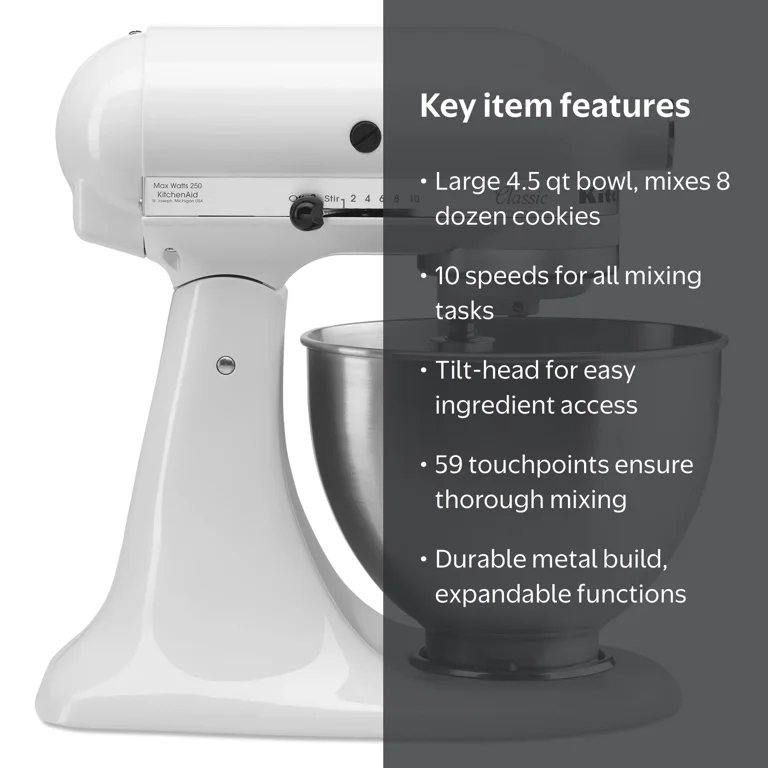
First things to check before assuming the mixer is broken
Before opening anything up or calling for service, start with the easy checks. These fixes solve a surprising number of KitchenAid Classic 4.5-Quart Tilt-Head Stand Mixer K45SS not working complaints. I’ve seen people replace parts when the real issue was a loose plug or a bad outlet.
Try these steps in order:
-
Plug another small appliance into the same outlet
If the outlet does not power that appliance, the problem is likely not your mixer. -
Check the power cord for cuts, bends, or heat damage
A damaged cord is a safety risk and should not be used. -
Test a different outlet
Sometimes the outlet has failed, especially in kitchens with GFCI protection. -
Make sure the speed lever is in the off position before starting
Some mixers behave oddly if the control was left between settings. -
Confirm the mixer head is locked down
On a tilt-head model, the head must sit fully in place to work correctly. -
Inspect the attachment and bowl fit
If the beater, whisk, or dough hook is too high, too low, or jammed, the mixer may struggle or stop.
These checks take only a few minutes, but they often save a lot of stress. The goal is to rule out the simple stuff before moving on to deeper troubleshooting.
What it means when the KitchenAid Classic 4.5-Quart Tilt-Head Stand Mixer K45SS not working at all
When the mixer will not turn on at all, the issue usually points to power delivery or the speed control system. That means the machine is not getting electricity, or it is not able to pass that power through to the motor. In my experience, this is where people often jump too fast to a motor failure.
Possible causes include:
- Faulty outlet or breaker
- Broken power cord
- Failed power switch
- Loose internal wiring
- Faulty control plate or speed governor
- Thermal overload protection shutting the mixer down
If the mixer has been used heavily, especially with bread dough, the thermal protector may have kicked in. Let the mixer cool for 20 to 30 minutes, then try again. If it still does nothing, the problem may be internal.
Why the mixer runs but sounds weak or slow
Sometimes the KitchenAid Classic 4.5-Quart Tilt-Head Stand Mixer K45SS not working does not mean it is fully dead. It may turn on, but the motor sounds tired, slow, or strained. That usually means the mixer is fighting resistance or the motor is not getting full power.
Typical causes include:
- Too much dough or batter in the bowl
- Heavy dough speed used for too long
- Worn motor brushes
- Old grease inside the transmission
- A slipping worm gear
- A failing speed control board or governor
I have made the mistake of assuming “slow” meant “normal with thick dough.” Sometimes it does, but if the mixer bogs down on a light batter, that is not normal. A healthy K45SS should keep a steady pace under regular home baking loads.
Helpful tips:
- Mix bread dough only on the recommended speed
- Do not overload the bowl
- Stop and scrape the bowl if ingredients collect in one area
- Let the mixer rest during long sessions
When the bowl, head, or attachments are the real problem
A lot of “not working” reports are really setup problems. The mixer may seem broken when the issue is actually the bowl latch, tilt-head lock, or attachment height. The KitchenAid Classic 4.5-Quart Tilt-Head Stand Mixer K45SS is designed to work only when everything lines up correctly.
Check these points:
- The bowl is seated fully in the base
- The tilt-head is locked into place
- The beater is not hitting the bowl
- The whisk is not bent
- The dough hook is installed correctly
- The attachment hub is not jammed with dried food
If the attachment scrapes the bowl, the mixer may strain, stall, or refuse to operate safely. A bad fit can also damage the motor over time, so this is worth checking carefully.
Common internal parts that fail over time
If the easy fixes do not help, the KitchenAid Classic 4.5-Quart Tilt-Head Stand Mixer K45SS not working may point to a worn internal part. These mixers are built well, but they still have mechanical parts that age with use. Heavy baking, long mixing sessions, and poor maintenance can speed that up.
Parts that often wear out include:
- Carbon motor brushes
- Speed control plate
- Transmission gears
- Worm gear
- Planetary gears
- Internal wiring connections
- Thermal fuse or overload protection parts
From a repair standpoint, motor brushes are one of the more common wear items. When they are worn down, the mixer may start intermittently, spark, lose power, or stop under load. That said, internal repairs can be tricky, so it helps to know your limits before opening the housing.
Safe troubleshooting steps you can try at home
If you are comfortable doing basic checks, keep safety first. Always unplug the mixer before inspecting or touching internal parts. Never test it with the housing open unless you know exactly what you are doing.
Try this safe process:
-
Unplug the mixer and let it cool
If it shut down from heat, cooling may fix it. -
Remove the bowl and attachment
Look for bent parts, stuck dough, or dried residue. -
Rotate the attachment by hand
It should move smoothly without binding. -
Inspect the tilt-head lock
Make sure the head closes fully and stays secure. -
Test the outlet with another device
This rules out a power problem outside the mixer. -
Reset any GFCI outlet
A kitchen outlet may have tripped without being obvious. -
Listen for a motor hum
If you hear hum but no movement, there may be a jam or internal mechanical failure.
If the mixer trips a breaker, smells burnt, or sparks heavily, stop using it right away. That usually means a deeper electrical issue that needs professional attention.
Signs the mixer needs repair instead of troubleshooting
Some problems are simple. Others are a sign the mixer needs service. Knowing the difference can save time and prevent more damage.
You likely need repair if:
- The mixer smells burnt
- The motor sparks excessively
- The speed lever feels loose or does nothing
- The mixer only works at one speed
- The motor hums but the attachment does not turn
- There is loud grinding or clicking
- Oil leaks from the top or planetary area
- The mixer shuts off repeatedly under light loads
A little noise is normal in a stand mixer. Grinding, burning smells, or repeated shutdowns are not. If you notice those signs, it is better to stop using the machine and inspect it properly.
How to prevent the KitchenAid Classic 4.5-Quart Tilt-Head Stand Mixer K45SS from failing again
Once your mixer is working again, a few habits can help keep it that way. Most long-term problems come from overload, heat, or lack of care. The K45SS can last a long time if you treat it like the powerful home tool it is.
Good habits include:
- Use the correct speed for each task
- Do not exceed bowl capacity
- Avoid running it for long stretches without breaks
- Clean dried ingredients from the attachment hub
- Store it in a dry place
- Check attachments for wear or bending
- Have worn brushes or cords replaced early
One lesson I learned the hard way: bread dough can be rough on a mixer if you treat it like a race. Slow and steady works better than pushing the machine to the limit. That small change can make a big difference in motor life.
When to repair, replace, or call a technician
If your KitchenAid Classic 4.5-Quart Tilt-Head Stand Mixer K45SS not working after all basic checks, decide based on the type of failure and the age of the mixer. A simple brush replacement or cord issue may be worth fixing. A burned motor or damaged transmission may cost more than the mixer is worth.
Consider repair if:
- The issue is limited to the cord, switch, or brushes
- The mixer is otherwise in good shape
- You use it often and want to keep it long term
Consider replacement if:
- The motor is badly damaged
- The transmission has major failure
- Repairs cost close to a new or refurbished unit
- Multiple parts are failing at once
If you are unsure, a reputable appliance repair shop can diagnose it quickly. That kind of expert check is often worth it when the symptoms are mixed.
Frequently Asked Questions
Why is my KitchenAid Classic 4.5-Quart Tilt-Head Stand Mixer K45SS not turning on?
The most common reason is a power issue, such as a bad outlet, damaged cord, or tripped breaker. It can also be caused by a faulty switch or an internal electrical failure.
Why does my KitchenAid Classic 4.5-Quart Tilt-Head Stand Mixer K45SS hum but not mix?
A hum with no movement often means the motor is getting power but something is jammed or failing inside. It may be a stuck attachment, worn gears, or a motor problem.
Can overloaded dough cause the mixer to stop working?
Yes, heavy dough can make the mixer overheat or strain the motor. If that happens, let it cool down and reduce the load next time.
How do I know if the motor brushes are worn out?
Signs include weak power, intermittent starts, sparking, or failure under load. Worn brushes are a common wear item and often need replacement over time.
Is it safe to keep using the mixer if it smells burnt?
No, a burnt smell can signal electrical damage or overheating. Stop using it and have it checked before running it again.
Conclusion
The KitchenAid Classic 4.5-Quart Tilt-Head Stand Mixer K45SS not working can feel frustrating, but the cause is often simpler than it seems. Start with the outlet, cord, speed control, bowl fit, and attachments before assuming the motor is gone. If those checks do not solve it, signs like burning smells, grinding noises, or repeated shutdowns usually mean it is time for repair.
The best approach is calm, step-by-step troubleshooting. That saves money, protects the mixer, and helps you avoid making a small problem worse. If this guide helped you, take the next step by checking your mixer carefully, sharing your experience, or exploring more appliance repair tips so you can keep your kitchen running smoothly.

