

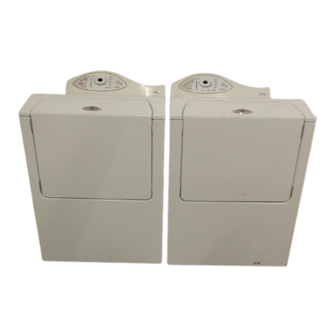
The Maytag Neptune Washer MAH5500BWW is known for its durability and solid cleaning performance. But like any appliance, it can develop problems after years of use. If your washer is acting up, you are not alone. Many owners face similar issues, from washer not starting to water leaks or strange noises.
The good news is that most problems can be diagnosed and fixed at home with basic tools and some patience.

36% off Today’s Exclusive Deals
Limited-time Exclusive Deals. Check current discount on Amazon.
Check Price on Amazon As an Amazon Associate I earn from qualifying purchases.This guide will help you troubleshoot the most common issues with your Maytag Neptune Washer MAH5500BWW. You’ll learn how to identify what’s wrong, which parts to check, and practical steps to solve each problem. We’ll also cover important safety tips, error codes, maintenance advice, and when it’s time to call a professional.
By the end, you’ll feel more confident in handling your washer’s troubles and possibly save money on service calls.
Understanding Your Maytag Neptune Washer Mah5500bww
Before starting any troubleshooting, it’s important to know some basic facts about your washer. The MAH5500BWW is a front-load washer with electronic controls, a direct-drive motor, and a range of automatic cycles. It was designed to be efficient with water and energy, but its electronic components can be sensitive to power surges or improper use.
Some key features include:
- LED display for cycle status and error codes
- Door lock mechanism for safety
- Automatic water level sensing
- High-efficiency wash cycles
Knowing these features will help you understand where things can go wrong and what to check first.
Safety First: Precautions Before Troubleshooting
Safety should always come first. Here are steps you must follow before opening or inspecting your washer:
- Unplug the washer from the power outlet.
- If you must move the washer, use two people due to its weight.
- Turn off the water supply valves.
- Wear gloves when handling sharp parts or tools.
- Never work on electrical components if the washer is still plugged in.
Ignoring these steps could result in electric shock or injury.
Common Problems And How To Fix Them
Let’s look at the most frequent complaints and how you can troubleshoot each one.
Washer Will Not Start
If the washer does nothing when you press start, check these:
- Power Supply: Is the washer plugged in? Is the outlet working? Test by plugging in another device.
- Door Latch: The washer won’t start if the door isn’t shut or the latch is faulty. Look for “DOOR” error on the display.
- Control Board: Sometimes the main control board fails due to a power surge.
- Start Button: Try pressing harder or see if the button feels stuck.
Example: If the power is fine but the door latch doesn’t click, the latch switch may need replacing.
Washer Fills Slowly Or Not At All
Slow fill or no water can be caused by:
- Water Supply Valves: Make sure both hot and cold valves are open.
- Inlet Hoses: Hoses can kink or clog with sediment.
- Inlet Screens: Small filters inside the hoses can block up.
- Water Inlet Valve: This electric part opens to let water in. If faulty, water won’t flow.
Practical tip: Detach the hoses and check if water flows freely into a bucket.
Washer Leaks Water
Leaks are frustrating and can damage your floor. Here’s where to look:
- Door Seal (Gasket): Front-load washers often leak at the rubber gasket. Look for tears or mold.
- Hoses: Check all hose connections at the back.
- Detergent Dispenser: Overfilling can cause leaks.
- Drain Pump: Cracks or loose clamps on the pump will drip water.
Non-obvious insight: Sometimes, using too much detergent causes excess suds, which can leak from the door.
Washer Does Not Drain
If water stays at the bottom, check:
- Drain Hose: Kinks or clogs can stop water from leaving.
- Drain Pump Filter: Lint, coins, or buttons can block the filter.
- Drain Pump: The pump motor can fail or get jammed.
- Control Board: If the board doesn’t send power to the pump, it won’t run.
Example: Open the bottom filter cover (be ready for water!) and check for debris.
Washer Does Not Spin Or Spins Slowly
A washer that won’t spin leaves clothes wet. Causes include:
- Unbalanced Load: Too many clothes on one side can stop spinning.
- Door Lock: The washer won’t spin if it thinks the door is open.
- Belt or Motor: A worn drive belt or faulty motor prevents spinning.
- Control Board: If the cycle stops before spin, the board may be at fault.
Tip: Try running the washer empty. If it spins, the load was likely the problem.
Washer Makes Loud Noises
Unusual noise can mean trouble:
- Drum Bearings: Worn bearings make a deep rumble.
- Shock Absorbers: Broken shocks cause banging during spin.
- Objects in Drum: Coins or small items can rattle inside.
- Pump: A noisy pump often means something is stuck inside.
Practical advice: If the noise only happens during spinning, check the rear drum bearing for wear.
Error Codes And What They Mean
The MAH5500BWW displays error codes to help you find the problem. Here are the most common ones:
| Error Code | Meaning | What to Check |
|---|---|---|
| DOOR | Door not locked | Door latch, wiring |
| ND | No drain | Drain pump, hose, filter |
| NF | No fill | Inlet valve, hoses |
| LO | Door won’t unlock | Door lock, control board |
| FL | Flood (overfill) | Water inlet valve, pressure switch |
If you see an error, try resetting the washer (unplug for 1 minute) before starting repairs.
Washer Smells Bad
Odor is a common complaint in front-load washers. Causes:
- Mold in Gasket: The door seal can trap water and grow mold.
- Detergent Drawer: Residue builds up over time.
- Drum: Bacteria can grow if you use cold water washes only.
Prevention: Leave the door open after use, and run a hot wash with bleach monthly.
Step-by-step Troubleshooting Process
Let’s walk through a structured method to diagnose your washer.
Step 1: Identify The Symptom
Write down exactly what the washer is doing (or not doing). Is there an error code? Does the problem happen every cycle?
Step 2: Check The Basics
- Is the washer plugged in and the outlet working?
- Are the water valves open?
- Is the door closing and clicking?
Many issues are caused by something simple.
Step 3: Run A Diagnostic Cycle
Maytag Neptune washers have a hidden diagnostic mode. Here’s how to enter it:
- Turn off the washer.
- Hold the Soil Level and Spin Speed buttons together and turn the knob one click clockwise.
- The display will show test codes. Write down any errors.
Step 4: Inspect Physical Parts
- Unplug the washer.
- Open the back panel (if needed).
- Check hoses, pumps, and wiring for damage.
Step 5: Test Electrical Parts
If you have a multimeter, test for continuity in the door switch, pump, and water inlet valve.
Step 6: Decide To Repair Or Replace
Some parts are cheap and easy to change (door latch, hoses). Others, like the control board or bearings, may not be worth the cost unless you’re skilled.
Comparison Of Common Faults And Solutions
Here’s a quick reference for the most frequent issues:
| Problem | Possible Cause | DIY Fix | When to Call a Pro |
|---|---|---|---|
| No power | Outlet, fuse, board | Check outlet, reset breaker | Replace main control board |
| Leaking water | Door seal, hoses | Clean/replace gasket, tighten hoses | Replace pump or tub |
| No drain | Pump, hose blockage | Clean filter/hose | Replace pump motor |
| Does not spin | Belt, door lock | Replace belt, check lock | Fix motor or control board |
How To Replace Common Parts
If you need to swap out a part, here are quick guides for the most common repairs.
Door Latch
- Unplug washer.
- Remove the front panel screws.
- Disconnect wires from the latch.
- Unscrew and remove the old latch.
- Attach the new latch, reconnect wires, and reassemble.
Tip: Take a photo before disconnecting wires to remember the order.
Water Inlet Valve
- Unplug washer and turn off water.
- Remove hoses from the back.
- Unscrew the valve from the washer.
- Disconnect wires.
- Install new valve, reconnect hoses and wires.
Non-obvious tip: Clean the screens in the hoses before reattaching.
Drain Pump
- Unplug washer.
- Lay down towels—some water will spill.
- Remove the lower front panel.
- Disconnect wires and hose clamps.
- Remove old pump, install new, and reattach everything.
Advice: Always check the filter for small objects before reassembly.
Drum Bearings
Drum bearing replacement is complex and requires special tools. Unless you are experienced, it’s best to call a professional for this repair.
Preventive Maintenance Tips
A little care can avoid most Neptune washer issues:
- Clean gasket and drum monthly with a hot cycle and bleach.
- Leave the door open to air out after every wash.
- Check hoses for leaks or cracks twice a year.
- Use HE detergent only. Too much soap causes suds and buildup.
- Clean drain filter every few months to prevent clogs.
These steps extend your washer’s life and reduce repairs.
When To Call A Professional
Some repairs are best left to experts:
- Drum bearing replacement (requires special tools)
- Main control board issues (expensive and sensitive)
- Multiple electrical faults (if more than one part fails)
- Persistent leaks after replacing gaskets and hoses
If your washer is over 10 years old and repair costs are high, it may be time to consider a new model for better efficiency and reliability.
Where To Find Replacement Parts
Always buy parts from trusted suppliers. The best sources include:
- Official Maytag service centers
- Reputable appliance part stores
- Online retailers (ensure they have clear return policies)
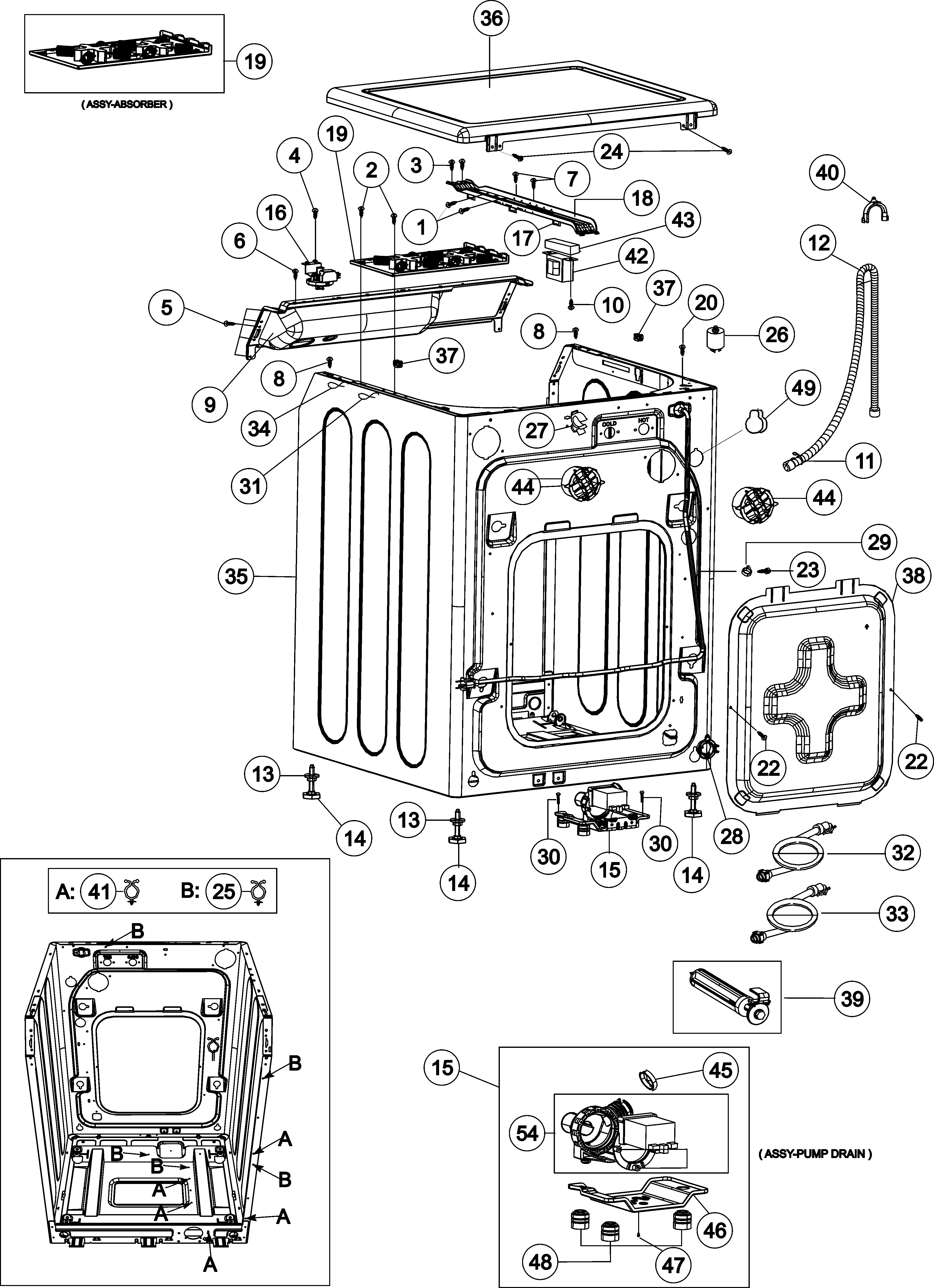
Check part numbers in your user manual or on the old part itself.
Maytag Neptune Mah5500bww Vs. Other Front-load Washers
Here’s how the Neptune MAH5500BWW compares to other popular models from the same era:
| Feature | MAH5500BWW | Whirlpool Duet (2004) | LG Tromm (2005) |
|---|---|---|---|
| Drum Capacity | 3.34 cu ft | 3.7 cu ft | 3.6 cu ft |
| Spin Speed | 1000 RPM | 1000 RPM | 1200 RPM |
| Error Codes | Yes (LED) | Yes (LED) | Yes (LED) |
| Typical Lifespan | 12+ years | 10–12 years | 12 years |
| Common Faults | Door lock, bearings | Pump, door boot | Control board, pump |
The Neptune is sturdy and easy to repair compared to newer, more complex machines.
Useful Resources For Owners
If you need more help, consider these options:
- Official Maytag website: Repair manuals and part diagrams
- YouTube tutorials: Visual guides for repairs
- Online forums: Real experiences from other owners
- Local appliance repair shops: For hands-on help
You can also find service manuals and troubleshooting diagrams at Sears Parts Direct.
Frequently Asked Questions
How Do I Reset My Maytag Neptune Mah5500bww Washer?
Unplug the washer from the wall for about one minute, then plug it back in. This will reset the control board and clear most minor errors.
Why Does My Washer Smell Bad Even After Cleaning?
Front-load washers can trap water and detergent in the door gasket and drum. Use a hot wash with bleach once a month, clean the gasket, and leave the door open after every cycle to let moisture escape.
What Does The “nd” Error Code Mean?
“ND” stands for “No Drain. ” It means the washer cannot remove water. Check the drain hose for blockages, clear the pump filter, and make sure the pump is working.
My Washer Is Leaking From The Door—what Should I Do?
First, inspect the rubber door gasket for tears, mold, or debris. Clean it thoroughly. If it’s damaged, replace it. Also, check that you’re not overfilling the detergent, as excess suds can leak.
Where Can I Find A Service Manual Or Wiring Diagram For My Model?
Service manuals and diagrams are available from official Maytag sources, appliance parts websites, or trusted repair forums. Always double-check the model number before buying or downloading manuals.
The Maytag Neptune Washer MAH5500BWW is a reliable machine, but even the best washers need care and attention as they age. With the right troubleshooting steps, most problems can be fixed at home—saving time, money, and frustration. Remember to practice regular maintenance, use the correct detergent, and don’t hesitate to call a professional for complex issues.
With patience and knowledge, your Neptune washer can keep running for years to come.

