

The foldable phone market is growing fast, and two names stand out for people who want a premium clamshell experience: the Motorola Razr+ and the Vivo X Flip. Both phones push the limits of what a folding device can be. They promise a blend of style and technology, but how do they really compare in daily use? This article explores both models in detail, breaking down their design, screens, software, cameras, battery, and more. If you’re thinking about buying one, or just curious about the best foldables, you’ll find real answers here—without jargon or hype.
Design And Build Quality
First Impressions
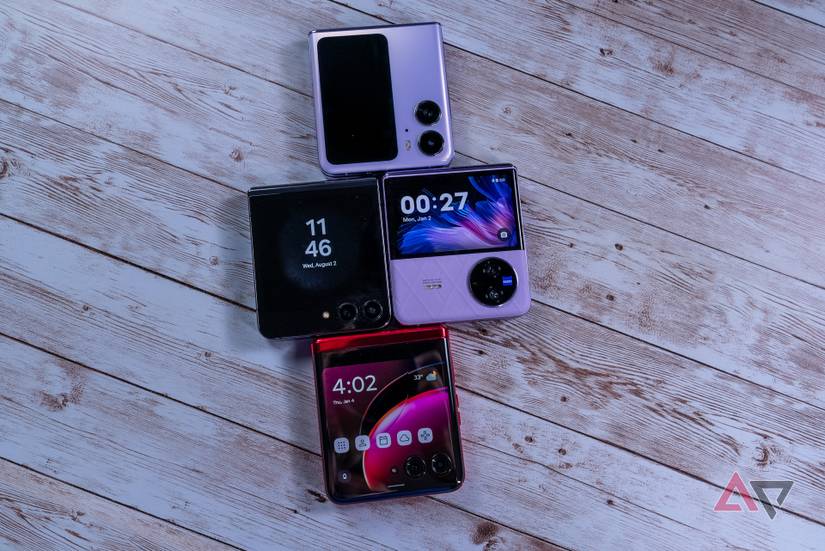
The first thing you notice when picking up either device is the premium feel. The Motorola Razr+ (also known as the Razr 40 Ultra in some markets) is slim, with a gentle curve that feels natural in your hand. The Vivo X Flip is slightly heavier, with a squared-off look and a textured back that adds grip. Both models use metal frames and glass panels, but their finishes and tactile feedback differ.

36% off Today’s Exclusive Deals
Limited-time Exclusive Deals. Check current discount on Amazon.
Check Price on Amazon As an Amazon Associate I earn from qualifying purchases.Materials And Durability
The Razr+ uses a 7000-series aluminum frame with Gorilla Glass Victus on the cover screen and back. This makes it sturdy against drops and scratches. The hinge is smooth, and Motorola claims it can survive up to 400,000 folds—enough for years of daily use. The Vivo X Flip uses an aluminum frame as well, with a vegan leather finish on some color options. Its hinge system is reinforced with steel, and Vivo also claims a 400,000-fold durability, putting both on similar ground for longevity.
Fold And Unfold Experience
Both devices close with a satisfying snap and leave almost no gap when shut. The Razr+ is thinner when folded, making it easier to slip into a pocket or purse. The Vivo X Flip is a bit bulkier but feels more solid, with less flex in the hinge area.
Some users notice a slight crease on both models when unfolded, but it’s less pronounced on the Razr+.
Style Choices
The Razr+ comes in classic black, a vibrant magenta, and icy blue. The Vivo X Flip offers purple, black, and gold, with the purple version especially eye-catching due to its patterned vegan leather. If you care about turning heads, both have strong options, but the Vivo X Flip’s finish stands out for people who want a phone that feels unique.
Display And Cover Screen
One of the biggest reasons to buy a foldable is the screen experience. Both phones aim to impress, but they do it in different ways.
Main Display Comparison
Here’s how the main screens stack up:
| Feature | Motorola Razr+ | Vivo X Flip |
|---|---|---|
| Size | 6.9 inches | 6.74 inches |
| Type | pOLED | AMOLED |
| Resolution | 2640 x 1080 | 2520 x 1080 |
| Refresh Rate | 165 Hz | 120 Hz |
| Brightness | Up to 1400 nits | Up to 1200 nits |
| Aspect Ratio | 22:9 | 21:9 |
The Razr+ offers a slightly larger, taller screen with a super-smooth 165 Hz refresh rate. This makes scrolling and animations extra fluid. The Vivo X Flip’s display is still bright and sharp but tops out at 120 Hz, which is more than enough for most users. However, gamers and tech fans might notice the difference. Both screens are great for watching videos or browsing, with vivid colors and deep blacks.
Cover Screen Differences
The cover screen is where the Razr+ pulls ahead in daily convenience.
- Motorola Razr+: 3.6-inch pOLED, 1066 x 1056, 144 Hz
- Vivo X Flip: 3.0-inch AMOLED, 682 x 422, 60 Hz
The Razr+’s cover display is nearly as big as a typical phone screen. You can run almost any app, use a full keyboard, and check notifications without opening the phone. The Vivo X Flip’s cover screen is smaller and more limited; it’s mainly for widgets, camera preview, and quick controls.
For people who want to reply to messages or check maps on the go, the Razr+ offers much more flexibility.
Outdoor Visibility
Both cover screens are bright enough to use in daylight, but the Razr+ is easier to read under the sun due to its higher brightness and anti-reflective coating. If you work outside or travel a lot, this can be a real advantage.
Software And User Interface
Operating Systems
The Razr+ runs Android 13 out of the box, with Motorola’s My UX. It’s clean and close to stock Android, with a few useful customizations for the foldable form. The Vivo X Flip uses OriginOS 3 (based on Android 13), which is typical for Vivo phones. It adds a lot of extra features and visual flair, but may feel busier for some users.
Special Foldable Features
Motorola’s software is built around its large cover screen. You can pin any app to run on the outside, reply to messages, or even play videos with the phone closed. Moto Actions (like twisting to open the camera or chopping to turn on the flashlight) add quick shortcuts.
The split-screen and multitasking features are smooth and reliable.
Vivo’s software is more limited on the cover display. You get basic widgets for music, weather, and notifications, but not full app support. Inside, OriginOS offers plenty of customization—different themes, always-on display options, and a handy sidebar for quick access to apps.
However, some features are aimed at the Chinese market and may not work outside of Asia.
Update Policy
Motorola promises three years of OS updates and four years of security patches for the Razr+. Vivo’s update commitment is less clear, though recent Vivo models have received at least two years of major updates. For long-term buyers, Motorola’s promise is more reassuring.
Global Usability
The Razr+ is available in more countries, with full support for Google services and the Play Store. The Vivo X Flip is officially sold only in China, though it can be imported. Some global users find that certain Google apps need manual installation, and software updates may arrive later.
Performance And Hardware
Chipset And Speed
Here’s a side-by-side look at raw power:
| Component | Motorola Razr+ | Vivo X Flip |
|---|---|---|
| Processor | Snapdragon 8+ Gen 1 | Snapdragon 8+ Gen 1 |
| RAM | 8/12 GB | 12 GB |
| Storage | 256/512 GB UFS 3.1 | 256/512 GB UFS 3.1 |
| MicroSD Slot | No | No |
Both use the Snapdragon 8+ Gen 1, a high-end chip from 2022. This means fast app launches, smooth gaming, and reliable multitasking. The Vivo X Flip ships with 12 GB RAM in all versions, while the Razr+ starts at 8 GB and goes up to 12 GB in some markets. In real use, both feel snappy and handle demanding tasks well.
Thermal Management
Foldables can get warm during heavy use. The Razr+ has a vapor chamber cooling system that spreads heat across the back, making it comfortable to hold. Vivo uses a graphite cooling pad, which works well but can get warm near the hinge when gaming or using the camera.
Neither phone overheats to the point of throttling, but power users might notice the Razr+ stays slightly cooler.
Storage
Neither phone supports microSD cards, so choose your storage carefully. Both offer 256 GB as standard, with a 512 GB option for people who store lots of photos, videos, or games. For most users, 256 GB is enough.
Connectivity
Both phones offer 5G, Wi-Fi 6E, Bluetooth 5.3, and NFC. The Razr+ includes eSIM support for easy switching between carriers. The Vivo X Flip has dual physical SIM slots, which can be handy for travelers or people with separate work and personal numbers.
Camera Systems
Rear Cameras
Camera performance is an important part of the foldable experience. Here’s how they compare:
| Camera | Motorola Razr+ | Vivo X Flip |
|---|---|---|
| Main | 12 MP, f/1.5, OIS | 50 MP, f/1.8, OIS |
| Ultra-wide | 13 MP, f/2.2, 120° | 12 MP, f/2.2, 120° |
| Front (selfie) | 32 MP, f/2.4 (punch-hole) | 32 MP, f/2.5 (punch-hole) |
The Razr+ focuses on quality over megapixels. Its 12 MP main sensor is larger than most, with a wide aperture for better low-light photos. The Vivo X Flip’s 50 MP main camera captures more detail, but its sensor is smaller. In daylight, the Vivo produces sharper, brighter images. In low light, the Razr+ sometimes pulls ahead with less noise and more natural colors.
The ultra-wide cameras are similar on both. They’re great for group shots or landscapes, but can be softer at the edges. Both use their cover screens as viewfinders for the main cameras, making selfies look much sharper than standard front cameras.
Selfie Camera
Both phones have a 32 MP punch-hole selfie camera on the main display. It’s useful for video calls and quick snaps, but the best selfies come from using the main camera with the cover screen preview.
Camera Features
- Motorola Razr+: Offers night mode, portrait, panorama, and a Pro mode with manual controls. Video tops out at 4K/60fps.
- Vivo X Flip: Adds AI scene recognition, beauty filters, night mode, and Pro mode. Video also up to 4K/60fps, with steady video stabilization.
Real-world Examples
In bright light, the Vivo X Flip’s photos look more vibrant, while the Razr+ produces more natural skin tones. At night, the Razr+ avoids over-brightening, but the Vivo sometimes captures more detail by using aggressive processing. For social media, the Vivo’s images often pop more, but serious photographers may prefer the Razr+ for editing.
Video Recording
Both phones deliver solid 4K video, but the Razr+ has slightly better stabilization. If you vlog or record while moving, this can make your clips look smoother.
Battery Life And Charging
Battery Capacity
- Motorola Razr+: 3,800 mAh
- Vivo X Flip: 4,400 mAh
The Vivo X Flip has a clear advantage in battery size. In real use, this means 1-2 extra hours of screen time per charge. The Razr+ can last a full day with moderate use, but heavy users might need a top-up by evening.
Charging Speed
- Motorola Razr+: 30W wired, 5W wireless
- Vivo X Flip: 44W wired, no wireless charging
The Vivo X Flip charges faster—about 70% in 30 minutes. The Razr+ takes about 40 minutes to reach the same level. Only the Razr+ supports wireless charging, which is handy for people who like to drop their phone on a charging pad at work or at night.
Power Management
Both phones offer battery saver modes and app-level power controls. The Razr+’s software is more aggressive at suspending unused apps, which can stretch the battery if you don’t use many background services. Vivo lets you tune which apps stay active.
Real-world Usage
For regular users (social media, web, light video), both phones last a day. The Vivo X Flip handles heavy days (lots of camera use or gaming) better. If you travel often and can’t always find a charger, the X Flip’s larger battery is a real plus.
Audio And Multimedia
Speakers
Both phones have stereo speakers, with one at the bottom and the earpiece acting as the second. The Razr+ is a bit louder, with clearer highs, but the Vivo X Flip has deeper bass. Neither has a headphone jack.
Audio Quality
For calls, both use multiple microphones for noise cancellation. The Razr+ delivers slightly clearer voice quality in noisy places. For music and video, both support Dolby Atmos, giving a surround sound effect with headphones.
Vibration And Haptics
The Razr+ uses a linear motor for vibrations, which feels sharp and precise. The Vivo X Flip uses a standard motor—good, but not as crisp. If you rely on vibration for notifications, you’ll notice the difference.
Pricing And Availability
Global Pricing
- Motorola Razr+: Starts at $999 (US, Europe, India)
- Vivo X Flip: Starts around $900 (China, fluctuates for imports)
Vivo does not officially sell the X Flip outside China, so buyers in other countries must use resellers. This can mean higher prices, fewer warranty options, and slower updates.
Availability
The Razr+ is easy to find in North America, Europe, and parts of Asia. It comes with a full warranty and local customer support. The Vivo X Flip is rare outside China. Some online shops ship internationally, but after-sales support is limited.
Carrier Support
The Razr+ works with most major carriers, including eSIM support. The Vivo X Flip supports a wide range of bands but may lack some 5G frequencies in North America or Europe, so check before buying.
Resale Value
Foldables lose value faster than traditional phones. However, the Razr+ holds its price better outside China due to official support and regular updates.
User Experience And Daily Use
One-handed Use
Both phones are compact when closed. The Razr+ is easier to open with one hand due to its thinner profile and lighter hinge. The Vivo X Flip sometimes requires both hands, especially if you’re holding something else.
Pocketability
The Razr+ is slimmer and fits better in tight jeans or small bags. The Vivo X Flip’s shape is less pocket-friendly, but the vegan leather adds grip, so it’s less likely to slip out.
Notifications And Quick Tasks
On the Razr+, you can read and reply to messages, play music, or check maps—all from the cover screen. On the Vivo X Flip, you’re limited to checking notifications and using quick controls. For users who want to do more without opening their phone, the Razr+ is the clear winner.
Flex Mode And App Support
Both phones support “flex mode,” where you can fold the screen at an angle and use one half for viewing and one half for controls (like video calls or taking selfies). However, more apps are optimized for this on the Razr+, including YouTube, Google Meet, and Instagram.
Customization
Vivo’s OriginOS is more customizable, with themes, icon packs, and animated wallpapers. Motorola’s My UX is simpler but less overwhelming, which some users prefer.
Accessibility Features
Both phones offer text-to-speech, font size adjustment, and color correction for people with vision needs. The Razr+ includes a dedicated “Accessibility Hub” with extra tools, while the Vivo X Flip’s options are spread out in the settings.
Ecosystem And Accessories
Cases And Protection
Because the Razr+ is sold globally, it’s easier to find cases, screen protectors, and skins. There’s a growing market for Razr+ accessories. The Vivo X Flip’s accessories are mostly sold in China, and choices are limited for international buyers.
Wireless Charging
Only the Razr+ supports wireless charging. This makes it compatible with many car chargers, office pads, and stands.
Smartwatch And Earbud Pairing
Both phones pair easily with Bluetooth accessories. Motorola has its own smartwatches and earbuds that work especially well with the Razr+, offering quick-pairing and battery status integration. Vivo’s TWS earbuds and smartwatches are also optimized for their phone, but these are harder to buy outside Asia.
Desktop/pc Integration
Motorola offers “Ready For,” which lets you connect the phone to a monitor or PC for a desktop-like experience. You can drag and drop files, use apps in windowed mode, or mirror your phone screen. Vivo lacks a similar feature, though you can still cast your screen with Miracast.

Security And Privacy
Biometric Unlock
Both phones use side-mounted fingerprint sensors—fast and reliable. Face unlock is also supported, but not as secure as on some flagship phones.
Software Security
Motorola’s clear update policy means you’ll get security patches for longer. Vivo’s updates are less predictable, especially outside China. For people who store sensitive data, this is an important difference.
Privacy Controls
Both phones let you control app permissions, block trackers, and use private folders. Motorola’s privacy dashboard is more user-friendly, showing which apps access your data at a glance.
Non-obvious Insights
- Cover screen customization matters more than specs. Many buyers focus on size and resolution, but the Razr+ lets you run ANY app on the cover screen, while the Vivo X Flip limits you to widgets. This affects daily convenience far more than the numbers.
- Importing the Vivo X Flip can lead to software headaches. Even if you install Google services, some apps (like Google Pay or banking apps) may not work due to software restrictions. Updates might need manual installation, and you may need to tweak settings for notifications.
- Wireless charging is underrated in foldables. The Razr+’s wireless charging is not just about convenience. Foldables are harder to plug in without stressing the port, so charging by just placing it on a pad can extend the life of the USB-C port.
- Flex mode is not equal on both devices. Many Western apps (like YouTube or Instagram) are optimized for Motorola’s flex mode, but not for Vivo’s, unless you use the Chinese version of the app. This can limit the usefulness of the folding feature if you’re outside China.
Which Should You Choose?
If you want a foldable that’s easy to buy, works perfectly outside China, and gives you a powerful cover screen, the Motorola Razr+ is the safest bet. It’s slim, stylish, and has excellent software support. The cover screen is a game-changer for daily tasks.
The Vivo X Flip is best for people who want a larger battery, faster charging, and a camera that pops for social media—*and* who don’t mind importing a phone and dealing with software tweaks. Its design is also a standout, especially in purple vegan leather.
For most global buyers, the Razr+ is the better everyday foldable. But if you want to be different and can handle the extra work of importing and setting up, the Vivo X Flip is a unique choice.
For more details on foldable phone technology and market trends, visit the Wikipedia page on foldable smartphones.
Frequently Asked Questions
Is The Motorola Razr+ Waterproof?
The Razr+ is not fully waterproof. It has a water-repellent coating for splashes and light rain, but you should not submerge it in water.
Can The Vivo X Flip Use Google Play Store?
The Vivo X Flip does not come with Google Play Store by default, but you can install it manually. Some Google apps may need extra steps to work, and certain services might be unavailable outside China.
Which Phone Is Better For Selfies?
Both are great for selfies, but the Razr+’s cover screen is larger, making it easier to frame your shot. Both let you use the main camera for higher-quality selfies by previewing on the cover screen.
How Durable Are These Foldable Phones?
Both Motorola and Vivo claim their hinges are tested for 400,000 folds. This should last for several years of regular use. However, foldables are still more delicate than normal phones, so handle with care.
Does The Motorola Razr+ Support Wireless Charging?
Yes, the Razr+ supports wireless charging up to 5W. The Vivo X Flip does not support wireless charging.
Foldable phones are evolving quickly, and both the Razr+ and the X Flip represent the best of what’s available today. Take time to consider what matters most to you—cover screen features, camera, battery, or global support—before making your choice.


