

The mobile world is always evolving, and Motorola has recently stepped up its game with two impressive flagship devices: the Motorola Razr+ and the Motorola Edge 50 Ultra. If you’re thinking about upgrading your phone, or just curious about the latest tech, understanding the differences between these two can help you make a smarter choice. Both offer cutting-edge features, but they target different types of users and daily needs. This detailed comparison will explore 50 key points—each with its own dedicated spotlight—so you can decide which model fits your lifestyle best. Whether you care about display, battery, performance, camera, or design, you’ll find all the details you need right here.
Design And Build Quality
1. Form Factor
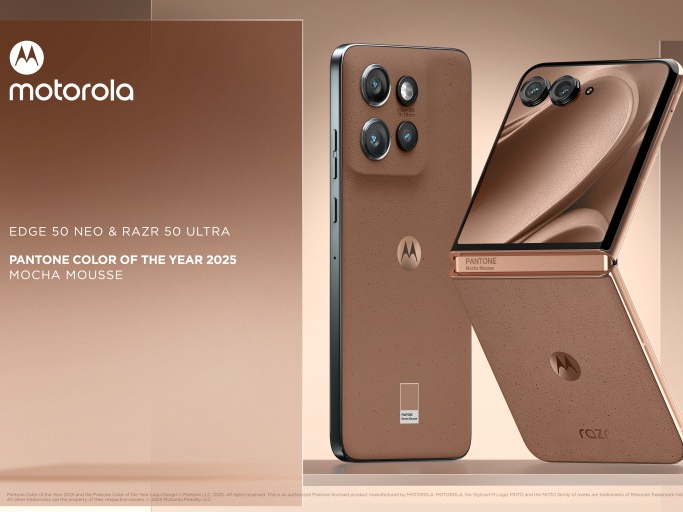
The Motorola Razr+ is a foldable phone, bringing back the nostalgic flip-phone style but with a modern twist. The Edge 50 Ultra uses a classic, candy-bar shape that feels familiar but premium. If you love tech that stands out, the Razr+ offers a unique experience, while the Edge 50 Ultra feels solid and professional.

36% off Today’s Exclusive Deals
Limited-time Exclusive Deals. Check current discount on Amazon.
Check Price on Amazon As an Amazon Associate I earn from qualifying purchases.2. Dimensions
When closed, the Razr+ is compact, fitting easily in small pockets or bags. Opened, it’s long and slim. The Edge 50 Ultra is slightly larger overall but always stays the same shape, which some people find more comfortable for long-term use.
3. Weight
Razr+ is lighter when folded, making it easy to carry. The Edge 50 Ultra is a bit heavier due to its larger battery and materials, giving it a robust feel in the hand.
4. Materials
The Razr+ uses a mix of aluminum frame and Gorilla Glass Victus for durability and style. The Edge 50 Ultra adds a vegan leather back option, which feels soft and adds grip.
5. Color Options
The Razr+ comes in bold colors like Viva Magenta and classic black. The Edge 50 Ultra offers more subtle, professional finishes, including Forest Grey and Peach Fuzz.
Display
6. Main Display Size
Razr+ features a 6.9-inch pOLED main screen when unfolded. Edge 50 Ultra has a 6.7-inch pOLED display. Both are large, but the Razr+ feels bigger due to its unique unfolding action.
7. External Display
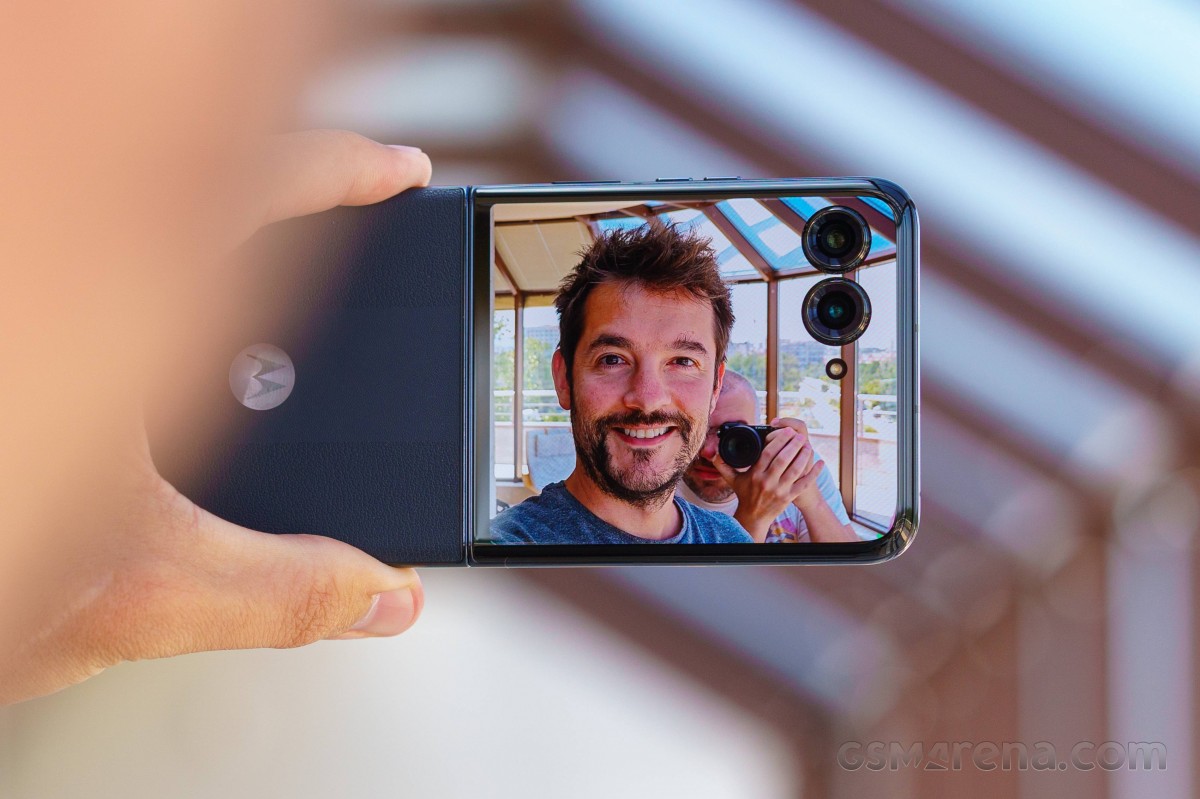
One of the Razr+’s highlights is its 3.6-inch external display. It lets you check notifications, take selfies, and control music without opening the phone—a feature the Edge 50 Ultra does not offer.
8. Display Refresh Rate
Both devices support a smooth 144Hz refresh rate, making scrolling and gaming feel incredibly responsive.
9. Resolution
The Razr+ offers 2640 x 1080 pixels; the Edge 50 Ultra bumps that up to 2712 x 1220 pixels, making it slightly sharper, though most people may not notice the difference day-to-day.
10. Brightness
Edge 50 Ultra boasts up to 2500 nits peak brightness—great for outdoor use. The Razr+ tops out at around 1400 nits, which is still bright, but can be less visible in direct sunlight.
Performance And Hardware
11. Processor
Edge 50 Ultra uses the latest Snapdragon 8s Gen 3 chip, while the Razr+ runs on Snapdragon 8+ Gen 1. The Edge 50 Ultra is faster and more efficient, especially for gaming or multitasking.
12. Ram
Edge 50 Ultra offers up to 16GB RAM, compared to the Razr+’s 8GB or 12GB options. More RAM means better multitasking and future-proofing.
13. Storage Options
Edge 50 Ultra provides up to 1TB of storage, while Razr+ maxes out at 512GB. If you keep lots of videos or photos, the Edge 50 Ultra is better for you.
14. Expandable Storage
Neither phone supports microSD cards, so choose your storage option carefully.
15. Cooling System
The Edge 50 Ultra has an advanced vapor chamber cooling system that helps keep temperatures low during gaming or heavy use. The Razr+ uses a more basic cooling setup.
Camera System
16. Main Camera Sensor
Edge 50 Ultra sports a 50MP main sensor, while the Razr+ uses a 12MP main camera. The Edge 50 Ultra’s sensor captures more detail and handles low light better.
17. Ultrawide Camera
Edge 50 Ultra offers a 50MP ultrawide lens, perfect for landscapes. Razr+ includes a 13MP ultrawide. The Edge 50 Ultra produces sharper wide-angle shots.
18. Telephoto Camera
Only the Edge 50 Ultra features a 64MP telephoto lens with 3x optical zoom, making it great for portraits or distant subjects. The Razr+ does not have a telephoto lens.
19. Front Camera
Razr+ offers a 32MP selfie camera inside the main display and lets you use the external display with the main camera for high-quality selfies. Edge 50 Ultra includes a 50MP front camera, focusing on sharpness and detail.
20. Video Recording
Both phones support 4K video recording, but Edge 50 Ultra allows for better stabilization and more modes, including slow motion and night video.
Software And User Experience
21. Operating System
Both run on Android 14, with Motorola’s clean, near-stock interface and useful custom gestures.
22. Software Updates
Edge 50 Ultra promises 4 years of OS updates and 5 years of security patches, while the Razr+ promises 3 years of OS updates. This makes the Edge 50 Ultra a better long-term investment.
23. Customization
Motorola’s Moto Experiences allow for gestures like chop-to-flashlight and twist-to-camera on both phones. The Edge 50 Ultra adds more AI-powered features for camera and performance optimization.
24. Always-on Display
Both support always-on display, but the Razr+’s external screen gives you more options for quick glances and widgets.
25. Edge Lighting
Edge 50 Ultra features edge lighting notifications, where the screen’s edges glow for calls or messages—a handy visual cue.
Battery And Charging
26. Battery Capacity
Edge 50 Ultra packs a 4500mAh battery; Razr+ has a smaller 3800mAh battery due to its foldable design.
27. Charging Speed
Edge 50 Ultra supports 125W wired charging—one of the fastest in the industry—plus 50W wireless and 10W reverse wireless charging. Razr+ supports 30W wired and 5W wireless charging.
28. Battery Life
Edge 50 Ultra typically lasts longer on a single charge because of its bigger battery and efficient processor. Power users will notice the difference.
29. Charging Port
Both use USB-C, but Edge 50 Ultra’s port supports faster data transfer.
30. Power Management Features
Edge 50 Ultra includes AI battery optimization to extend battery health and performance over time, something the Razr+ does less aggressively.
Audio And Multimedia
31. Speakers
Edge 50 Ultra has stereo speakers with Dolby Atmos, offering louder and clearer sound. Razr+ also uses stereo speakers but is a bit quieter.
32. Headphone Jack
Neither phone includes a 3. 5mm headphone jack, so you’ll need wireless or USB-C audio.
33. Bluetooth
Both support Bluetooth 5.3, ensuring stable connections for headphones, speakers, and smartwatches.
34. Audio Customization
Edge 50 Ultra allows for more detailed audio tuning, including custom equalizer settings through the Motorola audio app.
35. Haptics
Edge 50 Ultra uses a linear vibration motor for crisp feedback. The Razr+’s haptics are good but less refined.
Connectivity
36. 5g Support
Both phones offer full 5G support for fast downloads and streaming.
37. Wi-fi
Edge 50 Ultra supports Wi-Fi 7 for next-generation wireless speeds, while the Razr+ is limited to Wi-Fi 6E.
38. Nfc
Both feature NFC for contactless payments and quick pairing.
39. Dual Sim
Edge 50 Ultra supports dual SIM (Nano + eSIM) for flexibility with carriers. Razr+ offers only one physical SIM slot plus eSIM.
40. Gps And Navigation
Both use multi-band GPS for accurate location tracking, but the Edge 50 Ultra includes dual-frequency support for faster lock-in times.
Durability And Protection
41. Water Resistance
Edge 50 Ultra has an IP68 rating, meaning it’s fully protected against dust and can survive submersion in water. Razr+ comes with IP52, protecting against light splashes but not full immersion.
42. Screen Protection
Razr+ uses Gorilla Glass Victus on both displays for scratch resistance, while Edge 50 Ultra covers the front with the same glass and the back with either vegan leather or glass.
43. Hinge Durability
The Razr+’s waterdrop hinge design promises up to 400,000 folds without failing, making it more reliable than older foldables.
44. Drop Protection
Edge 50 Ultra’s flat design generally survives drops better, as foldable phones are more vulnerable due to moving parts.
45. Warranty
Both phones come with a standard one-year warranty, with options to buy extended coverage.
Security And Biometrics
46. Fingerprint Sensor
Edge 50 Ultra includes an under-display fingerprint sensor. Razr+ places the sensor on the side for quick unlocking.
47. Face Unlock
Both phones offer AI-powered face unlock using the front camera, but Edge 50 Ultra’s is faster and works better in low light.
48. Security Updates
As mentioned, Edge 50 Ultra offers longer support for security updates—important for protecting your data.
49. Secure Folder
Edge 50 Ultra includes a secure folder for private files and apps, while the Razr+ does not.
50. Parental Controls
Both phones offer Google Family Link for parental controls, but Edge 50 Ultra adds extra Motorola tools to manage children’s usage and screen time.
Quick Reference Comparison Table
Here’s a side-by-side look at some of the most important specs:
| Feature | Motorola Razr+ | Motorola Edge 50 Ultra |
|---|---|---|
| Main Display | 6.9″ pOLED, 144Hz | 6.7″ pOLED, 144Hz |
| External Display | 3.6″ pOLED | N/A |
| Processor | Snapdragon 8+ Gen 1 | Snapdragon 8s Gen 3 |
| RAM | 8/12GB | 12/16GB |
| Storage | 256/512GB | 256GB/512GB/1TB |
| Main Camera | 12MP | 50MP |
| Battery | 3800mAh | 4500mAh |
| Charging | 30W Wired | 125W Wired |
| Water Resistance | IP52 | IP68 |
Real-world Experience
Choosing between these two phones depends a lot on your lifestyle and preferences. Here’s what stands out after real-world use:
- The Razr+’s foldable design is a conversation starter and perfect for people who want something different. Being able to check messages or take photos with the phone closed is surprisingly practical.
- The Edge 50 Ultra feels like a classic flagship—fast, powerful, and reliable. Its camera system is excellent for all conditions, and the battery charges incredibly fast.
- If you are a heavy gamer or use your phone for work, the Edge 50 Ultra is generally the better pick due to its performance and battery.
- The Razr+ appeals to those who want a compact device without giving up a big screen, or anyone who loved the original Razr flip phones.
Unique And Overlooked Features
Many people focus only on the big specs, but here are two features beginners often miss:
- Edge 50 Ultra’s vapor chamber cooling keeps the phone comfortable even during long gaming or streaming sessions. This is rare in mainstream phones and prevents slowdowns due to overheating.
- Razr+’s external display is not just for notifications. You can use it for navigation, quick replies, and even run certain apps, making it much more useful than most small screens.
Common Mistakes When Choosing Between Razr+ And Edge 50 Ultra
- Ignoring Software Support: Many buyers focus only on hardware but forget that longer software and security support (like on the Edge 50 Ultra) means your phone will stay safe and up-to-date for years.
- Underestimating Battery Life: The Razr+’s battery is enough for casual use, but if you’re always on your phone, you might get frustrated with frequent recharging.
Camera System Deep Dive
Edge 50 Ultra’s camera setup is one of its biggest advantages. Here’s a closer look at how the three lenses work together:
| Camera | Edge 50 Ultra | Razr+ |
|---|---|---|
| Main Sensor | 50MP, OIS, f/1.4 | 12MP, OIS, f/1.5 |
| Ultrawide | 50MP, f/2.2 | 13MP, f/2.2 |
| Telephoto | 64MP, 3x Optical | N/A |
| Front | 50MP, f/1.9 | 32MP, f/2.4 |
In real photos, the Edge 50 Ultra produces more detail and dynamic range, especially in challenging light. Its telephoto lens allows for crisp zoom shots and flattering portraits. The Razr+ is decent for everyday photos but can’t match the versatility of the triple-lens Edge 50 Ultra.
Durability And Foldable Experience
Foldable phones are still new to many users, so here are two practical insights:
- The Razr+ hinge feels smooth and sturdy, but it collects dust more easily than a regular phone. Wiping the hinge area regularly helps prevent grit from affecting the mechanism.
- Edge 50 Ultra’s IP68 rating means you can drop it in water without worry—a real advantage if you’re often outdoors or near water.
Battery And Charging In Daily Life
Fast charging is a game changer. With the Edge 50 Ultra, even a 10-minute charge can give you hours of use. This is especially useful if you forget to charge your phone overnight. The Razr+ charges much slower, so you need to plan ahead.
Wireless charging is another area where the Edge 50 Ultra shines. It supports up to 50W wireless charging, making it one of the fastest on the market. The Razr+’s 5W wireless charging is much slower, mainly for overnight top-ups.
Software Experience And Updates
Motorola’s software is known for being clean and free of clutter. Both devices offer a similar interface, but the Edge 50 Ultra’s longer update promise makes it a safer choice for people who keep their phone for several years. AI features on the Edge 50 Ultra, like scene recognition in the camera and smart battery management, also make daily tasks easier.
Price And Value
Edge 50 Ultra costs more than the Razr+, but it offers better performance, camera capabilities, and future-proofing. The Razr+ is usually cheaper and targets those who want something different or prefer compact phones.
Who Should Buy Which?
- Edge 50 Ultra is best for power users, gamers, photographers, and anyone who wants the best specs with long-term support.
- Razr+ suits trendsetters, people who love unique gadgets, and anyone who misses the flip-phone days but wants modern performance.

Final Comparison Table
To wrap up, here’s a simple look at which phone wins in each key category:
| Category | Winner |
|---|---|
| Performance | Edge 50 Ultra |
| Camera | Edge 50 Ultra |
| Battery & Charging | Edge 50 Ultra |
| Display Innovation | Razr+ |
| Design Uniqueness | Razr+ |
| Durability | Edge 50 Ultra |
| Software Support | Edge 50 Ultra |
| Compactness | Razr+ |
If you want a phone that will turn heads and fit anywhere, the Razr+ is unmatched. If you need power, performance, and a great camera, the Edge 50 Ultra is the clear winner.
Frequently Asked Questions
What Is The Biggest Advantage Of The Motorola Razr+ Over The Edge 50 Ultra?
The Razr+ stands out with its foldable design and external display. This makes it more compact and lets you check notifications, control music, and even take selfies without opening the phone. It’s perfect for those who want something unique and easy to carry.
How Does The Edge 50 Ultra’s Camera Compare To The Razr+?
The Edge 50 Ultra has a much more advanced camera system, with a 50MP main sensor, 50MP ultrawide, and 64MP telephoto lens. It captures sharper, more detailed photos and offers more versatility, especially for zoom and wide-angle shots. The Razr+ camera is good for everyday photos but lacks the flexibility of the Edge 50 Ultra.
Which Phone Is Better For Gaming And Heavy Multitasking?
The Edge 50 Ultra is better for gaming and multitasking, thanks to its Snapdragon 8s Gen 3 processor and up to 16GB RAM. It also has a vapor chamber cooling system to prevent overheating during long gaming sessions.
How Long Will Each Phone Receive Software Updates?
The Edge 50 Ultra promises four years of OS updates and five years of security updates, while the Razr+ offers three years of OS updates. If software support and security are important, the Edge 50 Ultra is the better choice.
Where Can I Find More Official Information About These Phones?
You can visit the official Motorola website for the latest specs and updates: Motorola Official Site.
Choosing between the Motorola Razr+ and the Motorola Edge 50 Ultra isn’t easy, but understanding these 50 detailed differences makes the decision clearer. Pick the one that matches your style, needs, and future plans—and enjoy the best of what Motorola has to offer.

