

The world of smartphones is more exciting than ever, with brands pushing the boundaries of design and performance. Two of Motorola’s latest flagships—Motorola Razr+ and Motorola Edge 50 Pro—stand out for very different reasons. The Razr+ revives the classic flip-phone with a modern twist, while the Edge 50 Pro offers a more traditional, high-end experience. If you’re trying to decide between these two, you’re in the right place. We’ll compare 50 key areas, from display to durability, to help you pick the phone that fits your lifestyle and needs.
Design And Build
1. Form Factor
The Motorola Razr+ is a foldable phone. When closed, it’s compact and pocket-friendly, easily slipping into smaller pockets or bags. Many people enjoy the “snap” feeling when flipping it open, which adds a touch of nostalgia and fun. When unfolded, the Razr+ gives you a full-size smartphone experience, but with the unique ability to fold in half for storage.

36% off Today’s Exclusive Deals
Limited-time Exclusive Deals. Check current discount on Amazon.
Check Price on Amazon As an Amazon Associate I earn from qualifying purchases.The Edge 50 Pro is a classic bar phone, slim but with a larger footprint. It’s always ready to use, with no moving parts or hinges to think about. Some users prefer this classic form because there’s no need to open or close the device—just pick it up and start using it. For people who often use their phone one-handed, the bar shape can feel more comfortable and predictable.
2. Materials
Razr+ uses a mix of glass and aluminum for its chassis, with a soft-feel back on some versions. This blend of materials gives it a stylish look and a comfortable grip. The hinge is reinforced with sturdy materials, designed to last through hundreds of thousands of folds. On certain models, you’ll also find vegan leather finishes, which add extra grip and reduce fingerprint smudges.
The Edge 50 Pro sports an aluminum frame and Gorilla Glass protection, giving it a premium yet sturdy feel. The back can be glass or vegan leather, depending on the color option. This makes the phone feel solid and luxurious in the hand. The curved edges of the glass not only look beautiful but also make the phone feel thinner and more modern.
3. Color Options
The Razr+ comes in bold colors like Viva Magenta and Infinite Black, appealing to those who want their phone to stand out. Some limited editions have a glossy finish, while others use matte or vegan leather textures for a unique touch. These colors make the Razr+ more of a fashion statement—perfect for users who see their phone as an accessory.
The Edge 50 Pro offers choices like Luxe Lavender, Black Beauty, and Moonlight Pearl, appealing to both subtle and flashy tastes. There’s a focus on classic, elegant colors, but also a few brighter, more playful options. The finish resists fingerprints and minor scratches, keeping the phone looking new longer.
4. Weight
At around 188g, the Razr+ is surprisingly light for a foldable. This makes it comfortable to hold for long periods, and it won’t weigh down your pocket or bag. Many foldables are heavier due to their hinge mechanism, but the Razr+ keeps things manageable.
The Edge 50 Pro weighs about 186g, making them nearly identical in this area. The weight is well balanced, so the phone doesn’t feel top-heavy or awkward to use. This balance is especially noticeable when using the camera or gaming for extended sessions.
5. Thickness
Folded, the Razr+ is about 15.1mm thick; unfolded, it’s just 6.9mm. This duality is one of the phone’s biggest advantages. When closed, it’s chunkier, but the compact size means it takes up less space overall. When open, it’s thinner than many traditional phones.
The Edge 50 Pro stays at 8.2mm thick, so it’s slimmer in your hand, but not as pocketable as the folded Razr+. Its curved back helps it feel even thinner than it is, which is a nice touch for comfort and style.
Display
6. Main Screen Size
Razr+ features a 6.9-inch pOLED display, which is very large for a foldable. The tall and narrow aspect ratio makes it ideal for reading, scrolling social feeds, or watching videos. The crease in the middle is minimal and not very noticeable during daily use.
The Edge 50 Pro has a 6.7-inch curved pOLED screen. The curves on the left and right edges make the screen feel even bigger than it is, and help with gestures like swiping from the edge. Both displays are vibrant and deliver deep blacks, thanks to OLED technology.
7. Refresh Rate
Both devices offer a high 144Hz refresh rate, making animations and scrolling feel very smooth. This high refresh rate is usually found on gaming phones, and it gives a very premium experience, whether you’re playing games, browsing the web, or flipping through photos.
One detail many miss: both phones can automatically adjust their refresh rate depending on what you’re doing. This helps save battery life when you’re reading static content and boosts performance when you need it.
8. Resolution
The Razr+’s main display is 2640 x 1080 pixels. While this resolution is more than enough for sharp text and images, it’s slightly lower than the Edge 50 Pro.
The Edge 50 Pro steps up to 2712 x 1220 pixels, giving it a slight edge in sharpness. You’ll notice this mostly when looking at small text or detailed photos. If you like to zoom in on images or read a lot, the extra resolution makes a difference.
9. Cover Display
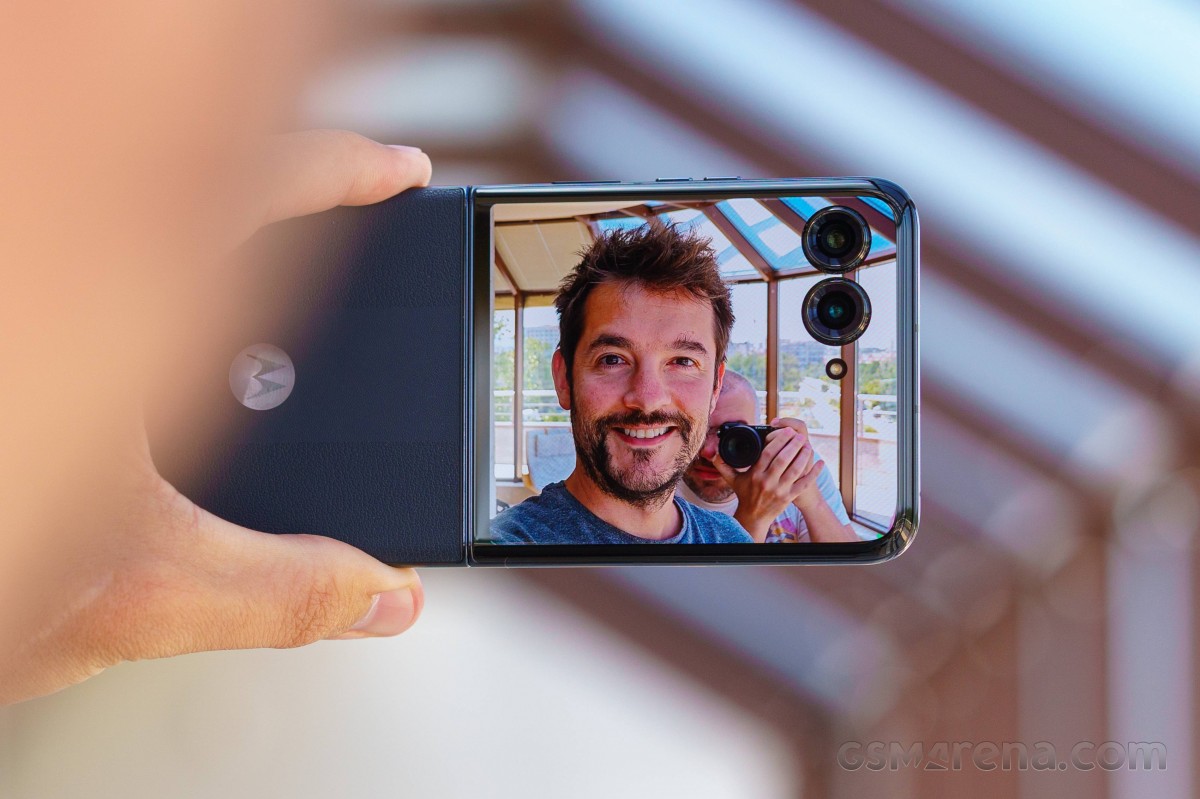
Razr+ includes a 3.6-inch external display for notifications, selfies, and basic tasks. You can check messages, control music, run selected apps, and even take photos without opening the phone. This is a game changer for people who want to quickly check something without unlocking the whole device.
The Edge 50 Pro does not have a secondary screen. However, its always-on display feature lets you see time, notifications, and other info at a glance, even when the phone is locked.
10. Display Protection
Edge 50 Pro uses Corning Gorilla Glass 5, which is known for surviving drops and resisting scratches. This is especially important with the curved screen, which can be more vulnerable at the edges.
Razr+ uses a similar toughened glass on both displays but doesn’t specify the exact version. The cover display is also made from durable glass, but because it’s a foldable, the main screen uses a flexible layer that can be more sensitive to sharp objects.
Many users choose to apply a screen protector for extra peace of mind.
Performance
11. Processor
Razr+ runs on the Qualcomm Snapdragon 8+ Gen 1 chipset. This is a flagship processor from 2022, known for excellent speed, multitasking, and handling demanding games. The phone feels fast and responsive, even with many apps open.
Edge 50 Pro uses the newer Snapdragon 7 Gen 3, which is more efficient but slightly less powerful. It’s designed for everyday tasks and balances speed with battery life. For most users, the difference is small, but mobile gamers or power users might notice a gap in performance during intensive tasks.
12. Ram Options
Razr+ offers 8GB of RAM, which is standard for premium phones and enough for most users. It can keep several apps open and switch between them without lag.
Edge 50 Pro comes in 8GB and 12GB variants, giving you more flexibility for multitasking. If you often use demanding apps, edit videos, or keep lots of tabs open, the 12GB model is a smart choice.
13. Storage
Razr+ provides 256GB of non-expandable storage, which is generous for photos, apps, and videos. However, if you run out of space, you’ll need to delete files or use cloud storage.
Edge 50 Pro offers 128GB, 256GB, and 512GB options. This range allows you to pick the size that fits your needs and budget. The 512GB version is ideal for heavy users or those who keep lots of media offline.
14. Expandable Storage
Edge 50 Pro supports microSD cards up to 1TB, which is a big plus for heavy users. You can carry your music, movies, or backup files without worrying about running out of space.
Razr+ does not support storage expansion. This is common on foldables, as adding a slot would make the design more complicated.
15. Benchmark Scores
In synthetic benchmarks, the Razr+ scores around 1,020,000 points on AnTuTu, slightly higher than the Edge 50 Pro’s 890,000 points. For everyday use, both are fast, but the Razr+ has more “headroom” for future-proofing or demanding apps.
Camera System
16. Main Camera
Edge 50 Pro features a 50MP wide sensor with optical image stabilization. This allows for very detailed photos, even in tricky lighting. The sensor size also helps in low light, giving brighter, clearer images.
Razr+ uses a 12MP main sensor with OIS, focusing more on compactness. While it takes good photos in daylight, it can struggle a bit in low light or when zooming in. The difference is clear if you often print your photos or view them on larger screens.
17. Ultra-wide Camera
Edge 50 Pro has a 13MP ultra-wide camera. This is great for landscapes, group shots, or creative angles. The wide field of view captures more of the scene in a single shot.
Razr+ offers a 13MP ultra-wide as well, so both are strong in this area. However, Edge 50 Pro’s camera app offers more advanced controls, like distortion correction and macro mode.
18. Telephoto Camera
Edge 50 Pro includes a 10MP telephoto lens with 3x optical zoom. This is useful for portraits, concerts, or capturing details from far away. The optical zoom keeps images sharp, unlike digital zoom, which can get grainy.
The Razr+ does not have a telephoto camera. If you take a lot of zoomed-in photos, this could be a downside.
19. Selfie Camera
Razr+ has a 32MP punch-hole selfie camera inside, but you can also use the main camera for selfies with the cover display. This gives you the option of high-quality selfies with better sensors and even more fun with friends.
Edge 50 Pro has a 50MP selfie camera, which is rare and excellent for self-portraits. It’s ideal for video calls or content creators who want the best possible front-facing shots.
20. Video Recording
Both phones can record up to 4K at 30fps. Edge 50 Pro offers more manual controls, letting you adjust settings like ISO, white balance, and focus during video. Razr+ is user-friendly for quick clips, making it easy to capture moments without fuss.

Battery And Charging
21. Battery Capacity
Edge 50 Pro packs a 4500mAh battery, which lasts longer, especially for heavy users or those who watch a lot of videos. On average, you can expect up to a day and a half of normal use.
The Razr+ has a slightly smaller 3800mAh cell. Foldables tend to have smaller batteries due to space limitations. With regular use, the battery will last a full day, but heavy users might need to top up by evening.
22. Charging Speed
Edge 50 Pro supports 125W wired charging—among the fastest in its class. You can get from 0% to 100% in about 18 minutes. Even a quick 10-minute charge is enough for several hours of use.
Razr+ offers 30W wired charging, which is fast but not as impressive. A full charge takes about 70 minutes. For most users, charging overnight or during a break is fine, but it’s not as convenient as the Edge 50 Pro.
23. Wireless Charging
Both phones offer wireless charging: Edge 50 Pro at 50W and Razr+ at 5W. The Edge’s wireless charging is fast enough for daily use, while Razr+’s is more for topping up slowly at your desk or overnight.
24. Battery Life
Edge 50 Pro lasts longer due to its larger battery, averaging 1.5 days with moderate use. Even with heavy gaming or video streaming, it should last a full day.
Razr+ usually needs a charge by the end of the day, especially if you use the cover display often. Some users carry a power bank or charge mid-day for peace of mind.
25. Reverse Charging
Edge 50 Pro supports reverse wireless charging, letting you power up accessories like earbuds or another phone. This is handy if you travel or forget your charger.
Razr+ does not offer reverse charging. If you rely on wireless accessories, this could be a factor.
Software And Updates
26. Operating System
Both run near-stock Android 14 out of the box, with Motorola’s light customizations. The software is clean, easy to use, and free from unnecessary apps.
27. Software Features
Edge 50 Pro offers Moto Secure and Ready For desktop mode, letting you connect the phone to a monitor for a PC-like experience. You can run presentations, use a mouse and keyboard, or multitask with several windows.
Razr+ focuses on unique cover screen experiences and foldable-specific apps. The cover display can run mini apps, and you can quickly reply to messages, check calendars, or control music without opening the phone.
28. Update Policy
Both promise three years of major Android updates and four years of security patches, a strong commitment for Android phones. This means your device will stay secure and get new features for years.
29. Bloatware
Motorola keeps bloatware minimal on both devices, making for a clean experience. Most pre-installed apps can be removed, and there are no ads in the interface.
30. Customization
Edge 50 Pro’s My UX offers more customization for icons, fonts, and gestures. You can tweak the look and feel to match your style.
Razr+ customization is focused on the cover display. You can set wallpapers, widgets, and shortcuts for quick access when the phone is closed.

Connectivity
31. 5g Support
Both phones support 5G networks for fast mobile data. This means you’ll get quicker downloads, smoother streaming, and better performance in cities with good coverage.
32. Wi-fi
Edge 50 Pro supports Wi-Fi 6E, which is faster and more reliable, especially in crowded environments like offices or airports.
Razr+ uses Wi-Fi 6, which is still fast and future-proof for most home and office networks.
33. Bluetooth
Both offer Bluetooth 5.3, ensuring strong, energy-efficient connections for wireless headphones, watches, and other accessories.
34. Nfc
NFC is present on both for contactless payments and quick pairing. You can use Google Pay or other tap-to-pay services with ease.
35. Dual Sim
Edge 50 Pro supports Dual SIM (nano + eSIM). This is useful for travelers or those who want to separate work and personal numbers.
Razr+ also supports Dual SIM, but the configuration can vary by region. In some countries, you might get two physical SIM slots, while others get one slot plus eSIM.
Audio
36. Speakers
Both devices feature stereo speakers with Dolby Atmos support, giving a rich audio experience. Watching movies, playing games, or making video calls sounds clear and immersive.
37. Headphone Jack
Neither phone includes a 3.5mm headphone jack, so you’ll need Bluetooth or USB-C headphones. This is standard on modern flagships, but something to keep in mind if you own wired headphones.
38. Audio Recording
Edge 50 Pro has triple microphones for clearer audio during calls and videos. This is especially helpful in noisy environments, as the phone can reduce background noise.
Razr+ uses a dual-mic system, which still provides good quality but might not be as effective in extreme conditions.
39. Hi-res Audio
Edge 50 Pro supports Hi-Res Audio over USB-C, a plus for audiophiles using high-end headphones. You’ll notice deeper bass and more detail in your favorite songs.
Razr+ focuses more on tuning for its unique form factor, balancing speaker placement with the foldable design.
40. Vibration Motor
Edge 50 Pro uses a linear vibration motor for precise feedback. This means notifications, typing, and touch interactions feel sharp and satisfying.
Razr+ has a standard motor, which feels less premium. If you care about haptic feedback, this is a small but noticeable difference.
Security
41. Fingerprint Sensor
Razr+ places its fingerprint sensor on the side (power button). This is quick and works even when the phone is closed.
Edge 50 Pro uses an in-display optical sensor. It’s hidden under the screen, making the design look cleaner. Both are fast and accurate.
42. Face Unlock
Both phones support AI face unlock via their front cameras. It’s not as secure as fingerprint unlock, but it’s convenient for quickly checking your phone.
43. Privacy Features
Edge 50 Pro includes Moto Secure for app lock and file vault, giving you extra privacy options. You can hide sensitive files or lock certain apps with a password or fingerprint.
Razr+ offers standard Android privacy tools, including encrypted storage and secure folders.
44. App Permissions
Both phones feature granular app permission controls for privacy. You can control what each app can access, like your location or contacts.
45. Secure Payments
NFC allows both devices to be used for Google Pay and other secure payment apps. Payments are encrypted and protected by your fingerprint or PIN.
Durability
46. Water Resistance
Razr+ is rated IP52 (splash-resistant), not fully waterproof. It can handle light rain or accidental splashes, but you shouldn’t submerge it in water.
Edge 50 Pro is IP68 certified, meaning it can survive submersion in water up to 1.5 meters for 30 minutes. This is a big plus for people who use their phone near water or in tough environments.
47. Dust Protection
Edge 50 Pro’s IP68 rating includes strong dust protection. It’s sealed against tiny particles that could damage the internals.
Razr+’s IP52 rating only covers basic dust resistance. Foldables are harder to fully seal, so a little more care is needed.
48. Hinge Durability (razr+ Only)
Razr+’s hinge is tested for over 400,000 folds, offering good long-term reliability. This means you can open and close the phone many times a day without worry. Still, avoid forcing the hinge or opening it with dirty hands to extend its life.
49. Drop Protection
Edge 50 Pro’s Gorilla Glass 5 provides better drop resistance than Razr+’s unspecified glass. The flat back and curved edges also help absorb shocks.
Razr+ is more vulnerable if dropped while open, especially on hard surfaces. Many users invest in a case or pouch for extra protection.
50. Warranty And Support
Both phones come with a one-year warranty and access to Motorola’s customer support network. Extended warranty plans are available in some regions for extra peace of mind.
Quick Comparison Table: Key Specs
To see the main differences at a glance, here’s a side-by-side comparison:
| Feature | Motorola Razr+ | Motorola Edge 50 Pro |
|---|---|---|
| Main Display | 6.9” pOLED, 144Hz | 6.7” pOLED, 144Hz |
| Processor | Snapdragon 8+ Gen 1 | Snapdragon 7 Gen 3 |
| Main Camera | 12MP + 13MP | 50MP + 13MP + 10MP |
| Battery | 3800mAh | 4500mAh |
| Charging | 30W wired, 5W wireless | 125W wired, 50W wireless |
| Weight | 188g | 186g |
| Water Resistance | IP52 | IP68 |
| Expandable Storage | No | Yes, microSD |
Real-world Performance
Multitasking
The Snapdragon 8+ Gen 1 in the Razr+ is more powerful, especially for gaming and heavy apps. If you like playing 3D games or editing photos and videos, you’ll appreciate the extra speed. The phone stays cool under pressure, thanks to good thermal management.
However, most users won’t notice a big difference for social media, browsing, or streaming. The Edge 50 Pro’s Snapdragon 7 Gen 3 is very capable for everyday activities. Switching between apps is smooth, and there’s plenty of RAM for multitasking.
A non-obvious benefit: the Razr+ can run more apps side-by-side on its unfolded screen, while the Edge 50 Pro’s curved edges make it easier to swipe and use gesture navigation.
Camera Results
Edge 50 Pro’s camera system is versatile, handling wide, zoom, and ultra-wide shots well. Night mode is impressive, capturing more light and detail without much noise. The telephoto lens makes it easier to shoot distant subjects with clarity, and the high-res selfie camera is great for vlogging or video calls.
Razr+ is best for casual photos and creative selfies using the cover screen, but the main sensor is less advanced. It’s quick to launch the camera—even when closed—so you can capture moments others might miss. Still, if you want pro-level photos or videos, the Edge 50 Pro is stronger.
One thing beginners often miss: Edge 50 Pro’s camera app offers more manual controls and AI features, like automatic scene detection and background blur for portraits.
Battery Endurance
Edge 50 Pro easily lasts through a day and a half with normal use. Even with heavy gaming or navigation, it rarely needs a midday charge.
Razr+ often needs a top-up by bedtime, especially if you use the cover display often. The smaller battery is the main trade-off for the foldable design.
Charging Experience
Edge 50 Pro’s 125W fast charging is a game changer, reaching 100% in about 18 minutes. You can plug in while getting ready in the morning and have enough battery for the whole day. The charger is included in the box, which is not always the case with other brands.
The Razr+ takes around 70 minutes for a full charge. For most users, this is still acceptable, but the difference is obvious if you’re often in a hurry.
User Experience Insights
Foldable Vs Bar Phone
The Razr+ is perfect if you value style, compactness, and nostalgia. The cover display is genuinely useful for quick tasks, and the flip design turns heads. It’s great for those who want something different from the crowd. The act of flipping the phone open and closed is not just fun, but also protects the main screen from scratches when in your pocket or bag.
However, foldables can feel less sturdy over time, and the smaller battery is a trade-off. The hinge mechanism, while durable, is still more complex than a standard phone, and repairs can be more expensive.
Edge 50 Pro is for those who want maximum performance, camera flexibility, and battery life. It feels more robust and is easier to use with one hand, thanks to the curved edges. Its classic design means fewer moving parts, which usually means longer life and fewer issues down the road.
Another detail: software on the Razr+ is tailored for the foldable experience, which can be both a benefit (more features for the cover screen) and a downside (some apps may not be optimized).
Practical Surprises
- Many people overlook how handy the Razr+ cover display is for controlling music, checking maps, and replying to messages without unfolding the phone. It even supports a small keyboard for quick replies.
- Edge 50 Pro’s 125W charging means you can plug in for just 10 minutes and get hours of use—a huge benefit if you’re always on the move.
- The Edge 50 Pro’s “Ready For” desktop mode lets you use the phone as a mini PC, which is great for productivity or presentations. This is a hidden gem for business users or students.
- The Razr+ is much easier to fit in small bags or tight jeans, which is a daily advantage you might not consider until you use it.
Price And Value
The Razr+ usually costs a bit more, reflecting its foldable tech. Foldables are always more expensive to produce, and you’re paying for the unique design and engineering.
Edge 50 Pro is priced competitively for a flagship, considering its camera and battery features. It’s a better deal for those who want the most features for their money.
Both offer good value, but your choice depends on what you value most: innovation or all-around excellence. If you want the latest tech and don’t mind spending a bit more, the Razr+ will make you happy. If you want the best combination of camera, battery, and performance, the Edge 50 Pro is hard to beat.
Which Should You Choose?
- Choose Razr+ if you love the idea of a foldable, want a unique phone, and mainly use your device for messaging, social media, and taking selfies. It’s also great if you want something that stands out or fits easily in any pocket.
- Choose Edge 50 Pro if you care about camera quality, fast charging, battery life, and durability. It’s a better choice for photographers, travelers, or anyone who needs their phone to last all day.
Here’s a quick summary of where each phone stands out:
| Category | Razr+ Winner | Edge 50 Pro Winner |
|---|---|---|
| Design & Portability | ✔️ | |
| Camera Flexibility | ✔️ | |
| Battery & Charging | ✔️ | |
| Innovation Factor | ✔️ | |
| Durability | ✔️ | |
| Value for Money | ✔️ |
Frequently Asked Questions
What Are The Main Differences Between The Motorola Razr+ And Edge 50 Pro?
The biggest difference is in the design: Razr+ is a foldable phone with a compact flip form, while the Edge 50 Pro is a traditional, high-end bar phone. The Edge 50 Pro also has a better camera system, faster charging, and more battery life. The Razr+ stands out for its unique look and cover display, while the Edge 50 Pro excels in all-around performance.
Is The Motorola Razr+ Durable Enough For Daily Use?
Yes, the Razr+ is tested for over 400,000 folds and uses tough materials. However, foldable phones are still more delicate than standard phones. If you need strong water and dust resistance, the Edge 50 Pro’s IP68 rating is better. With careful use, the Razr+ will last, but it’s wise to avoid dropping it or exposing it to sand or water.
Can I Expand The Storage On These Phones?
The Edge 50 Pro supports microSD cards up to 1TB, which is great for users with lots of media. The Razr+ does not offer expandable storage, so you’ll need to manage with the built-in capacity. If you often shoot 4K videos or download large files, the Edge 50 Pro’s expandable storage is a big advantage.
Which Phone Is Better For Photography?
The Edge 50 Pro is the clear winner for photography, thanks to its 50MP main sensor, telephoto lens, and high-resolution selfie camera. The Razr+ is fun for creative selfies but is limited in versatility. If camera quality is your priority, the Edge 50 Pro delivers more options and better results, especially in low light or when zooming.
How Fast Can I Charge These Phones?
The Edge 50 Pro supports 125W wired charging, reaching a full charge in under 20 minutes. The Razr+ is slower, with 30W wired charging. If fast charging is important, the Edge 50 Pro is the better choice. Both support wireless charging, but Edge 50 Pro’s is much faster.
Motorola’s latest flagships each have their own strengths, so your choice depends on whether you want cutting-edge design or power-packed performance. If you’re still undecided, consider visiting an official Motorola retailer or checking reliable sources like GSMArena for in-depth hands-on reviews. Either way, you’ll be getting a top-tier smartphone that stands out from the crowd.

