

If your Maytag Bravos X washer isn’t running as smoothly as before, you’re not alone. Many households rely on this popular model for its efficiency and reliability, but even the best appliances can run into trouble. This guide helps you diagnose and fix common issues step by step. With simple explanations, practical advice, and clear tables, you’ll feel confident tackling most problems yourself. Whether your washer won’t start, isn’t spinning, or leaves clothes soaking wet, you’ll find solutions here. Let’s get your laundry back on track.
Understanding Your Maytag Bravos X Washer
Before you start troubleshooting, it’s helpful to know the basics. The Bravos X series features a top-loading design, high-efficiency performance, and electronic controls. These washers use less water than older models and are designed to be gentle on clothes. But, their advanced technology also means new types of problems can occur.

36% off Today’s Exclusive Deals
Limited-time Exclusive Deals. Check current discount on Amazon.
Check Price on Amazon As an Amazon Associate I earn from qualifying purchases.Some common features:
- Load sensing for water and energy savings
- Automatic detergent dispenser
- Electronic error codes on the display
Knowing these basics helps you understand why certain issues happen and how to fix them.
Common Problems And Quick Solutions
Let’s look at the most frequent issues users face, along with their simplest solutions. For each problem, start with these basics before moving to more advanced troubleshooting.
Washer Won’t Start
If your washer doesn’t turn on:
- Check power supply: Make sure it’s plugged in and the outlet works.
- Look for error codes: If the screen shows a code, note it.
- Door not fully closed: The washer won’t start unless the lid is securely shut.
- Try a reset: Unplug for 1 minute, then plug back in.
Washer Isn’t Spinning
No spinning usually means:
- Lid switch faulty: If the lid isn’t detected as closed, spinning stops.
- Unbalanced load: Clothes bunched up can stop spinning.
- Error code: Check display for codes like “F7E1”.
Water Not Draining
If you find water still in the drum:
- Clogged drain hose: Check for kinks or blockages.
- Drain pump failure: Listen for pump noise.
- Too much suds: Excess soap can cause draining issues.
Clothes Still Wet After Cycle
This often means:
- Spin cycle interrupted
- Drainage issues
- Heavy or bulky items: Comforters can prevent proper spinning.
Error Codes
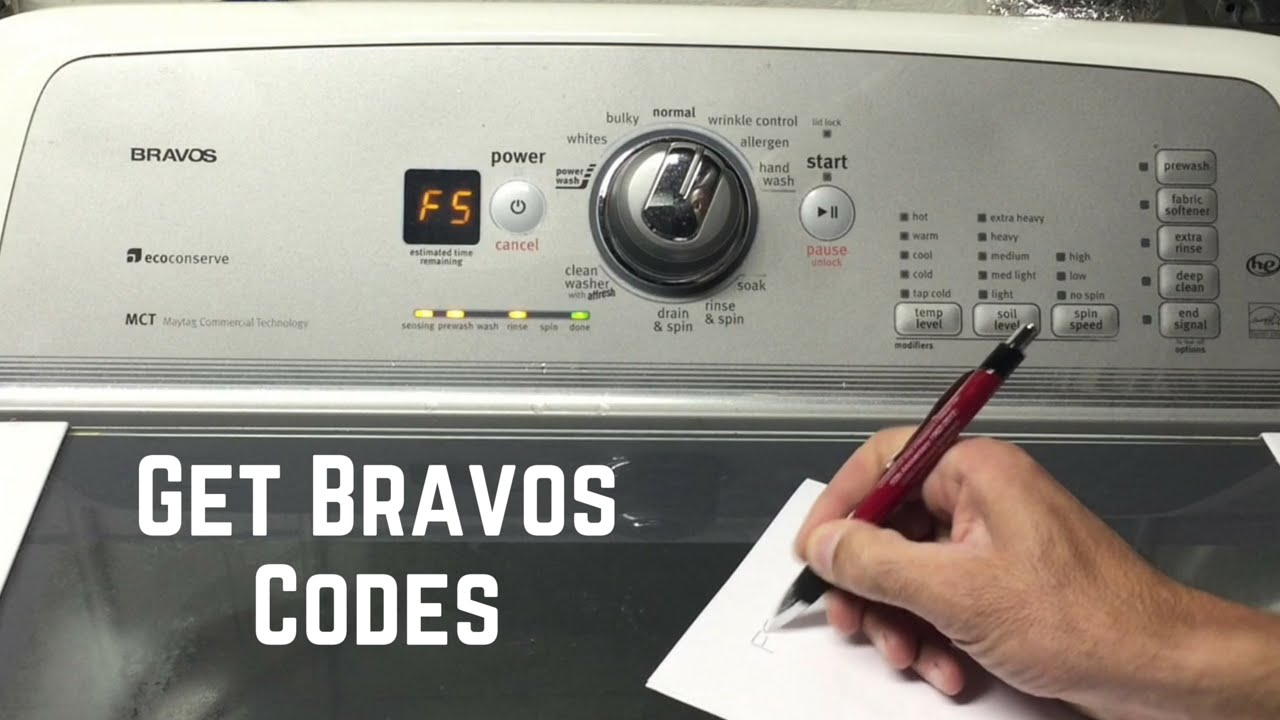
Maytag Bravos X washers use codes to signal what’s wrong. Some common ones:
- F7E1: Basket speed sensor issue
- F8E1: No water detected
- F9E1: Long drain time
Check your manual for full code meanings, but these are the most frequent.
Diagnosing Issues: Step-by-step
Now, let’s dig deeper. If basic solutions don’t work, use these steps to find the real problem.
Step 1: Check Power And Controls
Start with the obvious. Is the washer plugged in? Does the outlet work (try plugging in another device)? Are all controls set correctly? Sometimes, a simple button press can fix things.
Step 2: Inspect The Lid And Lid Switch
The lid switch is a safety feature. If it’s broken, the washer won’t spin or start. Open and close the lid firmly. Listen for a click. If you don’t hear one, the switch may need replacement.
Step 3: Examine Error Codes
If your washer displays an error code, look it up in your manual. Most codes point to a specific area—water, motor, pump, etc. If you don’t have the manual, search online for your model’s codes.
Step 4: Check Water Supply
No water coming in? Make sure the water valves are open. Inspect hoses for bends or damage. Sometimes, sediment blocks the inlet screen. Turn off water, disconnect hoses, and rinse screens.
Step 5: Look At Drain Hose And Pump
If water isn’t draining, check the hose. Remove it and flush with water. If the pump makes a loud or strange noise, it could be jammed. Unplug washer before checking the pump area.
Step 6: Balance The Load
Unbalanced loads cause many problems. Open the lid and rearrange clothes. Remove heavy items and run spin again. If the washer works, the load was the issue.
Step 7: Reset The Washer
A simple reset can clear glitches. Unplug for 1 minute, plug back in, and run a short cycle.
Error Code Troubleshooting
Error codes make diagnosis easier. Here’s a quick reference for the most common Maytag Bravos X codes:
| Error Code | Meaning | Action |
|---|---|---|
| F7E1 | Basket speed sensor fault | Check lid switch, motor, or wiring |
| F8E1 | No water detected | Check supply valves, hoses, inlet screen |
| F9E1 | Long drain time | Check drain hose, pump, suds |
| F5E2 | Lid lock issue | Check lid lock, wiring |
| F3E2 | Water temperature sensor issue | Check sensor or replace |
If you see these codes, try the basic actions first. If problems continue, you may need professional help.

Fixing Specific Problems
Here’s how to fix the most common issues step by step.
Washer Won’t Start
- Check plug and outlet.
- Test with another device.
- Check circuit breaker—reset if tripped.
- Inspect lid switch—replace if broken.
- Look for error codes.
- Reset washer.
Washer Won’t Spin
- Open lid, rearrange clothes.
- Close lid firmly.
- Check lid switch.
- Look for F7E1 code.
- Inspect motor and wiring if needed.
Washer Won’t Drain
- Remove drain hose, flush with water.
- Check for clogs or kinks.
- Listen for pump noise.
- Clean pump filter.
- Look for F9E1 code.
Washer Leaks Water
- Inspect hoses for cracks.
- Tighten hose connections.
- Check drum for damage.
- Make sure detergent is HE type (high efficiency).
- Don’t overload the washer.
Washer Makes Loud Noise
- Check for coins or objects in drum.
- Look at drum bearings.
- Balance the load.
- Inspect motor or pump.
Maintenance Tips To Prevent Issues
Regular maintenance keeps your washer running well. Here are some practical tips:
- Clean the drum monthly with a washing machine cleaner.
- Check hoses every 6 months for cracks or leaks.
- Wipe the lid and controls after each use to prevent buildup.
- Don’t overload the washer—follow manual guidelines.
- Use HE detergent only to avoid excess suds.
These simple steps can prevent most problems and extend your washer’s life.
Comparing Maytag Bravos X With Other Washers
How does the Bravos X stack up against similar models? Here’s a quick comparison.
| Feature | Bravos X | Samsung WA50 | LG WT7300 |
|---|---|---|---|
| Capacity | 4.6 cu. ft. | 5.0 cu. ft. | 5.0 cu. ft. |
| Spin Speed | 800 RPM | 750 RPM | 950 RPM |
| Energy Efficiency | HE | HE | HE |
| Common Issues | Lid switch, drainage | Drain pump, noise | Control board, balance |
Bravos X is known for reliability, but lid switch and drainage are frequent trouble spots. Other brands have their own weak points.
When To Call A Professional
Some problems require expert help. If you try all basic steps and the washer still doesn’t work, call a qualified technician. Reasons to call include:
- Electrical issues
- Motor failure
- Major leaks
- Repeated error codes
- Unusual burning smells
Attempting major repairs yourself can be risky and void your warranty.
Real-life Examples
Let’s look at a few practical cases:
Case 1: Washer stops mid-cycle, displays F7E1. The user checks lid switch—no click. Replaces switch, washer runs normally.
Case 2: Water won’t drain, clothes are soaked. User finds drain hose kinked behind washer. Straightens hose, drainage returns.
Case 3: Loud banging noise during spin. User opens lid, finds jeans bunched on one side. Redistributes clothes, noise stops.
These examples show that simple checks often solve big problems.
Advanced Troubleshooting
If basic steps don’t work, try these advanced tips:
Diagnosing The Motor
If the washer won’t spin or agitate, the motor may be faulty. Unplug the washer, remove the back panel, and inspect wiring. Look for burnt or loose connections.
Testing The Pump
For drainage issues, the pump can be removed and checked. If it’s jammed or noisy, replace it. Pumps cost $50–$100 and are available online.
Using Diagnostic Mode
Maytag Bravos X washers have a diagnostic mode. Press and hold specific buttons (check your manual) to activate. The display will show test results for sensors and motors.
Checking Control Board
Electronic issues may mean a bad control board. If the washer won’t respond, displays random codes, or powers off unexpectedly, the board may need replacement. Boards cost $100–$200.
Cost Comparison: Repair Vs Replace
Is it better to fix your washer or buy a new one? Here’s a quick breakdown.
| Problem | Repair Cost | Replacement Cost | Recommendation |
|---|---|---|---|
| Lid switch | $25–$50 | $600–$900 | Repair |
| Drain pump | $50–$100 | $600–$900 | Repair |
| Control board | $100–$200 | $600–$900 | Repair |
| Motor | $150–$300 | $600–$900 | Repair if under 5 years old |
| Multiple issues | $400+ | $600–$900 | Consider replacement |
Most repairs are cost-effective unless the washer is very old or has several problems at once.
Non-obvious Tips Beginners Often Miss
- Check for coins and small objects: Items left in pockets can block pumps or cause noise.
- Run a cleaning cycle: Residue from detergent or fabric softener can cause odors and affect performance.
- Reset after every major fix: Always unplug and restart the washer after repairs to clear error codes.
Many beginners skip these steps, leading to repeat issues.

How To Find Parts And Manuals
Parts for Maytag Bravos X are widely available online or at appliance stores. Use your model number (found inside the lid) to search for compatible parts. Manuals can be downloaded from the official Maytag website or through trusted sites like Maytag Official Site.
Frequently Asked Questions
What Does Error Code F7e1 Mean?
F7E1 signals a basket speed sensor problem. It usually means the washer can’t detect the drum’s speed. Check the lid switch and motor connections. Replace the sensor if needed.
Why Won’t My Washer Drain?
A washer may not drain due to clogged hoses, a broken drain pump, or too many suds. Unplug the washer, remove and clean the hose, and check the pump. Use less detergent if suds are the issue.
How Do I Reset My Maytag Bravos X Washer?
To reset, unplug the washer for 1 minute. Plug back in, wait 30 seconds, and run a short cycle. This clears minor glitches and error codes.
Can I Fix The Lid Switch Myself?
Yes, many users replace the lid switch with basic tools. Buy a compatible switch, unplug the washer, remove screws holding the switch, and swap for the new one. Test before closing up.
What Should I Do If My Washer Leaks?
Inspect hoses and connections for cracks or loose fittings. Make sure the washer is level and not overloaded. Use only HE detergent. If leaks continue, call a technician.
Getting your Maytag Bravos X washer back in working order doesn’t have to be complicated. With careful checks, simple fixes, and regular maintenance, most problems are easy to solve. For bigger issues, professional help is available. Remember, understanding error codes, keeping loads balanced, and cleaning regularly will help your washer last longer. Use this guide anytime your Bravos X acts up, and laundry day will stay stress-free.

