

If your Sub Zero ice maker is not working as it should, it can be frustrating—especially when you need ice on a hot day or for a gathering. While these high-end appliances are known for their quality, even the best ice makers can face issues over time. Understanding the reasons behind common problems and knowing how to fix them can save you time, money, and stress. This guide will help you troubleshoot your Sub Zero ice maker step by step, so you can get back to enjoying fresh ice without unnecessary delays.
How A Sub Zero Ice Maker Works
Sub Zero ice makers use a combination of water supply, freezing cycles, and mechanical ejectors to produce and store ice. When you select the ice function, the ice maker draws water, freezes it in a mold, and then releases the ice cubes into a storage bin. Sensors monitor the bin and stop production when it’s full.

36% off Today’s Exclusive Deals
Limited-time Exclusive Deals. Check current discount on Amazon.
Check Price on Amazon As an Amazon Associate I earn from qualifying purchases.Understanding this process helps pinpoint where problems may start. If any part of this cycle fails—such as the water line, freezing mechanism, or ejector arm—you’ll notice issues like no ice, small cubes, or leaks.
Common Problems And Causes
Let’s break down the most frequent Sub Zero ice maker issues and what might cause them:
- Not Making Ice: No ice at all, or the output has stopped suddenly.
- Small or Misshapen Cubes: Ice is coming out smaller than usual, oddly shaped, or incomplete.
- Slow Production: The ice maker works, but too slowly to keep up with needs.
- Ice Tastes or Smells Bad: The ice has an unusual odor or taste.
- Water Leaks: Puddles or drips around or inside the freezer.
- Ice Maker Won’t Turn Off: Ice keeps being made even when the bin is full.
- Noisy Operation: Grinding, banging, or humming sounds from the ice maker.
Each of these problems has specific causes, and some may be solved with a simple reset or cleaning, while others may require more attention.

Step-by-step Troubleshooting
1. Ice Maker Not Producing Ice
If your Sub Zero ice maker is not making ice at all, follow these steps:
- Check the Power: Make sure the refrigerator is plugged in and the ice maker switch is turned ON.
- Water Supply Line: Confirm the water line is connected and the valve is open. Kinks or frozen sections can block flow.
- Freezer Temperature: The ideal freezer setting is 0°F (-18°C). If it’s warmer, ice may not form.
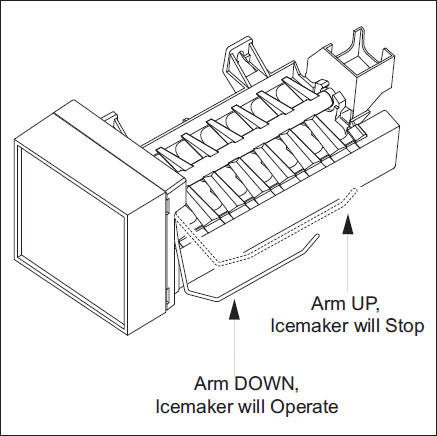
- Ice Maker Arm Position: Some models have a metal arm or plastic paddle. If stuck in the OFF position, the ice maker won’t cycle.
- Reset the Ice Maker: Unplug the unit for 2 minutes, then plug it back in. On some models, there’s a reset button—consult your manual.
If the ice maker still does not work, the problem may be with the water inlet valve, fill tube, or internal electrical components.
2. Small, Misshapen, Or Cloudy Ice
When ice cubes are too small or have a strange shape:
- Check Water Pressure: Sub Zero requires a minimum of 20 psi water pressure. Low pressure means less water in the mold.
- Change the Water Filter: A clogged filter restricts water flow. Replace filters every 6–12 months.
- Inspect the Fill Tube: Ice can sometimes block the tube. If so, defrost the tube using a hair dryer on LOW.
- Adjust Freezer Temperature: If it’s too cold, ice may form too quickly, leading to cloudy or misshapen cubes.
3. Slow Ice Production
If your ice maker is too slow:
- High Room Temperature: If your kitchen is hot, the freezer works harder, possibly slowing ice production.
- Overfilled Freezer: Too much food blocks air flow, making ice production less efficient.
- Dirty Condenser Coils: Dusty coils reduce cooling power. Clean coils every 6–12 months.
- Old Water Filter: Again, replace regularly to keep water flowing properly.
Most Sub Zero ice makers produce 8–12 cubes every 90 minutes. If you’re getting less than this, check the above items.
4. Ice Tastes Or Smells Bad
Unpleasant ice is usually caused by:
- Old Food in Freezer: Ice absorbs odors. Throw away spoiled food and clean the compartment.
- Dirty Ice Bin or Mold: Wash the ice bin and maker with mild soap and warm water.
- Water Quality: If your tap water tastes bad, consider a water filter or bottled water.
- Filter Needs Replacement: A worn-out filter can cause strange tastes.
5. Water Leaks
Leaks can damage your kitchen floor and cause other issues:
- Blocked or Frozen Drain: A blocked defrost drain can send water to the bottom of the unit. Clear with warm water.
- Loose Water Line: Check all connections for tightness.
- Cracked Ice Bin: Inspect for cracks and replace if needed.
- Improper Leveling: Make sure the refrigerator is level, or water may not flow to the drain properly.
6. Ice Maker Won’t Turn Off
If the ice bin is full but the ice maker keeps running:
- Bin Sensor Fault: Most Sub Zero models use an infrared sensor to detect when the bin is full. Clean the sensor with a soft, dry cloth.
- Jammed Ice: Sometimes, ice blocks the sensor’s view. Remove excess ice by hand.
- Control Board Issue: If cleaning doesn’t help, the control board may need service.
7. Noisy Operation
Some noise is normal, but loud or unusual sounds should be checked:
- Ice Jam: Ice stuck in the ejector arm can cause grinding or clicking.
- Loose Parts: Check for loose screws or panels.
- Compressor Noise: Humming is normal, but rattling could mean a loose motor mount.
Key Parts To Check
Understanding which parts commonly fail helps focus your troubleshooting:
| Part | Symptom | What to Do |
|---|---|---|
| Water Inlet Valve | No ice, slow production | Check for water flow, replace if faulty |
| Ice Mold/Thermostat | Small or misshapen ice | Inspect for ice buildup, replace if needed |
| Bin Sensor | Won’t stop making ice | Clean or recalibrate sensor |
| Control Board | Random errors | Reset or call for service |
How To Reset Your Sub Zero Ice Maker
Resetting can solve many minor problems. Here’s how:
- Turn off the ice maker using the on/off switch (usually found near the ice bin).
- Wait 5 minutes. This lets the system clear any stored errors.
- Turn the ice maker back on. Listen for the cycle to start (you may hear water entering the mold).
- Check after 1–2 hours to see if ice production resumes.
Not all models are the same. If you can’t find the reset button, check your Sub Zero manual or visit the official Sub Zero support page.
When To Replace Or Service Parts
Some ice maker issues require new parts or a professional technician. Here’s how to know:
| Sign | Likely Cause | Action |
|---|---|---|
| Repeated leaks | Cracked water line or valve | Replace faulty parts |
| No power to ice maker | Control board failure | Call a technician |
| Sensor cleaning does not help | Defective bin sensor | Replace sensor |
| Ice production stops after reset | Internal wiring or motor problem | Professional service needed |

Maintenance Tips To Prevent Future Problems
Regular care keeps your Sub Zero ice maker running smoothly. Here’s what you should do:
- Clean the ice bin every 1–2 months with warm water and mild detergent.
- Replace the water filter as recommended (usually every 6–12 months).
- Vacuum condenser coils twice a year.
- Keep the freezer full, but not packed—air needs to circulate.
- Check water supply lines for leaks or kinks every few months.
- Use the ice maker regularly. If you don’t use it often, run a cycle every week to keep parts lubricated and working.
Two Insights Most Owners Miss
Many Sub Zero ice maker owners overlook these important details:
- Using the wrong type of replacement filter can damage the ice maker. Always use Sub Zero-approved filters. Off-brand filters may not fit perfectly or could leak.
- Power surges can cause subtle control board errors, even if your fridge seems fine. If you live in an area with unstable electricity, use a surge protector. This can prevent expensive electronic failures.
What If Troubleshooting Doesn’t Work?
If you’ve tried all the steps above and your ice maker still isn’t working, it may be time for professional help. Sub Zero appliances are complex, and some problems—like faulty control boards, broken sensors, or internal leaks—should only be handled by trained technicians.
Attempting major repairs yourself can void your warranty or cause further damage.
Frequently Asked Questions
Why Is My Sub Zero Ice Maker Making Thin Or Hollow Ice Cubes?
Thin or hollow cubes often mean low water pressure or a clogged water filter. Check your home’s water pressure (must be at least 20 psi) and change the filter if it’s older than six months. Make sure there are no kinks in the water line.
How Often Should I Clean My Sub Zero Ice Maker?
Clean the ice bin and mold every 1–2 months to prevent odor and bacteria. Also, wipe the bin sensor and change the water filter every 6–12 months.
Can I Use Any Water Filter Brand With My Sub Zero Ice Maker?
No, it’s best to use Sub Zero-approved filters. Off-brand filters may not fit correctly or could cause leaks, voiding your warranty.
What Should I Do If My Ice Tastes Funny Even With A New Filter?
Bad-tasting ice can come from food odors in the freezer, a dirty ice bin, or poor water quality. Clean the bin, remove old food, and consider using bottled water if your tap supply is questionable.
Who Should I Call If My Ice Maker Needs Repair?
If basic troubleshooting does not solve the problem, contact a Sub Zero-authorized service technician. They have the tools and knowledge to safely repair high-end appliances. For more information, you can check the official Sub Zero support page.
A well-maintained Sub Zero ice maker can provide years of reliable service. With these troubleshooting tips, you can solve most issues quickly and avoid costly repairs. And if you ever get stuck, don’t hesitate to seek expert help—sometimes, it’s the best way to keep your kitchen running smoothly.

