

Singer Sewing Machine troubleshooting guide fixes common issues fast and helps you sew confidently.
I’ve worked on Singer machines for years, repairing models from vintage mechanicals to modern computerized units. This Singer Sewing Machine Troubleshooting Guide gives clear steps, real tips, and easy checks so you can diagnose and fix common problems quickly. Read on to learn practical fixes, maintenance routines, and when to call a pro.

Common Singer Sewing Machine Problems and Quick Fixes
Singer Sewing Machine Troubleshooting Guide covers the usual faults most owners face. Below are common problems, their causes, and fast fixes you can try at home.
-
Machine won’t power on.
- Possible causes: unplugged power cord, blown fuse, faulty foot pedal, or bad outlet.
- Fix: check the plug and outlet, test with a different cord, and inspect the fuse or reset switch if present.
-
Needle keeps breaking.
- Possible causes: bent or wrong needle, needle hitting a pin or thick seam, improper insertion, or thread caught.
- Fix: replace with correct Singer needle, ensure proper insertion, raise presser foot, and remove obstruction.
-
Skipped stitches.
- Possible causes: dull or bent needle, wrong needle for fabric, timing issue, or poor thread quality.
- Fix: change to a fresh, correct needle and use quality thread; if skipping continues, check timing or seek repair.
-
Tension problems (tight or loose stitches).
- Possible causes: incorrect upper or bobbin tension, improper threading, or lint build-up in tension discs.
- Fix: rethread machine correctly, clean tension discs, and adjust upper tension slowly until balanced.
-
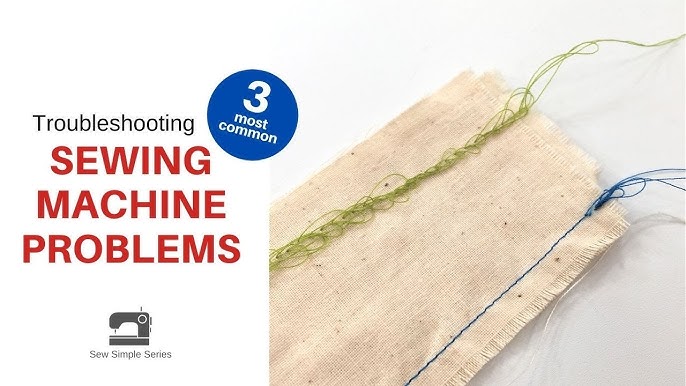
Thread jams or birdnesting under fabric.
- Possible causes: bad threading, bobbin inserted wrong, dirty bobbin case, or wrong bobbin type.
- Fix: remove bobbin and clean, rethread both top and bobbin, and ensure bobbin is the correct one for your Singer model.
-
Bobbin won’t wind or thread won’t feed.
- Possible causes: incorrect bobbin placement or worn feed dogs.
- Fix: follow manual for bobbin winding steps, replace worn feed dogs, and test with scrap fabric.
-
Loud noise or odd vibration.
- Possible causes: lint, loose screws, lack of oil, or internal damage.
- Fix: clean, tighten screws, oil the machine as recommended, and test for worn bearings.
-
Machine runs but won’t sew (motor spins but needle doesn’t).
- Possible causes: disconnected drive belt or broken handwheel coupling.
- Fix: check belt and handwheel coupling; replace parts or take to service if mechanical links are broken.
This Singer Sewing Machine Troubleshooting Guide aims to help you rule out simple issues first. If a fix involves internal parts you don’t know, stop and get expert help.

Diagnosing Step-by-Step: How to Troubleshoot Like a Pro
A calm, stepwise approach helps you fix problems quickly. Use this checklist from the Singer Sewing Machine Troubleshooting Guide.
-
Safety first.
- Unplug the machine before opening covers. Confirm power is off and needle is up.
-
Visual check.
- Inspect for thread caught, broken needles, loose screws, or obvious damage.
-
Clean and clear lint.
- Remove throat plate and bobbin case. Use a brush or gentle vacuum to clear lint.
-
Rethread top and bobbin.
- Follow the manual path. Many issues come from incorrect threading.
-
Check needle and presser foot.
- Use the correct needle size and type for the fabric. Ensure the presser foot is lowered when sewing.
-
Test tension and stitch settings.
- Use scrap fabric. Adjust the upper tension slightly until stitches look balanced.
-
Examine the bobbin case and bobbin.
- Make sure the bobbin type matches your Singer model and is inserted correctly.
-
Listen and feel.
- Run the machine with scrap fabric. Note sounds, vibrations, or slipping.
-
Isolate electrical issues.
- Swap cords, try another outlet, or test the foot pedal. If motor hums but nothing moves, mechanical parts may be at fault.
-
If unsure, stop.
- For timing problems or broken gears, seek a pro to avoid more damage.
This Singer Sewing Machine Troubleshooting Guide encourages a slow, logical flow. Small fixes often prevent expensive repairs.

Tools and Supplies You Need for Troubleshooting
Having the right tools turns a guessing game into a simple repair. Keep these handy while using the Singer Sewing Machine Troubleshooting Guide.
- Small screwdriver set for plates and covers
- Lint brush and small vacuum attachment
- Soft cloths and canned air for dust removal
- Quality sewing machine oil recommended by Singer
- Extra needles in various sizes and types
- Replacement bobbins meant for your Singer model
- Tweezers and seam ripper for thread jams
- Multimeter for electrical testing
- User manual and model-specific diagrams
These tools make it easy to run through the Singer Sewing Machine Troubleshooting Guide steps. A well-organized repair kit saves time and frustration.
Maintenance Tips to Prevent Future Problems
Regular care prevents most issues. Add these routines to your Singer Sewing Machine Troubleshooting Guide plan.
-
Clean after each project.
- Remove lint and dust from the bobbin area and feed dogs.
-
Oil per the manual.
- Use small drops only where Singer recommends. Over-oiling attracts lint.
-
Change needles often.
- Replace needles after 6–8 hours of sewing or when switching fabrics.
-
Use quality thread and correct bobbins.
- Cheap thread and wrong bobbins cause tension problems and jams.
-
Cover and store properly.
- Keep your Singer machine covered when not in use to avoid dust build-up.
-
Schedule professional servicing.
- Annual tune-ups help with timing and internal wear.
Following this maintenance part of the Singer Sewing Machine Troubleshooting Guide extends machine life and improves stitch quality.

Advanced Issues and When to Seek Professional Repair
The Singer Sewing Machine Troubleshooting Guide can handle many problems, but some issues need a technician.
-
Timing problems.
- Symptoms: consistent skipped stitches even with a new needle and correct threading. This often needs gear or timing adjustments by a pro.
-
Burnt motor smell or smoke.
- Stop sewing immediately. Professional repair or motor replacement is required.
-
Electronic faults.
- Computerized Singer models may have faulty PCBs, displays, or sensor issues. Diagnosis needs tools and expertise.
-
Major mechanical damage.
- Cracked head, broken shafts, or worn cams often need part replacement or shop repair.
-
Cost vs. value.
- For older machines, compare repair cost to buying a new Singer. A trusted technician can give an estimate.
When the Singer Sewing Machine Troubleshooting Guide points to internal or electronic failure, find an authorized service for best results.

Personal Experience and Real-Life Fixes
I’ve repaired dozens of Singer machines. One common case: a longarm of a vintage Singer would jam every few stitches. The fix was a tiny lint ball under the bobbin case causing the bobbin to sit slightly off. After cleaning and replacing the needle, the machine ran smoothly.
Another example: a computerized model kept skipping stitches. I replaced the needle and verified thread quality. When skipping persisted, the timing had drifted. A local repair shop reset the timing and the machine was restored.
Lessons learned from years of work for this Singer Sewing Machine Troubleshooting Guide:
- Always start simple: clean and rethread.
- Keep spare needles and bobbins on hand.
- Don’t force a jammed machine; you can bend internal parts.
- When in doubt, consult the manual or a certified tech.
These small habits save time and protect your machine.

Troubleshooting for Specific Singer Models
Different Singer models behave differently. This Singer Sewing Machine Troubleshooting Guide gives model-focused tips.
-
Mechanical models (vintage).
- They respond well to cleaning, oiling, and timing adjustments. Parts are often metal and serviceable.
-
Heavy-duty models (for denim).
- Use heavy needles, sturdy thread, and reduce stitch length for thick seams.
-
Computerized models.
- Check settings and reset the machine before mechanical checks. Firmware glitches can mimic mechanical faults.
-
Serger and overlock machines.
- Threading order and tension are critical. Follow model diagrams exactly.
-
Portable, entry-level Singer machines.
- These are simpler but can be more sensitive to needle choice and thread quality.
Apply the relevant section of this Singer Sewing Machine Troubleshooting Guide to your model for best results.

Frequently Asked Questions of Singer Sewing Machine Troubleshooting Guide
What should I do first if my Singer sewing machine won’t sew?
Unplug the machine, raise the needle and presser foot, and check for thread jams or a broken needle. Reclean and rethread the top and bobbin before testing again.
How often should I oil my Singer sewing machine?
Oil per your model’s manual; many mechanical Singers need light oiling every few months with moderate use. Computerized models often need less frequent oiling and may require professional service.
Why does my Singer stitch unevenly or skip stitches?
Uneven stitching often comes from a dull or wrong needle, incorrect threading, or timing issues. Replace the needle, rethread correctly, and test on scrap fabric.
Can I use any bobbin in my Singer machine?
No. Use the bobbin type specified for your Singer model to avoid jams and tension problems. The wrong bobbin can cause uneven stitches or damage.
When should I call a professional repair service?
Call a pro for timing fixes, motor burning smells, broken internal gears, or electronic board failures. If a problem persists after basic troubleshooting, seek expert help.
How can I prevent thread jams under the fabric?
Clean the bobbin area regularly, use good quality thread, and ensure the bobbin is correctly wound and inserted. Proper threading and the correct bobbin type reduce jams.
Conclusion
This Singer Sewing Machine Troubleshooting Guide gives simple steps and clear checks to handle most common problems. Start with cleaning, correct threading, and needle checks; then move to tension, bobbin, and electrical tests. If problems persist, seek professional service to protect your machine. Put these tips into practice, keep a small tool kit, and your Singer will sew longer and better. Try one fix today, and leave a comment about your experience or questions — subscribe for more repair tips and guides.
