

Most issues are lint buildup, a faulty heating circuit, or a blocked vent causing poor drying.
I’ve spent years repairing household dryers and testing Maytag Bravos models. This guide on Maytag Bravos Dryer Troubleshooting gives clear diagnostics, safe step-by-step fixes, and practical tips so you can solve common problems fast. Read on to learn how to identify causes, run quick tests, decide which parts to replace, and know when to call a pro.

36% off Today’s Exclusive Deals
Limited-time Exclusive Deals. Check current discount on Amazon.
Check Price on Amazon As an Amazon Associate I earn from qualifying purchases.
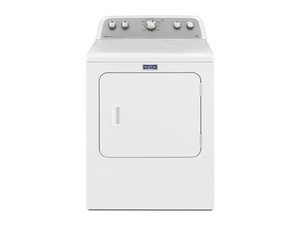
Common Problems and What They Mean
Maytag Bravos Dryer Troubleshooting starts with knowing common faults. Below are frequent symptoms and brief causes you can check quickly.
-
Dryer won’t start
Door switch failure, blown thermal fuse, tripped breaker, or control board problem could stop the dryer from starting. -
Dryer runs but won’t tumble
Broken drive belt, failed motor, or seized drum roller will stop the drum from turning. -
Dryer runs but doesn’t heat
Broken heating element, failed high-limit thermostat, blown thermal fuse, or gas ignition issue (for gas models) are typical culprits. -
Dryer takes too long to dry
Clogged lint trap, restricted vent, poor airflow, sensor failure, or overloaded loads reduce drying efficiency. -
Loud noises or squealing
Worn drum rollers, idler pulley, motor bearings, or foreign objects inside the drum cause unusual sounds. -
Error codes or control issues
Control board faults or sensor errors can generate codes and unexpected behavior. Consult the manual for code meanings.

Quick Diagnosis Checklist
A short checklist speeds up Maytag Bravos Dryer Troubleshooting so you can isolate issues in minutes.
-
Safety first
Unplug the dryer or shut off power at the breaker before opening panels or touching electrical parts. -
Check power and controls
Verify the outlet or breaker, test with a lamp or voltage tester, and confirm cycle settings and door latch. -
Inspect the lint screen and trap area
Clean the lint screen and look for lint in the trap cavity. -
Examine the exhaust vent
Check the outside vent hood for airflow and remove visible lint. A blocked vent is a top cause of long dry times. -
Listen and watch
Note whether the drum turns, sounds during operation, or if heat is present. -
Use a multimeter for basics
Test door switch continuity, thermal fuse, and heating element continuity when safe to do so.

Tools and Parts You Might Need
Having the right tools and parts makes Maytag Bravos Dryer Troubleshooting faster and safer.
-
Tools to have on hand
Multimeter, nut drivers, screwdrivers, shop vacuum with narrow nozzle, small brush, needle-nose pliers, and a flashlight. -
Common replacement parts
Drive belt, thermal fuse, heating element, thermostat, drum rollers, idler pulley, drum glides, moisture sensors, and lint screen. -
Safety items
Work gloves, safety glasses, and a dust mask for vent cleaning.
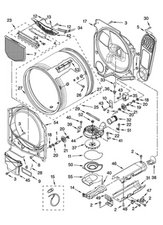
Step-by-Step Troubleshooting Guide
Use these targeted steps for the most common problems when doing Maytag Bravos Dryer Troubleshooting.
No power or won’t start
- Confirm the dryer is plugged in and the circuit breaker is on.
- Test the outlet with a small appliance or voltage tester.
- Check door switch continuity with a multimeter; replace if open with door closed.
No tumbling or motor won’t run
- Disconnect power, remove the dryer front or belt cover, and inspect the drive belt.
- Check motor for obstructions and test motor windings with a multimeter if comfortable.
- Replace worn drum rollers or idler pulley if they’re seized or noisy.
No heat or poor heating
- Unplug the dryer and test the thermal fuse for continuity; a blown thermal fuse commonly stops the heat.
- Test the heating element or gas igniter circuit depending on model type. Replace faulty parts.
- For gas dryers, inspect the gas supply and igniter but call a licensed technician for gas valve or burner work.
Takes too long to dry
- Clean the lint screen and vacuum lint buildup inside the door and trap cavity.
- Disconnect the vent hose and run a short cycle to check for strong airflow at the back of the dryer.
- If airflow is weak, clean the full vent run to the outside or hire a duct cleaning service.
Excessive noise or vibration
- Remove any items trapped between drum and front panel.
- Inspect and replace worn drum rollers, bearings, or motor mounts.
- Balance the dryer and level feet to reduce vibration.
Control errors or odd behaviors
- Try a power cycle: unplug for one minute, then restore power. This resets some control faults.
- If error codes persist, record code and consult the service manual or a technician.
- Replace the control board only after confirming other components are functional.

Replacement Parts, Costs, and When to Call a Pro
Understanding costs and limits helps decide whether to DIY or hire help during Maytag Bravos Dryer Troubleshooting.
-
Typical part cost ranges (approximate)
Drive belt: $15 to $40
Thermal fuse: $10 to $30
Heating element: $40 to $150
Drum roller or glide: $10 to $50
Control board: $150 to $400 -
When to call a professional
If the dryer uses gas and you suspect a gas valve, igniter, or gas-line issue, call a licensed tech.
For complex electrical problems or repeated control board failures, a pro can diagnose safely.
If the unit is older than 10–12 years and multiple components fail, replacing the dryer may be more cost-effective. -
My hands-on tip
I once traced long dry times to a vent clogged inside a wall. Cleaning the vent restored normal performance and saved a control board replacement.
Preventive Maintenance to Avoid Troubles
Routine care reduces the need for Maytag Bravos Dryer Troubleshooting and keeps the dryer efficient.
- Clean lint screen after every load to maintain airflow.
- Vacuum lint from the trap cavity and around seals at least monthly.
- Inspect and clean the full exhaust vent from dryer to outside every 6–12 months.
- Don’t overload the drum; use medium loads for best drying and less wear.
- Keep the dryer level and check drum rollers and belts annually for wear.

Frequently Asked Questions of Maytag Bravos Dryer Troubleshooting
How do I know if the thermal fuse is bad?
A blown thermal fuse usually results in no heat but the motor may still run. Test it for continuity with a multimeter to confirm and replace if it shows no continuity.
Why is my Maytag Bravos dryer running but not drying?
Poor drying is often caused by blocked vents, a clogged lint screen, or a failed heating component. Start with the lint screen and vent check before testing internal parts.
Can I replace the drive belt myself?
Yes, replacing a drive belt is a common DIY job if you’re comfortable removing the dryer front and drum. Always unplug the dryer and follow the model-specific instructions.
How often should I clean the dryer vent?
Clean visible lint and the vent hood every month and perform a full vent cleaning every 6–12 months depending on dryer use. High-use households should clean more frequently.
The dryer displays an error code. What should I do?
Power-cycle the dryer by unplugging it for a minute, then restart. If the code returns, note the code and consult the service manual or a technician for exact diagnosis.
Is it safe to run the dryer with a small load of wet towels to test heating?
Yes, as a short diagnostic test you can run a small load to check heat and airflow, but always monitor closely to avoid overheating or lint buildup.
Conclusion
Maytag Bravos Dryer Troubleshooting becomes straightforward when you follow safe diagnostic steps, clean vents regularly, and replace a few common parts like the thermal fuse or belt when needed. Start with the quick checklist: power, lint screen, and vent airflow—these solve many problems. If a gas component or complex electrical fault appears, call a licensed technician. Try the steps here, share your results, and leave a comment if you want help diagnosing a specific symptom.

