

Airxcel thermostat troubleshooting often starts with simple checks: power, wiring, batteries, and settings.
I have worked on RV and mobile HVAC systems for years and have fixed dozens of Airxcel thermostats. This guide explains Airxcel Thermostat Troubleshooting step by step. You will learn clear checks, common faults, fixes, and when to call a pro. Read on to save time and avoid unnecessary parts or service calls.

36% off Today’s Exclusive Deals
Limited-time Exclusive Deals. Check current discount on Amazon.
Check Price on Amazon As an Amazon Associate I earn from qualifying purchases.
Common problems and quick fixes for Airxcel Thermostat Troubleshooting
Most issues are simple and repeatable. Start with these checks when doing Airxcel Thermostat Troubleshooting.
- Power loss
- Check battery slot and replace batteries if used. Many Airxcel thermostats use AA or AAA cells.
- Check 12V or 120V feed to the control board in your RV or unit.
- Display blank or flickers
- Tighten wiring and check connectors behind thermostat.
- Clean contacts gently if corroded.
- Unit not reaching set temperature
- Verify mode (heat/cool/auto) and fan settings.
- Confirm sensor reads room temp by holding thermostat near a known thermometer.
- Short cycling or frequent on/off
- Check for loose wiring or incorrect heat anticipator settings.
- Inspect for a failing compressor or shorted relay.
- Incorrect temperature reading
- Calibrate or replace the thermostat sensor.
- Move the thermostat away from direct sun or vents.
Airxcel Thermostat Troubleshooting is mostly about the basics: power, wiring, sensors, and settings. Doing these steps first saves time and money.
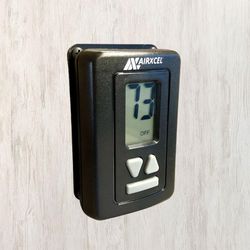
Step-by-step Airxcel Thermostat Troubleshooting guide
Follow this ordered checklist for clear results when you do Airxcel Thermostat Troubleshooting.
- Visual and power check
- Confirm the thermostat screen is on.
- Replace batteries if used. Test system power at fuse or breaker.
- Reset and settings
- Reset thermostat to default settings if available.
- Re-enter program and temperature setpoints.
- Wiring inspection
- Turn power off before removing the faceplate.
- Check for loose screws, broken wires, or improper wire placement.
- Sensor test
- Compare thermostat reading to a room thermometer.
- If readings differ by more than 2°F, replace or recalibrate the sensor.
- Relay and compressor checks
- Listen for clicking relays when the thermostat changes mode.
- If no click, suspect failed relay or wiring problem.
- Firmware or electronic faults
- Some Airxcel thermostats have firmware quirks. A reset can help.
- Replace the unit if the display or board is burnt or smells of burning.
- Test run
- Run a full heating and cooling cycle.
- Watch for proper fan and compressor behavior.
I have followed this checklist many times in the field. It cut the diagnosis time in half and usually points to a single fix like a loose wire or dead battery.

When to repair or replace: practical advice
Not every fault needs a new thermostat. Use this rule of thumb for Airxcel Thermostat Troubleshooting.
- Repair when
- Problem is wiring, batteries, or a dirty contact.
- Reset and calibration fix the issue.
- Replacement parts are inexpensive and available.
- Replace when
- Display or PCB has visible damage.
- Unit fails after a full reset and test run.
- Thermostat is outdated and lacks needed control features.
- Call a pro when
- You see burnt wiring or smell electrical burning.
- You are not comfortable working with 12V/120V systems.
- HVAC compressor issues appear.
I once replaced a thermostat that showed odd characters on the screen. A reset did not help. The new unit worked right away and saved repeated shop visits.

Maintenance tips and best practices for lasting performance
Regular checks make Airxcel Thermostat Troubleshooting easier and prevent common failures.
- Keep it clean
- Dust the thermostat face and vents every few months.
- Avoid spraying cleaners directly on the unit.
- Check batteries yearly
- Replace batteries yearly or when the low-battery icon appears.
- Inspect wiring annually
- Look for frayed wires and loose connections.
- Tighten terminal screws gently.
- Avoid heat sources
- Do not place thermostat near ovens, lamps, or direct sunlight.
- Record settings and errors
- Note any error codes or behavior in a log for future troubleshooting.
These simple steps cut callbacks. Good maintenance helps the thermostat last longer and makes Airxcel Thermostat Troubleshooting easier if problems arise.

Common error codes and what they mean
Knowing a few common error signs speeds up Airxcel Thermostat Troubleshooting.
- E1 or ERR on display
- Often a sensor error or open circuit. Check sensor wiring.
- Blank display with power on
- Likely a dead display or poor connection. Check power and connectors.
- Rapid flashing
- Could indicate low voltage or firmware fault. Test voltage.
- Furnace or AC won’t run but thermostat shows demand
- Check relay, board, or wiring between thermostat and unit.
When in doubt, take a clear photo of the display and wiring. That helps if you call a technician for help.
My hands-on tips and lessons learned
Here are practical tips from my time repairing RV and mobile HVAC systems while doing Airxcel Thermostat Troubleshooting.
- Always turn off power before removing the thermostat face. I once nicked a wire and had to re-splice it.
- Label wires before disconnecting. This saves time and prevents miswiring.
- Keep replacement batteries and a small screwdriver kit in your RV. Quick fixes often need only those items.
- Use a simple multimeter to check voltage and continuity. It’s the fastest way to narrow down a fault.
- If you replace the thermostat, keep the old one for parts or as a reference.
These small habits reduce stress and avoid costly mistakes during Airxcel Thermostat Troubleshooting.

PAA-style questions (People also ask)
- What causes an Airxcel thermostat to stop working?
- Power loss, dead batteries, loose wiring, or a failed PCB commonly stop the unit from working.
- How do I reset my Airxcel thermostat?
- Turn the power off, remove batteries, wait 30 seconds, replace batteries, and power on; refer to model manual for specific reset steps.
- Can I replace an Airxcel thermostat myself?
- Yes, if you are comfortable with low-voltage wiring and follow safety steps; otherwise hire a pro.
- Why does the thermostat show the wrong temperature?
- The sensor may be faulty, placed near a heat source, or the unit needs calibration.
- How often should I check my Airxcel thermostat?
- Inspect once a year and check batteries yearly for reliable performance.
Frequently Asked Questions of Airxcel Thermostat Troubleshooting
What should I check first when the Airxcel thermostat is unresponsive?
Start with power. Replace batteries, check fuses or breakers, and ensure the unit has proper voltage.
Why does my Airxcel thermostat click but not run the AC?
A clicking sound can mean the thermostat is calling for cooling but the relay, contactor, or compressor may be faulty. Check the HVAC unit and wiring.
How do I know if the thermostat sensor is bad?
Compare readings with a reliable thermometer. If the thermostat differs by more than 2°F, the sensor may be bad.
Is it safe to open the thermostat and check wiring myself?
Yes, if you turn power off and follow safety steps. If you see burnt wires or are unsure, call a technician.
Will resetting the thermostat fix software issues?
A reset often clears minor firmware glitches. If the problem returns, a replacement might be needed.
Can poor thermostat placement cause temperature swings?
Yes. Direct sun, drafts, or nearby heat sources cause wrong readings and frequent cycling.
How much does it cost to replace an Airxcel thermostat?
Costs vary by model but many replacements are affordable. Labor adds to total if you hire a technician.
Conclusion
Airxcel Thermostat Troubleshooting starts with the basics: power, batteries, wiring, sensor checks, and proper settings. Use the step-by-step guide and maintenance tips here to diagnose and fix most issues quickly. If you hit a burnt wire, repeated failures, or are unsure about electrical work, call a professional. Try the checks now, keep a quick log of errors, and consider simple upgrades after consistent problems. If this guide helped, leave a comment, subscribe for more HVAC tips, or share your Airxcel Thermostat Troubleshooting story.

