

Many coffee lovers choose the Farberware Dual Brew Coffee Maker for its flexibility and speed. This machine can brew a single cup or a whole carafe, making it fit both personal and family needs. But like any complex appliance, it can develop problems. When your morning cup is at stake, even a simple error can feel urgent. Luckily, most issues are easy to fix with some basic troubleshooting.
This guide walks you through common problems, clear solutions, and smart tips to keep your Farberware running smoothly. Whether you’re facing leaks, brewing failures, or odd noises, you’ll find practical answers here. You’ll also discover insights that many beginners miss—like how water quality and cleaning routines affect performance.

36% off Today’s Exclusive Deals
Limited-time Exclusive Deals. Check current discount on Amazon.
Check Price on Amazon As an Amazon Associate I earn from qualifying purchases.Let’s explore how to bring your machine back to top shape without stress.
Understanding The Farberware Dual Brew Coffee Maker
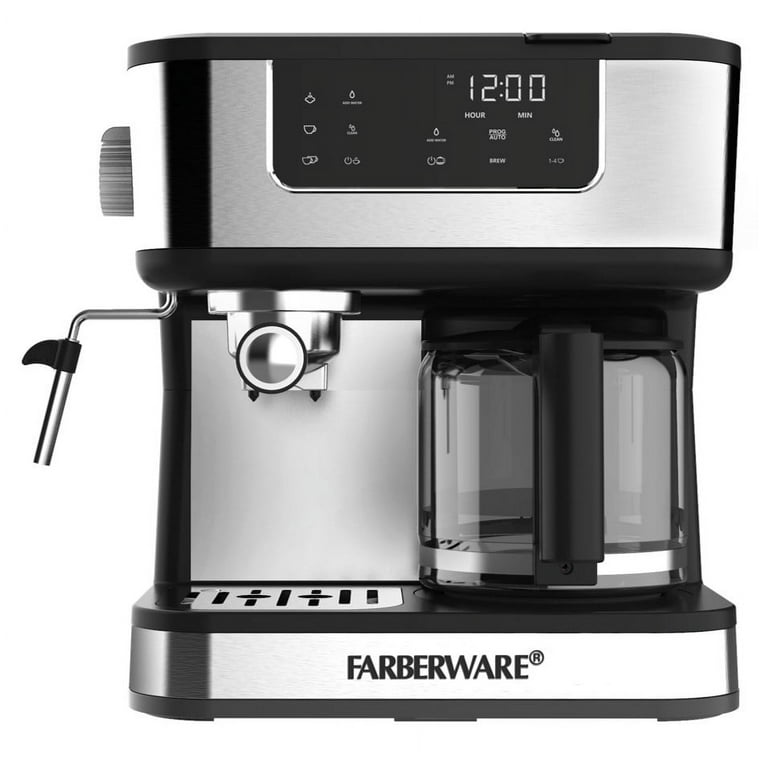
The Farberware Dual Brew is designed for convenience. It has two main brewing modes: a single-serve side (for pods or ground coffee) and a carafe side (for up to 12 cups). Key features include:
- Multiple brew sizes (6, 8, 10 oz for single serve; 12-cup carafe)
- Removable water reservoirs for easy filling and cleaning
- Programmable timer for the carafe side
- Strength control for bolder coffee
The control panel uses clear buttons and indicator lights. But these same features can sometimes confuse users if things go wrong. Understanding the layout and function of your machine is the first step in solving problems.
Comparing Single-serve And Carafe Sides
Here’s a quick comparison of the two brewing options:
| Feature | Single-Serve Side | Carafe Side |
|---|---|---|
| Brew Size | 6, 8, 10 oz | Up to 12 cups |
| Coffee Type | Pods or grounds | Ground coffee only |
| Water Reservoir | Removable, smaller | Removable, larger |
| Timer | No | Yes |
Knowing which side you’re using helps narrow down problems quickly.
Common Problems And Quick Fixes
When your Farberware stops working as expected, don’t panic. Most issues have simple solutions. Here are the most frequent problems and what to do.
1. Coffee Maker Won’t Turn On
If your machine shows no lights or response:
- Check the power cord for damage or loose connection.
- Try another outlet to rule out a faulty socket.
- Reset the machine by unplugging for 60 seconds, then plug back in.
Tip: Power surges can trip internal safety features. A full unplug-reset often solves hidden electrical glitches.
2. Machine Leaks Water
Leaks usually come from:
- Overfilled reservoir—don’t fill past the MAX line.
- Loose or misaligned carafe—make sure the carafe is seated correctly on the warming plate.
- Clogged brew basket—grounds can block water flow, causing overflow.
To fix, empty and dry the reservoirs, clean the brew basket, and check the carafe position before brewing again.
3. Brewing Cycle Won’t Start
If you press start and nothing happens:
- Water reservoir not seated—remove and reinsert it firmly.
- Lid not fully closed—check both the single-serve and carafe sides.
- Too little water—ensure there’s enough for your chosen brew size.
Non-obvious insight: Sometimes the brew cycle won’t start if the machine detects an air bubble in the water line. Gently tap the side of the machine or prime the pump by running a water-only cycle.
4. Weak Or Watery Coffee
If your coffee tastes thin:
- Too little coffee—use the correct amount for your brew size.
- Grind size too coarse—finer grounds give stronger flavor.
- Strength setting—choose “strong” if you prefer bold taste.
Double-check the pod or filter placement; a poorly seated pod can let water bypass the grounds.
5. Coffee Maker Is Noisy
Some noise is normal, but loud sputtering or banging can signal:
- Scale buildup in the water lines
- Air bubbles trapped in the pump
Run a cleaning cycle with vinegar and water (see the cleaning section below), then a few cycles with plain water to clear out residue.
6. Display Shows Error Codes
Some Farberware models have a small digital display. Error codes may include:
- E1/E2: Sensor issue, unplug for 2 minutes then restart.
- Fill: Add water to the reservoir.
- Clean: Time for descaling (see below).
Consult your manual for your specific model’s codes—this can save time and prevent unnecessary part replacements.
Cleaning And Maintenance
Keeping your coffee maker clean is the best way to prevent problems. Coffee oils, minerals, and old grounds can clog the system or cause off-flavors.
Daily Care
- Empty and rinse carafe and single-serve cup after each use.
- Wipe exterior with a damp cloth—never use abrasive cleaners.
Weekly Maintenance
- Wash the water reservoirs with warm, soapy water, rinse well.
- Clean the brew baskets and filters to remove trapped grounds.
Monthly Descaling
Minerals from water build up inside the machine, affecting taste and performance. Descale once a month or more often if you have hard water.
How to Descale:
- Mix equal parts white vinegar and water.
- Fill the reservoir with the solution.
- Run a brew cycle (no coffee).
- Discard the solution; run two cycles with plain water to flush.
Practical tip: Don’t skip descaling. Even filtered water leaves residue. Descaling prevents clogs, odd noises, and brewing failures.
Cleaning Data Table
Here’s a summary of cleaning routines:
| Part | Frequency | Cleaning Method |
|---|---|---|
| Carafe | Daily | Soap and water |
| Single-serve cup | Daily | Soap and water |
| Reservoir | Weekly | Soap and water |
| Brew basket/filter | Weekly | Soap and water |
| Descale system | Monthly | Vinegar and water |
Troubleshooting Single-serve Side Issues
The single-serve function can be tricky, especially if you’re switching between pods and ground coffee.
Pods Not Puncturing
If the machine doesn’t pierce the pod:
- Check the needle for clogs—clean with a paperclip.
- Align the pod—insert so the lid closes smoothly.
- Use compatible pods—off-brand pods can fit poorly.
Grounds In Cup
If you see coffee grounds in your cup:
- Overfilled filter—don’t fill past the line.
- Damaged filter—replace reusable filters if mesh is torn.
- Wrong grind size—use medium grind; fine espresso grinds can slip through.
Beginner’s miss: Reusable filters need careful cleaning to prevent old grounds from breaking loose during brewing.
Water Doesn’t Dispense
If no water comes out:
- Check reservoir placement
- Prime the system by brewing hot water without a pod or coffee
If water still doesn’t flow, descale the system and clean the needles.

Troubleshooting Carafe Side Issues
The carafe side is more like a classic drip coffee maker, but can have its own problems.
Carafe Not Filling To Selected Level
If you choose 12 cups but only get 8:
- Check the water reservoir—fill to match your selection.
- Look for blockages—the filter basket may be clogged with grounds.
- Descale if you haven’t done so in a while.
Overflow Or Spillage
Carafe overflow usually means:
- Too much coffee in the filter
- Filter basket not inserted fully
- Using very fine grounds that slow water flow
Advanced tip: High altitude can affect boiling—if you live above 5,000 feet, consider using a coarser grind and slightly less coffee.
Brew Timer Not Working
If the programmable timer doesn’t start:
- Double-check AM/PM settings
- Ensure the clock is set
- Power interruptions reset the timer—set it again after outages.
Essential Tips For Reliable Performance
To keep your machine in top condition, use these strategies:
- Use filtered water—reduces mineral buildup and improves taste.
- Avoid overfilling—fill only to the MAX line to prevent leaks.
- Switch between modes carefully—reset the machine when moving from single-serve to carafe or vice versa.
- Replace filters regularly—paper filters should not be reused.
- Check for recalls or updates—rare, but worth searching the Farberware website for your model.
Insight: Many performance issues are linked to water quality. Hard water users should descale twice as often.
When To Call For Service
Some problems require professional help. Call Farberware support if:
- Electrical smells or smoke come from the unit
- Display flashes codes not listed in the manual
- Repeated leaks after cleaning and reassembly
- No power after checking the outlet and cord
Have your model and serial number ready. Most Farberware coffee makers come with a 1-year limited warranty.
Replacement Parts And Accessories
Over time, filters, carafes, and reservoirs may wear out. You can order replacements from Farberware’s official site or trusted retailers.
Common Replacement Parts
| Part | When to Replace | Where to Buy |
|---|---|---|
| Water filter | Every 2-3 months | Online/Farberware site |
| Carafe | If cracked or stained | Official or third-party |
| Single-serve filter | Mesh damage/clog | Official or universal fit |
Avoid using non-compatible parts, as they may cause leaks or brewing errors.
Advanced Troubleshooting Steps
If basic fixes don’t solve the issue, try these advanced steps:
Resetting The Machine
A hard reset can clear many software glitches:
- Unplug the machine.
- Wait 5 minutes.
- Plug in and set the clock/timer again.
Inspecting For Blockages
- Remove all removable parts.
- Rinse under warm water.
- Use a soft brush or toothpick to clear any buildup.
- Check the needle (single-serve side) and brew basket holes (carafe side).
Recalibrating Water Sensors
If the machine misreads water levels:
- Empty and dry the reservoir.
- Fill to halfway and run a water-only brew.
- Repeat with a full reservoir.
This can help the sensors “reset” and read more accurately.
Firmware Updates
Some smart models can accept firmware updates for bug fixes. Visit the official Farberware site and check your model’s support page for instructions. This is rare, but can fix persistent timer or display errors.
Real-world Examples And User Stories
Many users face similar issues but overlook simple fixes. For example, one user found that brewing stopped after switching to a new brand of pods. The solution? Their new pods were slightly taller and didn’t pierce correctly. Switching back to the original pods solved the issue.
Another common story involves descaling. A user reported their carafe side would only brew half a pot. After running a vinegar cleaning cycle, the problem disappeared.
Lesson: Start with the basics—cleaning, checking parts, and following the manual. Most problems have simple causes.

Additional Resources
If you need more help, check:
- The official Farberware support page
- Product manuals (often available as PDFs online)
- User forums and YouTube tutorials for your model
You can also find in-depth brewing tips and troubleshooting guides at Consumer Reports.
Frequently Asked Questions
Why Does My Farberware Dual Brew Make Less Coffee Than Selected?
This usually means the water reservoir was not filled enough, or there’s a clog in the system. Descaling and cleaning the filter basket often solve this problem.
Can I Use Distilled Water In My Farberware Coffee Maker?
Distilled water is safe for the machine and reduces mineral buildup. However, some users find the taste of the coffee is “flat. ” Filtered tap water is a good middle ground.
How Often Should I Descale My Farberware Dual Brew?
Descale at least once a month. If you have hard water, do it every 2-3 weeks. Regular descaling prevents many brewing and taste issues.
What Do I Do If My Display Shows “e1” Or “e2”?
Unplug the coffee maker for 2–5 minutes, then plug it back in. If the error remains, contact Farberware support. These codes usually mean a sensor issue.
Is It Safe To Use Reusable Filters?
Yes, as long as the mesh is intact and they fit your model. Clean them thoroughly after each use to prevent clogs and off-flavors.
—
Fixing your Farberware Dual Brew Coffee Maker often comes down to careful cleaning, using the right water and coffee, and following proper maintenance steps. Most problems are easy to solve at home, saving you time and money. With the tips in this guide, you can enjoy reliable coffee every morning, knowing how to handle any issue that comes your way.

