

When your GE washer starts flashing lights, it can feel confusing and stressful. You might worry that your machine is broken, or that you’ll need to spend a lot of money on repairs. But flashing lights are often just your washer’s way of telling you something is wrong—or needs your attention. With a calm approach and some basic troubleshooting, you can usually identify the issue and even fix it yourself. This guide will help you understand what those flashing lights mean, how to solve common problems, and when to call for professional help. Let’s make sense of your GE washer’s signals and get your laundry routine back on track.
What Do Flashing Lights On A Ge Washer Mean?
Flashing lights on a GE washer are error signals. They alert you that the machine has detected a problem or wants your input. Sometimes, the lights are a simple reminder, like the lid being open. Other times, they signal more complex issues, like water supply problems or a faulty sensor.

36% off Today’s Exclusive Deals
Limited-time Exclusive Deals. Check current discount on Amazon.
Check Price on Amazon As an Amazon Associate I earn from qualifying purchases.Different models have different light patterns, but most GE washers use combinations of blinking lights on the control panel to indicate specific errors. For example, the wash, rinse, and spin lights might flash together, or just the power or start button might blink.
Understanding the pattern can save time and prevent unnecessary repairs. If you have your user manual, it will explain what each flashing light means. If not, you can follow this guide to decode the signals.
Common Reasons Ge Washer Lights Flash
Many issues cause flashing lights. Here are the most frequent triggers:
1. Lid Not Closed Properly
The washer won’t start or continue if the lid is open. The lid lock light will blink to remind you to close it.
2. Washer Paused Or Interrupted
If you press pause or open the lid during a cycle, lights may blink to show the cycle is halted.
3. Drain Or Spin Problems
A flashing spin or drain light often means the washer can’t drain water. This could be a clogged hose, blocked pump, or an overloaded tub.
4. Water Supply Issues
If the wash or rinse lights blink, the washer may not be filling with water. Check the faucets and hoses.
5. Unbalanced Load
When clothes bunch up on one side, the washer detects imbalance and flashes the spin light. It may try to fix itself, but sometimes you need to rearrange the laundry.
6. Electrical Or Sensor Errors
A flashing power or start button can mean a sensor or control board fault.
7. End Of Cycle Reminder
Some models flash lights to show the cycle is finished.
8. Door Lock Fault
If the door lock light flashes, the lock may be stuck, dirty, or faulty.

Ge Washer Light Patterns: What They Mean
Your GE washer might show different light combinations. Here’s what some patterns commonly indicate:
| Light Pattern | Possible Cause | Action Needed |
|---|---|---|
| Spin light flashing | Unbalanced load or drain issue | Redistribute clothes, check drain hose |
| Wash/Rinse lights flashing | Water supply problem | Check hoses, faucets, water pressure |
| Power/Start light blinking | Control board or sensor error | Reset washer, check for error codes |
| Lid lock light flashing | Lid not closed or lock faulty | Close lid, check lock mechanism |
| All lights flashing | System error | Reset washer, call technician if needed |
These patterns are the most common. Some models may show unique combinations. If your washer’s lights don’t match these, check your manual or look up your model online.
Step-by-step Troubleshooting For Flashing Lights
If your GE washer is flashing lights, follow these steps to diagnose and fix the problem. This section helps you avoid guesswork and unnecessary repairs.
1. Pause And Reset The Washer
Before anything else, try resetting the washer. This solves many minor issues.
- Unplug the washer for 1 minute.
- Plug it back in.
- Wait for the lights to stop blinking.
- Try running a cycle.
If the lights continue to flash, move to the next steps.
2. Check The Lid And Door Lock
Most GE washers stop working if the lid is open or the door lock is faulty.
- Close the lid fully. Listen for the click.
- If the lid lock light flashes, inspect the lock for dirt or damage.
- Clean the lock area with a dry cloth.
- Try opening and closing the lid several times.
If the light still blinks, the lock may need replacement.
3. Inspect Water Supply
If the wash or rinse lights flash, check the water flow.
- Make sure both hot and cold water faucets are open.
- Inspect hoses for kinks or bends.
- Remove hoses and check for blockages.
- Clean hose filters if clogged.
Low water pressure can also cause flashing lights. If your home has weak water flow, the washer may not fill correctly.
4. Check Drainage
If your spin or drain light flashes, there may be a drainage problem.
- Check the drain hose for clogs or twists.
- Make sure the hose is not too high (should be below 8 feet from the floor).
- Inspect the pump filter (usually under the machine).
Blocked drains are a common issue, especially after washing rugs, pet bedding, or heavy items.
5. Balance The Load
An unbalanced load triggers flashing lights during spin.
- Open the lid and redistribute clothes evenly.
- Avoid washing only one heavy item.
- Remove some items if the tub is overloaded.
The washer may try to rebalance itself, but manual adjustment is often faster.
6. Examine Electrical Components
If lights blink and nothing else works, the issue might be electrical.
- Try resetting the washer again.
- Check your home’s power outlet.
- Look for error codes on the display.
If you see codes like E22 or E11, consult your manual or search online for their meaning.
7. Look For Error Codes
Some GE washers show error codes along with flashing lights. These codes pinpoint the problem.
Common codes include:
- E22: Water inlet issue
- E11: Drainage problem
- E42: Lid lock fault
- E31: Motor error
If you get a code, follow the manual’s instructions or search for solutions online.
8. Clean And Maintain Regularly
Many flashing light issues are caused by lack of maintenance.
- Clean the detergent dispenser monthly.
- Run a cleaning cycle with washer cleaner.
- Wipe the control panel to avoid sticky buttons.
Regular cleaning helps prevent errors and keeps the washer running smoothly.
Ge Washer Models And Their Flashing Light Behaviors
Different GE washers use different methods to communicate errors. Here’s a quick comparison of how popular models signal problems:
| Model | Error Signal | Unique Features |
|---|---|---|
| GTW460ASJWW | Flashing lights, error codes | Automatic rebalancing, easy lid lock reset |
| GFW650SSNWW | Blinking LED, digital code | Smart diagnostics, app support |
| WASHER WCVH4800KWW | Flashing panel lights | Front-load, detailed error messages |
| GTW220ACKWW | Control lights flash | Basic signals, no digital display |
| GFW148SSMWW | Blinking cycle lights | Compact design, quiet operation |
If you know your model, you can check the manual for specific flashing patterns. If you don’t, use the general steps above.
When To Call A Professional
Some flashing light issues are too complex for home fixes. Here’s when you should seek expert help:
- Persistent flashing after reset
If lights keep blinking after you’ve tried all steps, the problem may be deep in the electronics.
- Error codes you can’t clear
If codes like E31 or E42 won’t go away, a technician can safely diagnose and repair the issue.
- Water leaks or burning smells
These are signs of serious problems. Stop using the washer and call for service.
- Electrical problems
If your washer trips breakers or shocks, call an electrician.
Most repairs cost between $100 and $300, depending on the problem. It’s often cheaper to fix than replace, unless your washer is very old.
Preventing Flashing Light Issues
Keeping your GE washer in good shape prevents most flashing light errors. Here are practical tips:
1. Clean Regularly
Washers need cleaning inside and out. Run a cleaning cycle monthly.
2. Use The Right Detergent
Too much detergent can cause sensors to malfunction.
3. Don’t Overload
Heavy loads stress the motor and cause imbalance.
4. Check Hoses And Drains
Inspect for clogs every few months.
5. Update Firmware
Some smart washers get software updates. Check the GE website or app.
6. Avoid Slamming The Lid
Gentle closing keeps the lock working.
7. Watch For Early Signs
If your washer makes strange noises or pauses often, address it before flashing lights appear.
8. Read Your Manual
Most manuals have troubleshooting sections. Keep yours handy.
Real-life Examples: Solving Ge Washer Flashing Lights
Seeing how others solved their washer issues can help. Here are three real-life cases:
Case 1: Drain Light Flashing After Washing Rugs
A homeowner washed several bathroom rugs. After the cycle, the drain light flashed. The washer wouldn’t spin. They checked the drain hose and found it clogged with rug fibers. After clearing the blockage and running a reset, the washer worked again.
Case 2: Lid Lock Light Blinking, Washer Won’t Start
The lid lock light blinked every time the washer was powered on. The owner inspected the lock and saw dust and detergent buildup. Cleaning the lock with a dry cloth solved the issue.
Case 3: Spin Light Flashing, Unbalanced Load
After washing a large comforter, the spin light flashed. The washer stopped. Redistributing the comforter and running a spin cycle fixed the problem.
These examples show that many flashing light issues have simple fixes. Always check for obvious causes before calling a technician.

Advanced Troubleshooting: Inside The Washer
Sometimes, flashing lights mean a deeper problem. If you’re comfortable with DIY repairs, you can check inside the washer:
Checking The Control Board
If lights flash and nothing else works, the control board may be faulty.
- Unplug the washer.
- Remove the back panel (screwdriver needed).
- Inspect for burnt marks or loose wires.
- If you see damage, you may need to replace the board.
This is an advanced step. Only do this if you’re confident with electronics.
Testing Sensors
Some washers have water level and temperature sensors. If these fail, lights flash.
- Remove the sensor and check for visible damage.
- Replace if necessary.
Sensors cost between $20 and $50 and are easy to find online.
Replacing Lid Lock
If the lid lock is broken, replacing it is simple.
- Buy a replacement lock for your model.
- Remove screws, unplug the old lock, plug in the new one.
- Test the washer.
Many users fix flashing lid lock lights with this step.
Comparing Ge Washer Flashing Light Troubles To Other Brands
How does GE’s system compare to other washer brands? Here’s a quick look:
| Brand | Signal Method | Ease of Troubleshooting |
|---|---|---|
| GE | Flashing lights, error codes | Moderate, good manuals |
| Whirlpool | Flashing lights, digital codes | Easy, clear codes |
| Samsung | Blinking lights, app support | Moderate, more digital help |
| LG | LED indicators, error codes | Easy, app diagnostics |
| Maytag | Panel lights, error codes | Easy, step-by-step guides |
GE washers are reliable, but their flashing light system can be confusing for beginners. Other brands use similar signals, but often have clearer digital codes or app support.
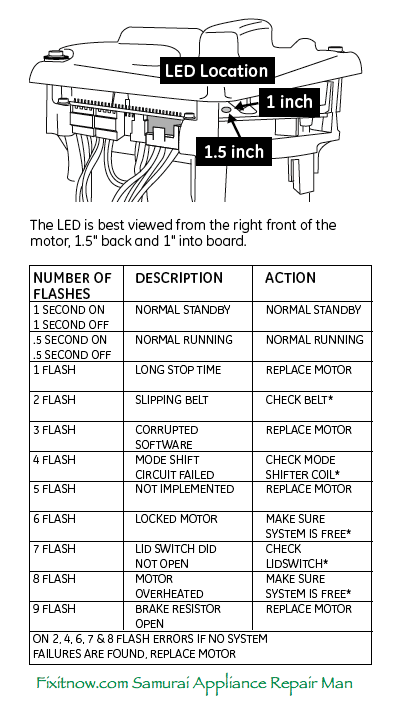
Non-obvious Insights For Beginners
Many guides miss these tips:
1. Flashing lights may reset themselves after you fix the cause.
If you clear a clog or close the lid, wait a few minutes. The washer may reset and stop flashing.
2. Power surges can cause random blinking.
If your home had a recent power outage or surge, your washer may blink for no reason. Resetting the machine usually solves it.
Helpful Resources
The official GE Appliances website has detailed troubleshooting guides and manuals. You can also find video tutorials on YouTube. For deeper technical information, the GE Appliances official site is a reliable source.
Frequently Asked Questions
Why Is My Ge Washer’s Lid Lock Light Blinking?
The lid lock light blinks when the lid isn’t closed properly or the lock is dirty or broken. Try cleaning the lock area and closing the lid fully. If it keeps blinking, the lock may need replacement.
What Should I Do If All Lights On My Ge Washer Are Flashing?
If all lights flash, unplug the washer for 1 minute and plug it back in. If they continue to flash, check for error codes. Persistent flashing may mean a control board issue—call a technician if basic steps don’t help.
How Do I Fix A Ge Washer That Won’t Spin And Shows A Flashing Spin Light?
A flashing spin light usually means the load is unbalanced or the washer can’t drain. Open the lid, redistribute the clothes, and check the drain hose for blockages. Run a spin cycle to test.
Can I Reset My Ge Washer If It’s Flashing Lights?
Yes. To reset your washer, unplug it for 1 minute and plug it back in. This clears minor errors and stops flashing lights in many cases.
Are Flashing Lights Always A Sign Of A Broken Washer?
No, flashing lights often mean a minor issue like an open lid, unbalanced load, or water supply problem. Most problems are easy to fix without professional help.
When your GE washer flashes lights, don’t panic. Most issues are simple and quick to fix with the right approach. By understanding the signals, troubleshooting step by step, and keeping your washer clean, you can avoid costly repairs and keep your laundry running smoothly.
If the problem is too complex, don’t hesitate to call an expert. With these practical tips, your GE washer’s flashing lights will be less scary—and your clothes will always be clean.

