

Hamilton Beach Coffee Maker Troubleshooting: A Complete Guide
If your morning coffee depends on a Hamilton Beach coffee maker, you know how important it is for the machine to work smoothly. But sometimes, these coffee makers have problems—like not brewing, leaking, or making weak coffee. Fixing them can feel confusing, especially if you’re not used to appliances or English instructions. This guide is made to help you solve common issues step by step, using simple language and clear explanations. You’ll find practical advice, real examples, and easy-to-follow tables, so you can get your coffee maker working again—without stress.
Common Hamilton Beach Coffee Maker Problems
Hamilton Beach coffee makers are popular because they are easy to use and reliable. However, like any appliance, they sometimes break or stop working well. Here are the most frequent issues people face:

36% off Today’s Exclusive Deals
Limited-time Exclusive Deals. Check current discount on Amazon.
Check Price on Amazon As an Amazon Associate I earn from qualifying purchases.- Coffee not brewing
- Slow brewing
- Coffee tastes bad
- Leaking water
- Not turning on
- Overflowing
- Error messages or blinking lights
Understanding these problems is the first step. Most are caused by simple things like blocked parts, dirty filters, or electrical faults. Let’s look at each problem and how you can fix it.
Coffee Maker Not Brewing
A coffee maker that won’t brew is frustrating. It’s usually caused by a few common reasons:
Water Reservoir Issues
If your coffee maker isn’t brewing, check the water reservoir first. Make sure it is filled enough, and placed correctly. If the reservoir is not seated or is empty, the machine may not start.
Clogged Filter Or Tube
Coffee makers need clean water flow to brew. Over time, minerals from water can block the filter, tube, or spray head. Signs of this problem include:
- No water coming out
- Only half a cup brewed
Solution: Remove the filter and wash it. Run a cleaning cycle with vinegar and water (equal parts) to dissolve mineral buildup.
Power Problems
If the coffee maker doesn’t turn on at all, check:
- The power cord is plugged in securely.
- The outlet works (try another device).
- The machine’s power switch is working.
If the outlet is fine, but the coffee maker still won’t turn on, it may need professional repair.
Slow Brewing Or Weak Coffee
A slow or weak brew is often caused by clogged parts or the wrong coffee-to-water ratio.
Mineral Buildup
Hard water leaves mineral deposits inside the machine. This slows water flow and affects coffee strength.
How to fix:
- Run a cleaning cycle with 1: 1 vinegar and water.
- After cleaning, rinse with fresh water to remove vinegar taste.
Coffee Grounds Issue
If you use too few coffee grounds, the drink will be weak. If the grounds are too fine, brewing slows down.
Tip: Use the recommended amount—usually one tablespoon per cup. Use medium ground coffee for best results.
Filter Problems
A dirty or old filter can block water and affect taste. Replace paper filters after each use. For permanent filters, clean them weekly.
Coffee Tastes Bad
Bad-tasting coffee is a common complaint. Causes include:
Dirty Machine
If the coffee maker is not cleaned regularly, old coffee oils and minerals build up. This changes the taste.
Fix: Clean the machine with vinegar every 2–3 months.
Stale Coffee Grounds
Freshness matters. Old or damp coffee grounds produce bitter or flat coffee.
Tip: Store coffee in an airtight container. Buy small amounts and use within a week.
Wrong Water Temperature
Coffee brews best at 195–205°F (90–96°C). If the machine heats water too little or too much, taste suffers.
Insight: Many beginners don’t realize that using cold tap water slows brewing and lowers temperature. Always use room-temperature water.
Leaking Water
Leaks are messy and can damage the machine. The most common leak points:
Water Reservoir Seal
If the seal is damaged or dirty, water leaks from the base.
How to fix: Remove and clean the seal. If it’s cracked, order a replacement.
Overflowed Filter Basket
If you use too many coffee grounds or the filter is not placed properly, water can overflow.
Tip: Fill the basket only to the marked line. Place the filter flat and centered.
Cracked Carafe
A carafe with a hairline crack can leak slowly. Inspect for damage, and replace if needed.
Coffee Maker Not Turning On
When your coffee maker doesn’t power up, it’s usually an electrical issue.
Outlet And Power Cord
Check if the outlet is working by plugging in another device. Inspect the cord for cuts or fraying.
Internal Fuse
Some models have a thermal fuse for safety. If overheated, this fuse blows and stops the machine. Replacing it usually requires a technician.
Control Panel Issues
If the buttons or display don’t work, the control panel may be faulty. Try unplugging the machine for 10 minutes, then plug it back in. This resets the electronics.
Overflowing Coffee Maker
Overflow happens when too much water or coffee is used, or the filter is clogged.
Overfilling
Always follow the machine’s fill lines. Adding more water or grounds than recommended causes overflow.
Filter Placement
Place the filter basket correctly. A tilted basket lets water bypass the filter and overflow.
Clogged Exit Hole
If the exit hole under the basket is blocked, water builds up and spills over. Clean this hole regularly.
Error Messages And Blinking Lights
Modern Hamilton Beach coffee makers show error messages or lights if something is wrong.
Common Error Codes
- Clean: The machine needs descaling.
- Water: The reservoir is empty or not seated.
- Brew: There’s a block in the system.
How to fix: Follow the manual instructions for each error. Usually, cleaning or resetting the machine solves the issue.
Resetting The Machine
If the display is frozen or lights blink, unplug the coffee maker for 10 minutes. Plug it back in and try again.
Cleaning And Maintenance Tips
Regular cleaning makes your coffee maker last longer and brew better coffee. Here are the basics:
Daily Cleaning
- Remove coffee grounds and wash the filter.
- Rinse the carafe and basket.
Weekly Cleaning
- Wash the water reservoir.
- Clean the permanent filter (if used).
Deep Cleaning (descaling)
Every 2–3 months:
- Fill the reservoir with equal parts vinegar and water.
- Run a full brewing cycle.
- Empty the carafe and rinse with fresh water twice.
Maintenance Table
Here’s a quick reference for cleaning and maintenance frequency:
| Part | Cleaning Frequency | Method |
|---|---|---|
| Carafe | Daily | Soap and warm water |
| Filter Basket | Daily | Remove grounds, rinse |
| Water Reservoir | Weekly | Soap and water |
| Descale (Deep Clean) | Every 2–3 months | Vinegar solution |
Hamilton Beach Coffee Maker Error Codes Explained
Hamilton Beach machines use error codes to make troubleshooting easier. Here are the most frequent codes and their meanings:
| Error Code | What It Means | Solution |
|---|---|---|
| CLEAN | Needs descaling | Run vinegar cleaning cycle |
| WATER | Reservoir empty/misaligned | Fill and seat reservoir |
| BREW | Blockage or error | Clean filter and tube |
| OVERFLOW | Too much water/grounds | Reduce quantity, check filter |
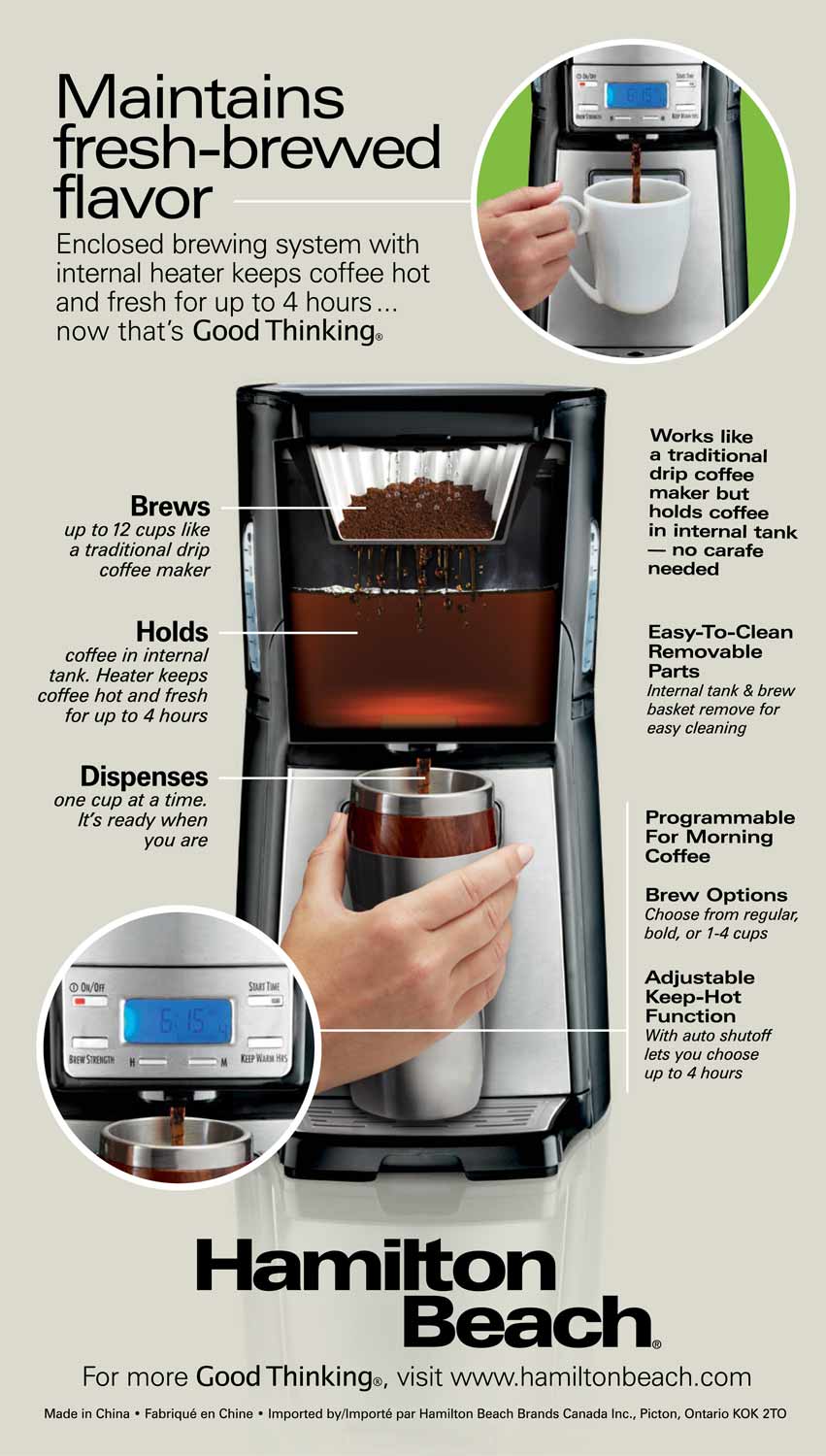
How To Reset Your Hamilton Beach Coffee Maker
Sometimes, your machine needs a reset to clear errors or fix strange behavior. Here’s how:
- Unplug the coffee maker from the wall.
- Wait 10–15 minutes.
- Plug it back in.
- Set up the machine again (time, brew settings).
This process clears the control panel memory. Beginners often forget that resetting can solve many problems, especially after a power surge or cleaning cycle.
Hamilton Beach Coffee Maker Models Compared
Hamilton Beach offers many models, each with different features and troubleshooting needs. Here’s a quick comparison:
| Model | Key Features | Common Issues | Best For |
|---|---|---|---|
| FlexBrew | Single-serve & carafe | Clogged pod holder | Variety drinkers |
| Programmable 12-Cup | Timer, auto shut-off | Overflow, slow brew | Families |
| Single-Serve Scoop | Fast brew, no pods | Weak coffee, leaks | Solo users |
| 2-Way Brewer | Single or carafe | Basket not seated | Flexible use |
Non-obvious insight: Not all troubleshooting steps fit every model. For example, FlexBrew’s pod holder needs special cleaning, while Single-Serve Scoop works best with medium ground coffee. Always check your model’s manual for unique parts or error codes.

Practical Troubleshooting Steps For Each Problem
Let’s walk through how to solve specific problems step by step.
Coffee Maker Not Brewing
- Check power cord and outlet.
- Fill water reservoir and seat it firmly.
- Remove and clean filter.
- Run vinegar cleaning cycle.
- Try brewing again.
Slow Brewing
- Descale with vinegar.
- Use medium ground coffee.
- Check filter basket for blockages.
- Clean exit hole.
Bad Taste
- Clean all removable parts.
- Use fresh coffee grounds.
- Rinse after vinegar cleaning.
Leaks
- Inspect water reservoir seal.
- Check carafe for cracks.
- Clean basket and filter.
Not Turning On
- Test outlet with another device.
- Inspect power cord.
- Reset by unplugging.
- If still dead, contact support.
Overflow
- Follow fill lines.
- Place filter flat.
- Clean exit hole.
When To Contact Hamilton Beach Support
Some problems need expert help. Contact support if:
- The machine won’t turn on after checking power
- Internal parts are broken
- Error codes won’t clear after cleaning and resetting
Hamilton Beach offers customer service through their official website and phone lines. Warranty covers certain repairs, usually for 1–2 years.
Real-life Examples
Let’s look at how people solved common problems:
- Amy’s FlexBrew wouldn’t brew: She found coffee grounds stuck in the pod holder. Cleaning it fixed the issue.
- John’s 12-Cup overflowed: He realized he was using too fine coffee grounds. Switching to medium grind stopped the overflow.
- Sara’s Single-Serve tasted bitter: She cleaned the machine with vinegar and switched to fresh coffee. The taste improved.
These stories show that small changes can solve big problems.
Preventing Future Problems
You can avoid most coffee maker issues by:
- Cleaning regularly
- Using filtered water (reduces mineral buildup)
- Not overfilling
- Following the manual instructions
Non-obvious tip: Many beginners miss that tap water can cause faster mineral buildup. If you have hard water, use bottled or filtered water to extend your machine’s life.
Hamilton Beach Coffee Maker Troubleshooting Faq
Frequently Asked Questions
What Should I Do If My Coffee Maker Leaks From The Bottom?
Check the water reservoir seal. Remove and clean it, and make sure it sits flat. If the seal is cracked, order a replacement. Also, inspect the carafe for damage and ensure the filter basket is seated correctly.
Why Does My Coffee Taste Bitter Or Weak?
Bitter coffee usually means the machine is dirty or the grounds are old. Clean the machine with vinegar and use fresh coffee. Weak coffee happens if you use too few grounds or the grind is too coarse. Follow the recommended coffee-to-water ratio and use medium ground coffee.
How Often Should I Descale My Hamilton Beach Coffee Maker?
Descale every 2–3 months, or more often if you have hard water. Descaling removes mineral buildup and keeps the machine working well.
What Do The Blinking Lights Or Error Codes Mean?
Blinking lights or codes show that something needs attention—like cleaning, adding water, or fixing a block. Check your user manual for each code. Usually, cleaning or resetting the machine solves the problem.
My Coffee Maker Won’t Turn On. What Should I Check First?
First, check the power cord and outlet. Test the outlet with another device. If the outlet works, unplug the coffee maker, wait 10 minutes, then plug it back in. If it still won’t turn on, contact Hamilton Beach support.
Getting your Hamilton Beach coffee maker back to working order doesn’t have to be difficult. With these troubleshooting steps, clear tables, and practical tips, you can solve most problems yourself. Regular cleaning and careful use keep your machine brewing great coffee for years. If you ever need more help, visit the Hamilton Beach Customer Support page for expert advice and warranty information.
Now, your coffee maker is ready for another perfect cup. Enjoy your coffee—and your day!

