

Unplug, isolate the source, secure connections, remove interference, and reseat or repair components.
You want to know how to fix a buzzing speaker fast and for good. I’ve fixed home theater speakers, studio monitors, car systems, and tiny Bluetooth boxes. Buzzing is common and fixable. In this guide, I show how to fix a buzzing speaker step by step. You will learn causes, quick tests, and real fixes that last.

36% off Today’s Exclusive Deals
Limited-time Exclusive Deals. Check current discount on Amazon.
Check Price on Amazon As an Amazon Associate I earn from qualifying purchases.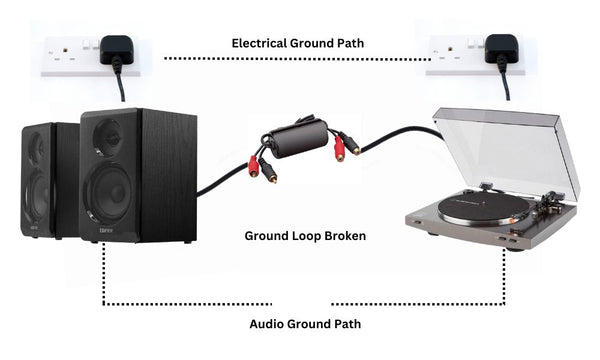
What buzzing sounds mean and how to tell the source
Not all buzz is the same. Some is a deep hum. Some is a sharp, high whine. Each sound points to a different cause.
Here is a quick way to spot the source:
- If the buzz stays when volume is at zero, suspect power or wiring.
- If the buzz gets louder with volume, suspect the source or amp.
- If you hear 50/60 Hz hum, think power or a ground loop.
- If the buzz is a high hiss or whine, think cable noise or RF from phones.
- If it rattles at bass hits, think loose screws, a torn cone, or a rubbing coil.
A fast isolation test helps. Swap in a known-good source or cable. Try a phone on battery. Move the speaker to a different outlet. If the buzz follows the speaker, the speaker is at fault. If it stays in the room, the room power or other gear is the issue.

Main causes of a buzzing speaker
Buzz often comes from one of a few things. Knowing them is half the fix.
- Loose or bad cables. RCA or 3.5 mm plugs get dirty. Speaker wire can fray.
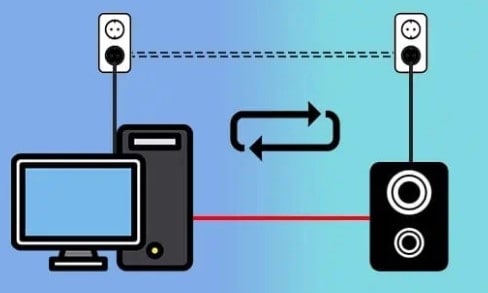
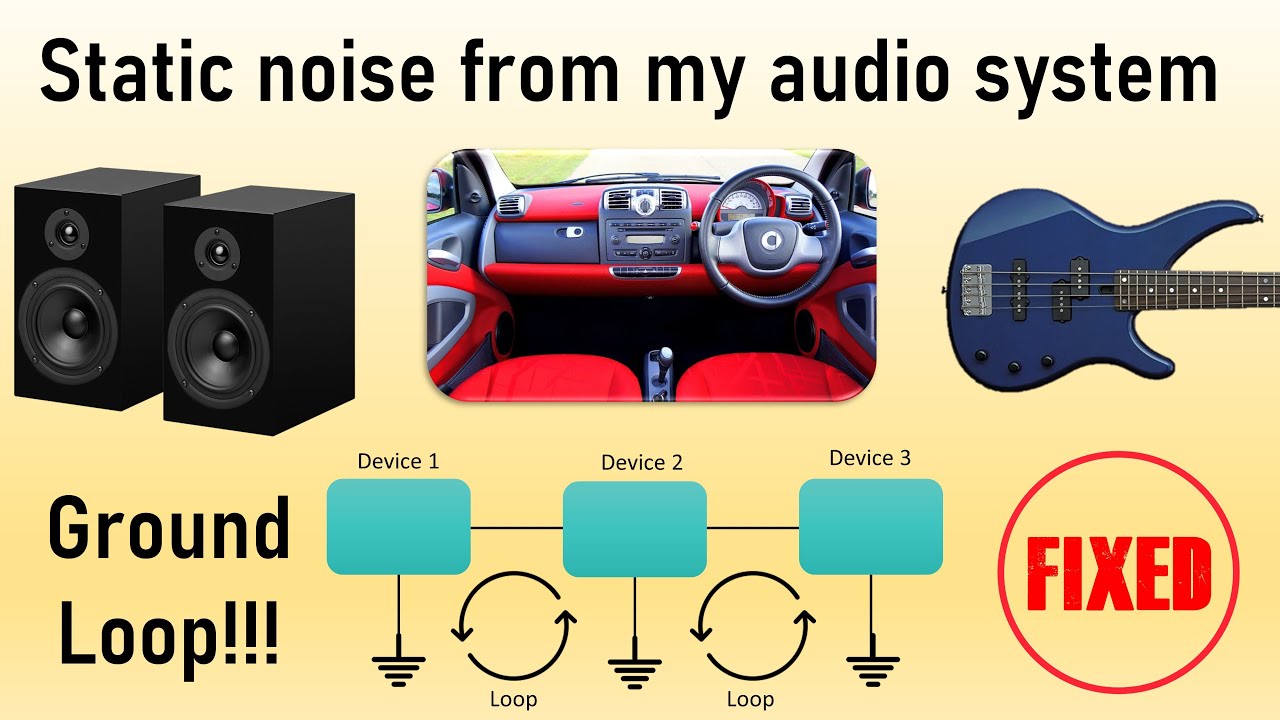
- Ground loops. Two or more devices on different outlets can fight each other.
- Power noise. Cheap power bricks or dimmers leak noise into your audio.
- RF and EMI. Wi‑Fi routers, phones, and USB hubs can inject whine.
- Gain and clipping. Hot signals or wrong EQ cause harsh buzz at peaks.
- Driver issues. Loose screws, torn surrounds, or a rubbing voice coil.
- Amp faults. Failing capacitors and noisy op‑amps in powered speakers.
In my studio, I once heard a nasty buzz on a monitor. It was only there when my laptop charger was plugged in. A USB isolator and a balanced cable path ended it in seconds.
How to fix a buzzing speaker: a step-by-step guide
If you came here to learn how to fix a buzzing speaker in minutes, start here. Work from safe, simple checks to deeper fixes.
- Power and safety
- Turn off gear. Unplug the speaker. Do not open a unit under warranty.
- If it is a powered speaker, wait a minute to discharge caps.
- Isolate the chain
- Test with a phone on battery. One cable direct to the speaker or amp.
- Swap cables. Try a different input. Move to a new outlet or room.
- If the buzz is gone, add gear back one piece at a time.
- Fix cables and connections
- Reseat every plug until it clicks. Tighten binding posts.
- Clean contacts with an electronics contact cleaner. Wipe dry.
- Replace any cable with kinks, loose tips, or green corrosion.
- For long runs, use balanced cables (XLR or TRS) instead of RCA.
- Solve ground loops the safe way
- Plug all audio gear into the same power strip to share ground.
- Use a ground loop isolator on unbalanced lines like RCA or 3.5 mm.
- For live rigs, a DI box with isolation works well.
- Do not remove the safety ground pin. That is a shock risk.
- Remove interference
- Keep audio cables away from power cords and wall warts.
- Move phones, routers, and hubs away from the speaker.
- Add ferrite cores to noisy USB and power lines if needed.
- Set gains to avoid clipping
- Set source volume to 70–80%. Set amp or speaker to a clean level.
- Reduce bass boost and extreme EQ cuts. They can cause distortion.
- If the buzz only happens at max volume, back off the gain.
- Check the speaker driver and cabinet
- Remove the grille. Gently press the cone in four spots. It should move smooth. Scratchy feel means a rubbing voice coil.
- Tighten driver and amp plate screws. Loose parts can rattle.
- Look for torn surrounds. Small tears can be glued with speaker repair kits.
- If the coil rubs or the cone is ripped, replace or recone the driver.
- Test the power supply on powered speakers
- If you hear steady 50/60 Hz hum with no input, suspect the PSU.
- Try a different outlet. Try a filtered surge strip.
- Bad capacitors need a tech. Watch for bulges or heat.
- Final verification
- Play pink noise or a clean test track. Sweep volume up and down.
- Wiggle cables and tap the cabinet edge. No new buzz should appear.
This is how to fix a buzzing speaker the right way. Keep notes on what changed the sound. That speeds future fixes.

Advanced tips: ground loops, balanced audio, and powered monitors
Ground loops are the top pain point. They happen when gear sees more than one return path to ground. That small voltage becomes a big hum.
Use these pro moves:
- Use balanced lines end to end. XLR from interface to monitors is ideal.
- Keep computer audio isolated. A USB isolator or a balanced DAC helps.
- For AV receivers, use a ground loop isolator on cable TV lines. They cause hum too.
- In cars, route RCA lines away from the 12 V power run. Check amp grounds.
Studio monitors buzz for other reasons too. Plate amps can hiss if gain is high. Set input sensitivity per the manual. Then use the interface output to set level. Many brands publish gain charts. Follow them and you will hear a clean floor.
If you still ask how to fix a buzzing speaker on a desk with a laptop, try this chain: laptop to balanced audio interface, interface to monitors via XLR, both on the same strip. That path kills 90% of common noise.
Prevent buzzing before it starts
The best way to learn how to fix a buzzing speaker is to not need to. Small habits help.
- Use short, high‑quality cables. Replace crushed ones at once.
- Keep power and audio runs at right angles. Do not bundle them.
- Label and tie cables to reduce stress on jacks.
- Dust vents and ports. Heat shortens the life of caps and amps.
- Update firmware on smart speakers and receivers.
- After moves, recheck every plug and screw.
I learned this the hard way after a gig. A single loose speakON screw made a sub buzz all night. Now I keep a tiny screwdriver in my rack bag.
Tools, tests, and quick checks
A few cheap tools make how to fix a buzzing speaker much easier.
- Contact cleaner. Cleans noisy pots and plugs.
- Multimeter. Checks cable continuity and shorts.
- Spare cables. Known-good RCA, TRS, XLR, and speaker wire.
- Ferrite cores. Clip-on filters for USB and power noise.
- Flashlight and small screwdrivers. For cabinet checks.
- Test tracks. Use pink noise and sine sweeps to spot rattles.
Fast tests I like:
- Battery pop test for passive speakers. A 1.5 V battery across the speaker wire should make a small pop and move the cone.
- Headphone-as-mic trick. Use a headphone as a quick mic to find rattles.
- The finger press test. Light pressure on the cone can change buzz if the surround is torn.
Repair or replace: cost, time, and when to call a pro
Not every fix needs a shop. But some do.
DIY friendly
- Cable swaps, grounding, and routing fixes. Free to $40.
- Contact cleaning and screw tightening. Free to $10.
- Surround re-glue on budget speakers. $15 to $40.
Pro jobs
- Recone or driver swap. $60 to $200+ per driver.
- Plate amp repair on powered monitors. $120 to $300.
- Vintage gear service. Parts may be rare and pricey.
If a speaker is cheap, replacement is often smarter. If it is part of a matched pair, try to replace both or match the model. When you want to know how to fix a buzzing speaker without risk, a local shop can test in minutes and confirm the cause.

Frequently Asked Questions of how to fix a buzzing speaker
How do I know if the buzz is from a ground loop?
Unplug the audio cable from the speaker. If the hum stays, it is likely power or the amp. If the hum stops, you may have a ground loop in the signal chain.
How to fix a buzzing speaker at high volume only?
Lower the input gain and raise the output volume in small steps. Remove heavy bass boost and check for clipping lights on your amp or interface.
How to fix a buzzing speaker on a PC or laptop?
Test on battery power first. If the buzz stops, use a USB isolator or a balanced audio interface, and keep the laptop charger and audio cables on one power strip.
Can phone or Wi‑Fi signals cause speaker buzz?
Yes, phones, routers, and Bluetooth can leak into unshielded lines. Move them away and switch to balanced cables to block RF noise.
How to fix a buzzing speaker that rattles on bass?
Tighten all screws, check the grille and ports, and inspect the cone and surround for tears. Small tears can be glued; heavy damage needs a new driver.
Will a surge protector or power conditioner help?
A good surge strip can reduce some noise and protect gear. A true power conditioner or isolation transformer helps more with dirty mains but costs more.
Is it safe to use a 3‑to‑2 prong adapter to stop hum?
No, do not defeat the safety ground. Use a ground loop isolator, balanced cabling, or a DI box with isolation instead.
Conclusion
Buzzing can feel scary, but it is a trail of clues. Start simple. Isolate the chain. Clean and reseat. Fix ground loops the safe way. Check the driver and gain. With this plan, you now know how to fix a buzzing speaker with confidence.
Take action today. Run the tests, log what changes, and lock in a clean setup. Want more tips like this? Subscribe, share your results, or drop a question so we can help you dial in silence.

