

Using a standing desk can be a game changer for your workday. Many people feel tired or uncomfortable after sitting for hours. You might have heard that standing desks help with posture, focus, and even energy. But there’s more to it than just standing up.
If you use a standing desk the wrong way, you could end up with sore feet, aching legs, or back pain. In this article, you’ll learn how to use a standing desk correctly, avoid common mistakes, and build healthy habits.

36% off Today’s Exclusive Deals
Limited-time Exclusive Deals. Check current discount on Amazon.
Check Price on Amazon As an Amazon Associate I earn from qualifying purchases.Whether you’re new to standing desks or want to improve your setup, you’ll find clear guidance, practical tips, and useful examples. Let’s explore how to make your standing desk work for you.
Why Use A Standing Desk?
Standing desks have become popular in offices, schools, and homes. The main reason is simple: sitting for long periods is linked to health problems. According to the CDC, adults spend more than 6 hours a day sitting. Research shows that too much sitting can increase the risk of heart disease, diabetes, and obesity.
Switching between sitting and standing helps your body stay active. Studies show that using a standing desk can:
- Improve posture
- Reduce back pain
- Boost energy levels
- Help with focus
One key insight many beginners miss: standing desks are not only about standing. The real benefit comes from changing positions often and moving throughout the day.
Setting Up Your Standing Desk
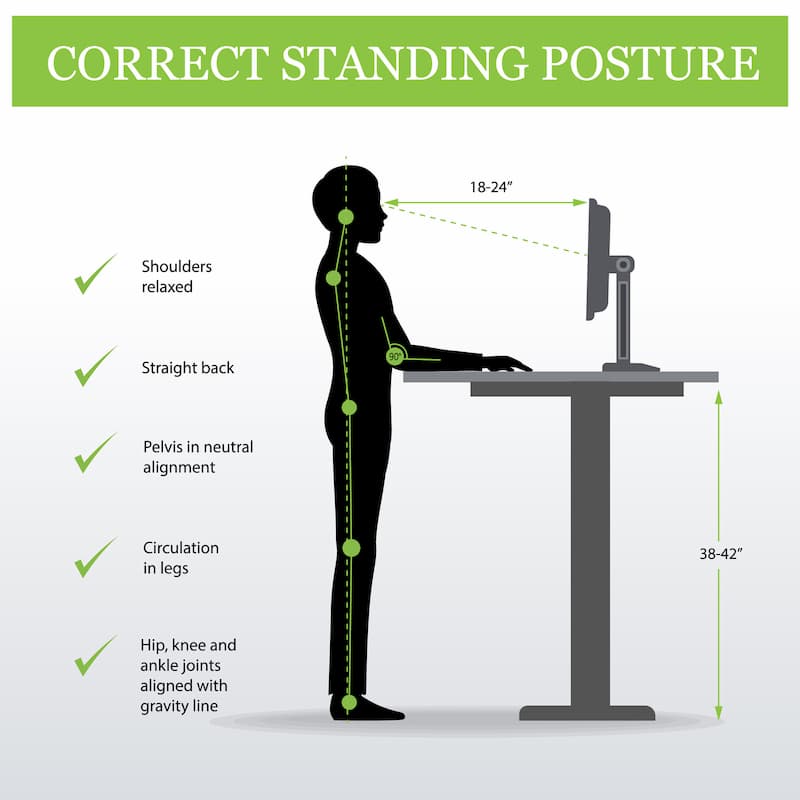
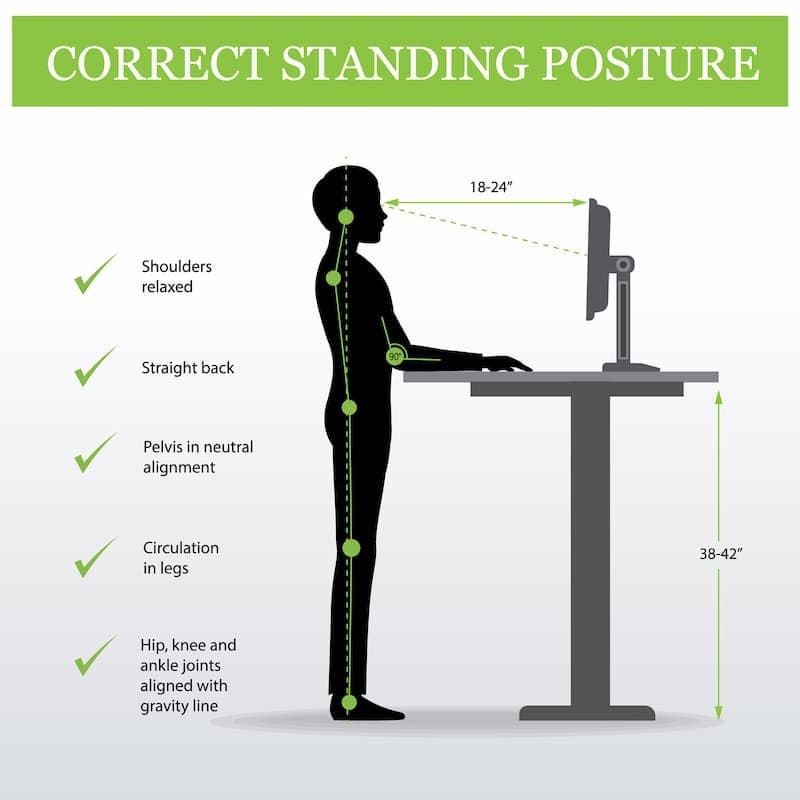
Your desk setup matters as much as how you use it. Getting the right height and position is essential. Here are the steps to set up your standing desk for comfort and productivity:
Find The Right Desk Height
The ideal desk height depends on your own body. To find the best height:
- Stand upright, shoulders relaxed.
- Keep your elbows bent at 90 degrees.
- Place your hands on the desk surface. Your wrists should be flat, not bent up or down.
Most people need a desk height between 38–46 inches. But this can vary based on your height. Here’s a quick reference for average desk heights:
| Height (ft/in) | Recommended Desk Height (in) |
|---|---|
| 5’2″ | 38 |
| 5’8″ | 42 |
| 6’0″ | 46 |
Monitor Position
Your monitor height is just as important. Place your monitor so the top of the screen is at or slightly below your eye level. Your eyes should look slightly down at the screen. Keep the monitor about 20–28 inches from your face.
Keyboard And Mouse Placement
Keep your keyboard and mouse at the same level. Your forearms should be parallel to the floor. Avoid reaching up or down for your mouse.
Foot Support
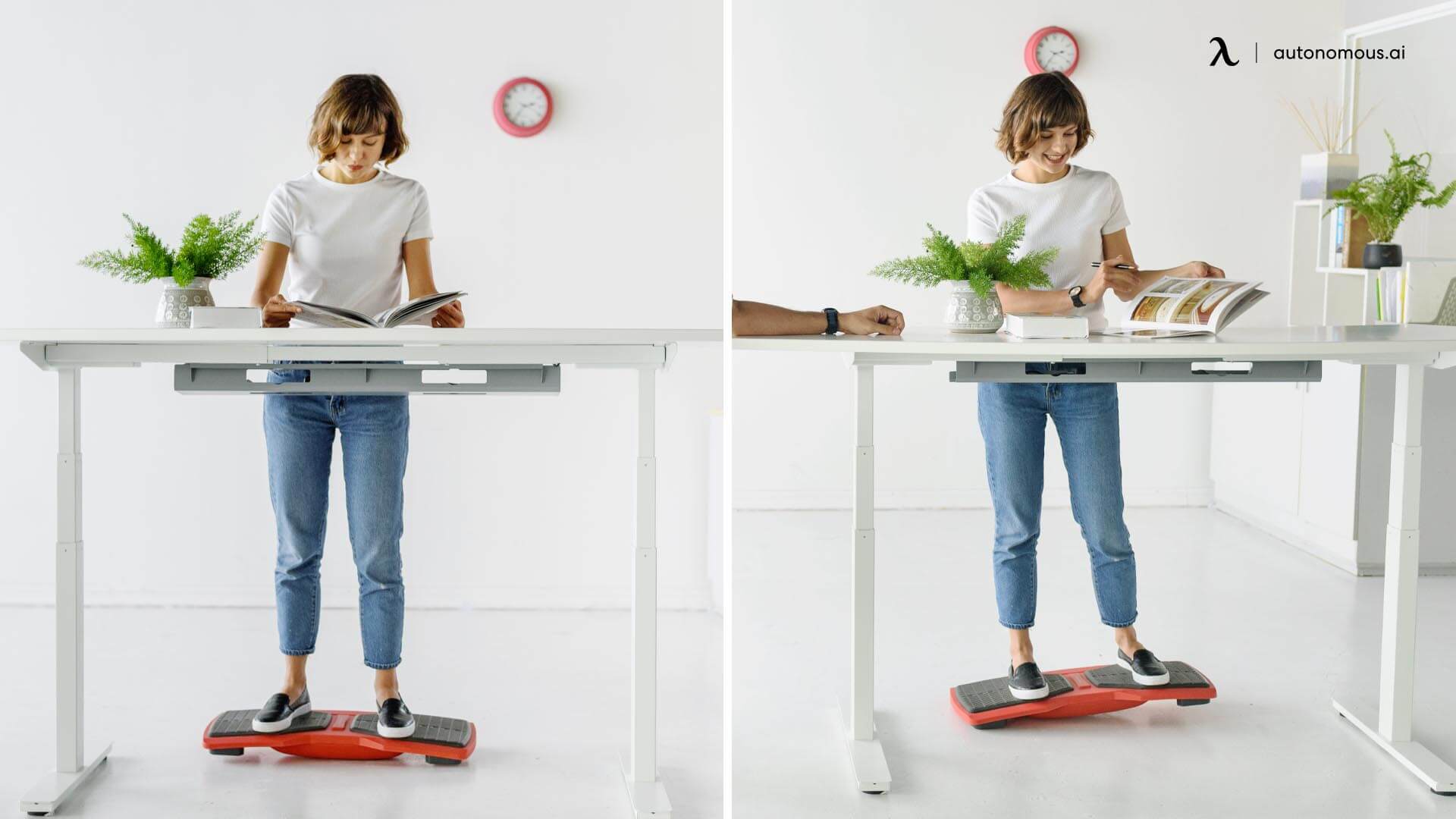
Many beginners overlook foot support. Standing on a hard floor for hours can cause pain. Use a standing mat or a small footrest to reduce pressure. Changing your foot position throughout the day helps prevent fatigue.
Lighting And Space
Good lighting reduces eye strain. Make sure your workspace is well-lit. Keep your desk surface clear to give yourself room to move.
Standing Desk Vs Sitting Desk: What’s Different?
Standing desks are not just taller versions of regular desks. They change the way you work and feel. Here’s a simple comparison to help you understand the main differences:
| Feature | Sitting Desk | Standing Desk |
|---|---|---|
| Posture | Often slouched | Encourages upright posture |
| Movement | Limited | Easy to shift or stretch |
| Energy | Lower | Higher |
| Health Risks | High (if sitting long hours) | Lower (if used properly) |
Many people think standing desks are only for people with back pain, but they can benefit almost anyone who works at a desk.
How To Use A Standing Desk: Step-by-step Guide
It’s easy to think you should stand all day. That’s a mistake. The best way to use a standing desk is to mix standing and sitting. Here’s how to do it right:
1. Start Gradually
Don’t switch to standing all day at once. Start with 20–30 minutes at a time. Increase your standing time slowly over a week or two.
2. Alternate Between Sitting And Standing
Change positions every 30–60 minutes. This keeps your muscles active and prevents tiredness.
A helpful tip: Use a timer or app to remind you when to switch.
3. Keep Moving
Standing still for hours can be hard on your body. Shift your weight, stretch, or take short walks. Try simple movements:
- Rock back and forth from heel to toe
- Stretch your arms overhead
- Bend your knees gently
4. Wear Comfortable Shoes
Wear flat, supportive shoes. Avoid heels or sandals. Your shoes should cushion your feet and help you stand comfortably.
5. Use A Foot Mat
A standing mat helps reduce fatigue. It gives your feet a soft surface and encourages small movements.
6. Adjust Your Desk For Tasks
Some tasks need different desk heights. For example, typing and writing require your elbows at 90 degrees. Reading or video calls may need a slightly higher monitor.
7. Listen To Your Body
If you feel pain or discomfort, sit down or adjust your setup. Standing should not hurt.
8. Stay Hydrated
Many people forget to drink water when standing. Keep a bottle at your desk and take sips often.
9. Track Your Progress
Keep a journal or use an app to track your standing time. This helps you see patterns and improve your routine.
10. Include Short Breaks
Take a 2–5 minute break every hour. Walk around, stretch, or do a quick exercise.
Common Mistakes When Using A Standing Desk
Standing desks can help your health, but only if you avoid these common mistakes:
- Standing too long: This can cause foot, leg, or back pain. The goal is balance.
- Poor posture: Leaning on the desk or slouching can cause aches.
- Wrong desk height: If your desk is too high or low, you’ll strain your arms and shoulders.
- Ignoring footwear: Thin or hard shoes lead to discomfort.
- No movement: Standing still is as risky as sitting still.
- Skipping breaks: Your body needs rest and movement.
One insight that surprises many new users: It’s normal to feel tired at first. Your body needs time to adjust. Don’t push yourself to stand more than feels comfortable.
Creating A Healthy Standing Desk Routine
Building a routine helps you get the most from your standing desk. Here’s how to create a healthy pattern:
Morning
Start your day sitting. Use this time to check emails or plan tasks. After 30–60 minutes, switch to standing.
Midday
Stand while working on projects or calls. Move around when possible. After lunch, sit for a short period to relax.
Afternoon
Alternate between sitting and standing. Use a timer to remind you. End your workday with some light stretching.
Example Routine
Here’s a sample schedule for an 8-hour workday:
- 9: 00–9:30: Sit
- 9: 30–10:00: Stand
- 10: 00–10:30: Sit
- 10: 30–11:00: Stand
- 11: 00–12:00: Sit
- 12: 00–12:30: Stand
- 12: 30–1:30: Lunch break (sit)
- 1: 30–2:00: Stand
- 2: 00–2:30: Sit
- 2: 30–3:00: Stand
- 3: 00–4:00: Sit
This schedule lets you stand for about 3–4 hours total. Adjust the times to fit your own needs.
How Standing Desks Affect Health
Standing desks are not magic, but they have real health benefits. Here are some examples:
- Back pain relief: A study by the CDC found that using a standing desk reduced back pain by 54% in office workers.
- Better energy: People often report feeling less tired and more alert after switching to a standing desk.
- Improved posture: Standing encourages you to keep your back straight and shoulders relaxed.
- Lower risk of disease: Sitting less can lower your risk of diabetes, heart disease, and obesity.
But remember, standing is not a cure-all. It works best when combined with movement, stretching, and regular breaks.
Standing Desk Accessories
To get more comfort and value from your standing desk, consider these accessories:
- Anti-fatigue mat: Cushions your feet and encourages movement.
- Footrest: Lets you shift weight and reduces leg strain.
- Monitor arm: Helps adjust your screen easily.
- Cable organizer: Keeps wires neat and safe.
- Desk riser: Turns a regular desk into a standing desk.
Each accessory helps solve a specific problem. For example, anti-fatigue mats are proven to reduce lower limb discomfort after long standing sessions.
Standing Desk Safety Tips
Safety is important. Here’s how to protect your body and workspace:
- Keep your desk clear of clutter to avoid tripping.
- Use stable furniture to prevent tipping or wobbling.
- Adjust your monitor to reduce neck strain.
- Change your standing position often.
- Don’t stand on slippery or uneven surfaces.
Standing Desk Myths And Facts
Standing desks are surrounded by myths. Let’s clear up some confusion:
- Myth: Standing desks burn lots of calories.
- Fact: Standing burns about 8 more calories per hour than sitting.
- Myth: You should stand all day.
- Fact: Too much standing can cause health problems.
- Myth: Anyone can use a standing desk.
- Fact: Some people with joint or balance issues may need extra support.
- Myth: Standing desks fix posture instantly.
- Fact: It takes time and practice to improve posture.
Comparing Standing Desk Types
Standing desks come in different styles. Here’s a comparison of three common types:
| Desk Type | Adjustability | Price Range | Best For |
|---|---|---|---|
| Fixed Height | None | $100–$300 | Simple setups |
| Manual Adjustable | Hand crank | $200–$500 | Budget users |
| Electric Adjustable | Button control | $400–$1,000+ | Frequent adjustments |
Most office workers prefer electric adjustable desks for easy switching. But manual and fixed desks are suitable for simple needs.
Standing Desk For Home Vs Office
Standing desks work in both home and office settings, but there are some differences:
- Home: More flexibility in setup. You can choose your own schedule and accessories.
- Office: May need to follow company guidelines. Often limited by space or budget.
Tips for home use:
- Find a quiet, well-lit spot.
- Customize the desk for your own tasks.
Tips for office use:
- Follow safety rules.
- Share tips with coworkers.
Real-life Example: Transitioning To A Standing Desk
Maria, a graphic designer, switched to a standing desk after years of back pain. She started with 15 minutes of standing per hour. After two weeks, she increased to 35 minutes per hour. She used an anti-fatigue mat and wore sneakers.
Within a month, Maria noticed less back pain and more energy in the afternoons.
One thing she learned: It’s important to listen to your body and adjust your routine. Standing desks are flexible tools, not one-size-fits-all solutions.
Tips For Staying Motivated
Building a standing desk habit takes time. Here are tips to stay motivated:
- Set reminders to stand and sit.
- Track your progress in a notebook.
- Celebrate small wins (like less back pain).
- Join a group or find a coworker who also uses a standing desk.
- Try new standing desk accessories.
Standing Desk And Productivity
Many people notice a boost in productivity with a standing desk. A study from Texas A&M University found that call center workers using standing desks were 45% more productive than those sitting all day. Standing can help you stay alert, reduce distractions, and finish tasks faster.
But productivity gains depend on your routine. If you feel tired or distracted, adjust your standing time.
Standing Desk For Different Age Groups
Standing desks are not only for adults. Teens and older adults can benefit too:
- Teens: Helps prevent slouching and keeps energy up.
- Older adults: Can improve balance and reduce stiffness.
However, children and seniors should use standing desks under supervision. Adjust height and time to match their needs.
Frequently Asked Questions
What Is The Ideal Ratio Of Sitting To Standing?
Most experts recommend a 1:1 or 2:1 ratio. For every hour sitting, spend 30–60 minutes standing. Adjust this based on your comfort and health.
Can A Standing Desk Help With Weight Loss?
Standing burns a few more calories than sitting. However, the effect is small. For real weight loss, combine standing with exercise and healthy eating.
What Shoes Are Best For Standing Desks?
Wear flat, cushioned, supportive shoes. Athletic shoes or sneakers are best. Avoid heels or sandals.
How Long Does It Take To Adjust To A Standing Desk?
Most people need 1–2 weeks to feel comfortable. Start slow, increase standing time gradually, and listen to your body.
Where Can I Find More Research About Standing Desks?
You can find detailed studies at the CDC Worksite Physical Activity page.
Using a standing desk is a smart way to improve your work life and health. The key is balance—mix sitting and standing, keep moving, and adjust your setup for comfort. With the right routine, you’ll feel better, work smarter, and stay energized throughout the day.

