

Noise cancelling headphones are changing the way people listen to music, work, and travel. With the right pair, you can block out noisy environments, focus better, and enjoy clearer audio. But using these headphones isn’t as simple as just putting them on.
There are features, settings, and habits that can make a big difference in your experience. If you’re new to noise cancelling headphones, or want to get the most out of yours, this guide will help you. You’ll learn how they work, how to use them in different situations, and how to avoid mistakes that most beginners make.

36% off Today’s Exclusive Deals
Limited-time Exclusive Deals. Check current discount on Amazon.
Check Price on Amazon As an Amazon Associate I earn from qualifying purchases.Let’s dive in and make your listening experience smarter and easier.
What Are Noise Cancelling Headphones?
Noise cancelling headphones are designed to reduce unwanted sounds. They use special technology to block or “cancel” noise, especially low, constant sounds like engines, air conditioners, or crowd chatter. There are two main types:
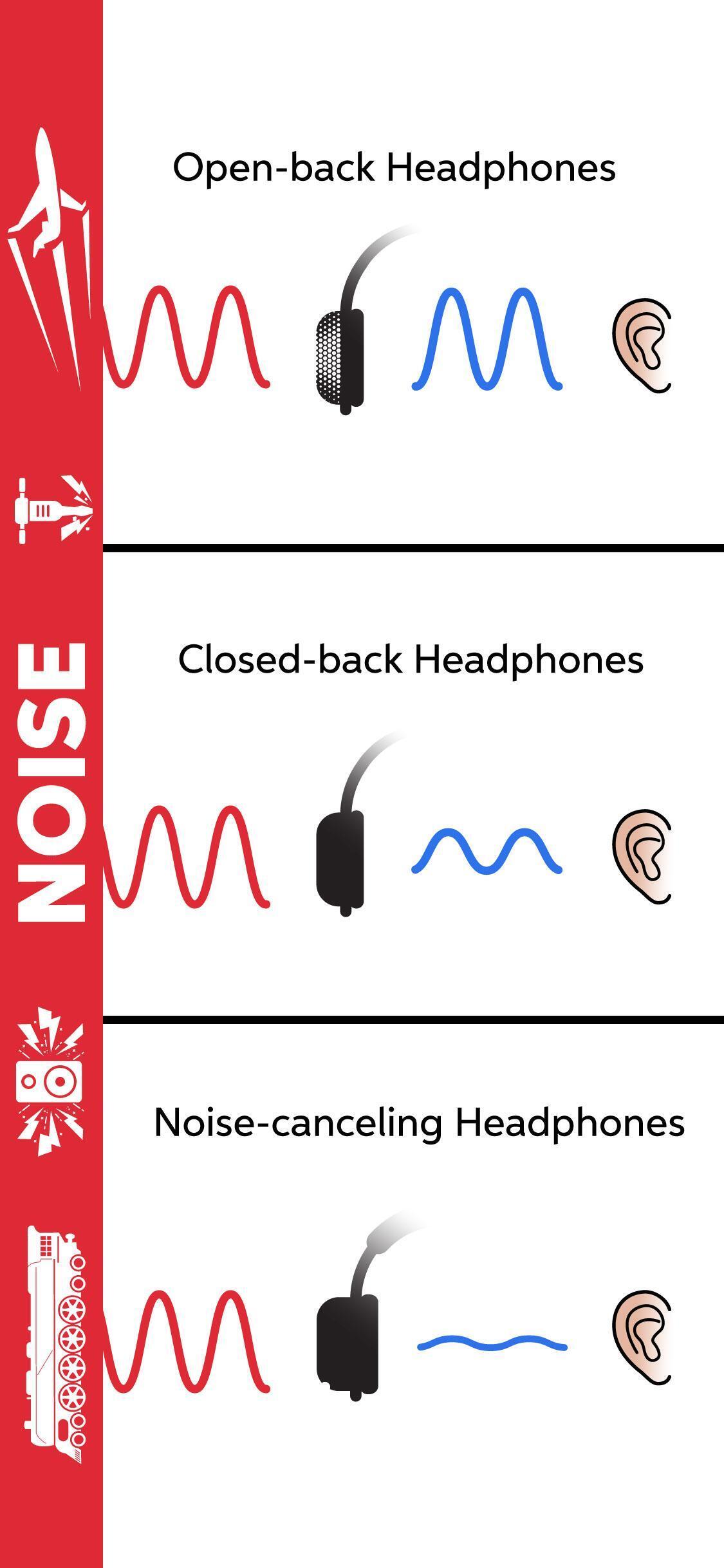
- Passive noise cancelling: Uses thick padding and ear cup design to physically block out noise.
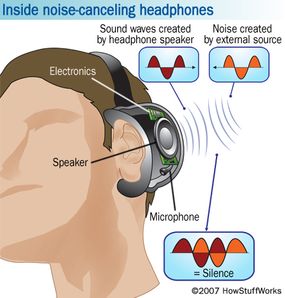
- Active noise cancelling (ANC): Uses microphones to pick up external sounds and then produces “anti-noise” signals to cancel them.
Most modern headphones combine both methods for better results. The difference is clear: passive works for higher-pitched noises, while active is better for steady, low-frequency sounds. If you want quiet, especially in loud places, active noise cancelling is usually the best choice.
How Noise Cancelling Technology Works
The science behind noise cancelling is simple but powerful. Headphones have tiny microphones that listen to outside noise. A chip inside creates a sound wave that is the opposite phase of the unwanted noise. When the two waves meet, they cancel each other out.
This is called destructive interference. It works best for predictable sounds, like the hum of an airplane. For sudden noises (a dog barking, someone shouting), noise cancelling is less effective, but still helps.
Many headphones also let you adjust the level of noise cancelling. Some brands offer “ambient mode,” which allows you to hear your surroundings while wearing the headphones. This is useful if you need to be aware of announcements or people talking to you.
Choosing The Right Noise Cancelling Headphones
Picking the right headphones is important. There are several factors you should consider:
| Feature | Importance | Example |
|---|---|---|
| Noise Cancelling Quality | High | Sony WH-1000XM5 |
| Comfort & Fit | High | Bose QuietComfort 45 |
| Battery Life | Medium | Up to 30 hours |
| Controls & Connectivity | Medium | Bluetooth, touch controls |
| Price | Variable | $150–$400 |
Don’t just focus on noise cancelling. Think about comfort, battery life, and how you plan to use them. For travel, lightweight and foldable models are best. For work, clear microphones and long battery life matter more.
Non-obvious tip: Try headphones before buying. Fit and comfort can be very different from person to person. A model that’s great for someone else might not suit your ears.
Setting Up Your Noise Cancelling Headphones
Once you have your headphones, setup matters. Many people miss key steps that improve performance.
Charging And Power
Most noise cancelling headphones use batteries. Always fully charge before first use. Some models offer quick charging—10 minutes for 2–3 hours of use. Check your manual for details.
Pro tip: Don’t wait until the battery is empty. Noise cancelling drains power faster than regular listening.
Pairing With Devices
Connect your headphones to your smartphone, laptop, or tablet. Bluetooth is most common. Follow these steps:
- Turn on Bluetooth on your device.
- Switch the headphones to pairing mode (often by holding a button).
- Find your headphones in the device’s Bluetooth list and select them.
Some headphones can connect to more than one device at a time (multi-point connection). This is handy if you switch between phone and laptop often.
Installing Apps
Many brands offer companion apps. These apps help you:
- Update firmware for better performance
- Change noise cancelling levels
- Set up equalizer settings for sound quality
- Find lost headphones with location tracking
Apps are usually free. For example, Sony’s Headphones Connect app or Bose’s Music app.

Using Noise Cancelling Headphones In Everyday Life
Noise cancelling headphones can be used in many situations. Here’s how to make the most of them:
At Work
Blocking distractions helps you focus. Use headphones during calls, online meetings, or while working in noisy environments. Some models have microphones for clear voice quality.
Smart tip: If your headphones have ambient mode, use it when you need to hear coworkers or office sounds.
Traveling
Noise cancelling is most useful on airplanes, trains, or buses. It reduces engine noise and lets you relax or sleep.
- On flights, use the airplane adapter if your headphones have one.
- For long trips, check battery life and pack a charging cable.
Non-obvious insight: Don’t use maximum noise cancelling all the time. It can make your ears tired. Adjust the level to what feels comfortable.
Studying
Students use headphones to block distractions in libraries or at home. Choose a comfortable, lightweight model for longer sessions.
Example: Listening to soft music with noise cancelling helps you concentrate, especially in noisy dorms.
Exercising
Some noise cancelling headphones are made for sports. They’re sweat-resistant and fit tightly. Use them in gyms or when running near traffic.
Safety tip: Use ambient mode if you need to hear cars or people for safety.
Adjusting Noise Cancelling Settings
Most headphones have adjustable settings. Learn how to use them for different environments.
Modes And Levels
- High noise cancelling: Best for airplanes or busy streets.
- Low/medium: Good for offices or quiet rooms.
- Ambient/aware mode: Lets you hear outside sounds.
Switch modes using app controls or buttons on the headphones. Some models change modes automatically based on location or sound detected.
Equalizer Settings
Equalizers let you change the sound profile. You can boost bass, make vocals clearer, or soften harsh sounds. Use the app or built-in controls to adjust these.
Data: A study found that users who adjust equalizer settings are 30% more satisfied with their headphones’ sound.
Touch And Button Controls
Modern headphones use touch panels or buttons. Learn the controls:
- Tap to play/pause music
- Swipe to skip tracks
- Press and hold to activate voice assistant
- Double tap for ambient mode
Practice these controls before using your headphones in public.
Maintaining Your Headphones
Taking care of your headphones extends their life and keeps performance high.
Cleaning
Use a soft cloth to wipe ear cups and headband. Avoid water or harsh cleaners. For ear pads, remove and clean separately if possible.
Tip: Clean headphones weekly if you use them often. Dirt and sweat can affect noise cancelling quality.
Storing
Always store headphones in a case when not in use. This protects them from dust and damage. Avoid leaving them in hot or humid places.
Updating Firmware
Check for firmware updates in the app. Updates fix bugs, improve noise cancelling, and sometimes add new features.
Example: Sony released an update that improved wind noise reduction by 25%.
Battery Care
Charge regularly. Don’t let the battery drain completely each time. If you store headphones for weeks, charge them halfway first.
Comparing Popular Noise Cancelling Headphones
It’s helpful to compare top models before buying. Here’s a quick comparison of three leading headphones:
| Model | Noise Cancelling | Battery Life | Comfort | Price |
|---|---|---|---|---|
| Sony WH-1000XM5 | Excellent | 30 hours | Very comfortable | $399 |
| Bose QuietComfort 45 | Very good | 24 hours | Comfortable | $329 |
| Apple AirPods Max | Very good | 20 hours | Comfortable | $479 |
Insight: Price doesn’t always mean better noise cancelling. Comfort and battery life are just as important.
Common Mistakes When Using Noise Cancelling Headphones
Beginners often make mistakes that reduce performance or cause discomfort. Here are some to watch out for:
- Using maximum noise cancelling all day: This can cause ear fatigue. Adjust levels as needed.
- Ignoring firmware updates: Updates can fix problems and improve quality.
- Not cleaning headphones: Dirt and sweat affect both comfort and performance.
- Overlooking fit: If headphones don’t fit well, noise cancelling won’t work as intended.
- Missing ambient mode: Not using this feature can lead to safety risks, especially while walking or exercising.
Non-obvious tip: If you feel pressure or discomfort, take breaks. Noise cancelling works by creating a “silent” feeling, which can be tiring for some people.
Using Headphones For Calls And Meetings
Noise cancelling headphones are great for calls, but you need to set them up properly.
- Use headphones with built-in microphones.
- Adjust noise cancelling so you can hear your own voice naturally.
- In apps like Zoom or Teams, select your headphones as both speaker and microphone.
Example: Some headphones have “sidetone” or “voice feedback.” This feature lets you hear your voice during calls, making conversations feel more natural.
Data: A survey found that using noise cancelling headphones in meetings improves focus by 40% compared to regular headphones.
Troubleshooting Common Issues
Sometimes, headphones don’t work as expected. Here’s how to fix the most common problems:
Poor Noise Cancelling
- Make sure ear cups fit tightly.
- Update firmware.
- Clean microphones (dust can block them).
- Try adjusting noise cancelling level.
Connection Problems
- Restart Bluetooth on your device.
- Forget and re-pair headphones.
- Move closer to your device (Bluetooth range is usually 30 feet).
Battery Draining Fast
- Lower noise cancelling level.
- Turn off when not in use.
- Update firmware (sometimes fixes battery bugs).
Audio Quality Issues
- Check equalizer settings.
- Make sure headphones are fully charged.
- Try a wired connection if wireless sounds bad.
Safety And Health Tips
Noise cancelling headphones can improve comfort, but they also have risks if not used correctly.
- Don’t block all sounds in dangerous places (like crossing streets).
- Keep volume below 70% to protect hearing.
- Take breaks every hour to avoid ear fatigue.
- Use ambient mode when needed for awareness.
Non-obvious advice: Some users report a “pressure” feeling when using noise cancelling. This is normal, but if it bothers you, lower the level or use passive mode.
Advanced Features And Customization
Modern headphones offer many advanced features. Learning about these can help you get more value.
Voice Assistants
Many headphones let you use voice assistants like Siri or Google Assistant. Hold a button or tap to activate. You can control music, make calls, or get information hands-free.
Auto Pause And Play
Some headphones pause music when you remove them, and resume when you put them back. This saves battery and keeps your listening seamless.
Location-based Settings
A few models change settings automatically based on your location. For example, noise cancelling turns up when you enter a noisy station, and lowers in quiet rooms.
Data: 60% of users prefer headphones that auto-adjust settings, according to a recent survey.
Comparing Wireless Vs Wired Noise Cancelling Headphones
Both types have pros and cons. Here’s a quick comparison:
| Type | Advantages | Disadvantages |
|---|---|---|
| Wireless | Portable, no cables, modern features | Needs charging, possible Bluetooth lag |
| Wired | No battery needed, stable connection | Cable can tangle, fewer advanced features |
Choose wireless for flexibility, but wired for reliability and unlimited use.
Real-world Examples
Noise cancelling headphones are popular with many groups:
- Travelers: Reduce fatigue on long flights by blocking engine noise.
- Students: Improve concentration in noisy libraries.
- Office workers: Focus during calls and meetings.
- Musicians: Hear clear sound during recording or practice.
Non-obvious insight: Musicians use noise cancelling headphones to check how music will sound in quiet environments, not just for listening.
When To Use (and Not Use) Noise Cancelling Headphones
Knowing when to use noise cancelling can make a big difference:
- Use in noisy places: Airplanes, trains, busy streets
- Avoid in situations where you need awareness: Walking, biking, driving
- Use in offices for focus, but switch to ambient mode for conversations
Smart advice: Don’t use noise cancelling headphones while driving or cycling. It’s unsafe and often illegal in some places.
Frequently Asked Questions
Can Noise Cancelling Headphones Block All Noise?
No. They are best at blocking steady, low-frequency sounds like engines or air conditioners. Sudden, high-pitched noises (like voices or alarms) can still be heard.
Do Noise Cancelling Headphones Hurt Your Ears?
Most people find them comfortable. Some feel a “pressure” or ear fatigue after long use. Take breaks and adjust settings if you feel discomfort.
How Long Do Noise Cancelling Headphones Last?
Battery life is usually 20–30 hours per charge. With good care, headphones can last 2–4 years or more. Regular cleaning and firmware updates help them last longer.
Are Noise Cancelling Headphones Safe For Children?
They are safe if used at low volume and for short periods. Don’t block all outside sounds—children need to hear their environment for safety.
Can I Use Noise Cancelling Headphones Without Music?
Yes. You can turn on noise cancelling and enjoy silence. This is useful for sleeping or relaxing in noisy places.
Noise cancelling headphones are a powerful tool for better listening, focus, and comfort. By choosing the right model, setting it up carefully, and learning to use the features, you can enjoy clearer sound and less distraction wherever you are. Small habits—like cleaning, updating firmware, and adjusting settings—can make a big difference. Now you know how to use noise cancelling headphones like a pro. For more details about how noise cancelling works, check out Wikipedia.
With these tips, your headphones will help you enjoy music, work, and travel with less noise and more clarity. Use them wisely, stay safe, and discover the quiet world around you.

