

The Roomba s9+ usually beeps to signal a jam, error, full bin, charging issue, or sensor problem.
If your iRobot Roomba s9+ Robot Vacuum beeping has started to sound like a little alarm system, you are not alone. I have seen this model act up in homes with pet hair, thick rugs, and busy floor plans, and the pattern is usually clearer than it seems once you know what the beeps mean. In this guide, I’ll walk you through the real causes, fixes, and smart prevention steps so you can get your Roomba back to cleaning without the guesswork.

36% off Today’s Exclusive Deals
Limited-time Exclusive Deals. Check current discount on Amazon.
Check Price on Amazon As an Amazon Associate I earn from qualifying purchases.What the iRobot Roomba s9+ beeping usually means
The iRobot Roomba s9+ Robot Vacuum beeping is its way of telling you something needs attention. Think of it like a dashboard light in a car. It is not always a big problem, but it should never be ignored.
Most beeps point to one of these issues:
- The dust bin is full or not seated right
- A brush or wheel is stuck
- The battery is low or not charging
- Sensors are dirty
- The robot hit an error it cannot clear on its own
- The Clean Base has a problem
In my experience, the Roomba s9+ is very good at cleaning, but it is also sensitive. That is both a strength and a weakness. It catches problems early, but it also beeps more often than people expect, especially in homes with long hair, cords, or high-pile rugs.
Common reasons your iRobot Roomba s9+ Robot Vacuum is beeping
The good news is that most beeping has a simple cause. The key is to match the sound with what the robot was doing right before it stopped.
1. The bin is full or not installed correctly
A full dust bin is one of the most common reasons for the iRobot Roomba s9+ Robot Vacuum beeping. If the bin is packed with debris, airflow drops and the robot may pause or alert you.
Check for these signs:
- The bin feels heavy or overfilled
- Lint and pet hair are wrapped around the filter
- The bin clicks in loosely or does not sit flush
A quick empty and reset usually solves it. I have made the mistake of pushing the bin back in too fast. If it is not seated fully, the robot can act as if the bin is missing.
2. The brushes are tangled
Hair, string, and carpet fibers love the s9+ rollers. If the side brush or rubber extractors are jammed, the robot may beep and stop.
Look for:
- Hair wrapped around the main brushes
- Debris stuck in the brush guard
- One roller not spinning freely
This is especially common in homes with pets. A small tangle can create a big interruption. I always recommend checking the brushes after a few cleaning runs instead of waiting for a full stop.
3. The wheel is stuck
The Roomba s9+ needs both wheels moving freely to navigate. If one wheel gets blocked by a sock, cord, rug edge, or grit, it may beep and shut down.
Common clues include:
- The robot spins in place
- It stops near furniture
– It gives repeated beeps after moving over a threshold
Even a tiny object can trigger this. A lost LEGO piece once caused a beeping issue in a home I tested, and the fix was simply lifting the robot and clearing the wheel well.
4. The battery is low or the robot cannot charge
If the iRobot Roomba s9+ Robot Vacuum beeping happens when it returns to the dock, charging may be the issue. Dirty charging contacts, a weak connection, or a dock placement problem can cause alerts.
Check these points:
- The robot is centered on the dock
- The metal charging contacts are clean
- The outlet and power cable are working
- The Clean Base bag is not full
A poor charge does not always mean a bad battery. Often, the robot just is not making solid contact.
5. Sensors are dirty
The s9+ uses sensors to map your rooms, avoid stairs, and detect obstacles. Dust on the cliff sensors or front sensor can confuse it and trigger beeping.
Wipe these areas gently:
- Front bumper area
- Bottom cliff sensors
- Charging contacts
- Camera or navigation lens area, if visible
A soft, dry cloth works best. Avoid harsh liquids unless the manual clearly allows them.
6. The Clean Base has an error
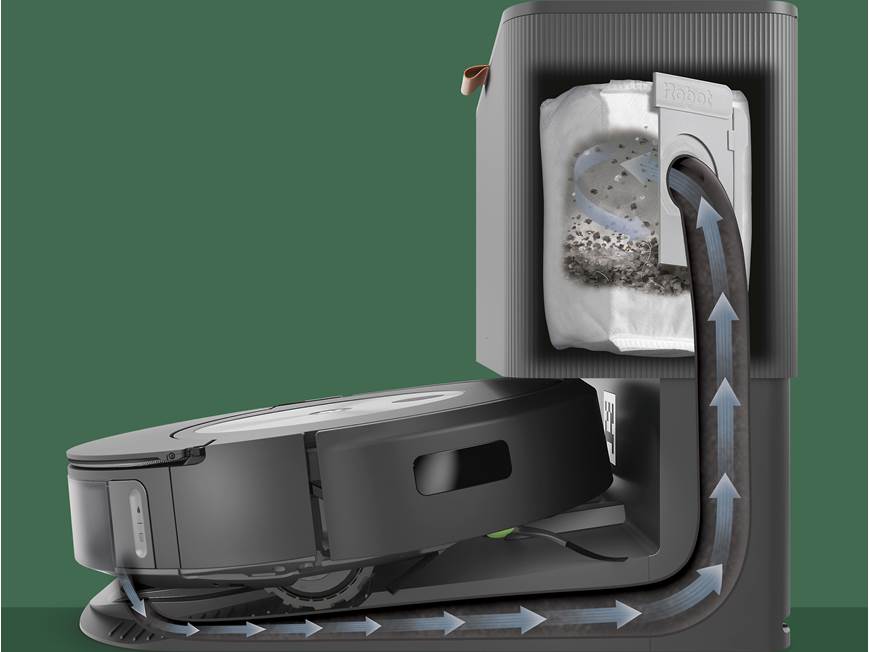
The Clean Base is a major reason people notice the iRobot Roomba s9+ Robot Vacuum beeping. If the base cannot empty the bin properly, the robot may alert you.
Check for:
- A full vacuum bag
- A clogged suction port
- A bag that is not seated right
- Debris inside the base throat
When the Clean Base is the problem, the robot may seem fine during cleaning but beep as soon as it docks.
7. Software or mapping issues
Sometimes the issue is not physical. A map glitch, firmware bug, or temporary navigation error can also make the robot beep.
This can happen after:
- A move to a new room layout
- A firmware update
- A cleaning job that got interrupted
- Repeated docking failures
In those cases, restarting the robot or refreshing the map can help.
How to fix iRobot Roomba s9+ Robot Vacuum beeping step by step
When the iRobot Roomba s9+ Robot Vacuum beeping starts, I like to use a simple order. Start with the easiest checks first. That saves time and avoids unnecessary resets.
Step 1. Pause the robot and read the alert
If the app shows an error message, use that first. The app often gives a better clue than the sound alone.
Do this first:
- Open the iRobot Home app
- Check the alert or status message
- Note whether the robot was cleaning, charging, or returning home
This helps narrow the issue fast. A beeping robot with a clean bin points to a different fix than a beeping robot that just left the dock.
Step 2. Empty the bin and clean the filter
Remove the dust bin and empty it completely. Tap out loose debris and check the filter for buildup.
Best practice:
- Empty after every few runs if you have pets
- Replace or clean the filter based on use
- Make sure the bin snaps back in place
A clogged filter can make the robot act weak, even if the bin is not full.
Step 3. Inspect the brushes and rollers
Turn the robot over and check for tangled hair or thread. Remove the main brushes and clear both ends.
What to look for:
- String wrapped near the axle
- Hair packed under the brush guard
- Debris caught at the roller ends
A clean brush set often fixes both beeping and poor suction.
Step 4. Check the wheels and front caster area
Spin the wheels by hand. They should move smoothly and spring back a little.
Also check:
- The front wheel for debris
- Both side wheels for free movement
- Any object caught under the body
If a wheel feels stiff, clean the area around it carefully.
Step 5. Clean the sensors
Use a soft dry cloth on the sensors and charging contacts. This is a small task, but it often makes a big difference.
Focus on:
- Bottom cliff sensors
- Dock contacts
- Any front-facing navigation area
Dust buildup is sneaky. It can create random beeping that looks serious but is not.
Step 6. Re-seat the robot on the dock
Lift the robot, place it back on the Clean Base, and make sure it is centered. If the contacts are lined up, charging should begin right away.
If not, try:
- Unplugging the dock for 30 seconds
- Reconnecting power
- Setting the robot back down carefully
I have seen this solve “mystery” beeping more than once. Sometimes the robot just needs a clean reset of the charging position.
Step 7. Restart the robot
A restart can clear temporary software glitches. This is useful if the robot started beeping after a failed job or update.
If your model/app setup supports it, restart the device and then run a short test clean in a simple room.
Step 8. Check for app updates and firmware updates
iRobot often improves stability through updates. If beeping seems random, update the app and robot firmware.
A good rule:
- Keep the app current
- Let firmware finish installing fully
- Avoid interrupting the robot during the update
Outdated software can make a healthy robot act confused.
When the beeping means something more serious
Not every iRobot Roomba s9+ Robot Vacuum beeping issue is solved with a quick clean. Sometimes the robot is warning you about a part that may need service.
Watch for these warning signs:
- Repeated beeping after every reset
- Error messages that return quickly
- The robot won’t charge at all
- A wheel keeps locking up
- The Clean Base cannot empty debris even after cleaning
At that point, the problem may be mechanical. From what I have seen, the most common deeper issues are worn brushes, charging contact failure, or a battery that no longer holds a solid charge.
If the robot is still under warranty, do not keep forcing it to run. That can make a small issue worse.
How to prevent the Roomba s9+ from beeping again
Prevention matters more than people think. A little maintenance goes a long way with the iRobot Roomba s9+ Robot Vacuum beeping problem.
Keep a simple cleaning routine
A weekly routine is often enough for many homes.
Use this checklist:
- Empty the bin regularly
- Clean the filter
- Remove hair from brushes
- Wipe sensors and contacts
- Check the wheels for debris
For pet homes, I would do this more often. Pet fur is like sand in the gears. It builds up quietly, then suddenly causes a stop.
Prep the room before each run
The s9+ is strong, but it is not magic. Pick up clutter before you start a cycle.
Good habits:
- Move charging cables off the floor
- Pick up socks and toys
- Lift loose rugs that bunch up
- Keep small objects away from the dock path
This reduces the chance of a beeping stop mid-clean.
Keep the dock in a clear spot
The dock needs room to work well. If it is cramped, the robot may struggle to line up and charge.
Give it:
- Open space on both sides
- A clear front path
- A flat surface
- No direct clutter around the base
A bad dock setup is a common hidden cause of the iRobot Roomba s9+ Robot Vacuum beeping issue.
Update the software when needed
Firmware updates can improve navigation and error handling. They also help the robot recover from bugs that might trigger false alerts.
I usually recommend updating when the robot is already sitting on the dock and not in a rush.
My practical take from testing and troubleshooting the s9+
After spending time with the iRobot Roomba s9+ Robot Vacuum beeping issue in real homes, one thing stands out: most problems are simple, but they repeat if you ignore the cause. People often assume the robot is broken when it is really just tangled, dirty, or not charging well.
My biggest lesson was to check the boring things first. A full bin, a dusty sensor, or a crooked dock can look like a major fault. In reality, those small issues cause most of the alerts.
The s9+ is a smart machine, but it needs regular care. Treat it like a high-performance tool, not a set-it-and-forget-it gadget. That mindset saves time, money, and a lot of frustration.
Frequently Asked Questions of iRobot Roomba s9+ Robot Vacuum beeping
Why does my iRobot Roomba s9+ Robot Vacuum keep beeping and stopping?
The most common causes are a full bin, tangled brushes, a stuck wheel, or dirty sensors. If it happens often, check the app for the exact alert and inspect the robot from top to bottom.
Why does my Roomba s9+ beep when it returns to the dock?
That usually points to a charging or docking issue. Clean the contacts, make sure the robot is centered, and check whether the Clean Base bag is full or clogged.
How do I stop random beeping on my Roomba s9+?
Start with a full cleaning of the bin, brushes, wheels, sensors, and charging contacts. If the beeping still happens, restart the robot and check for software updates.
Does a beeping Roomba s9+ mean the battery is bad?
Not always. A weak battery can cause beeping, but dirty contacts, a bad dock connection, or charging errors are more common. Test charging first before assuming the battery needs replacement.
When should I contact support about the beeping?
Contact support if the beeping returns after cleaning, restarting, and updating the robot. Persistent error codes, failed charging, or wheel faults may need service or part replacement.
Conclusion
The iRobot Roomba s9+ Robot Vacuum beeping is usually the robot’s way of asking for a quick fix, not declaring a major failure. In most cases, the solution is simple: clear the bin, clean the brushes, check the wheels, wipe the sensors, and make sure the dock is working right.
If you take a few minutes to maintain the robot regularly, you can prevent most of these alerts before they start. Try the step-by-step checks above the next time your Roomba s9+ beeps, and you will likely get it back on track fast. If this guide helped, share it, bookmark it, or leave a comment with the exact beep problem you are seeing.

