

Is Bambu Lab P1s Worth It?
If you’re looking for a reliable 3D printer that’s easy to use and packed with features, you’ve probably seen the Bambu Lab P1S. This model has been getting a lot of attention for its quality, speed, and smart technology. But is it really a good choice for your money? Let’s break down what makes the P1S special, compare it to other options, and see if it’s worth your investment.
Main Features Of Bambu Lab P1s
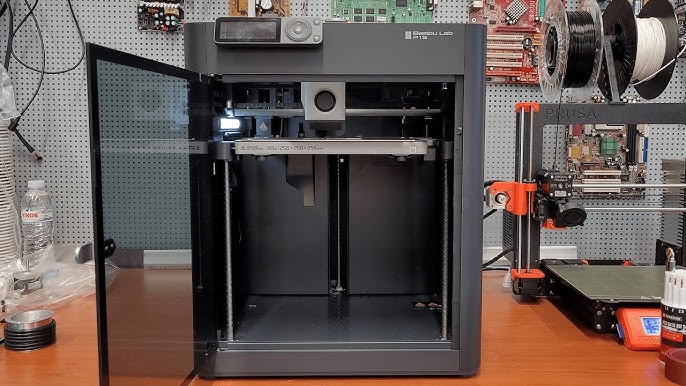
The Bambu Lab P1S is designed for both beginners and experienced users. It stands out for its fast printing, high accuracy, and automatic features that reduce manual work. Here are some key features:

36% off Today’s Exclusive Deals
Limited-time Exclusive Deals. Check current discount on Amazon.
Check Price on Amazon As an Amazon Associate I earn from qualifying purchases.- Print Speed: Up to 500 mm/s, which is much faster than most hobby printers.
- Build Volume: 256 x 256 x 256 mm, allowing medium-sized projects.
- Automatic Bed Leveling: Ensures prints stick well and reduces failed prints.
- Enclosed Chamber: Helps control temperature and improves quality for tricky materials like ABS.
- Direct Drive Extruder: Handles flexible filaments better than Bowden setups.
- Noise Level: Runs quieter than many competitors.
These features make the P1S stand out in daily use. Beginners can start printing without much setup, while advanced users get precise control.
Performance And User Experience
The P1S is known for its reliable performance. It rarely jams and produces consistent results. The setup process is simple, with most parts pre-assembled. Many users report printing their first test model within 20 minutes of opening the box.
Print Quality Comparison
Let’s compare the P1S to other printers in its price range:
| Model | Print Quality (Layer Resolution) | Speed | Materials Supported |
|---|---|---|---|
| Bambu Lab P1S | 0.1 mm (high) | Up to 500 mm/s | PLA, ABS, PETG, TPU |
| Creality Ender 3 V2 | 0.12 mm (good) | Up to 180 mm/s | PLA, PETG |
| Prusa i3 MK3S+ | 0.09 mm (very high) | Up to 200 mm/s | PLA, ABS, PETG, TPU |
The P1S offers fast printing without losing detail. It supports more materials than basic printers, making it flexible for different projects.

Price And Value
The Bambu Lab P1S costs about $699 (as of June 2026). This is higher than entry-level printers but cheaper than many professional models. To decide if it’s worth it, consider what you get:
- Speed: Cuts print times by up to 50% compared to budget models.
- Reliability: Fewer failed prints means less wasted material.
- Ease of Use: Automatic calibration and smart features save time.
Cost Comparison Table
Here’s how the P1S compares to other popular models:
| Model | Price | Key Feature | Warranty |
|---|---|---|---|
| Bambu Lab P1S | $699 | Enclosed, fast, smart | 12 months |
| Creality Ender 3 V2 | $250 | Open frame, slower | 12 months |
| Prusa i3 MK3S+ | $799 | High quality, slower | 24 months |
You’re paying more than basic models, but less than top-end printers. The P1S balances speed, reliability, and features.
Real-world Usage And Examples
People use the P1S for prototyping, hobby models, and even small business production. For example, a designer printed 100 phone cases in less than two days, thanks to its speed and enclosed chamber. Another user reported running 50 prints with zero failures—a sign of strong reliability.
One non-obvious benefit is the enclosed design. It helps with temperature-sensitive materials and reduces warping. Many beginners don’t realize that open-frame printers struggle with ABS and similar plastics. The P1S solves this without needing extra upgrades.
Another insight: the P1S has smart monitoring. It detects print issues like jams or empty filament and pauses automatically. This prevents ruined prints, which is rare at this price point.

Pros And Cons
Let’s quickly look at the strengths and weaknesses.
Pros:
- Very fast printing
- Easy setup and calibration
- Supports many materials
- Reliable, smart features
- Quiet operation
Cons:
- Higher price than entry-level printers
- Limited community support compared to older brands
- Enclosed chamber can be harder to access for repairs
- Not ideal for very large prints
Most users agree the pros outweigh the cons. If you value speed and reliability, the price makes sense.
Should You Buy The Bambu Lab P1s?
If you want a printer that works out of the box, prints fast, and handles tricky materials, the P1S is a solid choice. It’s ideal for users who:
- Print often and need fast results
- Use materials like ABS or TPU
- Prefer less manual setup
- Want smart monitoring for fewer failed prints
If you only print occasionally or don’t mind slow speeds, a cheaper model may be enough. But if you want consistent quality and time-saving features, the P1S stands out.
For more technical details and the latest reviews, you can check the official Bambu Lab website at Bambu Lab.
Frequently Asked Questions
What Materials Can The Bambu Lab P1s Print?
The P1S supports PLA, ABS, PETG, and TPU. Its direct drive extruder and enclosed chamber make it good for flexible and temperature-sensitive filaments.
Is The Bambu Lab P1s Beginner-friendly?
Yes, the P1S has automatic calibration and a simple setup. Most beginners find it easier to use than printers that need manual adjustments.
How Noisy Is The P1s Compared To Other Printers?
The P1S runs quieter than many open-frame printers. The enclosed chamber reduces noise, making it suitable for home or office use.
Does The P1s Require Much Maintenance?
Maintenance is minimal. Basic cleaning and occasional nozzle checks are needed. The smart monitoring alerts you if there’s a jam or empty filament.
How Does The P1s Compare To Prusa I3 Mk3s+?
Both printers offer high quality, but the P1S is faster and has more automation. The Prusa has a larger user community and longer warranty, but prints slower.
In the end, the Bambu Lab P1S delivers a strong mix of speed, reliability, and smart features. If those matter to you, it’s a good investment for serious 3D printing.

