

Most Murray mower problems are fixable with simple checks, cleaning, and basic maintenance.
I have repaired and tuned residential mowers for over a decade, and this Murray Lawn Mower Troubleshooting Guide brings that hands-on experience together with clear steps you can use today. Read on to get a practical, step-by-step approach to diagnosing and fixing the most common Murray issues, saving time and avoiding needless parts swaps.

36% off Today’s Exclusive Deals
Limited-time Exclusive Deals. Check current discount on Amazon.
Check Price on Amazon As an Amazon Associate I earn from qualifying purchases.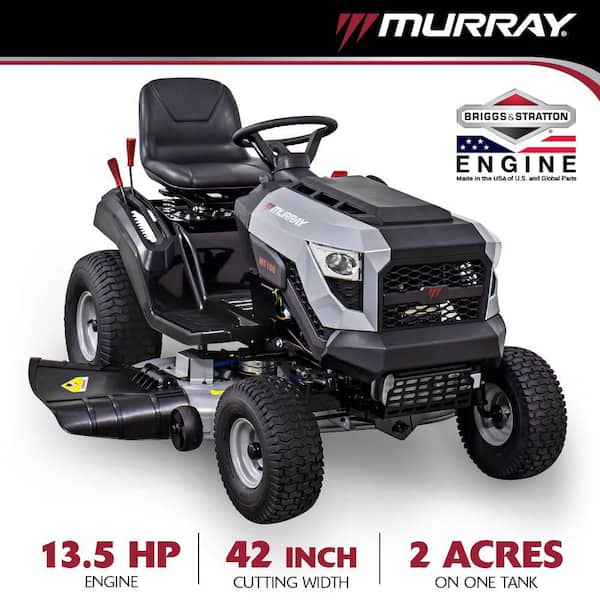
Why this Murray Lawn Mower Troubleshooting Guide works
This Murray Lawn Mower Troubleshooting Guide breaks problems into easy checks you can perform in minutes. You will learn how to spot common faults, test components, and apply fixes that fit most Murray models. The goal is to help you troubleshoot safely and confidently, whether the mower won’t start or it won't drive properly. I’ll share what I learned from years of tune-ups and repairs, including mistakes I made early on and how to avoid them.

Safety first: basic precautions before troubleshooting
Always disconnect the spark plug before doing anything under the deck or near moving parts. Wear gloves and eye protection when handling blades, belts, and fuel. Work on a level surface and use wheel chocks if needed. If you smell fuel or see leaks, ventilate the area and clean up spills before continuing.
Quick diagnostic checklist
Use this fast checklist from the Murray Lawn Mower Troubleshooting Guide to narrow down the issue:
- Visual inspection: Look for loose wires, frayed cables, missing hardware, and fuel leaks.
- Fuel and oil: Check fuel level, old-stale fuel, and oil level.
- Battery and spark: Confirm battery charge for electric start models and inspect the spark plug.
- Air and filters: Check air filter for dirt and the deck for clogged grass.
- Drive system: Look for loose belts, broken pulleys, and seized wheels.
- Safety switches: Test seat, blade, and brake interlocks.
These checks identify over 80% of common faults. Keep a small toolkit and a rag in the trunk; you’ll be surprised how often a loose nut is the culprit.

Starting problems and step-by-step fixes
Starting issues are the most common reason people consult any Murray Lawn Mower Troubleshooting Guide.
Spark plug and ignition
- Remove the spark plug, inspect for fouling or wear, and replace if corroded.
- Test spark by grounding the plug to the engine while cranking; look for a bright blue spark.
- Replace the ignition coil if no spark is present after checking wiring.
Fuel and carburetor
- Old fuel gums up the carburetor. Drain stale fuel and add fresh gasoline with the correct octane.
- Add a small can of carb cleaner if the engine floods; cleaning the bowl and jets often restores performance.
Choke and primer
- Ensure the choke actually moves and the primer bulb (if present) is not cracked.
- Follow the model-specific starting sequence in the owner manual for cold starts.
Safety interlocks
- Verify brake, blade engagement, and seat switches allow starting. A faulty safety switch can prevent cranking.
Engine runs rough, stalls, or loses power
If your engine runs unevenly, this Murray Lawn Mower Troubleshooting Guide recommends checking fuel and air first.
Air filter and intake
- A dirty air filter chokes the engine. Replace or clean a foam filter and replace paper filters regularly.
Carburetor adjustment and cleaning
- Remove the bowl, clean jets, and inspect the float needle. Small clogs cause lean running and stalling.
- Adjust idle and mixture screws per your model’s specs.
Compression and valves
- Low compression will make the engine weak. Perform a compression test; if low, the engine may need professional service.
Exhaust and muffler
- A clogged muffler reduces power. Remove and inspect for carbon build-up or damage.

Cutting and deck performance issues
Uneven cutting, scalping, or poor discharge are common complaints in this Murray Lawn Mower Troubleshooting Guide.
Blade condition and balance
- Inspect blades for nicks and bends. Replace if damaged and balance new blades to reduce vibration.
Deck level and mower height
- Check deck hanger bolts and level the deck side-to-side and front-to-back per the manual.
- Adjust cutting height evenly for a clean striping pattern.
Deck belt and pulleys
- Worn belts slip and cut poorly. Inspect pulleys for wobble or seized bearings and replace worn belts.
Clogging and wet grass
- Wet clippings plug deck chutes. Clean after each use and avoid mowing wet turf.
Drive system, belts, and transmission faults
If your Murray mower won’t move or the drive feels weak, follow these diagnostic steps from the Murray Lawn Mower Troubleshooting Guide.
Belt inspection
- Look for cracked, glazed, or stretched belts. Replace belts that show signs of wear.
Transmission and transaxle checks
- For hydrostatic or gear-drive mowers, check transaxle oil level and look for leaks.
- Test wheel engagement and listen for unusual grinding noises that indicate internal wear.
Control cables and linkages
- Ensure drive cables are properly adjusted and not frayed. Lubricate linkages per the manual.
Tire and wheel issues
- Low tire pressure or damaged wheels affect traction; check and inflate tires to the correct pressure.

Electrical, switches, and charging system
This Murray Lawn Mower Troubleshooting Guide covers the electrical basics to keep your mower reliable.
Battery and charging
- Test battery voltage and charge; a weak battery can prevent electric start models from turning over.
- Inspect the charging system by running the engine and measuring voltage at the battery; it should rise when charging.
Wiring and connectors
- Look for corroded connectors, melted insulation, or rodent damage. Clean and secure loose connections.
Safety switches
- Seat, blade, and clutch interlock switches prevent accidents. Bypass only for testing and never run with bypassed safety systems.
Fuel system and carburetor cleaning steps
Carburetor issues often mimic many problems; this Murray Lawn Mower Troubleshooting Guide gives safe cleaning steps.
Basic carburetor cleaning
- Drain fuel, remove the bowl, and spray carb cleaner into jets and passages.
- Use compressed air to blow passages clear, or rebuild the carb with a kit if corroded.
When to rebuild or replace
- Rebuild when cleaning helps but performance still lacks. Replace if internal parts are badly corroded or cracked.
Fuel filter and lines
- Replace clogged fuel filters and inspect hoses for cracks. Small leaks reduce fuel pressure and cause stalling.
Maintenance schedule and practical tips
Regular care prevents most calls to this Murray Lawn Mower Troubleshooting Guide.
Simple seasonal checklist
- Before season: change oil, replace air filter, inspect blades and belts, sharpen blades.
- Mid-season: check tire pressure, spark plug, and fuel filter.
- End of season: stabilize fuel, fog the engine if stored indoors, and remove the battery.
Practical tips
- Keep a service log with dates and hours. That makes later troubleshooting faster.
- Use OEM or recommended parts for best fit and reliability.
Tools, parts to carry, and when to call a professional
Carry a small kit based on this Murray Lawn Mower Troubleshooting Guide to handle roadside fixes.
Recommended tools
- Spark plug socket, adjustable wrench, screwdrivers, pliers, socket set, insulated gloves.
- Spare spark plug, short length of fuel line, small belt, and a compact multimeter.
When to call a pro
- Call a professional if you detect internal transmission damage, engine knock, low compression, or if the repair needs specialized tools. Complex rebuilds can cost more if done incorrectly.
People also ask
Q: How often should I change oil on a Murray mower?
A: Change oil every 25 to 50 hours for most models, or at least once per season.
Q: Can stale gas ruin my carburetor?
A: Yes. Stale gas leaves deposits that clog jets, so drain or stabilize fuel for long storage.
Q: Why is my Murray mower smoking?
A: Smoking usually means oil in combustion or a fouled air filter; check oil level and filter condition.
Frequently Asked Questions of Murray Lawn Mower Troubleshooting Guide
What should I do if my Murray mower won't start?
Check fuel, spark, and the safety interlocks first. Replace the spark plug and clean the carburetor bowl if necessary.
Why does my Murray mower lose power under load?
A dirty air filter, clogged carburetor, or low compression can cause power loss; inspect filters, clean the carb, and perform a compression test.
How often should I replace the blades on a Murray mower?
Replace blades when they show major nicks, bends, or when sharpening no longer restores an even edge. Typically every 1–2 seasons for regular users.
What causes the drive to stop working on my Murray lawn mower?
Worn or broken belts, damaged transaxle components, or misadjusted drive cables are common causes; inspect belts and linkage first.
Can I use a generic belt or should I get an OEM one?
OEM belts fit better and last longer; use OEM when possible for best results, especially on drive and deck systems.
How do I know if the carburetor needs rebuilding?
If cleaning doesn’t restore performance, or if you find rusted parts and cracked diaphragms, a rebuild is needed.
Is it safe to bypass a seat switch to test the mower?
Temporarily bypassing for testing is okay if you’re careful, but never leave a bypassed switch in place during normal operation.
Conclusion
This Murray Lawn Mower Troubleshooting Guide gives clear, low-risk steps to diagnose and fix the most common Murray mower problems. Start with the simple checks—fuel, spark, air, and belts—then move to more detailed tests if needed. With a small toolkit, regular maintenance, and the testing approach outlined here, you can keep your Murray mower running smoothly and avoid costly repairs. Try the steps on your mower, keep a log of what you changed, and share your results or questions below to get more help.

