

Most connection issues stem from Bluetooth pairing, low battery, or signal interference.
I’ve worked with Peloton gear and tested heart rate setups for years, so I know exactly how frustrating a dropped readout can be. This guide on Peloton Heart Rate Monitor Troubleshooting will walk you through clear fixes, cause analysis, and practical tips. You’ll get step-by-step solutions for common faults, device-specific advice, accuracy tweaks, and when to replace hardware — all in plain language you can follow right away. Read on to fix the problem fast and get reliable heart rate data during every ride.

36% off Today’s Exclusive Deals
Limited-time Exclusive Deals. Check current discount on Amazon.
Check Price on Amazon As an Amazon Associate I earn from qualifying purchases.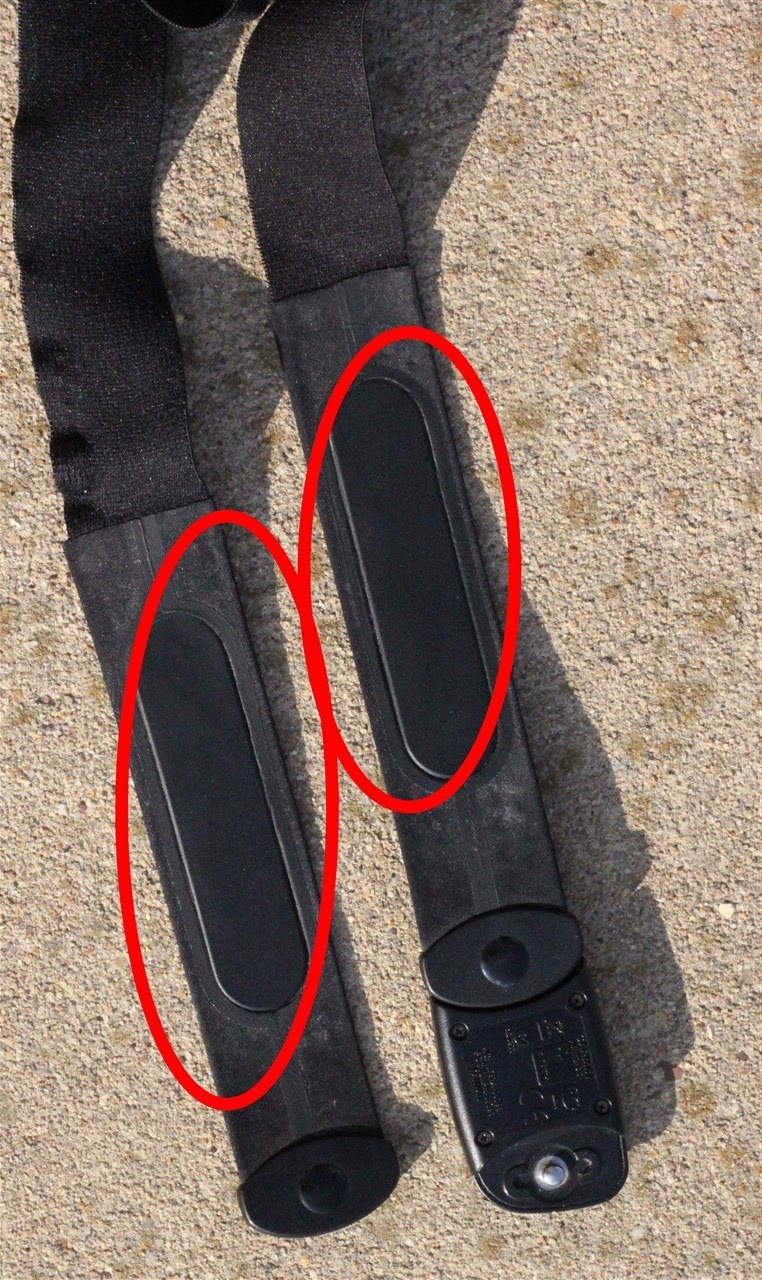
How Peloton Heart Rate Monitor Works
A Peloton Heart Rate Monitor uses sensors to read electrical or optical signals from your body. Chest straps detect the heart’s electrical impulses. Wrist-based monitors use optical sensors and light to estimate pulse. Data is then sent to the Peloton bike or app via Bluetooth or ANT+.
Understanding the basics helps with troubleshooting. If you know whether your sensor uses chest ECG or wrist PPG, you can narrow down likely causes. Most connection problems are protocol or power related, not sensor failure.
Common Issues with Peloton Heart Rate Monitor Troubleshooting
Peloton Heart Rate Monitor Troubleshooting usually addresses these common issues:
- Not pairing with the Peloton device.
- Random signal drops during workouts.
- Inaccurate or delayed readings.
- Conflicts with multiple Bluetooth devices.
- Sensor not detected after firmware or app updates.
These issues show up in both Peloton-branded and third-party monitors. Pinpointing the root cause cuts time to a fix. I’ve seen pairing fail after app updates and signal drops when a phone was between the rider and bike.

Step-by-Step Troubleshooting Guide
Follow this checklist for Peloton Heart Rate Monitor Troubleshooting. Work down the list until the issue is resolved.
-
Basic checks
- Ensure the monitor has fresh batteries or is charged.
- Wear the strap or watch correctly: snug but comfortable.
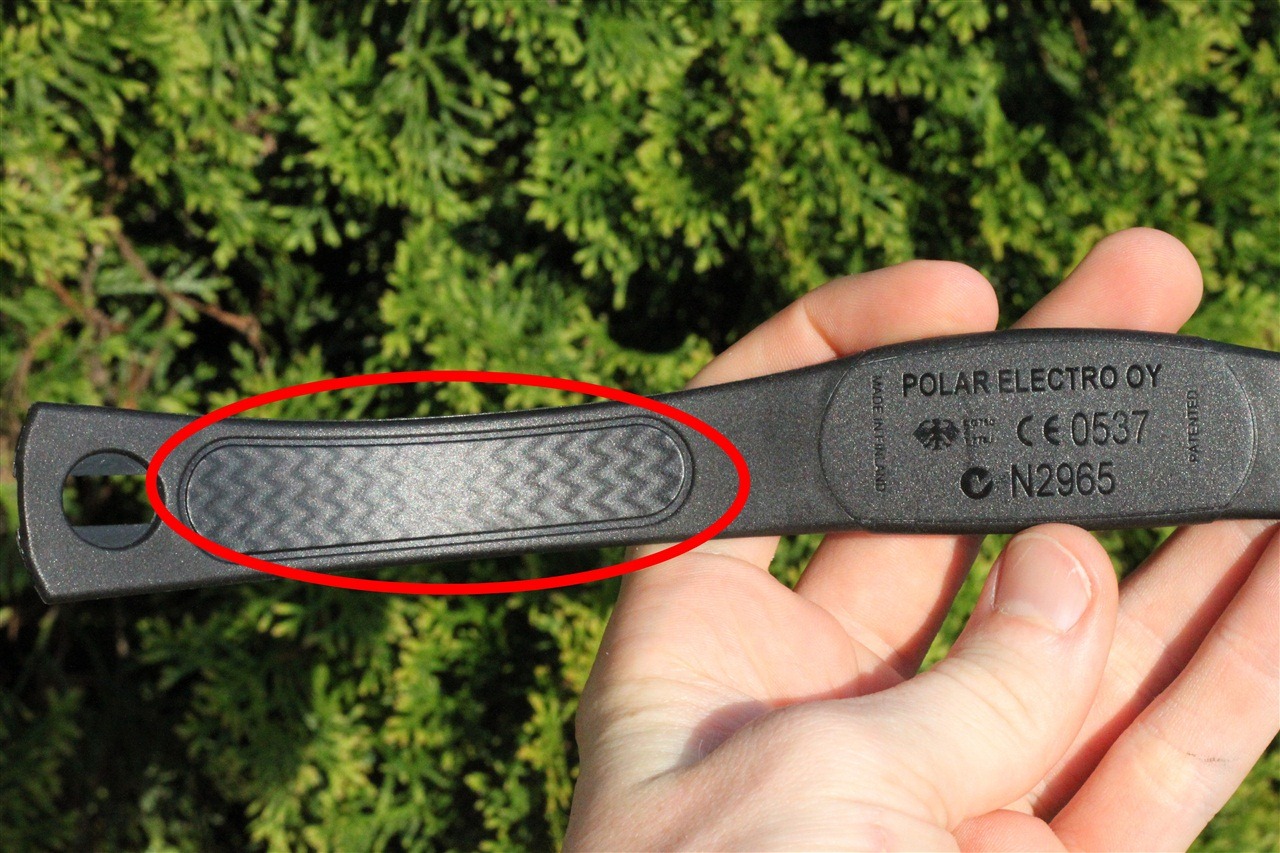
- Moisten chest strap sensors slightly to improve contact.
-
Restart devices
- Reboot the Peloton bike or app.
- Turn your heart rate monitor off and back on.
- Restart any phone or tablet you use for Bluetooth.
-
Re-pair the monitor
- Forget the device in Peloton settings, then rescan.
- Make sure no other app is connected to the monitor simultaneously.
- Use Peloton’s add device flow for heart rate monitors.
-
Check Bluetooth and ANT+
- Confirm the monitor uses Bluetooth or ANT+ and your Peloton supports that protocol.
- If using ANT+, verify the receiver is plugged in and recognized.
-
Update firmware and app
- Update the Peloton app and bike OS if available.
- Update third-party monitor firmware through its app.
-
Reduce interference
- Move other Bluetooth devices away.
- Keep your phone or tablet close to the bike console.
- Avoid Wi-Fi routers or metal objects blocking the signal path.
-
Test with another device
- Pair your monitor to a phone or another app to see if it reads correctly.
- If it works elsewhere, the bike or app is likely the issue.
-
Factory reset or replace
- Reset the monitor if supported.
- Replace the battery or strap if age or wear is suspected.
I once solved a persistent drop by moving my phone from behind the console to the side. The signal improved immediately. Small things often fix big headaches.
Troubleshooting by Device Type
Tailor Peloton Heart Rate Monitor Troubleshooting to your device type for faster results.
Peloton Chest Strap
- Ensure correct alignment and moist sensors.
- Replace the battery if readings are weak.
- Remove and reattach the strap to clean contacts.
Wrist-based Monitors (Apple Watch, Fitbit, etc.)
- Make sure the watch fits snugly above the wrist bone.
- Enable heart rate sharing and permit the Peloton app to access health data.
- Turn off power-saving modes that throttle sensors.
Third-Party Chest Straps (Wahoo, Polar)
- Use the manufacturer’s app to confirm the strap broadcasts.
- Some straps broadcast on multiple channels; pick the Bluetooth option for Peloton.
- Re-pair using Peloton’s device menu.
Bluetooth vs ANT+ adapters
- Verify your Peloton supports ANT+ or needs a Bluetooth-only device.
- Use a certified ANT+ dongle if required and check compatibility.
Tips to Improve Accuracy and Signal Stability
Good habits reduce the need for Peloton Heart Rate Monitor Troubleshooting.
- Proper placement: chest straps should sit just below the chest muscle; watches should sit firm above the wrist bone.
- Moisture: a damp strap improves electrical contact. For wrist sensors, good skin contact helps optical readings.
- Secure fit: loose straps shift and cause noise.
- Firmware and app updates: keep everything current to avoid compatibility bugs.
- Minimize electronic clutter: turn off unneeded Bluetooth devices in the workout area.
From my tests, a snug strap and clean sensors give the most consistent readings. Treat the monitor like a precision tool — small adjustments matter.
When to Replace or Seek Support
Peloton Heart Rate Monitor Troubleshooting can fix most issues, but sometimes replacement or professional help is best.
- Replace the monitor if it fails tests with other devices or if battery changes don’t help.
- Contact Peloton support if your bike or tread won’t pair any monitor after firmware updates.
- Use warranty coverage for defective Peloton-branded monitors.
- Keep screenshots or logs of errors when you contact support to speed resolution.
If you’ve tried the checklist and still have problems, replacement is often cheaper than ongoing unreliable data.
People Also Ask
What if my Peloton won’t find any heart rate monitor?
- Restart the Peloton, power-cycle your monitor, and ensure Bluetooth is enabled. Move other Bluetooth devices away and try pairing again.
Why is my heart rate reading so low or high on Peloton?
- Check strap placement and battery level. Wrist sensors can jump with motion; chest straps usually give more stable readings.
Can the Peloton app use Apple Watch heart rate?
- Yes, but you must enable heart rate sharing in the Health app and allow Peloton to read that data.
Frequently Asked Questions of Peloton Heart Rate Monitor Troubleshooting
Why won’t my Peloton chest strap connect?
Try removing the strap from Peloton’s paired devices list, then rescan. Ensure the strap isn’t paired to another device simultaneously and the battery isn’t dead.
How do I stop my heart rate from dropping mid-ride?
Check for loose contact or interference, tighten the strap, and keep your phone near the console. Replace the battery if the drops continue.
Does Peloton support ANT+ heart rate monitors?
Some models support ANT+ via adapters or built-in receivers; verify your Peloton model specs and use a compatible ANT+ dongle if needed.
My Apple Watch shows HR but Peloton doesn't. What now?
Enable heart rate sharing in the Health app and grant Peloton permission. Also confirm the watch is broadcasting to third-party apps during workouts.
How often should I replace my chest strap?
Replace the strap or its battery every 2–4 years depending on use. Replace sooner if fabric or sensors show wear or accuracy declines.
Conclusion
Reliable heart rate data makes workouts safer and more effective. With these Peloton Heart Rate Monitor Troubleshooting steps, you can fix most pairing, accuracy, and signal issues quickly. Start with basics: power, placement, and pairing, then move to updates and interference checks. If problems persist, test on another device and consider replacement or support. Try one troubleshooting step today and see how much clearer your ride metrics become. If it helped, share your experience, subscribe for more gear tips, or leave a comment with your specific issue.

