Selling on Amazon can feel like a big challenge. You see thousands of products and sellers, and it’s easy to wonder if you can stand out. But the truth is, with the right steps, anyone can build a real business on Amazon—even if you’re starting from scratch.
This guide will show you, step by step, how to sell on Amazon. You’ll learn how to choose the right products, set up your account, optimize your listings, and handle shipping and customer service. We’ll also cover key insights that many beginners miss, plus real data and tips from experienced sellers.

36% off Today’s Exclusive Deals
Limited-time Exclusive Deals. Check current discount on Amazon.
Check Price on Amazon As an Amazon Associate I earn from qualifying purchases.By the end, you’ll know how to launch and grow your Amazon business confidently.
Understanding The Amazon Marketplace
Before jumping in, it’s important to understand what makes Amazon unique. Amazon is more than just a place to buy things. It’s the world’s biggest online marketplace, with over 310 million active customers and more than 1.9 million active sellers. Amazon’s platform is built to connect buyers and sellers from all over the world.
There are two main types of sellers on Amazon:
- Individual sellers: These are usually people selling a few items a month. There are no monthly fees, but you pay a small fee per item sold.
- Professional sellers: These are businesses or people who plan to sell more than 40 items a month. They pay a monthly subscription but get extra tools and reports.
Amazon offers two main ways to fulfill orders:
- Fulfillment by Amazon (FBA): You send your products to Amazon’s warehouses. Amazon handles storage, packing, shipping, and even customer service.
- Fulfillment by Merchant (FBM): You store, pack, and ship products yourself. You handle returns and customer service.
Most new sellers choose FBA because it saves time and lets you offer Prime shipping, which attracts more buyers.
Setting Up Your Amazon Seller Account
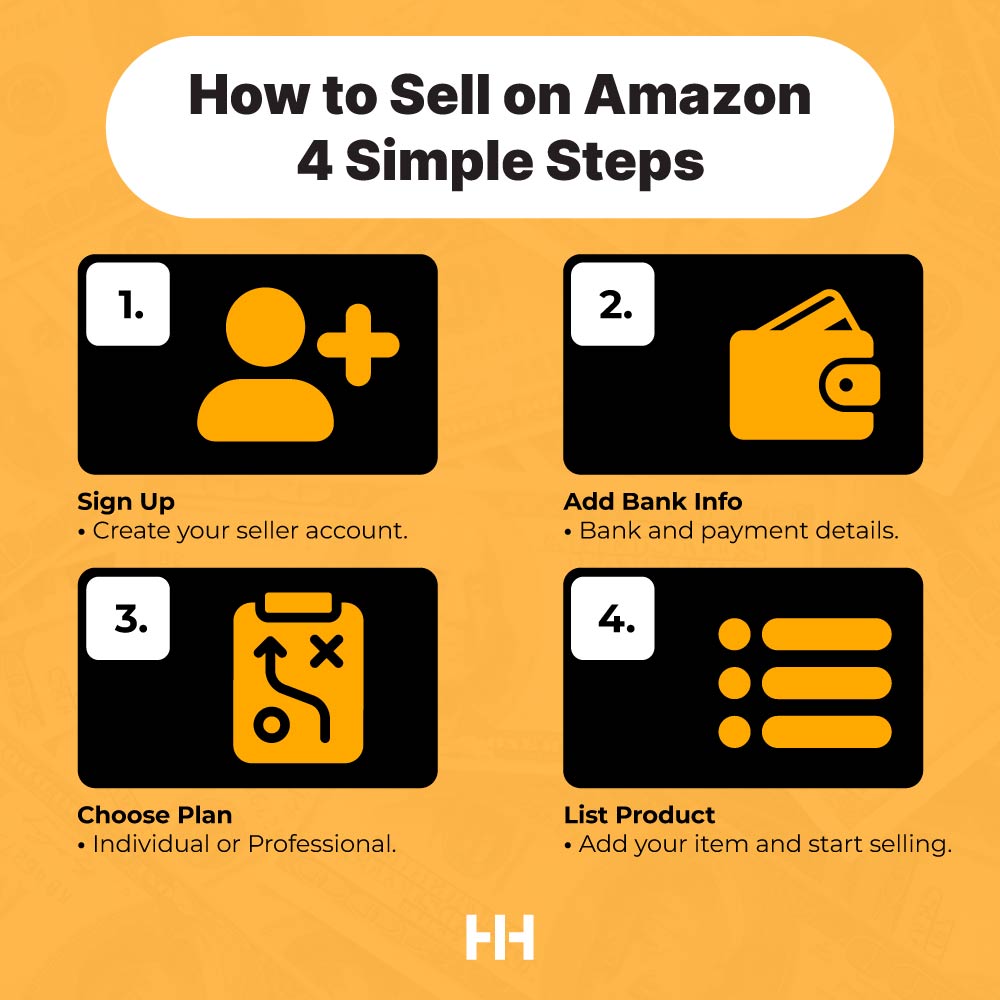
To start selling, you need to create an Amazon Seller account. This process is simple but requires careful attention to details.
Steps To Create Your Seller Account
- Go to Amazon Seller Central (sellercentral.amazon.com) and click “Sign up.”
- Choose your account type (Individual or Professional).
- Enter your business information: This includes your legal name, address, phone number, and email.
- Provide tax information: Amazon will ask for your Social Security Number (SSN) or Employer Identification Number (EIN).
- Set up your bank account: This is where Amazon will deposit your earnings.
- Verify your identity: Amazon may ask for photos of your ID and proof of address.
Pro tip: Make sure your documents match your registration details exactly. Small mismatches can delay your approval.
What You Need To Register
- Legal name and business address
- Valid credit card
- Bank account information
- Government-issued ID
- Tax information
Amazon is strict about seller verification to prevent fraud. Double-check all your information for accuracy.
Choosing The Right Products To Sell
One of the biggest reasons new sellers fail is choosing the wrong products. Picking what to sell is both an art and a science. Here’s how you can find products with real potential.
Product Research Basics
- Demand: Look for products that sell regularly, but not so much that the market is crowded.
- Competition: Avoid markets where top sellers have thousands of reviews.
- Profit margin: Make sure you can sell at a price that covers Amazon’s fees, shipping, and your costs—with at least 30% profit margin.
Tools For Product Research
Many sellers use tools like Jungle Scout, Helium 10, or Amazon’s own Best Sellers pages. These tools show data like monthly sales estimates, average reviews, and price history.
Product Ideas That Work
- Lightweight items (cheaper to ship)
- Products with clear uses
- Seasonal or trending products (but be careful—trends can fade fast)
- Private label products (your own brand)
Two Insights Many Beginners Miss
- Small, simple products are often more profitable because they have lower shipping and fewer returns.
- Bundling: Selling a set of related items can help you stand out and avoid direct competition.
Calculating Costs And Profit
You should know all the costs before listing a product. Amazon’s fees can eat into your profits if you’re not careful.
Main Costs To Consider
- Amazon referral fees (usually 8%-15% of the sale price)
- FBA fees (if you use FBA, fees depend on size and weight)
- Cost of goods (how much you pay your supplier)
- Shipping to Amazon (for FBA)
- Advertising costs (optional, but often necessary)
Here’s a quick comparison of FBA vs. FBM fees for a sample product:
| Fee Type | FBA (per unit) | FBM (per unit) |
|---|---|---|
| Referral Fee | $1.50 | $1.50 |
| Fulfillment Fee | $3.00 | $1.20 (own shipping) |
| Storage Fee | $0.25 | $0.10 |
| Total | $4.75 | $2.80 |
Note: FBA is more expensive per unit, but it often leads to more sales because of Prime eligibility.
Sourcing Your Products
Once you know what you want to sell, you need to find a reliable supplier. Most sellers use one of these options:
- Domestic wholesalers: Faster shipping, easier communication, but usually higher prices.
- Overseas suppliers (like Alibaba): Lower prices, but longer shipping times and more risk.
- Dropshipping: You never hold inventory. The supplier ships directly to the customer, but margins are usually low.
Tips For Finding Suppliers
- Request samples before placing a large order.
- Check supplier reviews and ratings.
- Negotiate prices, especially for larger orders.
- Make sure the supplier can meet Amazon’s packaging and labeling requirements.
Example: Sourcing From Alibaba
Imagine you want to sell a stainless steel water bottle. On Alibaba, you find a supplier offering bottles for $2 each, with a minimum order of 500 units. Shipping and customs add another $1 per unit. If you sell the bottle for $15 on Amazon, you have room for fees and profit.
Insight: Always calculate your “landed cost” (the total cost per unit after shipping and customs), not just the supplier’s price.
Creating Your Amazon Product Listing
Your product listing is your online storefront. A good listing can make the difference between a sale and a scroll-past.
Key Parts Of A Strong Listing
- Title: Use clear, keyword-rich titles. Example: “Stainless Steel Water Bottle – Leak Proof, BPA Free, 20 oz, Blue.”
- Images: Use high-quality photos from different angles. Show the product in use.
- Bullet points: List main features and benefits. Keep them easy to scan.
- Description: Explain the product in more detail. Use simple, direct language.
- Keywords: Use Amazon’s search terms to help buyers find your product.
Here’s a side-by-side comparison of weak vs. strong bullet points:
| Weak Bullet Point | Strong Bullet Point |
|---|---|
| Durable bottle | Made from premium stainless steel for long-lasting use |
| Easy to use | Wide mouth for easy filling and cleaning |
| Good size | 20 oz capacity fits in most car cup holders |
Two Common Listing Mistakes
- Using low-quality images or only one photo.
- Forgetting to mention important details (like size, color, or included accessories).
Setting Your Price
Pricing can be tricky. Too high, and you get no sales. Too low, and you make little profit.
How To Set The Right Price
- Check competing products. What are similar items selling for?
- Calculate your break-even point (costs + Amazon fees).
- Start a bit lower to attract first buyers and get reviews.
- Use Amazon’s “Automate Pricing” tool to stay competitive.
Tip: Many sellers forget about the impact of shipping costs—especially for heavy or bulky items. Always include these in your pricing calculations.
Shipping And Fulfillment
How you deliver products affects your success on Amazon. Most beginners use FBA, but you should know the pros and cons.
Fba Vs. Fbm
| Feature | FBA | FBM |
|---|---|---|
| Shipping Speed | Fast (Prime eligible) | Depends on your carrier |
| Customer Service | Handled by Amazon | You handle it |
| Returns | Amazon manages returns | You manage returns |
| Storage Costs | Higher for slow-moving items | Lower, but you need space |
| Control | Less (Amazon controls process) | More control |
Shipping To Amazon (for Fba)
- Prepare products according to Amazon’s guidelines (labels, packaging).
- Create a shipment in Seller Central.
- Ship inventory to the assigned Amazon warehouse.
Mistake to avoid: Sending products without correct labels or in poor packaging. Amazon can reject or delay your shipment.
Getting Your First Sales
Launching a product is exciting, but most new listings don’t sell right away. You need to create momentum.
Ways To Increase First Sales
- Run Amazon ads (Sponsored Products): This puts your product at the top of search results.
- Offer a launch promotion: Temporary discounts or coupons attract early buyers.
- Get reviews: Ask friends or family to buy and review (but follow Amazon’s rules—no fake reviews).
- Join Amazon’s Early Reviewer Program: For a small fee, Amazon encourages buyers to leave honest reviews.
Why Reviews Matter
Most buyers look at reviews before purchasing. Products with less than 5 reviews often get ignored, while those with 15+ reviews see a jump in sales.
Non-obvious insight: The first 30 days after launching are critical. Amazon gives new listings a boost in search rankings—use this time to push hard for sales and reviews.
Managing Inventory And Orders
Staying in stock is key. If your product runs out, you lose sales and search ranking.
Tracking Inventory
- Use Amazon’s inventory reports to see what’s selling.
- Set up low-stock alerts.
- Reorder before you run out (consider lead times from your supplier).
Hidden risk: Over-ordering can lead to high storage fees, especially with FBA.
Fulfilling Orders
- For FBA: Amazon ships and handles customer service.
- For FBM: Ship quickly (within 2 days), use reliable carriers, and provide tracking.
If you get a return, process it quickly to keep your account healthy.
Optimizing Your Listings For More Sales
After your product is live, you should keep improving your listing. Small changes can make a big difference.
Best Practices For Optimization
- Update keywords as you learn what buyers are searching for.
- Add new photos, including lifestyle shots (product in use).
- Test different bullet points and descriptions.
- Encourage more reviews by following up with buyers (using Amazon’s messaging system).
Advanced tip: Use A/B testing (called “Manage Your Experiments” in Seller Central) to see which images or text perform best.
Advertising On Amazon
Amazon ads can boost your visibility and sales, especially for new products.
Main Types Of Amazon Ads
- Sponsored Products: Appear in search results and product pages.
- Sponsored Brands: Show your brand logo and multiple products.
- Sponsored Display: Show ads on and off Amazon.
Start with Sponsored Products, as they are simple and effective for most beginners.
Budgeting For Ads
- Start with a small daily budget (e.g., $10/day).
- Monitor your ad reports to see which keywords drive sales.
- Pause ads that are not profitable.
Pro insight: Many sellers ignore their ad reports. Reviewing them weekly helps you cut waste and focus on high-performing keywords.
Handling Customer Service And Returns
Amazon expects top-notch customer service. Fast, polite responses keep your account healthy and drive repeat sales.
Customer Service Essentials
- Answer questions within 24 hours.
- Resolve problems quickly—offer refunds or replacements if needed.
- Stay polite, even if the customer is rude.
Dealing With Returns
- FBA: Amazon handles returns automatically.
- FBM: You must provide return instructions and process refunds.
Critical tip: Negative feedback can hurt your seller rating. Address complaints quickly and professionally.
Growing And Scaling Your Amazon Business
Once you have a few sales, think about how to grow. Scaling up takes planning.
Strategies To Expand
- Add more products: Use your sales data to find related items.
- Expand to new marketplaces: Sell in Canada, Europe, or Japan.
- Build your own brand: Register your trademark and join Amazon Brand Registry for more tools.
- Automate tasks: Use software to manage pricing, inventory, and feedback.
Advanced move: Consider using Amazon’s Multi-Channel Fulfillment to sell on eBay, Shopify, or your own site—using Amazon to ship all orders.
Staying Compliant And Avoiding Mistakes
Amazon has strict rules. Breaking them can get your account suspended.
Common Reasons For Suspension
- Selling counterfeit items
- Poor customer service or slow shipping
- Too many order defects or late shipments
- Not following listing rules
How to stay safe:
- Read Amazon’s policies regularly
- Respond to customer issues quickly
- Keep your business info updated
If you get a warning, act fast and explain how you’ll fix the issue.
Frequently Asked Questions
How Much Does It Cost To Start Selling On Amazon?
It can be as low as $39.99 per month for a professional account, plus Amazon’s selling fees and your inventory costs. Many new sellers start with $500–$2,000 to buy inventory and cover early expenses.
Do I Need A Business License To Sell On Amazon?
No, you can sell as an individual. But if you want to register as a business or sell certain restricted products, you may need a business license and tax ID.
What Is Amazon Fba, And Should I Use It?
Fulfillment by Amazon (FBA) is a service where Amazon stores, packs, and ships your products. Most new sellers use FBA because it’s easier and products qualify for Prime shipping. However, FBA costs more per unit.
How Do I Get More Reviews On My Products?
Deliver great products and customer service, and ask buyers politely for feedback. You can use Amazon’s “Request a Review” button in Seller Central. Never offer incentives for reviews, as this violates Amazon’s rules.
Where Can I Learn More About Selling On Amazon?
Amazon’s own Seller University offers free video tutorials and guides for beginners and advanced sellers.
Selling on Amazon is a journey. With clear planning and smart decisions, you can build a business that grows month after month. Start small, learn as you go, and always focus on your customers. Success on Amazon is not about luck—it’s about preparation and action.