

The Kenmore Series 700 washer is a reliable home appliance, but even the best washers can face problems over time. Whether you’re dealing with a washer that won’t start, unusual noises, or water that won’t drain, knowing how to troubleshoot common issues can save you time and money.
Many users feel frustrated when their washer stops working, but most problems have simple solutions you can try at home before calling a technician. This guide will walk you through the most frequent problems with the Kenmore Series 700 washer, explain why they happen, and offer practical steps to fix them.

36% off Today’s Exclusive Deals
Limited-time Exclusive Deals. Check current discount on Amazon.
Check Price on Amazon As an Amazon Associate I earn from qualifying purchases.If you want to keep your laundry routine running smoothly and extend your washer’s life, these tips will help you become more confident in handling basic repairs.
Understanding Your Kenmore Series 700 Washer
The Kenmore Series 700 washer is a top-loading model designed for everyday use. It features several wash cycles, load size options, and advanced technologies like HE (High Efficiency) washing. Before troubleshooting, it’s important to know your washer’s basic functions:
- Control panel: Where you select cycles and settings
- Agitator or impeller: Moves clothes during the wash
- Drain pump: Removes water from the washer
- Lid lock: Prevents the washer from running with the lid open
Many problems relate to these parts. Understanding what each one does helps you pinpoint issues faster.
Common Kenmore Series 700 Washer Problems
Washer Won’t Start
If your washer doesn’t start, check these areas first:
- Power supply: Make sure the washer is plugged in and the outlet works. Try another appliance in the same outlet to confirm.
- Lid switch: The washer won’t run if the lid is open or the switch is faulty. Listen for a clicking sound when you close the lid.
- Control settings: Double-check your cycle settings and press the start button firmly.
- Blown fuse or tripped breaker: Inspect your home’s electrical panel for any tripped breakers or blown fuses.
Non-obvious insight: Sometimes, power surges cause the control board to freeze. Unplug the washer for one minute and plug it back in to reset the system.
Washer Not Filling With Water
A washer that won’t fill may have:
- Closed water supply valves: Both hot and cold valves behind the washer must be fully open.
- Kinked hoses: Check for bent or twisted water hoses.
- Clogged inlet screens: Filters at the hose connection can collect debris.
- Faulty water inlet valve: If you hear a clicking but no water flows, the valve may need replacing.
Practical example: If only cold water fills, the hot water supply might be off or the hot water valve is faulty.
Washer Won’t Drain Or Spin
If your Kenmore Series 700 leaves water in the drum or won’t spin:
- Clogged drain pump: Small objects or lint can block the pump.
- Blocked drain hose: Make sure the hose isn’t clogged or kinked.
- Unbalanced load: Too many or too few clothes can stop the spin cycle.
- Lid switch issue: The washer won’t spin if the lid isn’t locked.
Insight beginners miss: The washer may pause if it senses an unbalanced load, and you might just need to redistribute the clothes.
Washer Makes Loud Noises
Unusual noises during operation often mean:
- Objects in the drum: Coins or buttons may be stuck.
- Worn drive belt: A squealing or thumping noise could mean the belt is loose or damaged.
- Broken drum bearings: Grinding sounds may require professional repair.
Check the pockets of all clothes before washing to avoid foreign objects in the drum.
Washer Shakes Or Vibrates Excessively
Excessive movement can result from:
- Unlevel washer: Use a level to check the machine and adjust the feet as needed.
- Unbalanced loads: Mix large and small items for even weight distribution.
- Worn suspension rods: These help stabilize the drum.
Non-obvious insight: Placing the washer on a soft or uneven floor increases vibration. Install on a solid, level surface.
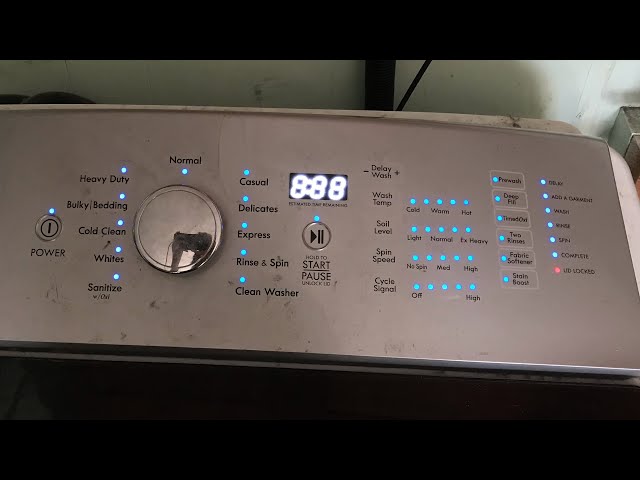
Troubleshooting Steps For Kenmore Series 700 Washer
Step 1: Identify The Error Code
Many Series 700 washers display error codes on the control panel. Common codes include:
- LF: Long fill (washer is taking too long to fill)
- Ld: Long drain (washer is not draining properly)
- UL: Unbalanced load
- F5: Lid lock issue
Look up the code in your manual for specific guidance.
Step 2: Basic Reset
Some problems resolve with a simple reset:
- Unplug the washer for 1-2 minutes.
- Plug it back in.
- Open and close the lid six times within 12 seconds to reset the control panel.
Step 3: Check Hoses And Connections
Inspect all hoses for kinks, clogs, and leaks. Tighten connections and clean inlet screens if needed.
Step 4: Clean The Washer
Over time, detergent residue and lint can build up inside the washer. Run a cleaning cycle with washer cleaner or white vinegar to keep the drum fresh.
Step 5: Inspect Key Components
- Lid switch: Test with a multimeter for continuity.
- Drain pump: Remove the pump and check for blockages.
- Drive belt: Look for cracks or looseness.
For most parts, you can find video tutorials online showing how to remove and replace them.
Comparing Common Kenmore Washer Models
To understand how the Series 700 compares to similar models, see the table below:
| Model | Capacity (cu. ft.) | Wash Cycles | High Efficiency | Price Range |
|---|---|---|---|---|
| Kenmore Series 700 | 4.5 | 12 | Yes | $700-$900 |
| Kenmore Series 600 | 4.3 | 8 | Yes | $600-$800 |
| Kenmore Elite | 5.2 | 14 | Yes | $1,000-$1,400 |
The Series 700 offers a good balance of capacity, cycles, and price for most families.
When To Call A Technician
While many problems can be fixed at home, some require professional help:
- Control board failure: If the washer won’t power on after resetting, the control board may be faulty.
- Water leaks: Leaks from the bottom or back often point to internal hose or pump issues.
- Repeated error codes: If codes return after resetting and checking hoses, a deeper problem may exist.
Attempting advanced repairs without training can void your warranty or cause further damage. Always disconnect power before inspecting internal parts.
Preventive Maintenance Tips
To keep your Kenmore Series 700 running smoothly:
- Clean the drum monthly with washer cleaner or vinegar.
- Check hoses for leaks and replace every 5 years.
- Wipe the door and gasket after each wash to prevent mold.
- Use the right detergent: Only use HE detergent to avoid buildup and over-sudsing.
- Balance loads: Wash mixed sizes for better spinning and less stress on components.
Non-obvious insight: Excess detergent is a common cause of residue, odors, and pump failure. Use less than you think if loads are small or lightly soiled.

Data Table: Common Kenmore Series 700 Washer Problems And Solutions
Here’s a quick reference for frequent issues and their solutions:
| Problem | Likely Cause | Quick Solution |
|---|---|---|
| Washer won’t start | Power supply, lid switch | Check outlet, reset washer, inspect lid switch |
| No water fill | Closed valves, clogged screens | Open valves, clean screens |
| Not draining | Pump clog, blocked hose | Clear pump, clean hose |
| No spin | Unbalanced load, lid switch | Redistribute clothes, check switch |
| Loud noises | Foreign objects, worn belt | Remove objects, replace belt |
Troubleshooting Example: Washer Won’t Drain
Suppose your Kenmore Series 700 won’t drain water after a cycle. Here’s a step-by-step process:
- Pause and unlock: Stop the cycle and open the lid if possible.
- Check the drain hose: Make sure the hose isn’t clogged or kinked.
- Inspect the pump: Remove the lower panel and check the drain pump for blockages like coins or lint.
- Test the pump: Listen for a humming sound. If the pump is silent, it may need replacement.
- Restart the washer: After clearing any blockages, run the spin/drain cycle.
If the problem continues, consider calling a professional.
Error Code Table For Kenmore Series 700 Washer
For quick reference, here are some common error codes and their meanings:
| Error Code | Meaning | Action |
|---|---|---|
| LF | Long fill | Check water supply and inlet screens |
| Ld | Long drain | Check drain hose and pump |
| uL | Unbalanced load | Redistribute clothes |
| F5 | Lid lock error | Check lid switch and lock mechanism |
| F7 | Motor problem | Reset washer, call technician if repeats |
Safety Precautions
Working on your washer can be safe if you follow these steps:
- Unplug the washer before any inspection or repair.
- Use gloves when handling sharp components.
- Don’t overload the drum to prevent accidents.
- Keep children away during troubleshooting.
Safety tip: Never try to bypass the lid lock. It’s there to prevent injuries while the washer is running.
Where To Find Replacement Parts
Kenmore replacement parts are widely available. You can find them:
- At Sears PartsDirect (official Kenmore source)
- On online marketplaces like Amazon
- At local appliance repair shops
Always use your washer’s model number when searching for parts to ensure compatibility.
Using The Warranty
Most Kenmore Series 700 washers come with a one-year warranty. Some major parts may have longer coverage. If your washer is under warranty:
- Contact Kenmore customer support.
- Provide your model and serial number.
- Describe the issue clearly.
Attempting repairs yourself on a machine under warranty can void coverage. Check your manual for details.
Two Insights Most Owners Miss
- The lid lock system is a common but overlooked failure point. If the washer won’t start or unlock, check the lock mechanism and wiring before assuming a major part is bad.
- Regularly cleaning the inlet screens can prevent water fill issues. Even small debris can block these filters and stop the washer from working correctly.
Resources For More Help
If you want more technical information or step-by-step videos, the official Kenmore support page offers manuals and troubleshooting guides. For deeper learning about washer technology, visit Wikipedia’s washing machine page.
Frequently Asked Questions
Why Does My Kenmore Series 700 Washer Keep Going Out Of Balance?
Your washer may go out of balance if the load is too small, too large, or unevenly distributed. Try mixing large and small items and avoid washing one heavy item alone. Make sure your washer is level on the floor.
What Detergent Should I Use In My Series 700 Washer?
Always use HE (High Efficiency) detergent with this washer. Regular detergent makes too many suds and can cause drainage and odor problems.
How Often Should I Clean My Washer?
Clean the drum and dispensers at least once a month. Run a cleaning cycle with washer cleaner or white vinegar to remove buildup and prevent smells.
My Washer Is Leaking Water; What Should I Check First?
Check the hoses for cracks or loose connections. Look at the door gasket for debris or damage. If leaks are from the bottom, the pump or internal hoses may need inspection.
Can I Replace The Lid Switch Myself?
Yes, if you’re comfortable with basic tools. Unplug the washer, remove the top panel, and disconnect the old switch. Match the new part to your model number and follow video tutorials for guidance.
The Kenmore Series 700 washer is a strong, dependable appliance, but like all machines, it needs care and attention. By learning to troubleshoot common issues, you can often fix problems yourself and keep your laundry routine on track. Remember to perform regular maintenance, use the correct detergent, and don’t ignore warning signs.
With these tips, your washer can give you years of reliable service.

