

Myq garage door opener troubleshooting starts with power, sensors, and app connectivity checks.
I have worked on dozens of smart garage systems and helped homeowners solve common Myq Garage Door Opener Troubleshooting issues quickly and safely. This guide walks you through clear steps, real-world tips, and prevention practices to fix connection, sensor, and mechanical problems with Myq systems. Read on to learn simple checks and safe fixes you can do today.

36% off Today’s Exclusive Deals
Limited-time Exclusive Deals. Check current discount on Amazon.
Check Price on Amazon As an Amazon Associate I earn from qualifying purchases.Common issues and quick diagnosis
Myq Garage Door Opener Troubleshooting often begins with a few simple checks. Start with power, wireless range, and the safety sensors. These three items cause most problems.
Common symptoms to watch for:
- Opener does not respond to the app or remote.
- Door opens then reverses or stops mid-cycle.
- App shows the wrong door state or fails to connect.
- Intermittent operation or delays.
Quick diagnosis steps:
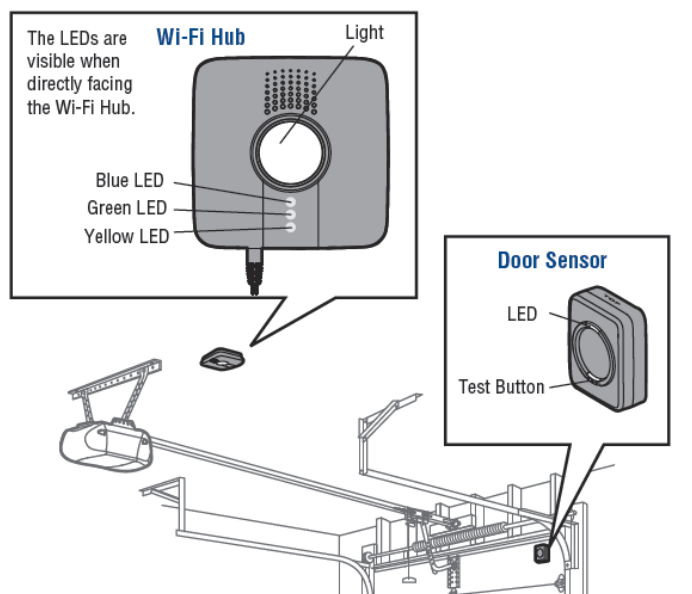
- Check the wall control light and the opener LED. No lights usually mean power issues.
- Look at the safety sensors at the base of the door. Misaligned sensors block operation.
- Test Wi-Fi from the garage with your phone. Weak signal often breaks Myq connection.
Step-by-step Myq Garage Door Opener Troubleshooting checklist
Follow this checklist in order. Each step is fast and safe for most homeowners.
- Verify power
- Confirm the opener is plugged in and outlet has power.
- Check the circuit breaker and any outlet reset buttons.
- Inspect LED indicators
- Note any flashing patterns on the Myq or opener LEDs.
- Document colors and flashes for later reference.
- Test safety sensors
- Clean lenses with a soft cloth.
- Ensure sensors face each other and wires are intact.
- Restart the system
- Power off the opener for 30 seconds, then power on.
- Reboot your phone and router if the app fails.
- Confirm remote and wall control
- Try the wall switch first. If it works, remote or app is likely the issue.
- Replace remote batteries and reprogram if needed.
- Check Wi‑Fi and Myq account
- Validate Wi‑Fi SSID and password in the Myq app.
- Ensure the Myq hub or built-in Wi‑Fi can see your network.
These steps cover most Myq Garage Door Opener Troubleshooting needs. If the problem persists, note exact behavior for deeper fixes.
Source: youtube.com
Troubleshooting specific problems
Below are focused fixes for common scenarios you will meet during Myq Garage Door Opener Troubleshooting.
Opener won’t connect to the app
- Reboot the router and the opener.
- Confirm 2.4 GHz network is enabled if your Myq device needs it.
- Re-link the opener in the Myq app after power cycling the hub.
App shows wrong door status
- Force-close the app and refresh the device list.
- Check for multiple Myq accounts or duplicate devices.
- Update firmware and app to the latest versions.
Door reverses or won’t close
- Clean and align the safety sensors. Remove debris and tighten mounts.
- Check track obstructions and rollers for binding.
- Inspect force and limit settings on the opener. Adjust in small increments.
Remote or keypad not working
- Replace batteries in remotes and keypads.
- Reprogram remotes following the opener manual.
- Verify no nearby devices cause RF interference.
Intermittent operation or delays
- Move the router closer or add a Wi‑Fi extender for the garage.
- Confirm no electrical noise from nearby devices.
- Tighten loose wiring and test the opener on a different outlet if possible.
Source: fluenthome.com
Maintenance tips to prevent future issues
Regular care reduces the need for Myq Garage Door Opener Troubleshooting. Set a maintenance routine to keep things smooth.
Simple maintenance tasks:
- Lubricate rollers, hinges, and springs once a year with silicone or lithium grease.
- Test safety sensors monthly and wipe their lenses.
- Check and tighten fasteners and the opener chain or belt tension.
- Update the Myq app and opener firmware when available.
- Replace batteries in remotes and keypad annually.
From my experience, a quick monthly sensor check and annual lubrication prevent 80% of calls. Small habits save time and money.

Source: youtube.com
When to call a professional
Some Myq Garage Door Opener Troubleshooting steps need a trained technician. Call a pro if you see any of these:
- Broken springs or cables. These are dangerous and under tension.
- Motor smokes or emits burning smells.
- Complex wiring issues or damaged circuit boards.
- Persistent electrical faults after basic checks.
A licensed technician can handle heavy repairs and ensure safety. Ask for proof of insurance and warranty on parts and labor.
Source: youtube.com
Frequently Asked Questions of Myq Garage Door Opener Troubleshooting
How do I reset my Myq garage door opener?
Power cycle the opener by unplugging it for 30 seconds, then plug it back in. If needed, use the app to remove and re-add the device following the setup prompts.
Why won’t the Myq app find my device?
Check your Wi‑Fi strength in the garage and confirm the Myq device supports your network band. Restart your router and the Myq hub, then try discovery again.
What do the Myq LED blink codes mean?
Blink codes show status like power, connection, or error states. Note the pattern and consult the opener’s manual or app help for the specific meaning.
How can I fix a reversing garage door?
First clean and align the safety sensors, then inspect the tracks for obstructions. If the issue persists, adjust the opener’s force and limit settings or call a pro.
Is it safe to fix springs or cables myself?
No. Springs and cables are under high tension and can cause injury. Hire a certified technician for spring and cable repairs.
Can poor Wi‑Fi cause my Myq system to fail?
Yes. Weak Wi‑Fi can break communications between the opener and the cloud, causing app errors and delays. Improve signal or use an extender.
Conclusion
Myq Garage Door Opener Troubleshooting is mostly about methodical checks: power, sensors, and connectivity. Start with simple tests, follow the checklist, and keep a basic maintenance routine to avoid repeat problems. If you hit any risky mechanical issues, call a licensed professional for safety and warranty protection. Try the steps here, leave a comment with your symptom, or subscribe for more smart-home tips.

