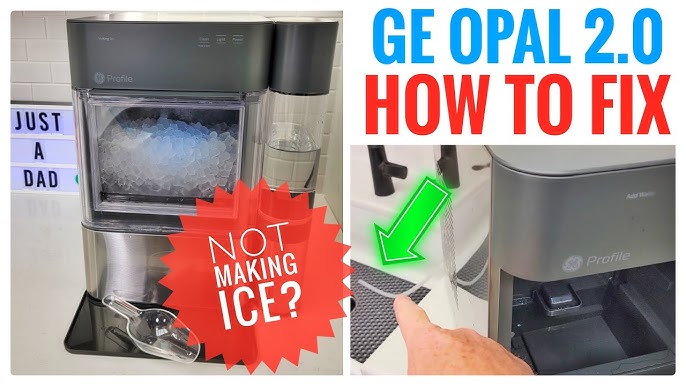
If you own an Opal ice maker, you know the joy of having soft, chewable nugget ice at home. But like all appliances, even the best ice makers can run into issues. When your Opal ice maker stops working as expected, it can be frustrating. The good news is that many common problems have simple solutions. Whether your ice maker isn’t making ice, is making strange noises, or is leaking, you can often fix it yourself. This guide will walk you through practical troubleshooting steps for the most frequent Opal ice maker issues, helping you save time and avoid unnecessary service calls.
Understanding How Your Opal Ice Maker Works
Before jumping into fixes, it’s useful to know how your machine operates. The Opal ice maker uses a water reservoir and a refrigeration system to create small ice nuggets. It pulls water from the tank, freezes it in layers, and uses a rotating auger to push out the ice. The process is quick, usually producing the first batch of ice in about 20 minutes. Any leftover water drains back into the reservoir for the next cycle.

36% off Today’s Exclusive Deals
Limited-time Exclusive Deals. Check current discount on Amazon.
Check Price on Amazon As an Amazon Associate I earn from qualifying purchases.Knowing these basics helps you spot where things might go wrong—whether it’s a water flow issue, a blocked auger, or a sensor problem.
Common Opal Ice Maker Problems And How To Fix Them
1. Opal Ice Maker Not Making Ice
This is one of the most common complaints. If your Opal isn’t producing ice, check these areas:
- Power connection: Ensure the unit is plugged in and the outlet works. Try another device in the same outlet to confirm.
- Water reservoir: The Opal must have enough water. Fill up to the max line, but not above.
- Water filter: If you use a filter, make sure it’s not clogged. A blocked filter restricts water flow.
- Cleaning cycle: Mineral deposits can block the ice-making process. Run a cleaning cycle with Opal cleaning solution or vinegar.
If you’ve checked all these and it’s still not making ice, unplug the machine for five minutes, then restart it. Sometimes a simple reset solves hidden problems.
2. Opal Ice Maker Making Less Ice Or Slow Production
If your machine works but produces less ice than before, these steps can help:
- Room temperature: Opal ice makers work best in rooms below 90°F (32°C). High temperatures slow ice production.
- Water quality: Hard water leaves mineral buildup faster. Use filtered or distilled water if possible.
- Cleaning: Scale or debris inside the machine can slow performance. Clean the machine monthly, or more often in areas with hard water.
- Ventilation: Make sure the ice maker has at least 3 inches of space on all sides for airflow.
Here’s a quick comparison of how different water types affect ice production:
| Water Type | Ice Production Rate | Mineral Buildup Risk |
|---|---|---|
| Tap Water (Hard) | Slow | High |
| Filtered Water | Normal | Medium |
| Distilled Water | Normal | Low |
3. Opal Ice Maker Leaking Water
A leaky ice maker can make a mess and even damage your countertop. Here’s what to check:
- Reservoir position: Ensure the water reservoir is seated properly. If it’s not, water can spill out during the cycle.
- Side tank connection: If your model uses a side tank, make sure the tubing is connected tightly.
- Drain cap: The rubber drain plug underneath the machine must be closed tightly after draining or cleaning.
- Cracks or damage: Inspect the tank and hoses for any cracks. Replace damaged parts as needed.
A practical tip: after cleaning, always double-check the drain cap is secure. Many users forget to close it, leading to leaks.
4. Opal Ice Maker Making Loud Or Unusual Noises
While the Opal ice maker is not silent, sudden loud noises often mean something is wrong.
- Normal sounds: The machine makes soft humming, clicking, and occasional grinding as it freezes and pushes out ice.
- Abnormal sounds: Loud clunks, rattles, or continuous grinding are not normal.
If you hear these:
- Check for any ice jam or blockages in the auger (the spiral that moves ice out).
- Ensure the machine is on a flat, level surface. If it’s tilted, the motor may strain and make more noise.
- Remove and clean any loose ice chunks or debris from the ice bin.
5. Opal Ice Maker Lights Flashing Or Error Codes
Modern Opal ice makers have indicator lights to show their status. Flashing lights usually mean the machine needs attention.
Here’s a quick guide to what the lights mean:
| Light Pattern | Meaning | Action |
|---|---|---|
| Solid White | Making ice | No action needed |
| Flashing Yellow | Needs water | Add water |
| Flashing White | Cleaning mode | Let cycle finish |
| Solid Yellow | Ice bin full | Remove ice |
| Flashing Blue | Error detected | Restart or check manual |
If you see a flashing blue or error light, unplug the machine, wait a minute, and plug it back in. If the error returns, check the manual or contact support.
6. Ice Nuggets Are Clumping Together
Sometimes, the ice comes out in clumps instead of separate nuggets. This happens when:
- Ice sits too long: If you don’t use the ice quickly, it can partially melt and refreeze.
- Room is too warm: High temperatures speed up melting.
- Water quality: Minerals can cause nuggets to stick together.
To prevent clumping, empty the ice bin regularly, especially in hot weather. Store extra ice in your freezer if you don’t plan to use it soon.
7. Opal Ice Maker Won’t Turn On
If your Opal won’t power up at all, check:
- Power cord: Is it plugged in securely?
- Circuit breaker: Has the breaker for that outlet tripped?
- Faulty outlet: Test the outlet with a lamp or phone charger.
- Internal fuse: Rarely, the ice maker’s internal fuse can blow. This requires professional repair.
If you’ve checked all these and it still won’t turn on, contact Opal support.

Cleaning And Maintenance Tips
Regular cleaning is one of the best ways to prevent problems. Opal recommends cleaning every one to two weeks, or more often in hard water areas.
Here’s a simple cleaning schedule:
| Task | Frequency |
|---|---|
| Rinse water reservoir | Weekly |
| Run cleaning cycle | Every 2 weeks |
| Descale with vinegar | Monthly |
| Check for leaks | Every use |
A non-obvious tip: always use the official Opal cleaning solution or white vinegar. Avoid harsh chemicals—they can damage the machine and void your warranty.
When To Call For Service
While most issues can be fixed at home, some problems require expert help. Call for service if you notice:
- Repeated error codes after reset and cleaning
- No power even after checking the outlet and breaker
- Damaged or broken parts (cracks, leaks you cannot stop)
- Unusual smells (burning, melting plastic)
Trying to repair complex problems yourself can void your warranty. For major issues, contact Opal customer support or an approved repair center.
Practical Tips For Long-term Opal Ice Maker Performance
- Use filtered water: This reduces mineral buildup and helps the ice maker last longer.
- Keep it level: Always place the machine on a flat, stable surface for best results.
- Don’t overfill: Only fill the reservoir to the max line.
- Avoid direct sunlight: Heat can slow ice production and cause clumping.
- Store ice properly: If you need lots of ice, transfer nuggets to the freezer and keep the bin clear.
Many new owners overlook the importance of using the right water type and regular cleaning. These two steps prevent most Opal ice maker problems.
Frequently Asked Questions
Why Does My Opal Ice Maker Smell Bad?
A bad smell usually means there’s mold or bacteria inside. Run a cleaning cycle with vinegar or Opal solution. Rinse the bin and reservoir with warm soapy water. Let all parts dry before using again.
How Can I Improve The Taste Of The Ice?
Ice taste problems often come from the water source. Use filtered or bottled water. Clean the machine more often if you notice a strange taste.
Is It Safe To Use Vinegar For Cleaning?
Yes, white vinegar is safe and effective for removing mineral buildup. Mix equal parts vinegar and water, run a cleaning cycle, then rinse with fresh water to remove any smell.
What Does The Flashing Yellow Light Mean On My Opal Ice Maker?
A flashing yellow light means the machine needs water. Fill the reservoir up to the max line, but not above. Make sure the tank is seated properly.
Where Can I Find The Official Opal Ice Maker Manual?
You can download the manual from the official manufacturer’s website. For more troubleshooting info and support, visit the GE Appliances support page.
Solving Opal ice maker problems is usually straightforward if you follow these steps. With good care and regular cleaning, your ice maker will keep producing perfect nugget ice for years. If you ever get stuck, the user manual and official support are always there to help.
Enjoy your ice!