

Carrier Ac Troubleshooting Guide helps diagnose and fix common Carrier AC problems quickly and safely.
I have spent years repairing and optimizing HVAC systems. This Carrier Ac Troubleshooting Guide distills that hands-on experience into clear steps. You will get easy checks, smart fixes, and safety tips. Read on to learn how to diagnose common Carrier AC faults, perform safe tests, and decide when to call a pro.
Common Carrier AC problems and causes
Most Carrier AC units show the same few symptoms when they fail. This Carrier Ac Troubleshooting Guide covers each symptom and likely causes. Below are common problems, simple causes, and quick checks you can run.
- No cooling. Could be low refrigerant, dirty filter, or a failed compressor. Check the thermostat and power first.
- Poor airflow. Often a clogged filter, blocked vents, or a failing blower motor. Inspect filters and vents.
- Unit won’t start. Could be a tripped breaker, faulty capacitor, or control board issue. Check breakers and fuses.
- Short cycling. Short on and off cycles point to thermostat placement, refrigerant issues, or an oversized system.
- Frozen evaporator coil. Low refrigerant or poor airflow usually causes ice on the coil.
- Loud or unusual noise. Loose parts, failing fan bearings, or refrigerant flow issues are common.
I have seen filters left unchanged for months cause frozen coils. Small, routine checks can stop big repairs. This Carrier Ac Troubleshooting Guide helps you spot those early signs.
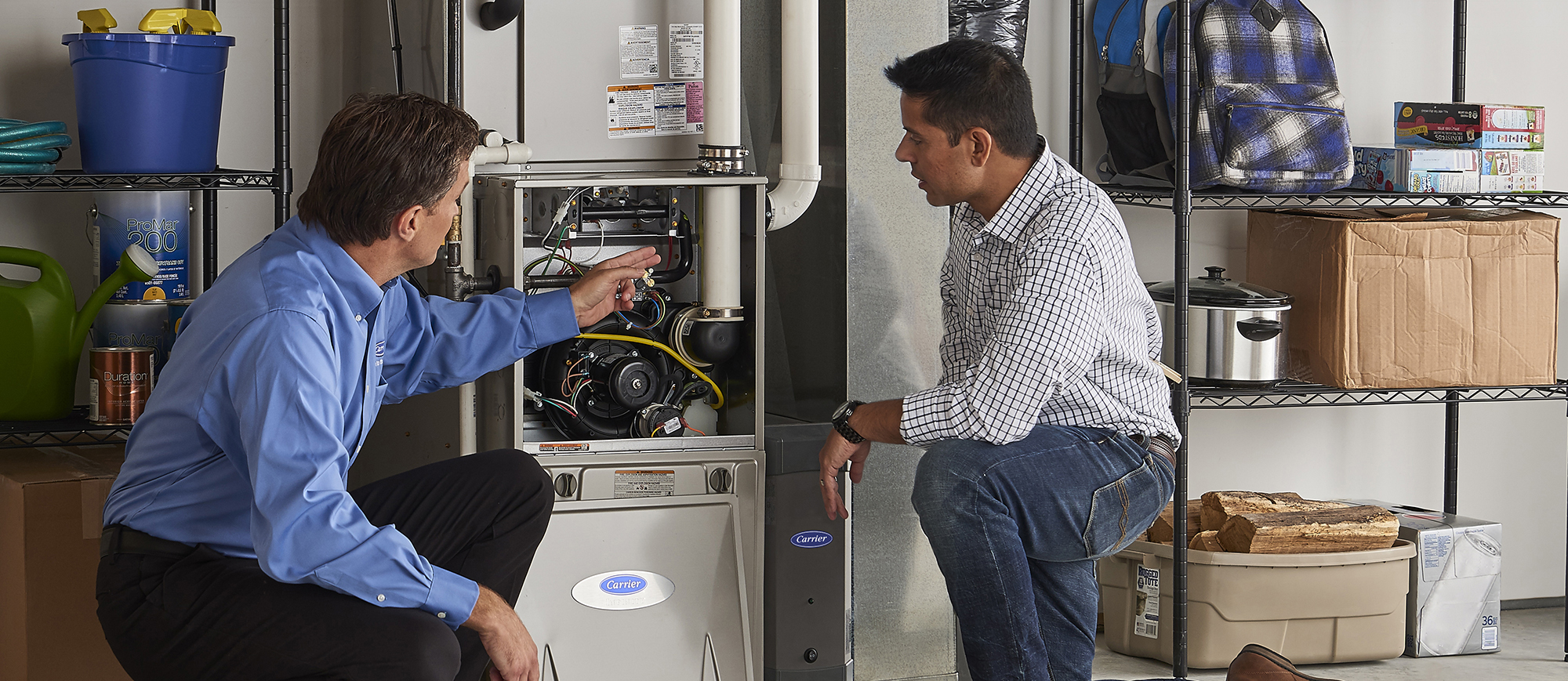
Step-by-step Carrier AC troubleshooting checklist
Follow this simple checklist. It walks you from easy fixes to more advanced checks. Keep notes as you go.
-
Safety first
- Turn off power at the breaker. Wait a few minutes before touching anything.
- Use gloves and eye protection when needed.
-
Basic checks
- Verify thermostat is set to cool and set 3 to 5 degrees below room temperature.
- Confirm the outdoor unit has power and the disconnect is on.
- Check circuit breakers and fuses.
-
Filter and airflow
- Inspect and replace dirty filters. Blocked filters reduce cooling fast.
- Ensure vents are open and unobstructed.
-
Outdoor unit inspection
- Clear debris from around the condensing unit.
- Clean fins gently with a soft brush if dirty.
- Listen for fan and compressor operation.
-
Indoor unit checks
- Look for frost on the evaporator coil.
- Check the condensate drain for clogs and standing water.
-
Electrical components
- Inspect the capacitor for bulges or leaks.
- Smell for burned wiring or components.
- Test contactor and relays if you have a multimeter and know how.
-
Refrigerant and pressure checks
- Low refrigerant causes poor cooling and icing.
- Only certified technicians should add refrigerant.
PAA-style questions
- How fast should a Carrier AC cool a room?
- Most systems start noticeable cooling within 10 to 20 minutes. Larger rooms take longer.
- Can I reset a Carrier AC by turning the breaker off?
- Yes, a quick power cycle can reset controls. Wait about 5 minutes before restoring power.
- Is a frozen coil always a refrigerant leak?
- Not always. Poor airflow can also freeze coils. Check filters first.
This Carrier Ac Troubleshooting Guide gives you a clear path. If a step seems risky, stop and call a pro.

Advanced diagnostics, tools, and safety
Some tests need skills and tools. Use them only if you are comfortable and trained. Safety is key.
Tools to consider
- Multimeter to test voltages and continuity.
- Gauge set for refrigerant pressure checks. Certified use required.
- Clamp meter to measure current draw on the compressor or fan.
- Thermometer or infrared gun to check temperature drops across coils.
Advanced checks
- Compressor current draw. High draw can mean motor stress or mechanical failure.
- Capacitor microfarad test. Weak capacitors cause start-up problems.
- Pressure checks. Compare high and low side pressures to expected ranges for the outdoor temperature.
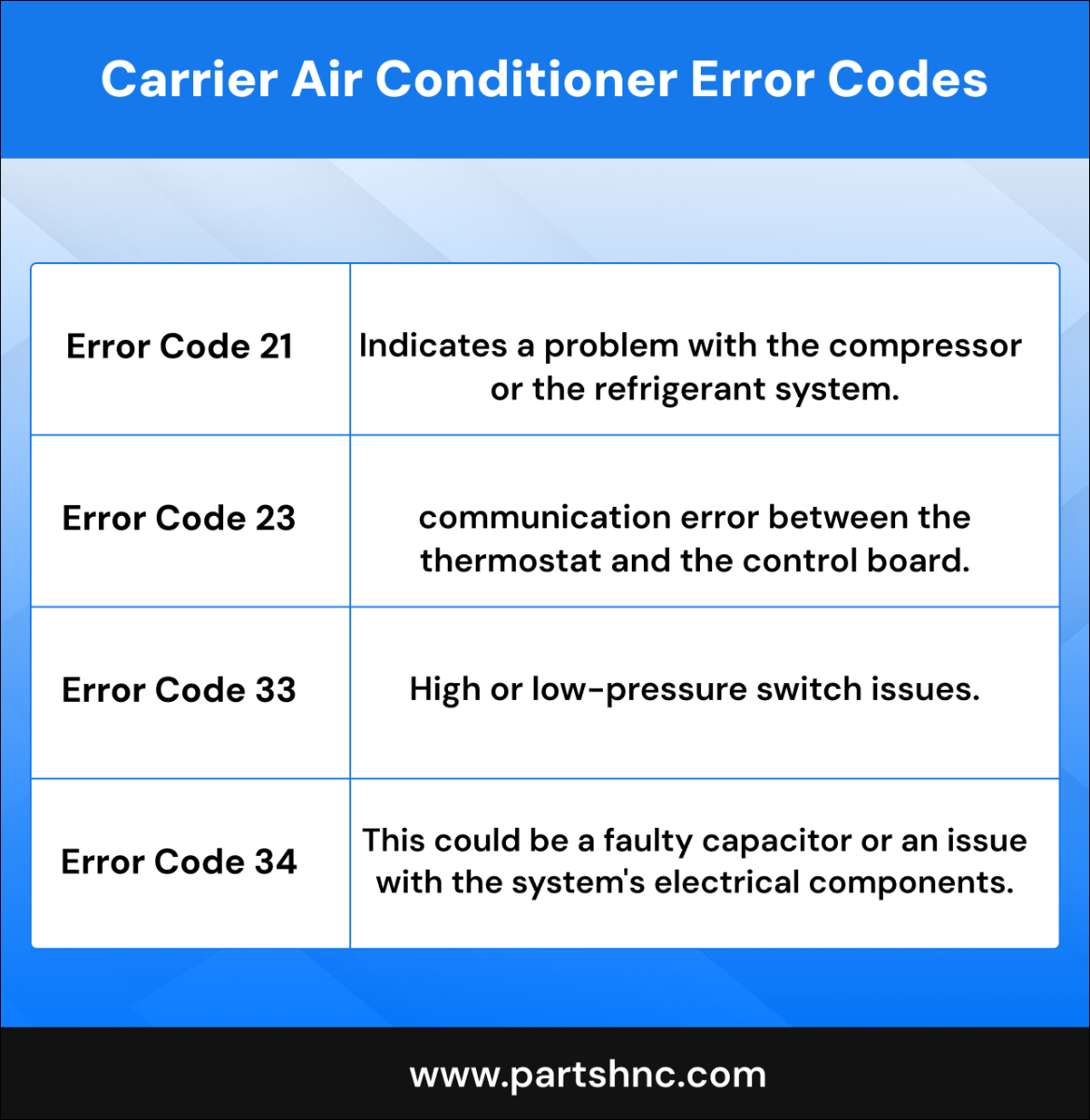
- Control board diagnostics. Look for error codes on modern Carrier systems.
Safety tips
- Never open refrigerant lines unless certified. Handling refrigerant can be hazardous and illegal without certification.
- Turn off power before working on electrical parts.
- If you smell gas or burning, evacuate and call a professional.
I once diagnosed a failing capacitor by measuring low microfarad. Swapping the capacitor fixed the unit fast. This Carrier Ac Troubleshooting Guide stresses safe, correct testing.

Maintenance tips to avoid problems
Regular care keeps your Carrier AC running longer. This Carrier Ac Troubleshooting Guide includes simple maintenance you can do monthly or seasonally.
Monthly tasks
- Replace or clean filters.
- Check thermostat batteries.
- Clear debris from outdoor unit.
Seasonal tasks
- Schedule a professional tune-up in spring. Technicians check refrigerant, belts, and electrical parts.
- Clean evaporator and condenser coils annually.
- Inspect ductwork for leaks and insulation gaps.
Long-term tips
- Keep the area around the outdoor unit clear of plants and debris.
- Use a smart thermostat to reduce short cycling.
- Record service dates and repairs to track unit health.
A small habit like replacing filters every 1 to 3 months prevents many failures. This Carrier Ac Troubleshooting Guide shows how routine steps save money and time.
When to call a professional
Know your limits. This Carrier Ac Troubleshooting Guide guides you on when to stop and call a licensed HVAC technician.
Call a pro if
- You suspect a refrigerant leak.
- The compressor does not start or hums loudly.
- You see electrical burning, smoke, or melted insulation.
- Multiple safety controls trip repeatedly.
- The unit needs major component replacement.
Choosing a technician
- Pick licensed and insured technicians with Carrier experience.
- Ask for references and check reviews.
- Request an itemized estimate before work begins.
I once delayed a call and the compressor failed. The repair was costly. Calling a pro early often saves money and avoids safety risks.
Frequently Asked Questions of Carrier Ac Troubleshooting Guide
How do I reset my Carrier AC?
Turn off the thermostat and switch off power at the breaker. Wait five minutes, restore power, and set the thermostat back to cool.
Why is my Carrier AC not blowing cold air?
Common reasons include dirty filters, low refrigerant, or a faulty compressor. Run simple checks and replace filters before calling a technician.
Can I add refrigerant myself?
No. Adding refrigerant requires certification and proper tools. It is safer and legal to hire a licensed HVAC technician.
What does short cycling mean for my Carrier AC?
Short cycling is the AC turning on and off quickly. It can damage the compressor and often means thermostat, refrigerant, or sizing issues.
How often should I service my Carrier AC?
Get a professional tune-up at least once a year, preferably before cooling season. Regular checks help catch small problems early.
Conclusion
This Carrier Ac Troubleshooting Guide gives clear steps for common issues. Start with simple checks like filters and power. Use safe tools for tests and get a licensed pro for refrigerant and major repairs. Try the checklist and maintenance tips to prevent problems. If you found this useful, subscribe, leave a comment, or share your experience with your Carrier AC.
