

If your Hotpoint Washer HTW240ASKWS has started acting up, you’re not alone. This model is known for being reliable, but every appliance can run into issues. Maybe your washer isn’t spinning, draining, or starting at all. Or perhaps you’re hearing strange noises and seeing odd error codes. When your laundry is piling up, these problems can be stressful. The good news? Many issues with the Hotpoint HTW240ASKWS can be fixed at home with some basic troubleshooting. This guide will help you understand, diagnose, and—often—resolve the most common problems.
Understanding Your Hotpoint Washer Htw240askws
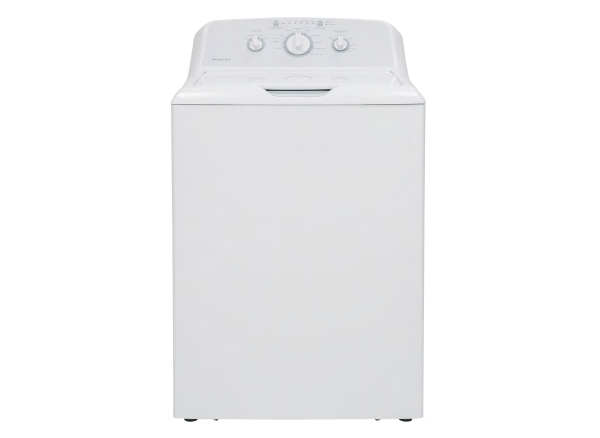
Before you start troubleshooting, it helps to know your machine a little better. The HTW240ASKWS is a top-load washer with a 3.8 cubic foot capacity. It uses an agitator to move clothes, multiple wash cycles, and a straightforward control panel. Like most modern washers, it has safety locks, sensors, and a drain pump. All these parts work together to give you clean clothes. But if one part fails, it can stop the whole process.

36% off Today’s Exclusive Deals
Limited-time Exclusive Deals. Check current discount on Amazon.
Check Price on Amazon As an Amazon Associate I earn from qualifying purchases.Knowing basic features and how the washer works will make troubleshooting easier. For example, understanding the lid lock or the water level system can help you spot why the washer isn’t starting or is filling too much.
Common Problems And How To Diagnose Them
When your washer isn’t working right, start by looking for obvious signs—strange noises, lights flashing, or water that won’t drain. Here are some of the most common problems with the Hotpoint HTW240ASKWS:
- Washer won’t start
- Washer won’t spin or agitate
- Washer won’t drain water
- Water leaking from the machine
- Strange noises or vibrations
- Washer not filling with water
- Error codes on the display
Let’s go through each problem, what usually causes it, and how to fix it.
Washer Won’t Start
If your washer doesn’t turn on or begin a cycle, check these areas:
- Power source: Make sure the washer is plugged in and the outlet is working. Test another device in the outlet.
- Lid lock: The washer won’t start if the lid isn’t closed or the lid lock is broken. Listen for a click when you close the lid—no click means the lock may be faulty.
- Control settings: Double-check you’ve selected a cycle and pressed the start button. Sometimes, a stuck button can prevent starting.
- Fuse or circuit breaker: A blown fuse or tripped breaker will cut power to the washer.
Non-obvious Insight:
Sometimes, the washer pauses if the load is unbalanced and the lid is opened. Reset by unplugging the washer for one minute, then plug it back in.
Washer Won’t Spin Or Agitate
The spin and agitation functions are essential for cleaning and removing water. If these don’t work, consider:
- Lid switch: If this safety feature fails, the washer won’t spin. Test by gently pressing the lid switch with a pen while the lid is open.
- Drive belt: The belt connects the motor to the drum. If it’s loose, worn, or broken, spinning stops.
- Motor issues: Listen for a humming sound. If you hear it, the motor tries to work but is stuck.
- Unbalanced load: Too many or too few clothes can cause the washer to stop spinning.
Non-obvious Insight:
An overloaded washer can trigger a safety shutdown, so always follow the recommended load size.
Washer Won’t Drain Water
If your washer leaves water in the drum:
- Clogged drain hose: Check for kinks or clogs. Remove and rinse out the hose.
- Drain pump: Small objects (coins, socks) can block the pump. You may hear a buzzing noise if it’s jammed.
- Pump filter: Some models have a filter you can clean, though not all HTW240ASKWS units do.
- Faulty lid switch: If the lid switch is bad, the spin and drain cycles won’t start.
Water Leaking From The Machine
Leaks can be messy and damage your floor. Check:
- Hoses: Inspect both inlet and drain hoses for cracks or loose connections.
- Door gasket: This rubber seal can tear or move out of place.
- Detergent use: Too much detergent or the wrong kind can create excess suds that leak.
- Overfilling: A faulty water level switch can cause overflow.
Strange Noises Or Vibrations
Loud banging or shaking isn’t normal.
- Leveling legs: The washer must sit flat. Adjust the legs underneath until it’s stable.
- Foreign objects: Coins, buttons, or zippers can get stuck in the drum or pump.
- Worn bearings: If you hear grinding, the drum bearings may be failing.
- Unbalanced load: Redistribute clothes if the drum is thumping.
Washer Not Filling With Water
If there’s little or no water entering:
- Water supply valves: Make sure both hot and cold valves are fully open.
- Inlet screens: These small filters can get clogged with debris.
- Water pressure: Low pressure can slow filling.
- Faulty water inlet valve: The valve may need replacement if it’s stuck closed.
Error Codes
The HTW240ASKWS may flash codes like IE, OE, or LE. Check your manual for meanings, but here are some common ones:
- IE: Water inlet error (check water supply)
- OE: Drain error (inspect drain hose and pump)
- LE: Lid error (lid not locked)
If you see a code, try unplugging the washer for 60 seconds to reset.

Step-by-step Troubleshooting Guide
When facing a problem, follow these steps for safe and effective troubleshooting.
Step 1: Safety First
Always unplug your washer before checking inside. Water and electricity are a dangerous mix.
Step 2: Visual Inspection
Look for obvious issues—loose hoses, open lids, or error codes. Sometimes the fix is as simple as closing the lid or tightening a hose.
Step 3: Run A Diagnostic Cycle
Some Hotpoint models have a hidden diagnostic mode. Check your manual to learn how to activate it. This mode can show which part is failing.
Step 4: Check For Obstructions
Remove anything that might block the drum or pump—coins, socks, or small items.
Step 5: Test Components
If you’re comfortable, test parts like the lid switch, drive belt, or pump with a multimeter. If you’re not sure, call a technician.
Step 6: Reset The Washer
Unplug the washer for one minute, then plug it back in. This can clear some electronic glitches.
Step 7: Contact Support
If none of the above works, call Hotpoint customer service or a local repair pro. Sometimes, a faulty control board or motor requires expert help.
Table: Common Problems, Possible Causes, And Quick Fixes
Here’s a quick reference for the most common issues:
| Problem | Possible Cause | Quick Fix |
|---|---|---|
| Washer won’t start | Power, lid lock, fuse | Check outlet, close lid fully, reset breaker |
| No spin/agitation | Lid switch, belt, unbalanced load | Test switch, check belt, redistribute clothes |
| Not draining | Drain hose, pump, filter | Clear hose, clean pump/filter |
| Leaking water | Hoses, gasket, detergent | Tighten hoses, inspect gasket, use proper detergent |
| No water fill | Valves, screens, pressure | Open valves, clean screens, check supply |
| Strange noises | Objects, bearings, load | Remove objects, check bearings, balance load |
Replacing Common Parts: Diy Or Call A Pro?
Some repairs are simple enough for homeowners. Others should be left to professionals. Here’s a comparison to help you decide:
| Part | DIY Difficulty | Tools Needed | Call a Pro? |
|---|---|---|---|
| Lid switch | Easy | Screwdriver | No |
| Drive belt | Medium | Screwdriver, pliers | No (unless uncomfortable) |
| Pump | Medium | Screwdriver, bucket | Maybe |
| Control board | Hard | Multimeter, screwdriver | Yes |
| Bearings | Very Hard | Special tools | Yes |
Preventative Maintenance Tips
Regular care can prevent many washer problems. Here’s what you can do to keep your HTW240ASKWS running smoothly:
- Check hoses every six months. Replace if cracked or bulging.
- Clean detergent drawer monthly to prevent buildup.
- Wipe door gasket to prevent mold and leaks.
- Balance loads to avoid shaking and wear.
- Leave the lid open after washes to dry out and stop mildew.
- Use only HE detergent to avoid excess suds.
- Inspect power cord for wear.
- Run a cleaning cycle (with washer cleaner or vinegar) every 1–2 months.
- Don’t overload the washer.
A little maintenance saves money and extends your washer’s life.
When To Call A Professional
While many problems are easy to fix, some signs mean you should call a trained technician:
- Burning smell
- Repeated electrical problems
- Washer won’t power on after resets
- Major leaks
- Error codes you can’t clear
- Loud grinding or squealing
Repairs involving the motor, control board, or bearings are best left to experts. Trying to fix these yourself can be dangerous and might void your warranty.
Comparing Hotpoint Htw240askws With Similar Models
If you’re troubleshooting often, you might wonder how your washer compares to others. Here’s a quick look at how the HTW240ASKWS stacks up against similar top-load models:
| Feature | Hotpoint HTW240ASKWS | GE GTW335ASNWW | Whirlpool WTW4816FW |
|---|---|---|---|
| Capacity | 3.8 cu. ft. | 4.2 cu. ft. | 3.5 cu. ft. |
| Wash Cycles | 10 | 11 | 12 |
| Agitator | Yes | Yes | Yes |
| Manual Water Level | No | Yes | No |
| Average Price | $500 | $650 | $530 |
The Hotpoint model is a solid basic washer, but it lacks some advanced settings found in newer machines.
Cost Of Common Repairs
Repair costs can vary, but here are some typical prices for the HTW240ASKWS:
- Lid switch replacement: $80–$150
- Drive belt replacement: $100–$180
- Drain pump replacement: $130–$250
- Control board replacement: $200–$400
- Bearing replacement: $300–$500
If your washer is older, compare these costs with the price of a new machine. Sometimes, replacement makes more sense.
How To Find Hotpoint Washer Parts
If you need to buy a part, use the full model number (HTW240ASKWS) to avoid mistakes. Reliable sources include:
- Official Hotpoint website
- Major appliance parts retailers
- Local appliance repair shops
Bring your old part or a photo to avoid confusion. Always unplug the washer before replacing any part.
Avoiding Common Troubleshooting Mistakes
Many users make the same errors when trying to fix their washer. Here’s what to watch for:
- Skipping the basics: Always check power, hoses, and the lid first.
- Forgetting safety: Unplug before opening panels.
- Using wrong parts: Use only compatible replacement parts.
- Over-tightening connections: This can crack plastic fittings.
- Ignoring error codes: They point to the source of the problem.
- Overloading the drum: This causes more problems and can damage the washer.
Taking your time and following instructions carefully can save you frustration and money.
Hotpoint Customer Support And Warranty
Most Hotpoint washers come with a one-year limited warranty covering parts and labor for manufacturing defects. You can contact Hotpoint support through their official website or by phone. Have your model and serial number ready. If you’re still within warranty, don’t try major repairs yourself—this can void coverage.
For detailed warranty info and support, visit the official Hotpoint website.
Frequently Asked Questions
Why Does My Hotpoint Htw240askws Washer Stop Mid-cycle?
A washer stopping mid-cycle often means the lid switch is faulty, the load is unbalanced, or there’s a power issue. Make sure the lid is closed firmly and try redistributing clothes. If the problem continues, check for error codes.
How Do I Reset My Hotpoint Washer?
Unplug the washer from the wall for one minute. Plug it back in, then open and close the lid six times within 12 seconds. This resets most Hotpoint top-load washers.
What Type Of Detergent Should I Use In My Htw240askws?
Use high-efficiency (HE) detergent. Regular detergent makes too many suds, which can cause leaks or poor cleaning.
Why Is My Washer Making A Grinding Noise?
A grinding noise could mean an object is stuck in the drum or pump, or the bearings are worn out. Stop the machine, unplug it, and check for foreign objects. If the noise continues, call a technician.
How Often Should I Clean The Washer?
Clean your washer once a month. Run an empty hot wash with washer cleaner or white vinegar to remove residue and keep it smelling fresh.
Final Thoughts
Troubleshooting your Hotpoint Washer HTW240ASKWS doesn’t have to be frustrating. With a little patience and the right steps, you can solve many problems yourself. Remember to check the basics first, keep safety in mind, and don’t hesitate to call for help when repairs get complicated. Regular maintenance will help your washer last longer and run better. When in doubt, always consult your manual or reach out to Hotpoint support. A little knowledge and care go a long way in keeping your laundry routine smooth and stress-free.


