

Greenworks Pressure Washer Troubleshooting: A Complete Guide
Pressure washers help you clean tough surfaces quickly, and Greenworks pressure washers are a favorite for many homeowners. But sometimes, even the best tools stop working or don’t perform well. When your Greenworks pressure washer has problems, fixing it can feel confusing—especially if you’re not used to electrical tools or if English isn’t your first language.
This article is your practical guide to troubleshooting Greenworks pressure washers. You’ll learn how to solve common issues, understand error signs, and get your washer working again. Whether your machine won’t start, loses pressure, or leaks water, you’ll find step-by-step solutions. We’ll also cover smart tips, real examples, and mistakes beginners often make. If you want to clean your patio, car, or driveway without frustration, read on.

36% off Today’s Exclusive Deals
Limited-time Exclusive Deals. Check current discount on Amazon.
Check Price on Amazon As an Amazon Associate I earn from qualifying purchases.Understanding Your Greenworks Pressure Washer
Before you start fixing problems, it’s important to know how your pressure washer works. Greenworks makes both electric and battery-powered models. Most parts and issues are similar, but the power source can affect troubleshooting steps.
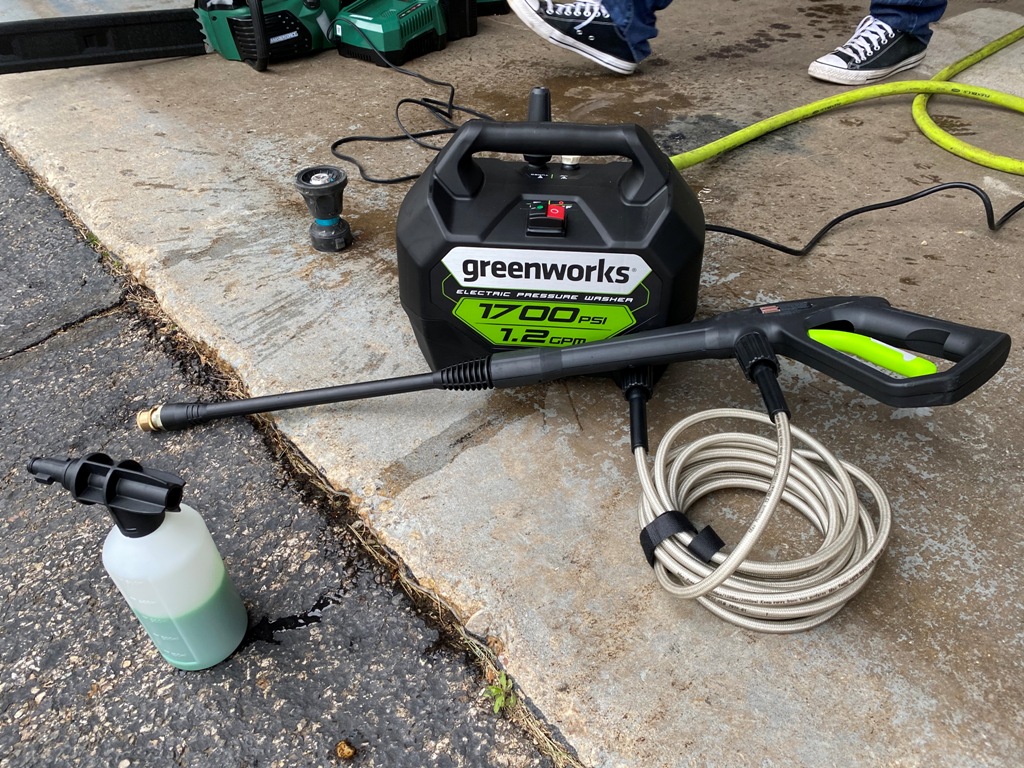
Main Parts Of Greenworks Pressure Washers
- Motor or battery: Powers the pump.
- Pump: Creates high pressure.
- Hose: Delivers water from the machine to the spray gun.
- Spray gun: Controls water flow and direction.
- Nozzle: Changes water pressure and spray shape.
- Water inlet: Connects to your garden hose.
Knowing these parts helps you find where problems start. For example, if water leaks from the hose, you don’t need to check the motor.
Basic Operation Cycle
- Connect your garden hose to the water inlet.
- Plug in the machine (or insert the battery).
- Turn on the power.
- Press the spray gun trigger.
- Water flows through the pump, hose, and nozzle.
If any step fails, the washer won’t work well.
Common Greenworks Pressure Washer Problems And Solutions
Many users face similar issues. Here are the most frequent problems, along with clear solutions.
1. Pressure Washer Won’t Start
This issue is common with electric models. If your washer doesn’t start, try these steps:
- Check power supply: Make sure the power outlet works. Test with another device.
- Inspect power cord: Look for cuts, bends, or damage.
- Reset GFCI plug: Many models have a safety plug. Press the ‘reset’ button.
- Check the switch: Ensure the machine’s power switch is ON.
- Battery charge: If you have a battery model, check if the battery is charged and connected.
If none of these work, the motor or internal wiring may be faulty. Most beginners overlook the GFCI plug, which is a common cause.
2. Low Pressure Or No Pressure
Low water pressure is frustrating. Here’s how to fix it:
- Check water supply: Is your garden hose fully open? Low water flow causes low pressure.
- Inspect hose for kinks: Straighten the hose if it’s bent.
- Clean nozzle: Dirt or debris blocks the nozzle. Remove and rinse it.
- Remove air from system: Run water through the washer (without power) for 1–2 minutes.
- Check inlet filter: Some models have a filter at the water inlet. Clean it.
If you still have low pressure, the pump may be damaged.
3. Water Leaks
Leaks waste water and reduce cleaning power.
- Check hose connections: Tighten all connections by hand.
- Inspect O-rings: These rubber rings seal joints. Replace if cracked.
- Look for cracks in hose or gun: Change broken parts.
- Check pump housing: If water leaks from inside, the pump may need professional repair.
A common mistake is over-tightening connections, which can break O-rings.
4. Sudden Shut-off During Use
Sometimes, your washer turns off while cleaning.
- Motor overheating: Let the machine cool for 20–30 minutes.
- Power overload: Unplug and reset the GFCI plug.
- Battery drain: For battery models, recharge or replace the battery.
If the washer often shuts off, check your power supply and avoid long, continuous use.
5. Spray Gun Not Working
If you press the trigger and nothing happens:
- Trigger lock engaged: Some spray guns have a lock. Unlock before use.
- Clogged spray gun: Disassemble and clean inside parts.
- Broken trigger: Replace the spray gun.
Many users don’t notice the trigger lock, a simple but easily missed issue.
6. Pressure Fluctuates
Pressure that goes up and down can make cleaning difficult.
- Air in hose: Purge air by running water before turning on power.
- Nozzle blockage: Clean or replace the nozzle.
- Water supply issue: Ensure steady water flow.
7. Soap Dispenser Not Working
Soap helps clean dirt, but the dispenser sometimes fails.
- Check soap tank: Is there soap in the tank?
- Use correct nozzle: Some models require a special soap nozzle.
- Clean dispenser: Rinse with warm water to unclog.
8. Machine Vibrates Excessively
Too much vibration can damage parts.
- Check for loose parts: Tighten screws and bolts.
- Place on flat surface: Uneven surfaces cause shaking.
- Pump issue: If vibration is severe, consult a technician.
9. Burning Smell
A burning smell is dangerous.
- Stop using immediately.
- Check for motor overheating.
- Inspect power cord and wiring.
- Contact Greenworks support: Do not use until fixed.
10. Noisy Operation
Loud noise isn’t normal.
- Check for debris in pump.
- Lubricate moving parts (if recommended in the manual).
- Tighten loose parts.
If noise continues, the pump may be failing.
Troubleshooting Steps: A Practical Approach
Let’s look at a real-world example. Suppose your pressure washer won’t start.
- Test the outlet: Plug a lamp or phone charger. If it works, the outlet is fine.
- Inspect power cord: Look for damage. Replace if needed.
- Reset GFCI plug: Press ‘reset’ and ‘test’ buttons. Wait 10 seconds.
- Check switch and fuse: Turn the switch ON. If your model has a fuse, inspect and replace.
- Check internal wiring: If comfortable, open the casing to look for loose wires.
If you’re unsure, contact a repair technician.
Comparison Of Greenworks Pressure Washer Models
Different Greenworks models have unique features and problems. Here’s a quick comparison:
| Model | Power Source | Max Pressure (PSI) | Common Problems |
|---|---|---|---|
| GPW1500 | Electric | 1500 | Low pressure, GFCI issues |
| GPW2000 | Electric | 2000 | Leaks, motor overheating |
| GWP1700 | Battery | 1700 | Battery drain, soap dispenser |
Knowing your model helps you focus on specific troubleshooting steps.
Diagnosing Pressure Issues: Psi Vs Gpm
Pressure washers are rated by PSI (pounds per square inch) and GPM (gallons per minute). PSI is water pressure; GPM is water flow. Both affect cleaning.
| Problem | Likely PSI Cause | Likely GPM Cause |
|---|---|---|
| Low pressure | Clogged nozzle, pump issue | Low water supply, hose kink |
| Pressure fluctuation | Air in pump, electrical problem | Unsteady water source |
| No pressure | Motor failure | Disconnected hose |
Check both PSI and GPM causes to solve pressure problems.
Cleaning And Maintenance Tips
Regular care prevents most issues. Here’s how to keep your Greenworks washer in top shape:
- Flush the system after use: Run clean water through the washer for 1–2 minutes.
- Store indoors: Protect from rain and snow.
- Check hoses and connectors: Inspect for cracks and leaks monthly.
- Clean nozzle and filter: Remove and rinse every few uses.
- Recharge battery fully: For battery models, avoid partial charges.
- Lubricate moving parts: Follow the manual’s instructions.
A smart tip: Use distilled water if your local water is hard. This reduces scale buildup and pump damage.

Advanced Troubleshooting: When To Seek Professional Help
Some problems are too complex for home repair. If you notice these signs, call a technician:
- Motor doesn’t turn after basic checks.
- Water leaks from pump housing.
- Burning smell or smoke from machine.
- Broken trigger or gun after cleaning and inspection.
Trying to fix these yourself may void the warranty or cause more damage.
Common Mistakes When Troubleshooting
Many beginners make simple errors:
- Skipping basic checks: Always check power, water, and hose first.
- Forgetting nozzle cleaning: Nozzles clog easily.
- Ignoring trigger lock: Spray gun locks prevent accidental spraying.
- Over-tightening connectors: This damages O-rings.
- Using wrong soap nozzle: Soap only works with the correct nozzle.
Avoid these mistakes to save time and money.
Greenworks Pressure Washer Troubleshooting Checklist
Here’s a quick checklist for reference:
- Power: Is the washer plugged in and switched ON?
- Water supply: Is the hose open and water flowing?
- Nozzle: Is it clean and correctly attached?
- Hose: Is it straight, without kinks?
- GFCI plug: Is it reset?
- Trigger lock: Is it unlocked?
- Soap dispenser: Is it filled and unclogged?
If you check these, most issues are easy to fix.
Warranty And Support
Greenworks offers a limited warranty on most models (usually 1–3 years). If your washer is under warranty, avoid opening the casing or making big repairs yourself. Contact Greenworks support for help. You can find official contact info on their website: Greenworks Support.

Pressure Washer Safety Tips
When fixing or using your pressure washer:
- Unplug before repairs: Prevent electric shock.
- Don’t touch wet power cords: Water and electricity are dangerous.
- Wear gloves and goggles: Protect your hands and eyes.
- Keep children away: High-pressure water can cause injury.
Quick Troubleshooting Reference Table
Here’s a handy table for common issues and solutions:
| Issue | Likely Cause | Quick Fix |
|---|---|---|
| No power | Outlet, cord, GFCI | Test outlet, reset plug |
| Low pressure | Nozzle, hose kink | Clean nozzle, straighten hose |
| Leaking water | O-ring, loose connector | Replace O-ring, tighten |
| Soap not dispensing | No soap, wrong nozzle | Fill soap, use soap nozzle |
| Spray gun not working | Trigger lock, clog | Unlock, clean gun |
Frequently Asked Questions
Why Does My Greenworks Pressure Washer Lose Pressure After A Few Minutes?
This usually happens because of air in the hose or a clogged nozzle. Make sure you purge air before use and clean the nozzle regularly. If your water supply is unsteady, pressure can drop quickly. Also, check for hose kinks and filter blockages.
Can I Use Hot Water In My Greenworks Pressure Washer?
No. Most Greenworks pressure washers are designed for cold water only. Using hot water can damage the pump and seals, voiding your warranty. Always use water at room temperature or as recommended in the manual.
What Should I Do If My Pressure Washer Makes A Loud Noise?
A noisy pump can mean debris inside or loose parts. Turn off and unplug the washer. Check for blockages in the nozzle and hoses. Tighten screws or bolts if needed. If noise continues after cleaning, the pump may be failing—contact a technician.
How Often Should I Clean The Nozzle And Filter?
For best performance, clean the nozzle and filter every 3–5 uses. If you wash very dirty surfaces or use hard water, clean them more often. Regular cleaning prevents clogs and keeps pressure high.
Is It Safe To Repair My Greenworks Pressure Washer Myself?
You can fix simple issues like nozzle cleaning, hose replacement, and O-ring changes. For electrical or motor problems, always unplug before working. If you’re not comfortable or if the problem is serious, contact Greenworks support or a technician. Trying to fix complex issues yourself may void the warranty.
Getting your Greenworks pressure washer working again doesn’t have to be hard. With these troubleshooting tips, you can solve most issues quickly and safely. Remember to check power, water, and nozzle first, and follow maintenance steps to prevent future problems.
If you ever feel unsure, reach out to Greenworks support for expert help. Happy cleaning!

