

Every modern home depends on its washing machine, and the Samsung Vrt Plus washer is a favorite for many. It’s known for its quiet operation, high spin speeds, and smart features. But like any appliance, problems can happen. When your washer stops working well, it can disrupt your routine and cause stress. Luckily, most issues are easy to fix, and you often don’t need a technician. This guide will help you troubleshoot your Samsung Vrt Plus washer step by step, using clear instructions and practical advice. Whether you’re facing noisy cycles, error codes, leaks, or washer that won’t spin, you’ll find answers here.
Understanding The Samsung Vrt Plus Washer
The Samsung Vrt Plus washer uses advanced technology to reduce noise and vibration. “VRT” stands for Vibration Reduction Technology, which keeps the machine steady even during high-speed spins. This washer has digital displays, smart sensors, and a variety of wash cycles. It is efficient and user-friendly, but its complexity can make troubleshooting tricky for beginners.

36% off Today’s Exclusive Deals
Limited-time Exclusive Deals. Check current discount on Amazon.
Check Price on Amazon As an Amazon Associate I earn from qualifying purchases.Features That Affect Troubleshooting
- Vibration sensors: Detect imbalances and adjust spin.
- Digital error codes: Help identify problems.
- Smart control panel: Offers multiple functions and settings.
- Eco-friendly options: Save water and energy.
Knowing these features helps you understand why your washer might act up and how to fix it.
Common Samsung Vrt Plus Washer Problems
Let’s look at the most frequent issues owners experience. Identifying the exact problem is the first step to solving it.
- Washer won’t start
- Washer is noisy or shakes
- Washer won’t spin or drain
- Error codes on display
- Water leaks
- Washer smells bad
- Door won’t unlock
- Cycle stops mid-way
- Clothes come out wet
- Display or controls not working
Each problem has possible causes and solutions. Some fixes are simple, while others need more care.
Troubleshooting Steps For Each Problem
1. Washer Won’t Start
This is a common frustration. If your Samsung Vrt Plus washer doesn’t turn on, try these steps:
- Check power supply: Make sure the washer is plugged in and the outlet works. Test with another appliance.
- Inspect power cord: Look for visible damage.
- Reset circuit breaker: Sometimes breakers trip. Flip it off and on.
- Child lock: If the child lock is activated, the buttons won’t respond. Hold the relevant button (usually “Temp” or “Spin”) for 3 seconds to unlock.
- Door closed properly: The washer won’t start if the door isn’t fully shut.
If the washer still won’t start, it may need a service check for the control board or internal wiring.
2. Washer Is Noisy Or Shakes
VRT Plus washers are designed to be quiet. If yours is making loud noises or shaking:
- Check for overload: Too many clothes can cause imbalance.
- Balance the load: Spread items evenly inside the drum.
- Level the washer: Use a spirit level. Adjust the feet so the washer sits flat.
- Inspect floor: The surface must be solid and flat, not carpeted.
- Remove shipping bolts: If new, shipping bolts must be removed. They’re at the back.
If the noise persists, the suspension or drum bearings may be worn.
3. Washer Won’t Spin Or Drain
If your washer isn’t spinning or draining:
- Check drain filter: Located at the front bottom. Clean it regularly.
- Inspect drain hose: Ensure it’s not kinked or clogged.
- Select proper cycle: Some cycles (like delicate) use less spin.
- Check for unbalanced load: The washer may pause if the load is uneven.
Non-obvious insight: Many owners forget to clean the drain filter. Clogged filters cause most draining problems.
4. Error Codes On Display
Samsung washers display codes like 4E, 5E, dE, etc. Each code means something specific.
- 4E: Water supply error. Check hoses and valves.
- 5E: Drain error. Clean filter and hose.
- DE: Door error. Make sure the door is shut and latch isn’t broken.
- UE: Unbalanced load. Redistribute clothes.
- 1E: Water level sensor error. Inspect for blockages.
Refer to your manual for the full list. If the code persists after basic checks, contact support.
5. Water Leaks
Leaks can damage your floor and cause mold.
- Inspect hoses: Make sure inlet and drain hoses are tight.
- Check door seal: Clean the rubber gasket. Look for tears.
- Clean filter: Overflows can happen if filters are blocked.
- Check detergent drawer: Don’t overfill, and clean regularly.
Non-obvious insight: Leaks often come from using too much detergent, which causes overflow and residue buildup.
6. Washer Smells Bad
Odors are usually caused by mold or bacteria.
- Run a self-clean cycle: Most Samsung washers have this option.
- Clean drum and gasket: Wipe with a cloth and mild cleaner.
- Leave door open after use: Air dries the interior.
- Use proper detergent: High-efficiency detergent reduces buildup.
Avoid using vinegar on rubber seals; it can damage them.
7. Door Won’t Unlock
If the door is stuck:
- Wait a few minutes: The lock releases after a cycle.
- Check water level: The door won’t open if water is inside.
- Unplug washer: Wait 5 minutes, then plug in. This resets the lock.
- Manual release: Some models have a hidden release cord near the filter.
If none of these work, the lock may be faulty.
8. Cycle Stops Mid-way
Interrupted cycles can be frustrating.
- Check power and water supply: Sudden outages stop the cycle.
- Error codes: Check for codes indicating problems.
- Door open: If the door isn’t fully latched, the cycle stops.
- Overheated motor: Let the washer rest, then restart.
9. Clothes Come Out Wet
If your clothes are still wet:
- Spin speed: Check if you selected a low spin cycle.
- Unbalanced load: The washer might reduce spin for safety.
- Drain filter: Clean it for proper drainage.
- Too many clothes: Overloading prevents good spinning.
10. Display Or Controls Not Working
When the display is blank or controls don’t respond:
- Check power: Confirm the outlet works.
- Child lock: Disable if active.
- Reset washer: Unplug for 5 minutes, then plug back in.
- Control board: If all else fails, the board may need replacement.
Error Codes Reference Table
Here is a handy table with common Samsung Vrt Plus washer error codes and their meaning:
| Error Code | Meaning | Action |
|---|---|---|
| 4E | Water supply error | Check hose and tap |
| 5E | Drain error | Clean filter and hose |
| dE | Door error | Ensure door is closed |
| UE | Unbalanced load | Redistribute clothes |
| 1E | Water level sensor error | Inspect sensor |
Practical Tips For Samsung Vrt Plus Washer Maintenance
Preventing problems is easier than fixing them. Here are practical ways to keep your washer running smoothly:
- Clean the drain filter: Do this every month.
- Inspect hoses: Check for leaks or wear every 6 months.
- Use the right detergent: Avoid excess suds.
- Don’t overload: Wash smaller loads for better results.
- Run self-clean cycles: This prevents mold and odors.
- Keep the washer level: Adjust feet if needed.
- Wipe the door seal: Prevents mildew buildup.
Regular care saves money and extends the washer’s life.
When To Call A Technician
Some problems are too complex for DIY solutions. Call a professional if:
- Error codes won’t clear after basic troubleshooting.
- Washer leaks from inside (not hoses or door seal).
- Drum won’t turn or makes grinding noises.
- Control board fails (display won’t light up).
- Electrical issues: Sparks, burning smell, or frequent power loss.
Technicians have the tools and parts to fix these safely.
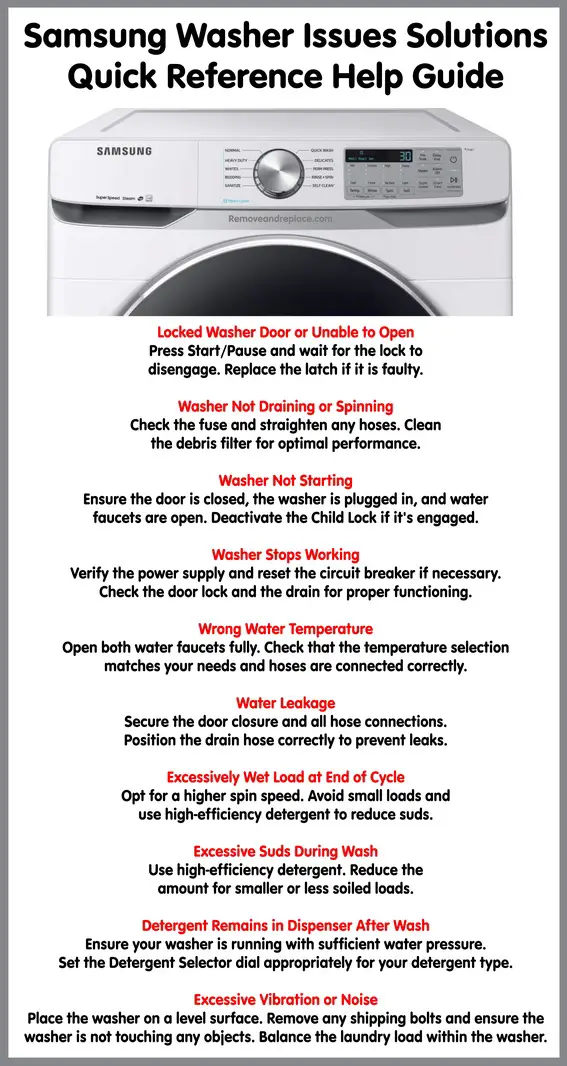
How To Reset Your Samsung Vrt Plus Washer
Resetting can solve many minor glitches.
- Unplug the washer from power.
- Wait 5 minutes to clear memory.
- Plug it back in and restart.
Some models have a dedicated reset button. Use it if available.
Comparing Samsung Vrt Plus With Other Washers
If you wonder how the Vrt Plus stacks up against other models, here’s a comparison:
| Feature | Samsung Vrt Plus | LG Direct Drive | Whirlpool Cabrio |
|---|---|---|---|
| Vibration Reduction | Advanced VRT Plus | Direct Drive Motor | Less advanced |
| Noise Level | Very low | Low | Medium |
| Spin Speed (RPM) | 1200 | 1400 | 1100 |
| Smart Features | Yes | Yes | No |
| Self-Clean Cycle | Yes | No | No |
Samsung Vrt Plus stands out for vibration control and noise reduction.
Troubleshooting Example: Washer Won’t Drain
Let’s walk through a real troubleshooting scenario.
Imagine your washer finishes a cycle, but water stays inside and it won’t drain. Here’s what to do:
- Turn off the washer and unplug it.
- Open the drain filter cover at the front bottom.
- Place a towel and bowl under the filter to catch water.
- Remove and clean the filter. Check for coins, hair, or fabric.
- Inspect the drain hose for blockages or kinks.
- Plug in and restart. Run a short cycle to test.
Most drain problems are solved at this stage. If water still won’t drain, the pump may be faulty.
Samsung Vrt Plus Washer Statistics
Samsung is a global leader in appliances. According to market data:
- Over 3 million units of Vrt Plus washers sold in the US since 2015.
- Customer satisfaction averages 4.5 out of 5 stars on major retail sites.
- Average lifespan is 8–10 years with regular maintenance.
- Most common owner-reported problems: Drain issues (28%), noise (17%), and error codes (15%).
These numbers show that Vrt Plus washers are reliable, but regular upkeep is essential.

Using Smart Features For Troubleshooting
The Vrt Plus washer has smart diagnostics. You can use Samsung’s Smart Care app to scan error codes and get advice.
- Download the app and scan the washer’s display with your phone.
- The app gives step-by-step solutions.
This feature saves time and reduces guesswork. If you have a newer model, use Smart Care for quick fixes.
Water Supply Comparison Table
Water supply issues are a common source of error codes like 4E. Here’s a comparison of possible causes:
| Cause | Impact | Solution |
|---|---|---|
| Low water pressure | Cycle won’t start | Check valves and pressure |
| Kinked hose | Error code 4E | Straighten hose |
| Closed valve | No water enters | Open valve fully |
| Clogged filter | Slow fill | Clean inlet filter |
Fixing water supply problems is usually quick and easy.
Practical Advisor’s Tips: Avoiding Common Mistakes
Many beginners make simple errors that cause bigger problems.
- Don’t overload the washer. It stresses the motor and reduces cleaning.
- Always use high-efficiency detergent. Regular soap creates too many suds.
- Clean the filter every month—even if the washer seems fine.
- Keep the washer level. A tilted machine vibrates and wears out faster.
- Never force the door open. Wait for the lock to release.
Following these tips prevents most issues and keeps your washer healthy.
Frequently Asked Questions
What Does The 4e Error Mean On My Samsung Vrt Plus Washer?
The 4E error means your washer is not getting enough water. This can be due to a closed valve, kinked hose, or clogged filter. Check each part and ensure water flows freely.
How Often Should I Clean The Drain Filter?
Clean the drain filter every month. This prevents clogs and ensures smooth draining. If you wash items with lots of lint or small objects, clean it more often.
Why Is My Washer Shaking During The Spin Cycle?
Excessive shaking is usually caused by an unbalanced load or the washer not sitting level. Spread clothes evenly and adjust the feet if needed. Remove shipping bolts if your washer is new.
Can I Use Regular Detergent In My Samsung Vrt Plus Washer?
You should use high-efficiency (HE) detergent only. Regular detergent creates too many suds, which can cause leaks and damage the washer. HE detergent is designed for modern machines.
What Should I Do If My Washer Keeps Showing Error Codes?
If error codes keep appearing, follow the steps for each code. Clean filters, check hoses, and reset the washer. If codes won’t clear, contact a technician or use Samsung’s Smart Care app for help.
Troubleshooting your Samsung Vrt Plus washer is easier than you think. With the steps and advice above, you can fix most problems quickly and safely. Regular maintenance and smart use will keep your washer running for years. If you need extra help, Samsung’s official support and guides are reliable—find more information at Samsung Support. Remember, a well-maintained washer saves time, money, and stress.


