A Samsung VRT washer can make life easier, but when it stops working right, laundry becomes a headache. Many owners face issues like loud noises, error codes, or water leaks. If you’re struggling with a Samsung VRT washer problem, you’re not alone.
This guide will show you how to troubleshoot common problems, fix them safely, and understand when to call a professional. With clear steps and real-world tips, you’ll learn how to handle most issues—even if English isn’t your first language.

36% off Today’s Exclusive Deals
Limited-time Exclusive Deals. Check current discount on Amazon.
Check Price on Amazon As an Amazon Associate I earn from qualifying purchases.Understanding Samsung Vrt Washer Technology
Samsung’s VRT (Vibration Reduction Technology) washers are known for their quiet operation and advanced features. The VRT system uses sensors and special drum designs to reduce vibration, making them ideal for apartments and homes where noise is a concern. These washers also use digital controls and smart error detection.
However, advanced technology means more parts can fail. For example, a sensor problem might cause a washer to stop mid-cycle or display an error code. Learning about the key components helps you troubleshoot faster:
- Drum: Holds clothes and spins during washing
- Motor: Turns the drum
- Control board: Manages washer functions
- Sensors: Detect vibration, water level, and door position
- Pump: Removes water after washing
Knowing these basics will help you understand error messages and symptoms.
Common Samsung Vrt Washer Problems
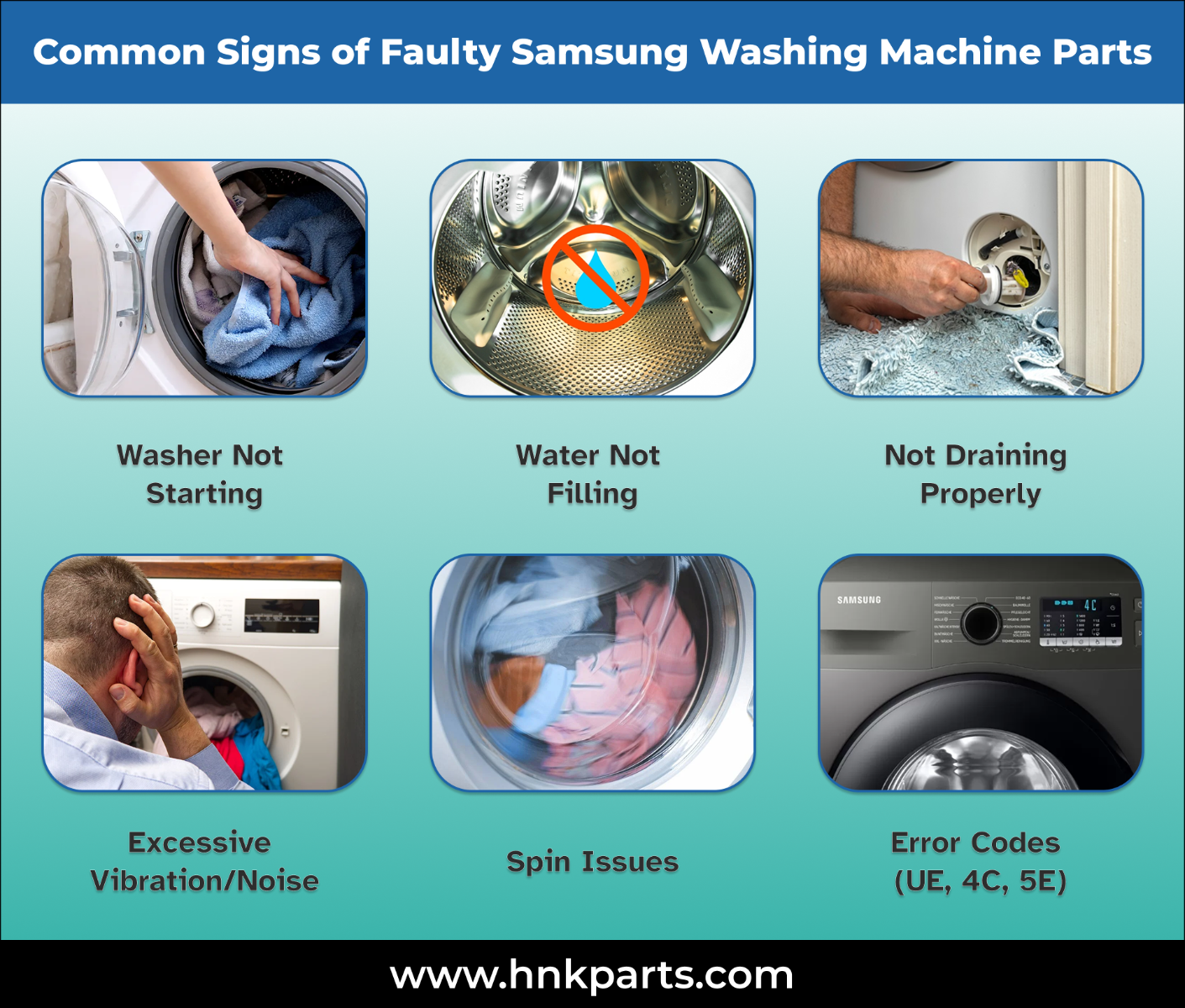
If your washer isn’t working right, it’s usually one of these issues:
- Washer won’t start
- Washer makes loud noises
- Washer is leaking water
- Washer is not draining
- Washer is not spinning
- Washer displays error codes
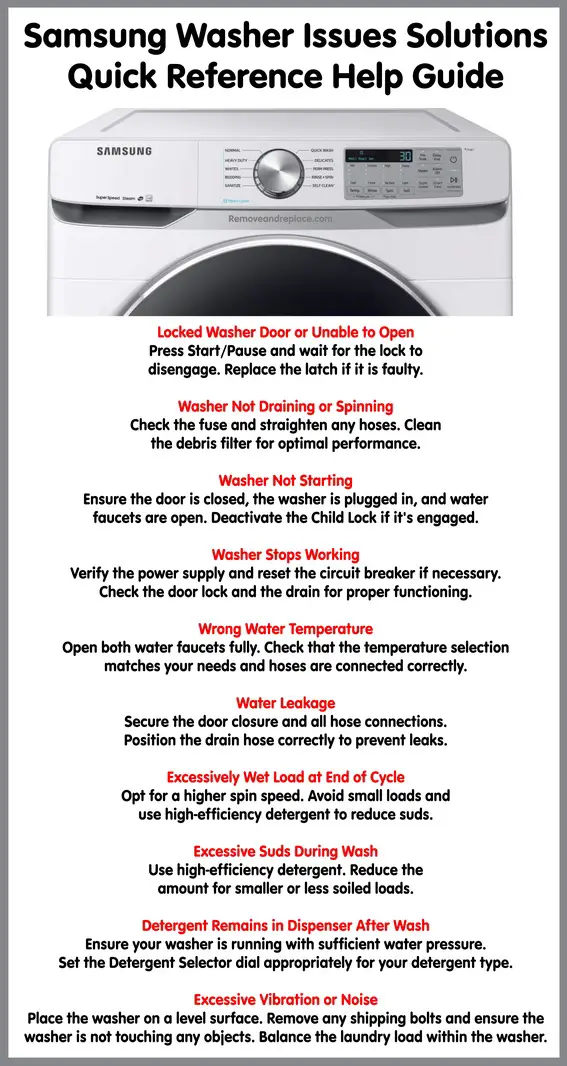
- Washer door won’t unlock
- Washer leaves clothes wet
- Washer smells bad
- Washer fills but won’t wash
Each problem has unique causes and solutions. Let’s look at how to fix them step by step.
Troubleshooting Steps For Each Problem
1. Washer Won’t Start
First, check the basics:
- Is the washer plugged in?
- Is the power outlet working?
- Is the door fully closed?
If everything looks fine, try these steps:
- Press the Power button for 5 seconds to reset.
- Check for tripped circuit breakers.
- Look for error codes on the display.
- If you see an error code, consult your manual or read below.
Non-obvious insight: Sometimes, a faulty door sensor prevents the washer from starting, even if the door looks closed.
2. Washer Makes Loud Noises
Loud noises can mean:
- Washer is not level
- Loose objects are inside the drum
- Drum bearings are worn
To fix:
- Make sure the washer is on a flat surface. Adjust the feet if needed.
- Remove coins, buttons, or other items from the drum.
- If you hear grinding or banging, drum bearings may need replacement—a job for professionals.
Example: If your washer shakes during spin, check the floor for stability. Even small tilts can cause big vibrations.
3. Washer Is Leaking Water
Leaks are common, but easy to fix:
- Check hoses for cracks or loose connections.
- Inspect the door seal for dirt or damage.
- Look underneath for water pooling.
If you see water near the back, the hose might be loose. Tighten it gently. For leaks at the front, clean the door seal with a damp cloth.
Practical tip: Detergent buildup in the seal can cause leaks and bad smells. Clean the seal monthly.
4. Washer Is Not Draining
If water stays in the drum:
- Check the drain filter (usually at the bottom front). Remove and clean it.
- Inspect the drain hose for clogs or bends.
- Run a drain cycle.
If you still have problems, the pump may be faulty. Replacing a pump is best left to a technician.
Common mistake: Forgetting to clean the filter regularly. A blocked filter is the top cause of drainage problems.
5. Washer Is Not Spinning
A washer that doesn’t spin usually has:
- Unbalanced load
- Door not locked
- Too much water inside
Try these steps:
- Rearrange clothes evenly in the drum.
- Close the door tightly.
- Run a spin-only cycle.
If the washer still won’t spin, check for error codes. Sometimes, the washer stops spinning to protect itself from damage.
6. Washer Displays Error Codes
Samsung VRT washers use codes to show problems. Some common codes:
- 4E: Water supply issue
- 5E: Drain problem
- DE: Door not locked
- UE: Unbalanced load
Here’s a quick reference:
| Error Code | Meaning | How to Fix |
|---|---|---|
| 4E | No water supply | Check hose, faucet, filter |
| 5E | Not draining | Clean filter, check hose |
| dE | Door error | Close door, check sensor |
| UE | Unbalanced load | Redistribute clothes |
If you see a code not listed above, check your manual or visit Samsung’s official website.
7. Washer Door Won’t Unlock
After a cycle, the door should unlock automatically. If not:
- Wait a few minutes; the lock releases when the washer cools.
- Try unplugging the washer for 5 minutes, then plug it back in.
- Make sure all water has drained.
If the door still won’t open, the lock may be broken. This is a job for a repair technician.
8. Washer Leaves Clothes Wet
If your clothes are still wet after spinning:
- Check the spin speed setting (higher speeds dry better).
- Make sure the drain filter is clean.
- Avoid overloading the drum.
Non-obvious insight: Using too much detergent can cause excess suds, which prevents proper spinning.
9. Washer Smells Bad
Odors can build up over time. To fix:
- Run a “Self Clean” or hot wash cycle with no clothes.
- Clean the door seal and detergent drawer.
- Leave the door open after each wash.
For stubborn smells, use washing machine cleaner tablets.
10. Washer Fills But Won’t Wash
If your washer fills but doesn’t start washing:
- Check for error codes.
- Make sure the door is locked.
- Try resetting the washer.
If the motor or control board is faulty, you’ll need professional repair.
How To Reset A Samsung Vrt Washer
Many problems can be fixed by resetting. To reset:
- Unplug the washer from the wall.
- Wait at least 5 minutes.
- Plug it back in.
- Press the Power button.
This clears minor errors and can unlock the door or fix display glitches.
Tip: Don’t skip unplugging. Just pressing the power button won’t fully reset the washer.
Preventing Common Problems
Regular maintenance can stop most issues before they start. Here’s what to do:
- Clean the drain filter monthly
- Check hoses for leaks every 3 months
- Wipe the door seal weekly
- Run an empty hot wash once a month
- Don’t overload the drum
| Task | Frequency | Benefit |
|---|---|---|
| Clean drain filter | Monthly | Prevents blockages |
| Check hoses | Every 3 months | Stops leaks |
| Wipe door seal | Weekly | Reduces odors |
| Hot wash cycle | Monthly | Kills bacteria |
| Don’t overload | Every wash | Protects motor |
Practical advisor insight: Most users forget to clean the filter. This simple step can prevent many costly repairs.
Comparing Samsung Vrt Washers With Other Brands
Samsung VRT washers are popular for their quiet operation and advanced features. How do they compare to other brands?
| Feature | Samsung VRT | LG | Whirlpool |
|---|---|---|---|
| Vibration reduction | Excellent | Very good | Good |
| Error detection | Advanced | Advanced | Basic |
| Noise level | Low | Medium | Medium |
| Maintenance | Easy | Moderate | Moderate |
Samsung is a good choice if you want quiet washes and easy maintenance. However, LG and Whirlpool also offer reliable machines.
When To Call A Professional
Some issues are easy to fix at home, but others need expert help. Call a technician if:
- The washer has electrical problems
- The drum doesn’t turn at all
- There’s a burning smell
- Error codes don’t clear after reset
- Water leaks from inside the machine
Trying to fix complex parts can make things worse or void the warranty.
Experience-based guide tip: If your washer is still under warranty, always contact Samsung support first. DIY repairs might cancel your coverage.
Safety Precautions When Troubleshooting
Before fixing your washer, remember:
- Unplug the machine before opening panels
- Don’t touch wet wires or plugs
- Use gloves when cleaning filters
- Keep children away from the washer during repairs
Non-obvious insight: After unplugging, wait a few minutes. Some parts retain electricity for a short time.

Real-world Examples Of Samsung Vrt Washer Issues
Let’s look at how real users solved their washer problems:
- Leaking door seal: Maria found water leaking from the front. She cleaned the seal and removed hair and detergent residue. The leak stopped.
- Error code 5E: John’s washer showed 5E and wouldn’t drain. He opened the drain filter and found a sock blocking it. After cleaning, his washer worked again.
- Loud spinning: Ali’s washer made loud noises during spin. He adjusted the feet to level the machine. The noise disappeared.
These examples show that small steps can solve big problems.
Useful Samsung Vrt Washer Maintenance Products
To keep your washer running well, use:
- Washing machine cleaner tablets
- Microfiber cloths for wiping seals
- Water leak detectors for early warning
- Replacement hoses if old ones crack
Using the right products helps prevent damage and keeps your washer smelling fresh.
How To Find Genuine Samsung Parts
If you need to replace a part, always buy genuine Samsung parts. Fake or cheap parts can cause more problems.
- Check Samsung’s official parts store
- Look for the model number on your washer
- Avoid third-party sellers unless they are authorized
For more details, visit the official Samsung support page or a trusted resource like Consumer Reports.
Frequently Asked Questions
What Does The “ue” Error Code Mean On My Samsung Vrt Washer?
The UE error code means the load is unbalanced. This happens if you put too many clothes on one side or mix heavy and light items. To fix, open the washer, move clothes evenly, and run a spin cycle again.
Why Is My Samsung Vrt Washer Not Draining?
If your washer won’t drain, the drain filter may be blocked, or the hose might be kinked. Clean the filter and straighten the hose. If the problem continues, the drain pump might be faulty.
How Often Should I Clean The Drain Filter?
Clean the drain filter once a month. If you wash items like socks or small clothes, check the filter more often. Keeping the filter clean prevents blockages and keeps your washer working well.
Can I Use Any Detergent In A Samsung Vrt Washer?
Use HE (High Efficiency) detergent for Samsung VRT washers. Regular detergent creates too many suds, which can cause errors and stop the washer from spinning. Follow the detergent instructions for your machine.
What Should I Do If My Washer Smells Bad?
If your washer smells, run a hot wash cycle with a cleaning tablet and wipe the door seal. Leave the door open between washes to let air flow and prevent mold.
A Samsung VRT washer is a reliable machine when you maintain it well and fix problems quickly. Most issues can be solved with simple steps, but some need expert help. Remember to clean filters and seals regularly, check hoses, and use the right detergent.
With this troubleshooting guide, you’ll save time, avoid frustration, and keep your laundry fresh and easy.