

Waking up on time is easier when your alarm clock does more than ring. Many people want extra features, like a USB charging port, so they can charge their phone at night. The Anjank Alarm Clock is popular for its modern look and practical design, but buyers often wonder: Does the Anjank Alarm Clock have a USB charging port? In this article, you’ll find a clear answer, see how the port works, and learn about its benefits, alternatives, and practical tips. If you’re thinking about buying an Anjank Alarm Clock or already have one, you’ll find everything you need to know right here.
Anjank Alarm Clock: Overview And Key Features
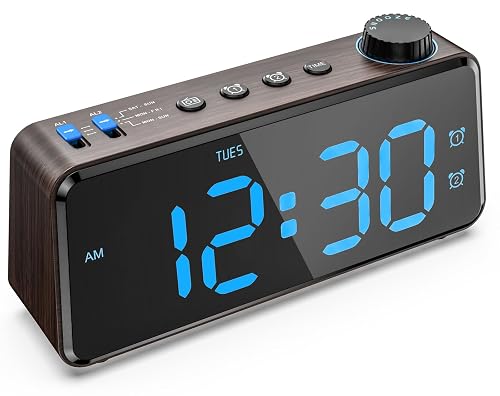
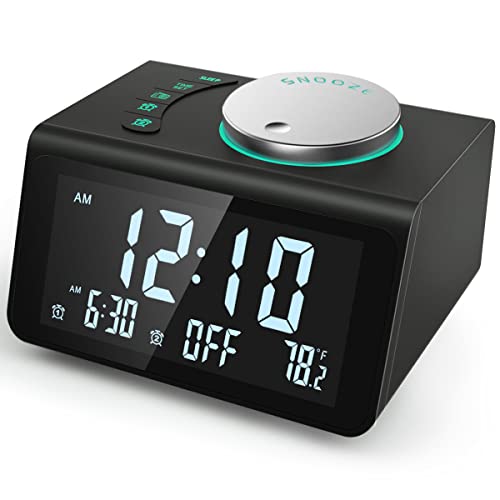
The Anjank Alarm Clock is designed to fit modern bedrooms and offices. It comes in several models, all with a sleek shape, easy-to-read digital display, and useful extras. Here are some features many buyers appreciate:
- Large LED Display: The clock shows the time clearly, even from across the room. Most models have adjustable brightness.
- Dual Alarm Settings: You can set two alarms for different times — helpful for couples or anyone with a varied schedule.
- FM Radio: Some versions include an FM radio with memory presets.
- Snooze Function: The snooze button is easy to find, so you can add a few more minutes of sleep.
- Battery Backup: If the power goes out, your alarm settings are saved.
- USB Charging Port: This feature is available on most Anjank models.
The USB port is one reason the Anjank Alarm Clock stands out. It lets you charge your phone or other devices without using a separate wall plug. But not all models have this feature, so it’s important to check before buying.
Does Anjank Alarm Clock Have A Usb Charging Port?
Most Anjank Alarm Clock models come with at least one USB charging port on the back or side. This allows you to plug in your phone, smartwatch, or any device that uses a USB cable. The port is usually labeled “USB” and is easy to access.
Models With Usb Charging Port
Here is a comparison of three popular Anjank Alarm Clock models and their USB port availability:
| Model | USB Charging Port | Number of Ports | Other Features |
|---|---|---|---|
| Anjank Wooden Alarm Clock | Yes | 1 | Wireless charging, FM radio |
| Anjank Digital Alarm Clock | Yes | 1 | Night light, dual alarm |
| Anjank Bluetooth Alarm Clock | No | 0 | Bluetooth speaker, FM radio |
As you can see, two out of three of the most common models include a USB charging port. The Bluetooth Alarm Clock focuses on audio features instead, so it does not have a port.
How The Usb Port Works
The USB port on the Anjank Alarm Clock is powered by the main AC adapter. When you plug the clock into the wall, the port becomes active. You simply connect your charging cable and place your device nearby. The current supplied is usually 5V/1A, which is enough for smartphones, smartwatches, and earbuds.
Here is a simple breakdown of the USB port’s technical details:
| Feature | Details |
|---|---|
| Output Voltage | 5 volts (V) |
| Output Current | 1 ampere (A) |
| Compatible Devices | Phones, smartwatches, earbuds |
| Location | Back or side of clock |
This output is safe for most portable devices, but may charge slower than a high-power wall charger.
Exceptions And Common Mistakes
Not every Anjank Alarm Clock model has a USB port. Sometimes, buyers assume all models have the feature, but it’s missing in some versions. Always check the product description and photos before buying. If you already own an Anjank clock and can’t find the port, look carefully at the back or sides.
Some ports are hidden behind a cover or blend into the design.
Benefits Of A Usb Charging Port In Alarm Clocks
Adding a USB charging port to your alarm clock offers several advantages. It can make your night routine easier and your bedroom less cluttered.
Practical Convenience
You can charge your phone overnight without needing a separate wall adapter. This is especially useful if your outlet is far from your bed or you want to keep your phone within reach.
Reduces Clutter
Having one device do two jobs means fewer cables and adapters. Your nightstand stays tidy, with less mess and fewer chances for tangled cords.
Ideal For Guests
If you have guests in your home, a clock with a USB port makes it easy for them to charge their devices without hunting for a charger.
Safer Charging
The clock’s USB port is designed for slow, steady charging. This reduces the risk of overheating and is gentle on your battery.
Saves Outlet Space
Many homes have limited outlets near the bed. The USB port frees up plugs for lamps, fans, or other devices.
Comparing Anjank Alarm Clock With Other Brands
It’s helpful to see how the Anjank Alarm Clock stacks up against similar products from other brands. Here is a quick comparison:
| Brand | USB Port | Wireless Charging | Display | Alarm Features |
|---|---|---|---|---|
| Anjank | Yes (most models) | Yes (some models) | Large LED | Dual alarm, snooze |
| Philips | No | No | Color display | Wake-up light, FM radio |
| iHome | Yes | Yes | LED | Bluetooth, dual alarm |
| JALL | Yes | No | Wood grain LED | Triple alarm |
The Anjank Alarm Clock holds its own against other brands, especially for its simple design and reliable USB port. Some competing products offer extra features, but may cost more or take up more space.

Real-world Usage: Charging Phones And Devices
Many people use the USB port on their Anjank Alarm Clock to charge their smartphones. The port works well with Apple, Samsung, and other brands. It is also compatible with fitness trackers, wireless earbuds, and smartwatches. Here are some practical examples:
- You can leave your phone plugged in overnight and wake up with a full battery.
- If you use your phone as a sleep tracker, it stays charged all night.
- Guests can easily charge their devices without asking for a charger.
Non-obvious insight: The USB port is not designed for fast charging. If you need to quickly charge your phone, use a wall adapter. However, slow overnight charging is better for battery health.
Tips For Using The Anjank Usb Charging Port
To get the most from the USB port, follow these practical tips:
- Use a quality cable: Cheap cables can break or fail to charge properly.
- Don’t overload the port: Only charge one device at a time.
- Keep the clock plugged in: The USB port works only when the clock has power.
- Check the device’s battery: If your phone is not charging, make sure the cable is connected firmly.
- Avoid water or moisture: The port is not waterproof. Keep drinks and liquids away.
- Clean the port regularly: Dust can block the connection. Use a dry cloth or compressed air.
Non-obvious insight: If your device charges slowly or not at all, try a different cable or test another device. Sometimes, the port can loosen over time if cables are pulled too hard.
Alternatives To Usb Charging Ports In Alarm Clocks
Some people prefer wireless charging in their alarm clock. Anjank offers models with wireless pads on top. You can place your phone directly on the pad, and it charges without cables. This is helpful if your phone supports wireless charging.
Other alternatives include:
- Built-in charging docks: Some clocks have a slot for your phone, keeping it upright while charging.
- Multiple USB ports: If you need to charge more than one device, look for models with two or more ports.
- Integrated power outlets: A few clocks have extra AC sockets on the back.
If you have an older device, or want faster charging, you may need to use your wall adapter.
Common Buyer Mistakes
Buyers sometimes make mistakes when shopping for alarm clocks with USB ports. Here are some to avoid:
- Not checking the specs: Don’t assume all models have a USB port.
- Expecting fast charging: The port is for slow, steady charging, not quick top-ups.
- Overloading the port: Charging too many devices may cause problems.
- Ignoring compatibility: Some older devices may not charge well.
- Missing the location of the port: Make sure you can reach the port easily from your bed.
Always read the product description, check the photos, and look for reviews before buying.
Frequently Asked Questions
Is The Usb Charging Port Available On All Anjank Alarm Clock Models?
No, not every model has a USB port. Most popular Anjank Alarm Clocks include one, but some versions focus on other features, like Bluetooth or FM radio, and skip the USB port. Always check the specific product details before buying.
Can I Charge My Tablet Or Ipad Using The Anjank Alarm Clock Usb Port?
The USB port supplies 5V/1A, which is enough for smartphones and small devices. Tablets like iPads may charge slowly or not at all, depending on their power requirements. For best results, use a dedicated charger for larger devices.
Is The Usb Port Safe For Overnight Charging?
Yes, the port is designed for steady overnight charging. It uses a low current that is gentle on batteries and reduces the risk of overheating. Make sure your device and cable are in good condition.
Does The Usb Port Work During A Power Outage?
No, the USB port only works when the clock is plugged into the wall. If the power goes out, your alarm settings are saved by the battery backup, but the USB port becomes inactive.
Where Can I Find More Information About Anjank Alarm Clocks?
For detailed specs and model comparisons, visit Anjank’s official website or trusted retailers. You can also check this Amazon product page for real user reviews and answers.
Choosing an alarm clock with a USB charging port can make your life easier, especially in a busy bedroom or office. Anjank offers several models that include this feature, but it’s important to check the details before you buy. With the right clock, you’ll wake up on time and keep your devices charged and ready. If you want reliable charging and a clean nightstand, Anjank is a smart choice.
