

Stackable washer and dryer units are a popular solution for saving space in homes, apartments, and condos. Kenmore is a trusted name for these appliances, offering reliability and a variety of features. But even the best machines can develop problems over time. If your Kenmore stackable washer and dryer is acting up, you are not alone—many users face similar challenges. Knowing how to troubleshoot common issues can save you time, money, and frustration.
In this guide, you’ll discover practical steps for diagnosing and fixing many typical problems with Kenmore stackable units. This includes error codes, noise issues, water leaks, spinning problems, and more. Whether you are a homeowner, a renter, or a landlord, this article provides clear advice and real-world examples.

36% off Today’s Exclusive Deals
Limited-time Exclusive Deals. Check current discount on Amazon.
Check Price on Amazon As an Amazon Associate I earn from qualifying purchases.You’ll also learn which problems you can fix yourself and when it’s best to call a professional. Let’s get your laundry routine back on track.
Understanding Your Kenmore Stackable Washer And Dryer
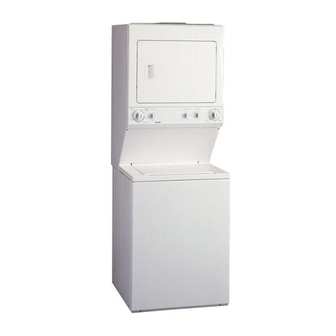
Before you start troubleshooting, it’s important to know how stackable washer and dryer units work. In most Kenmore models, the washer sits below, and the dryer is installed on top. They share certain connections, such as power and sometimes water lines. But each unit has its own set of controls and systems.
Common Features And Model Variations
Kenmore offers several types of stackable units:
- Front-load washer with electric dryer
- Top-load washer with gas dryer
- All-in-one washer-dryer combo
Some models feature digital displays and error codes, while older units use simple dial controls. Knowing your model number (often found inside the door or on the back panel) is helpful when ordering parts or searching for manuals.
Why Stackable Units Have Unique Problems
Stacked designs save space, but they can also lead to:
- Restricted airflow (dryer overheating)
- Difficult access (controls or filters hard to reach)
- Vibration issues (especially on upper floors)
- Shared electrical circuits (risk of tripped breakers)
Understanding these factors can help you target the root cause of many issues.
Initial Troubleshooting Steps
Before taking your unit apart or calling for help, start with these basic checks. Many problems have simple solutions.
- Power supply: Ensure the machine is plugged in and the circuit breaker is ON. Stackable units may use two separate circuits (one for the washer, one for the dryer).
- Door/lid switch: If the door is not fully closed, the washer or dryer will not start.
- Water supply: Check that both hot and cold water valves are open.
- Lint filter: A clogged dryer filter restricts airflow and causes overheating.
- Error codes: Newer models display error messages—write them down for reference.
Many times, laundry problems come down to one of these simple issues.

Troubleshooting The Washer: Common Problems And Solutions
Stackable washers face unique challenges due to their compact design. Let’s look at the most frequent issues and how to solve them.
Washer Will Not Start
This is a common frustration. Here’s what to check:
- Power cord plugged in securely.
- Door/lid switch: Listen for a click when you close the door. No click often means a broken switch.
- Control settings: Make sure you have selected a cycle and pressed “Start.”
- Child lock: Some Kenmore washers have a lock feature—check your manual.
If none of these steps work, the control board or timer may have failed.
Washer Fills Slowly Or Not At All
If the washer isn’t filling with water:
- Confirm both water supply valves are open.
- Inspect the inlet hoses for kinks or clogs.
- Remove and clean the inlet screens (use pliers carefully).
- Listen for a humming sound; if you hear it, the water valve may be faulty.
Low water pressure or clogged screens are often the cause.
Washer Won’t Drain
If water stays in the drum:
- Check the drain hose for clogs or kinks.
- Inspect the pump filter (usually behind a small panel).
- Make sure the drain hose isn’t inserted too far into the standpipe (can cause siphoning).
- Listen for the pump running—if it’s silent, the drain pump may be broken.
Regular maintenance of the filter can prevent future blockages.
Washer Won’t Spin Or Agitate
If your clothes are soaked after a cycle:
- Confirm the load is balanced; too many heavy items can cause the washer to stop spinning.
- Check the lid switch (washer will not spin if the lid is open).
- Inspect the drive belt (for belt-driven models).
- For digital models, check for error codes related to the motor.
An unbalanced load is a simple fix—just redistribute the clothes and try again.
Washer Is Leaking
Puddles under your stackable washer can come from:
- Loose hoses (check supply and drain connections).
- Door gasket—worn or dirty seals may leak.
- Detergent drawer—using too much soap creates excess suds.
- Cracked tub—rare, but possible with older units.
If leaks happen regularly, inspect the gasket for mold or tears.
Washer Makes Loud Noises Or Vibrates
Kenmore stackables can develop rattles, bangs, or shakes:
- Make sure the unit is level (use a bubble level).
- Check for shipping bolts—these must be removed after installation.
- Worn bearings or a broken suspension can cause loud spinning noises.
- Coins or small objects in the drum also create noise.
If your floor is uneven, consider using anti-vibration pads.
Washer Error Codes
Newer Kenmore models display error codes. Common ones include:
- F21: Long drain time—check the drain filter.
- F11: Communication error—try unplugging for 5 minutes.
- SUD: Too many suds—run a rinse cycle with no detergent.
Refer to your user manual for a full list of codes. If the code returns after a reset, further diagnosis is needed.
Troubleshooting The Dryer: Common Problems And Solutions
Dryers in stackable units experience their own set of challenges. Here’s how to spot and fix the most common issues.
Dryer Will Not Start
If your dryer stays silent:
- Ensure the door is fully closed (listen for a click).
- Check the start button—press firmly.
- Inspect your circuit breaker or fuse box.
- For gas dryers, check the gas supply valve.
If the dryer still doesn’t start, the thermal fuse or start switch may be faulty.
Dryer Not Heating
Clothes coming out damp or cold? Try these steps:
- Clean the lint filter (every load).
- Check the vent hose—make sure it’s not crushed or blocked.
- Make sure the dryer is set to a heat cycle (not “air fluff”).
- For electric dryers, a tripped heating element may be the problem.
- For gas dryers, ensure the gas valve is open.
Lint buildup is a leading cause of heating failure and even dryer fires.
Dryer Takes Too Long To Dry
If drying times are longer than usual:
- Clean both the lint filter and the vent duct to the outside.
- Shorten extra-long vent hoses.
- Avoid overloading—too many clothes block airflow.
- Check for moisture sensor problems (wiping it gently can help).
Long drying times usually mean poor airflow, not a broken heater.
Dryer Drum Not Turning
If you hear the motor but the drum doesn’t move:
- The drive belt may be broken or slipped off.
- The drum rollers can wear out and seize up.
- Check for jammed objects (buttons, coins).
Replacing a drive belt is possible for handy users, but drum roller replacement is best left to professionals.
Dryer Makes Strange Noises
Common noises include squeaking, thumping, or rattling:
- Squeaking often means worn drum rollers or idler pulley.
- Thumping can be caused by objects stuck in the drum.
- Rattling may indicate loose panels or screws.
Ignoring these noises can lead to bigger (and more expensive) repairs.
Dryer Error Codes
Digital Kenmore dryers may show codes such as:
- F01: Control board issue—try resetting the unit.
- AF: Airflow restriction—check venting.
- E1/E2: Thermistor problems.
If error codes persist, consult a technician or refer to your model’s manual.
Troubleshooting Shared Problems In Stackable Units
Some problems affect both the washer and dryer together, especially in Kenmore laundry centers (where both appliances are built into a single frame).
Both Units Won’t Power On
If neither the washer nor dryer turns on:
- Check for a tripped breaker (stackable units often need 240V).
- Inspect the main power cord for damage.
- Make sure the wall outlet is providing power (test with a lamp).
If the outlet works but the appliances don’t, the issue could be with the internal wiring or control board.
Units Vibrate Or Move
Stacked units are more likely to vibrate during spin cycles:
- Confirm the stacking kit is installed (prevents shifting).
- Use anti-vibration pads under the feet.
- Make sure the unit is level on all corners.
If vibration continues, check for loose bolts or supports.
Error Codes Affecting Both Units
Some stackable models use a single digital interface. Codes like F70 or F71 can signal communication errors between the washer and dryer. Unplugging the whole unit for 5 minutes often resets these errors.
Maintenance Tips To Prevent Problems
Regular care is the best way to avoid costly repairs. Here are some essential maintenance tips for Kenmore stackable units:
- Clean the lint filter after every dryer load.
- Check water hoses every 6 months for cracks or bulges.
- Inspect the door gasket on the washer for mold or debris.
- Run a cleaning cycle with washing machine cleaner once a month.
- Vacuum behind the unit every few months to remove dust buildup.
- Check vent hoses for lint blockages at least twice a year.
Following these steps will keep your stackable set running efficiently.
Diy Repair Or Call A Professional?
Some repairs are simple, but others need expert help. Here’s a quick comparison to help you decide:
| Problem | DIY Possible? | When to Call a Pro |
|---|---|---|
| Clogged drain hose | Yes | If water still doesn’t drain after clearing |
| Broken drive belt | If handy with tools | If uncomfortable opening panels |
| Leaking water | Yes (check hoses/gasket) | If leak is from drum or internal part |
| Control board issue | No | Always call a technician |
| Electrical problems | No | Always call a licensed electrician |
A good rule: If you need to open the unit’s back panel or handle wiring, it’s best to call a pro.
Kenmore Stackable Models: Common Error Codes And Their Meanings
To help you identify problems faster, here is a summary of typical error codes for Kenmore stackable models.
| Model | Error Code | Meaning | DIY Solution |
|---|---|---|---|
| Front-load | F21 | Long drain time | Clean drain filter, check hose |
| Front-load | SUD | Too many suds | Rerun rinse, use less detergent |
| Electric dryer | AF | Restricted airflow | Clean lint filter and vent |
| All models | F70 | Communication error | Unplug 5 min, check wiring |
| Gas dryer | E1/E2 | Thermistor issue | Replace thermistor |
Always consult your specific model’s manual for detailed error code explanations.
Common Mistakes To Avoid When Troubleshooting
Many users make avoidable errors when trying to fix their Kenmore stackable washer and dryer. Here are some to watch out for:
- Skipping the basics: Always check power, water, and door/lid switches before complex repairs.
- Forgetting to unplug: Always disconnect the unit before opening any panels.
- Using too much detergent: Excess suds cause leaks and error codes.
- Ignoring unusual noises: Early attention can prevent major breakdowns.
- Neglecting maintenance: Small steps, like cleaning filters, prevent big problems.
These practical habits will save money and extend your appliance’s life.
When To Replace Instead Of Repair
Kenmore stackable units are built to last, but sometimes replacement is smarter than repair.
- If your unit is over 12-15 years old and repairs are frequent, consider a new model.
- If the cost of repair exceeds 50% of a new unit’s price, replacement is usually best.
- Newer units use less water and energy—saving money in the long run.
Check for Energy Star certified models when shopping for replacements. For more guidance, see the Energy Star Appliance Guide.
Real-world Examples
Here are two common scenarios with solutions:
Example 1:
Maria’s Kenmore stackable washer stopped spinning. She checked the load and found a tangled blanket. After redistributing the clothes, the spin cycle worked again. She also cleaned the drain filter, which had a sock inside.
Example 2:
John noticed his dryer was not heating. He cleaned the lint filter and vent duct, removing years of lint buildup. After this, his dryer heated up and dried clothes faster.
These simple steps often solve major headaches.
Frequently Asked Questions
Why Does My Kenmore Stackable Washer Keep Stopping Mid-cycle?
This often happens due to an unbalanced load, a clogged drain filter, or too many suds. Make sure clothes are spread evenly. Clean the filter and use the right amount of detergent.
How Often Should I Clean The Dryer Vent?
Clean the lint filter after every load. The vent duct to the outside should be cleaned at least twice a year to prevent blockages and reduce fire risk.
What Does The F21 Error Code Mean On My Kenmore Washer?
F21 means your washer is taking too long to drain. Check for a clogged filter, blocked drain hose, or a failing drain pump.
Can I Stack Any Washer And Dryer?
No. Only washers and dryers designed as stackable units or with a compatible stacking kit can be safely stacked. Always use the manufacturer’s recommended kit.
My Dryer Runs But Clothes Stay Wet. What Should I Check First?
Start by cleaning the lint filter and checking the vent hose for blockages. These are the most common reasons for poor drying performance.
—
Stackable washer and dryer sets like those from Kenmore offer great convenience, but they can develop unique issues. With the right troubleshooting steps and regular maintenance, you can solve most problems yourself and keep your laundry routine running smoothly. Remember, when in doubt or when facing electrical or major internal repairs, always call a professional for safety and peace of mind.


