

Fisher Paykel Washer Troubleshooting
If you own a Fisher & Paykel washer, you probably enjoy its modern design, quiet operation, and smart features. But like any home appliance, it can run into problems over time. Maybe your washer won’t start, makes strange noises, or leaves clothes soaking wet after a cycle. These issues can be frustrating, especially if you’re not sure what’s wrong.
The good news is, many common Fisher Paykel washer problems can be fixed at home with some basic troubleshooting. In this guide, you’ll learn how to identify and solve the most frequent issues with these washers. You’ll also find helpful tips to keep your machine running smoothly and discover when it’s time to call in a professional.

36% off Today’s Exclusive Deals
Limited-time Exclusive Deals. Check current discount on Amazon.
Check Price on Amazon As an Amazon Associate I earn from qualifying purchases.Even if you’re not an expert, you’ll be able to follow these steps thanks to simple explanations and practical examples.
Let’s dive into the world of Fisher Paykel washer troubleshooting and make laundry day easy again.
Understanding Your Fisher Paykel Washer
Before you begin fixing problems, it helps to know how your Fisher Paykel washer works. These washers come in both top loader and front loader models, with some differences in how they operate. Most use direct drive motors, smart sensors, and electronic controls. This makes them more efficient, but sometimes, errors can be hard to understand.
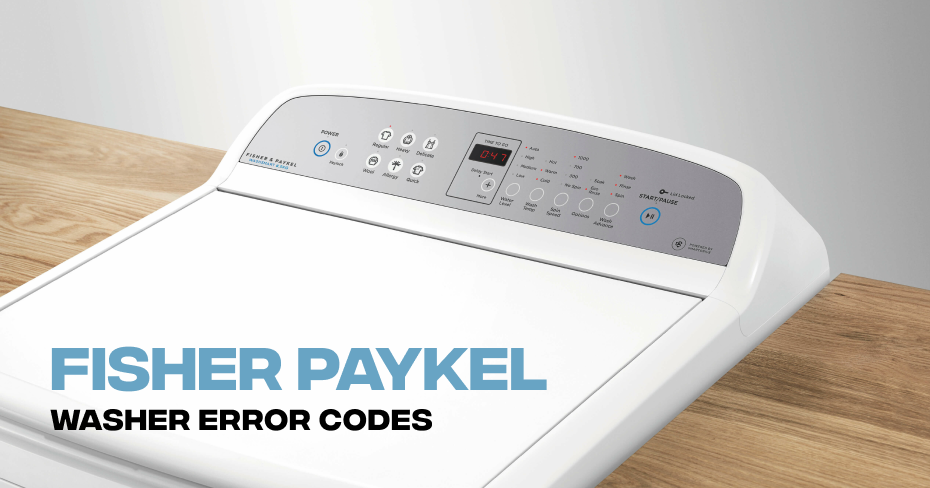
Fisher & Paykel washers often display error codes on their digital panel. These codes are clues to what is wrong. For example, “Error 49” usually means a water supply problem, while “Error 37” means a pump issue. Knowing these codes can save you time and guesswork.
There are also some features unique to Fisher & Paykel:
- Eco-Active Wash: Mixes detergent and water before washing to save energy.
- SmartDrive Motor: Uses sensors to control speed and balance.
- Auto Water Level: Adjusts water use based on the load size.
Understanding these features helps you spot when something isn’t working as it should.
Common Problems And How To Fix Them
1. Washer Won’t Start
When your washer does not turn on, it might feel like a major problem. But often, the cause is simple.
What to Check:
- Power supply: Make sure the washer is plugged in and the outlet is working. Try another device in the same outlet.
- Lid or door: Most models have a safety switch. If the lid or door is not closed, the washer won’t start.
- Control panel: Check if the panel lights up. If not, there may be a problem with the control board or fuse.
- Delay start: Some washers have a delay timer. Make sure this isn’t set.
Quick Fixes:
- Unplug the washer for 1 minute and plug it back in to reset the electronics.
- Close the lid or door firmly until you hear a click.
- Check your home’s circuit breaker or fuse box.
Non-obvious tip: If the washer starts but then stops, the issue might be with the water supply, not the power. Always check water taps are turned on.
2. Washer Not Filling With Water
If your clothes stay dry, or the drum doesn’t fill, the issue is likely with the water supply.
What to Check:
- Water taps: Make sure both hot and cold taps are turned on.
- Hoses: Inspect for kinks, twists, or leaks. Straighten or replace if damaged.
- Filters: Each hose has a filter at the connection point. These can get clogged with dirt or sand.
- Error code: Look for codes like “Err 49” or “Err 10.”
Quick Fixes:
- Turn off taps, disconnect hoses, and check filters. Clean with a brush if dirty.
- Reconnect hoses tightly to prevent leaks.
- Run a short cycle to test.
Non-obvious insight: Sometimes, water pressure is too low for the washer to sense. Test the pressure by filling a bucket from the tap – if it’s slow, the problem is with your home’s supply.
3. Washer Not Draining
A washer full of water at the end of a cycle usually means a drainage issue.
What to Check:
- Drain hose: Make sure it’s not bent, blocked, or placed too high.
- Pump filter: On most models, there’s a small door at the bottom where lint and coins can get trapped.
- Pump operation: Listen for a humming or clicking sound from the pump.
Quick Fixes:
- Remove the drain hose from the standpipe and check for clogs.
- Open the pump filter door, place a towel under it, and twist to remove debris.
- Run the “Spin” or “Drain” cycle to test.
Practical tip: Small socks, coins, or hairpins often cause drain blockages. Always check pockets before washing.
4. Washer Not Spinning
If your clothes come out wet and heavy, the spin cycle may not be working.
What to Check:
- Load balance: If the washer detects an uneven load, it won’t spin fast. Rearrange clothes evenly.
- Lid lock: The lid must be locked before spinning. Check for error codes or blinking lights.
- Drive belt: For older models, a worn or loose belt can stop the drum from spinning.
Quick Fixes:
- Pause the cycle, open the lid, and spread the clothes out.
- Check for loose items under the drum.
- If you hear a clicking noise, the lid lock may need replacement.
Non-obvious insight: Overloading the washer can cause repeated unbalanced loads, leading to long cycles and motor strain. Always follow the recommended load size.
5. Strange Noises During Operation
Unusual sounds often worry users. Most noises have a simple explanation.
Common Noises:
- Banging: Often caused by heavy loads shifting during spin.
- Grinding: May signal a foreign object in the drum or pump.
- Clicking: Normal when the lid locks or the pump changes cycles.
Quick Fixes:
- Stop the cycle, open the lid, and check for coins or buttons.
- Make sure the washer is level on the floor. Adjust the feet if needed.
- Remove excess items and run a rinse/spin cycle.
Example: A frequent cause is washing shoes or heavy items without using a laundry bag.
6. Washer Leaks Water
Leaks can lead to water damage and mold. Fix them quickly.
What to Check:
- Hose connections: Ensure all hoses are tight and free from cracks.
- Door seal: For front loaders, check the rubber seal for tears or trapped objects.
- Detergent drawer: Using too much detergent can cause overflow.
Quick Fixes:
- Tighten or replace hoses.
- Clean and dry the door seal after each wash.
- Use only the recommended amount of detergent.
Non-obvious tip: Hard water can cause a buildup in the detergent drawer, leading to leaks. Clean the drawer monthly.
7. Washer Smells Bad
A musty or sour smell means mold or bacteria inside the washer.
What to Do:
- Clean the drum: Run a hot wash with no laundry and add 2 cups of white vinegar.
- Clean the seal: Wipe the rubber seal with a vinegar solution.
- Leave the door open: After each wash, leave the door or lid open to dry out.
Example: If you wash with cold water often, residue can build up faster. Use a hot cycle once a month.
8. Error Codes And What They Mean
Fisher Paykel washers display error codes to help you troubleshoot. Here’s a reference table for the most common ones:
| Error Code | Meaning | What to Check |
|---|---|---|
| Err 49 | Water supply issue | Taps, hoses, filters |
| Err 37 | Pump blocked | Pump filter, drain hose |
| Err 9 | Lid/door open | Lid switch, door seal |
| Err 40 | Motor fault | Power supply, motor wiring |
| Err 15 | Out of balance | Load distribution |
If you see an error code not listed here, check your user manual or visit the official Fisher & Paykel website.
Step-by-step Diagnostic Guide
When your washer has a problem, a structured approach helps you find the cause faster. Here’s a step-by-step diagnostic checklist:
- Check the basics: Power, water supply, and door/lid closure.
- Observe: Listen for strange sounds, look for leaks or error codes.
- Run a test cycle: Use the shortest wash cycle without laundry.
- Examine hoses and filters: Remove and clean if needed.
- Balance the load: Make sure clothes are not clumped together.
- Reset the washer: Unplug for 1-2 minutes, then restart.
If the washer still doesn’t work, write down any error codes and what you observed. This makes it easier to get help from customer support.
Comparing Fisher Paykel Models: Troubleshooting Differences
Different Fisher & Paykel washers may have unique troubleshooting steps. Here’s a comparison of common models:
| Model Type | Main Differences | Unique Issues |
|---|---|---|
| Top Load | Direct drive, no agitator | Balance errors, lid switch faults |
| Front Load | Door seal, auto water level | Seal leaks, pump filter blockages |
| Washer-Dryer Combo | Drying function included | Dryer not heating, lint buildup |
Practical note: Front loaders are more likely to have door seal issues, while top loaders often suffer from unbalanced loads.
Preventive Maintenance Tips
Regular care keeps your washer running well and helps avoid breakdowns.
- Clean filters and hoses every 2-3 months.
- Wipe down the drum and seal after each use to prevent mold.
- Use the right detergent (HE for high-efficiency models).
- Don’t overload the washer. Follow the recommended load size in your manual.
- Level the washer to reduce vibration and noise.
- Check for leaks under and around the washer after moving it.
A little maintenance can prevent many common problems and extend the life of your machine.
When To Call A Professional
Some washer issues need expert help. Don’t try to fix electrical or motor problems yourself.
Call a technician if you notice:
- Burning smells or visible smoke.
- Repeated error codes after resetting the machine.
- Electrical shocks, sparks, or a completely dead washer.
- Water leaks that you cannot stop or locate.
Fisher & Paykel offers customer support and certified technicians. Keep your model and serial number handy when calling for service.
Non-obvious guidance: Trying to fix advanced issues yourself can void your warranty. Always check your warranty terms before opening the washer.
Troubleshooting Quick Reference Table
Here’s a quick summary table for fast troubleshooting:
| Problem | Possible Cause | Action |
|---|---|---|
| Washer won’t start | No power, lid open, delay set | Check outlet, close lid, reset |
| No water fill | Taps off, clogged hose/filter | Open taps, clean hose/filter |
| Not draining | Blocked pump/hose | Clean pump, check hose |
| Strange noises | Loose items, unbalanced load | Remove objects, balance load |
| Leaks | Loose hoses, damaged seal | Tighten hoses, check seal |
Keep this table handy for a fast check when you run into trouble.
Real-world Examples
Example 1: Maria’s Fisher Paykel washer stopped draining. She found an “Err 37” code. After unplugging the washer, she removed the pump filter and found a baby sock blocking it. Once cleared, the washer worked perfectly.
Example 2: Tom’s washer made a grinding noise. He discovered a coin stuck in the drum after opening the lid and checking under the agitator plate. The coin was removed, and the noise stopped.
Example 3: Nina saw water on the floor after each cycle. She checked the hose connections and found a loose clamp. Tightening it solved the leak.
These stories show that many problems have simple solutions, often needing just basic tools and some patience.

Advanced Troubleshooting Tips
For users comfortable with DIY, here are some advanced checks:
- Test the lid or door switch: Use a multimeter to check for continuity.
- Check the drive belt: Remove the back panel to inspect for wear or breakage.
- Inspect the control board: Look for burned or damaged components (only if you have electrical experience).
- Examine motor wiring: Loose or broken wires can cause motor faults.
Warning: Only attempt these steps if you are confident and the washer is unplugged. Otherwise, call a professional.
Keeping Your Washer Running Longer
To get the most from your Fisher & Paykel washer:
- Run maintenance washes monthly with hot water and vinegar.
- Always empty pockets to avoid coins, pins, or tissues inside the drum.
- Use the right cycle for the fabric and soil level.
- Check for recalls or updates on the manufacturer’s website.
For more information on washer maintenance and troubleshooting, you can visit the official Fisher & Paykel Support page.
Frequently Asked Questions
Why Does My Fisher Paykel Washer Keep Going Out Of Balance?
This happens when clothes gather on one side of the drum, causing it to shake. Spread items evenly and avoid mixing heavy and light fabrics in the same load.
What Should I Do If My Washer Shows An Error Code?
Check the code in your user manual or the table above. Most errors point to a simple issue you can fix, like a blocked hose or open door. If the code stays after fixing, reset the washer.
How Often Should I Clean The Pump Filter?
Every 2-3 months is best, or sooner if you wash very dirty items. Cleaning the filter stops blockages and keeps your washer draining well.
Can I Use Regular Detergent In My Fisher Paykel Washer?
High-efficiency (HE) detergent is recommended, especially for front loaders. Regular detergent creates too many suds, which can cause leaks or poor cleaning.
My Washer Smells Bad. How Can I Get Rid Of The Odor?
Run a hot cycle with 2 cups of white vinegar and no laundry. Wipe the drum and seal afterward. Leave the door open after each wash to keep the inside dry.
Your Fisher Paykel washer is a smart, reliable machine. With the steps in this guide, you can fix most problems yourself and keep your laundry routine smooth. Remember, when in doubt, professional help is always available. Happy washing!

