

The Kenmore 500 Series washer is a popular choice in many homes, known for its durability and straightforward design. But even the most reliable washers can have problems from time to time. When your Kenmore 500 Series washer isn’t working right, it can be stressful and confusing.
You might hear strange noises, see error codes, or notice your clothes are not coming out clean or dry. The good news is, most issues can be fixed at home with simple troubleshooting steps.

36% off Today’s Exclusive Deals
Limited-time Exclusive Deals. Check current discount on Amazon.
Check Price on Amazon As an Amazon Associate I earn from qualifying purchases.Understanding how to identify and solve common washer problems can save you time and money. In this article, you’ll learn clear steps to troubleshoot your Kenmore 500 Series washer. We’ll cover problems like the washer not starting, not spinning, draining slowly, leaks, and more.
You’ll also find useful tables that compare common error codes and symptoms, as well as practical tips that most beginners miss. By the end, you’ll feel more confident handling your washer’s issues or knowing when to call a professional.
Understanding Your Kenmore 500 Series Washer
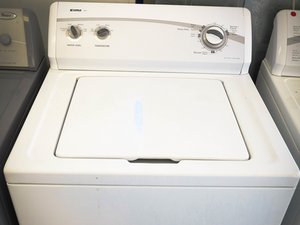
Before jumping into troubleshooting, it helps to know a bit about the Kenmore 500 Series washer. This washer is a top-loading model, often found in homes across the United States. It uses a central agitator to move clothes during the wash cycle. Most units have a simple control panel with dials or buttons, making them easy to operate.
The 500 Series is valued for its reliability, but like all appliances, it can develop problems from regular use. Understanding the basic parts—like the lid switch, water inlet valve, motor, pump, and timer—makes troubleshooting simpler. If you know what these parts do, you can quickly figure out what might be wrong when your washer stops working as it should.
Common Problems And How To Fix Them
Let’s look at the most frequent issues with the Kenmore 500 Series washer and how you can fix them. Each problem is explained in simple steps, so even first-time troubleshooters can follow along.
Washer Won’t Start
If your washer doesn’t turn on, check these areas first:
- Power supply: Make sure the washer is plugged in securely. Test the outlet with another appliance to confirm it’s working.
- Lid switch: The washer won’t start if the lid switch is faulty. Try pressing the lid down firmly—if you hear a click, the switch is working. If not, the switch may need replacement.
- Control settings: Double-check that you’ve selected a cycle and pressed the start button.
- Blown fuse or tripped breaker: Check your home’s fuse box or breaker panel.
Non-obvious insight: Many people forget to check the child lock feature. Some models have this, and if it’s on, the washer won’t start.
Washer Won’t Spin Or Agitate
If the washer fills with water but doesn’t spin or agitate, the issue could be:
- Lid switch: Again, a broken lid switch is a common cause.
- Drive belt: Open the back panel and inspect the drive belt. If it looks worn or broken, it should be replaced.
- Motor coupling: This small part connects the motor to the transmission. If it’s broken, the washer won’t move.
- Clutch or transmission: These parts can wear out with age. If you hear the motor running but nothing moves, call a technician.
Practical tip: If you’re hearing a humming noise but no movement, the motor could be jammed by a small piece of clothing or a coin.
Washer Won’t Drain
A washer that doesn’t drain leaves clothes soaking wet. Try these fixes:
- Clogged drain hose: Disconnect the hose and check for blockages.
- Pump issue: The drain pump may be blocked or broken. You can often hear a grinding noise if the pump is struggling.
- Lid switch: On some models, the washer won’t drain if the lid switch is faulty.
Beginner mistake: Forgetting to check the coin trap. Small items like socks or coins often block the drain pump.
Washer Leaking Water
Water on the floor can mean:
- Loose hose connections: Check all hoses at the back of the washer.
- Door seal: Inspect the rubber seal for cracks or damage.
- Overloading: Too many clothes can cause water to spill.
- Detergent: Using too much detergent can create excess suds and leaks.
Non-obvious insight: Sometimes, leaks come from the water inlet valve at the back. If only leaking during fill, this valve may need replacement.
Washer Makes Loud Noises
Strange sounds can point to several issues:
- Objects in the drum: Coins, zippers, or buttons can make rattling or banging noises.
- Worn bearings: A loud rumble during the spin cycle often means the drum bearings are worn.
- Unbalanced load: If clothes collect on one side, the washer can shake or bang.
Practical example: Run the washer empty. If the noise goes away, the issue was likely an unbalanced load or a foreign object.
Washer Smells Bad
A musty smell is common if the washer isn’t cleaned regularly:
- Clean the drum: Run an empty cycle with hot water and two cups of white vinegar.
- Leave the lid open: After each wash, keep the lid open to let air circulate.
- Check the filter: Clean the lint filter if your model has one.
Beginner mistake: Only cleaning the drum, not the detergent drawer or rubber seals, which can hold mold.

Error Codes And What They Mean
Many Kenmore 500 Series washers display error codes when something is wrong. Here’s a simple guide:
| Error Code | Meaning | What to Check |
|---|---|---|
| F1 | Control board failure | Try unplugging for 5 min; if error returns, replace control board |
| F21 | Drain problem | Check pump, drain hose, and coin trap |
| F30 | Dispenser problem | Clean or replace dispenser drawer |
| F33 | Water pressure switch | Check hose and switch for blockages |
| F50/F51 | Motor or sensor issue | Check motor, wiring, and rotor position sensor |
Not all models show codes, but if you see a code, look it up in your manual or online.
Cleaning And Maintenance Tips
Regular care helps prevent most washer problems. Here’s how to keep your Kenmore 500 Series washer running smoothly:
- Clean the drum every month with hot water and vinegar.
- Wipe the lid and seals to stop mold and mildew.
- Check hoses for cracks every six months.
- Don’t overload the washer.
- Use the right detergent—too much or the wrong kind can cause buildup and leaks.
Non-obvious insight: Check the leveling feet under the washer. If the machine isn’t level, it can shake, make noise, and even leak.

When To Call A Professional
Most problems can be fixed at home, but some require expert help:
- Electrical issues: If you see sparks or smell burning, unplug the washer and call an electrician.
- Major leaks: If water is flooding, turn off the supply and call a plumber.
- Transmission or motor problems: These are complex and need a trained technician.
Tip: If your washer is under warranty, always check with Kenmore or Sears before making repairs yourself.
Comparing Kenmore 500 Series To Other Models
If you’re considering whether to repair or replace your washer, it helps to see how the 500 Series compares to newer models.
| Feature | Kenmore 500 Series | Newer Kenmore Models |
|---|---|---|
| Control Type | Mechanical dials | Digital touchpad |
| Agitator | Central agitator | Impeller or agitator |
| Water Usage | Higher | Lower (HE models) |
| Repair Cost | Lower | Higher (more complex parts) |
| Lifespan | 12–15 years | 10–12 years |
The 500 Series is easier and cheaper to repair than most newer machines, but it uses more water and may lack smart features.
Troubleshooting By Symptom
Sometimes, you only know something is wrong by a symptom—not an error code or obvious problem. Here’s a quick guide:
Washer Vibrates Or Moves During Spin
- Ensure the washer is on a level surface.
- Remove shipping bolts (if newly installed).
- Balance the load inside.
Clothes Still Wet After Spin
- Check the spin cycle setting.
- Too many clothes can prevent spinning.
- The drain hose might be clogged.
Washer Fills Slowly Or Not At All
- Water supply valves must be fully open.
- Clean the water inlet screens.
- Make sure hoses aren’t kinked.
Tip: Use a flashlight to look for blockages in hoses or valves—small bits of debris are easy to miss.
Preventing Future Problems
The best way to avoid breakdowns is through simple habits:
- Don’t overload the washer—follow the manual’s guidelines for load size.
- Sort clothes by weight to balance loads.
- Clean the filter and drum regularly.
- Check for leaks every month.
Non-obvious tip: Avoid washing items like rugs or shoes, which can damage the drum and suspension.
Cost Of Common Repairs
Knowing repair costs helps you decide whether to fix or replace your washer.
| Part/Problem | DIY Cost | Professional Cost |
|---|---|---|
| Lid switch | $20–$40 | $100–$150 |
| Drive belt | $15–$30 | $90–$140 |
| Pump replacement | $35–$60 | $120–$200 |
| Control board | $110–$200 | $250–$400 |
DIY repairs are much cheaper, but only try them if you’re comfortable with basic tools and safety steps.
Resources For Further Help
If you need more information, Kenmore’s official website and user forums offer guides, parts diagrams, and troubleshooting help. The Sears PartsDirect site is also a trusted resource for parts and manuals.
Frequently Asked Questions
How Do I Reset My Kenmore 500 Series Washer?
To reset, unplug the washer for at least one minute, then plug it back in. Open and close the lid six times within 12 seconds to reset the control board. This works for most models.
Why Does My Washer Smell Musty?
A musty smell comes from mold or mildew. Clean the drum with hot water and vinegar, wipe down seals, and keep the lid open when not in use to let it dry out.
What Causes A Washer To Stop Mid-cycle?
Common reasons include a faulty lid switch, power loss, or a control board issue. Also check for overloaded loads or a blocked drain pump.
Can I Replace The Lid Switch Myself?
Yes, if you’re comfortable with basic repairs. Unplug the washer, remove the control panel, and swap out the old switch for a new one. Many online videos show this process.
How Long Does A Kenmore 500 Series Washer Last?
With regular maintenance, these washers often last 12–15 years. Problems like worn belts, pumps, or lid switches are normal over time, but major repairs may mean it’s time for a new washer.
Solving problems with your Kenmore 500 Series washer doesn’t have to be difficult. With these clear steps and tips, you can handle most issues quickly and safely. Regular maintenance will keep your washer running for years, saving you money and stress.
If you ever feel unsure, don’t hesitate to reach out to a professional or visit trusted online resources for extra support.

