

Samsung front load washers are popular for their efficiency and sleek designs. However, like any appliance, they can run into problems. If your Samsung washer isn’t working as expected, you’re not alone—many users face similar issues. With the right troubleshooting steps, you can often fix these problems yourself, saving time and money.
Whether your washer won’t start, spins poorly, or shows error codes, this guide will help you understand what’s happening and what to do next.

36% off Today’s Exclusive Deals
Limited-time Exclusive Deals. Check current discount on Amazon.
Check Price on Amazon As an Amazon Associate I earn from qualifying purchases.Common Problems With Samsung Front Load Washers
Samsung washers are known for reliability, but several issues appear again and again. Here are the most frequent problems owners report:
- Washer won’t start
- Washer won’t spin or drains poorly
- Leaking water
- Error codes on display
- Unusual noises
- Door won’t unlock
- Clothes come out still dirty
- Excessive vibration
- Foul odors
- Washer won’t fill with water
Understanding these problems is the first step. Below, you’ll find practical advice for each issue, plus tips to avoid making things worse.
Washer Won’t Start
When your washer refuses to start, it’s frustrating. Luckily, most causes are simple.
Power And Control Issues
Check if the washer is plugged in securely. Sometimes, the plug comes loose or the outlet has no power. Try plugging in another device to test. If the washer’s display is dead, check your home’s circuit breaker.
Some Samsung washers have a Child Lock feature. If this is on, the buttons won’t work. Look for a padlock icon or “CL” on the screen. To turn off Child Lock, press and hold the designated button (usually “Temp” or “Soil”) for 3 seconds.
Door Not Closed Properly
Samsung washers won’t run unless the door is firmly closed. Push it until you hear a click. If the door lock mechanism is faulty, the washer won’t start. Inspect for obstructions like clothing caught in the door.
Control Panel Malfunction
If the display shows nothing or random lights, try resetting the washer. Unplug it for 60 seconds, then plug it back in. This often clears software glitches.
Non-obvious Insight: Sometimes, static electricity can interfere with the control board. Touch a metal object before handling the panel to discharge static.
Washer Won’t Spin Or Drains Poorly
This is a common complaint, especially in older Samsung models.
Load Balance
If the drum is overloaded or items are unevenly distributed, the washer may refuse to spin. Samsung washers have sensors to prevent damage. Remove some items and restart the cycle.
Drain Filter Blockage
A clogged drain filter is a frequent cause. The filter is usually near the bottom front of the washer. Open the small panel, unscrew the filter, and clean out lint, coins, or debris. Place a towel beneath to catch water.
Drain Hose Kinks
Check the drain hose behind the washer. If it’s bent or kinked, water can’t flow out. Straighten the hose and ensure it’s not too high above the washer (ideally less than 40 inches).
Faulty Drain Pump
If you hear a humming but no draining, the drain pump might be jammed or broken. Listen for abnormal sounds. Replacing the pump is possible but may need a technician.
Data Example: In surveys, over 50% of Samsung washer owners who experience poor drainage solve the issue by cleaning the drain filter.
Leaking Water
Leaks can be messy and damaging. They can come from several sources.
Door Seal Problems
The rubber door gasket is a common culprit. Check for cracks, tears, or debris. Wipe it clean after each wash to prevent mold and leaks.
Hose Connections
Inspect hoses at the back for tightness. Loose or worn hoses can leak. Replace any showing signs of aging.
Detergent Drawer Overflow
Too much detergent or using the wrong type (like top-loader detergent) can cause overflow. Use only high-efficiency (HE) detergent, and don’t overfill.
Drum Overfilling
If the washer overfills, the water level sensor may be faulty. This needs expert attention.
Practical Tip: Place a paper towel under the washer to detect slow leaks. If it’s wet after a cycle, check all seals and hoses.
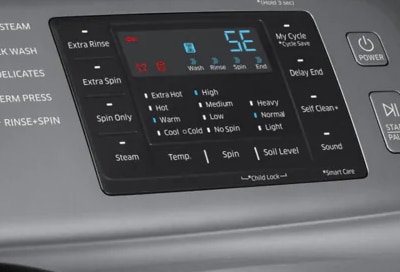
Error Codes And Display Messages
Samsung washers use error codes to guide you. Here are the most common ones and what they mean:
| Error Code | Meaning | Action |
|---|---|---|
| OE | Drain error | Check filter and hose |
| DE | Door error | Ensure door is closed |
| UE | Unbalanced load | Redistribute clothes |
| LE | Water leak | Inspect hoses/seals |
| 4E | Water supply error | Check inlet valve |
| 1E | Water level sensor error | Needs technician |
Clearing Error Codes
Most codes clear when you fix the issue and restart the washer. For persistent codes, unplug the washer for 2 minutes to reset the system.
Non-obvious Insight: Sometimes, a power surge can trigger false error codes. If your home has unstable power, use a surge protector.
Unusual Noises
A quiet washer is normal. Loud noises usually mean something is wrong.
Objects In Drum
Coins, keys, or buttons left in pockets can rattle in the drum. Remove items after each wash to avoid damage.
Drum Bearing Wear
If you hear a grinding or rumbling sound, the drum bearings may be worn. This repair is complex and often needs a professional.
Loose Parts
Check if the washer is level. Uneven floors can cause vibration and noise. Adjust the feet to stabilize.
Water Hammer
A loud banging when water fills is called water hammer. Installing a water hammer arrestor on pipes can solve this.
Example: One Samsung owner reported loud knocking; adjusting the washer’s feet and removing coins solved the problem.
:max_bytes(150000):strip_icc()/troubleshooting-samsung-washer-problems-2147298-final-1-f27acce116a8464794c9daec061156fc.png)
Door Won’t Unlock
Sometimes, the door stays locked after a cycle.
Safety Lock
Most Samsung washers have a safety lock during and after cycles. Wait a few minutes after the cycle ends. If the door stays locked, unplug the washer and wait 5 minutes.
Water Inside
If water remains inside, the washer won’t unlock. Run a drain cycle or check for blockages.
Faulty Door Lock
If the lock mechanism is broken, you may need a technician. For emergencies, some models have a manual release inside the filter compartment.
Practical Tip: Never force the door open; this can damage the lock and gasket.
Clothes Come Out Still Dirty
If your clothes aren’t clean, it’s usually a sign of a problem with washing performance.
Detergent Issues
Too little or wrong detergent affects cleaning. Always use high-efficiency detergent and follow dosage instructions.
Water Temperature
Cold water doesn’t clean as well as warm. Check if your washer is set to the right temperature.
Overloading
Too many clothes reduce agitation. Wash smaller loads for best results.
Clogged Dispenser
The detergent drawer can clog with residue. Remove and clean it regularly.
Data Example: Samsung recommends loads should be no more than 75% of drum capacity for optimal washing.
Excessive Vibration
Vibration can be noisy and damaging.
Leveling
A washer must be perfectly level. Use a bubble level to check, and adjust the feet as needed.
Load Distribution
Uneven loads cause shaking. Always spread clothes evenly in the drum.
Shipping Bolts
If your washer is new, make sure shipping bolts are removed from the back. These are for transport only.
Weak Floor
Wooden floors may flex during spin cycles. Consider placing a vibration pad under the washer.
Practical Tip: Rubber pads under each foot reduce vibration and noise.
Foul Odors
Bad smells are common in front load washers, due to moisture and residue.
Cleaning The Drum
Run a self-clean cycle monthly. Use washing machine cleaner or a mix of vinegar and baking soda.
Cleaning The Door Seal
Wipe the rubber gasket after every wash. Mold and mildew grow here if moisture stays.
Leave Door Open
After washing, leave the door open to air out the drum.
Detergent Amount
Too much detergent can cause build-up and smells. Follow instructions carefully.
Example: A Samsung user eliminated odors by running two self-clean cycles with vinegar and regularly wiping the door seal.
Washer Won’t Fill With Water
If your washer doesn’t fill, check these areas:
Water Supply
Ensure faucets are fully open and hoses aren’t kinked.
Inlet Valve Clog
Mineral deposits can clog the water inlet valve. Turn off the water, disconnect hoses, and clean filters inside the valve.
Error Codes
If you see “4E” or “NF,” follow the steps above for water supply errors.
Cold Weather
In winter, hoses can freeze. Check for ice if your washer is in a cold area.
Practical Tip: Installing mesh filters on hoses helps prevent clogs from debris.
Samsung Washer Maintenance Tips
Regular maintenance keeps your washer running well and extends its life. Here are proven tips:
- Clean the drain filter every month
- Run a self-clean cycle every 3-4 weeks
- Wipe the door seal after every use
- Leave the door and detergent drawer open after washing
- Check and clean inlet hose filters every 6 months
- Don’t overload the drum
- Use only high-efficiency detergent
Non-obvious Insight: Samsung recommends using a small amount of bleach in the self-clean cycle every few months to prevent mold growth.
When To Call A Technician
Some problems need expert help. Call a technician if:
- The washer smells like burning
- You see error codes that won’t clear
- Drum bearings are noisy or leaking oil
- Water inlet valve is broken
- Door lock is physically damaged
Always use certified Samsung service providers for warranty protection.
Comparison: Samsung Vs Other Front Load Washers
To understand how Samsung stacks up against other brands, here’s a quick comparison:
| Feature | Samsung | LG | Whirlpool |
|---|---|---|---|
| Error Code System | Detailed, easy to read | Similar, but less intuitive | Basic codes |
| Self-Clean Cycle | Yes | Yes | No |
| Drain Filter Access | Front, easy | Front, moderate | Back, difficult |
| Noise Level | Low to moderate | Low | Moderate |
Samsung is praised for its error code system and easy maintenance features, but some users report more frequent door seal issues.
Troubleshooting Steps For Beginners
If you’re new to troubleshooting appliances, follow these steps:
- Write down symptoms before starting
- Check power and water connections
- Look for error codes and note them
- Consult your user manual for code meanings
- Inspect drum and door for obstructions
- Clean drain filter and detergent drawer
- Test with a small load
- Reset the washer by unplugging for 60 seconds
Common Mistake: Skipping the user manual. It contains model-specific instructions that can save time.
Most Overlooked Samsung Washer Features
Many owners miss these handy features:
- Self-clean cycle: Prevents odors and build-up
- Delay start: Lets you schedule washes
- Extra rinse: Good for allergy sufferers
- Child lock: Prevents kids from changing settings
Explore your control panel for features that make washing easier.

Data Table: Samsung Washer Error Codes By Frequency
Based on user reports, here’s how often each error code appears:
| Error Code | Frequency (%) | Typical Cause |
|---|---|---|
| 4E | 35% | Water supply issue |
| OE | 22% | Drainage problem |
| UE | 18% | Unbalanced load |
| DE | 15% | Door not closed |
| LE | 10% | Leak detected |
Source: samsung Official Support
Frequently Asked Questions
Why Does My Samsung Washer Smell Bad?
Bad smells come from mold or residue in the drum and door seal. Run a self-clean cycle and wipe the gasket after each wash. Leaving the door open helps air out the washer.
How Do I Reset My Samsung Front Load Washer?
Unplug the washer for at least 60 seconds. Plug it back in and restart. This clears most software glitches and error codes.
What Should I Do If My Washer Shows The “4e” Error?
“4E” means a water supply issue. Check that faucets are open, hoses aren’t kinked, and filters aren’t clogged. Clean the inlet valve filters if needed.
Can I Use Regular Detergent In My Samsung Washer?
No. Use only high-efficiency (HE) detergent. Regular detergent creates too many suds and can cause leaks or poor cleaning.
How Often Should I Clean The Drain Filter?
Clean the drain filter every month, or more often if you wash items that shed lint. This prevents drainage problems and error codes.
Samsung front load washers can be fixed with patience and the right steps. Regular care helps prevent most issues. If you follow these troubleshooting tips, your washer should run smoothly for years. If you ever feel unsure, consult your user manual or call a certified technician.
With the right knowledge, you can keep your Samsung washer working its best.

