

Owning a Whirlpool Duet Steam Washer can make laundry easy and efficient. But when something goes wrong, many people feel lost. Modern washers are packed with features like steam cycles, advanced sensors, and error codes. This means troubleshooting is not always simple. Even small issues can cause big headaches if you don’t know what to look for. In this guide, you’ll learn how to solve common problems with your Whirlpool Duet Steam Washer. We’ll cover error codes, common faults, and practical steps to fix your machine. Whether your washer won’t start, shows a strange code, or leaves clothes wet, you’ll find clear answers here. Let’s dive in and get your laundry back on track.
Understanding Your Whirlpool Duet Steam Washer
The Whirlpool Duet Steam Washer is a front-loading machine with advanced features. It uses steam cleaning to remove tough stains and bacteria. This washer also has smart sensors to adjust water and energy use. Knowing the basics helps you troubleshoot more effectively.

36% off Today’s Exclusive Deals
Limited-time Exclusive Deals. Check current discount on Amazon.
Check Price on Amazon As an Amazon Associate I earn from qualifying purchases.Key Features
- Steam cycle: Uses heat and steam to clean deeply.
- Sensor technology: Adjusts water and cycle time automatically.
- High spin speed: Extracts more water for faster drying.
- Error code display: Shows codes when something goes wrong.
Common Models
Most Duet Steam Washers share similar controls and parts, but model numbers vary. Here are some popular models:
- WFW9600TA
- WFW9550WL
- WFW97HEXW
These models offer similar troubleshooting steps, so advice in this article applies to most Duet Steam Washers.
Basic Troubleshooting Steps
Before you start fixing problems, try these basic steps. Many washer issues are simple to solve, and you don’t need special tools.
1. Check Power Supply
Make sure the washer is plugged in and the outlet is working. If the washer won’t turn on, try another device in the same outlet.
2. Inspect Water Supply
Turn both water valves on fully. The washer needs enough water to operate. If hoses are kinked or blocked, water may not flow.
3. Clean Filter And Drain
A clogged filter or drain can cause error codes or stop the washer. Remove the lower front panel and check the filter for lint or debris.
4. Restart Washer
Turn the machine off and unplug it for 60 seconds. Plug it in and turn it back on. This resets many minor faults.
5. Check Door Latch
If the door isn’t closed properly, the washer won’t start. Make sure nothing blocks the latch and close the door firmly.
These steps fix many small problems. If your washer still has issues, move on to specific troubleshooting.
Error Codes And What They Mean
When your Whirlpool Duet Steam Washer detects a problem, it shows an error code. Understanding these codes is key to solving issues.
Most Common Error Codes
| Error Code | Meaning | Action |
|---|---|---|
| F21 | Drain problem | Check drain hose and pump |
| F11 | Communication error | Check wiring and control board |
| F01 | Electrical fault | Inspect main control unit |
| F20 | No water detected | Check water supply and valves |
| F28 | Motor error | Check motor and connections |
| F30 | Dispenser issue | Inspect dispenser drawer |
How To Clear Error Codes
Some codes clear automatically when you fix the issue. For others, you must reset the washer:
- Unplug the washer for 1 minute.
- Plug it back in.
- Start a new cycle.
If the code returns, you may need deeper troubleshooting or a technician.
Solving Drain And Water Problems
Drain and water issues are the most common faults in Whirlpool Duet Steam Washers. They cause error codes like F21 and F20.
Fixing Drain Issues
If your washer shows F21 or doesn’t drain, follow these steps:
1. Check Drain Hose
Make sure the hose isn’t kinked or blocked. Remove the hose and run water through it.
2. Clean The Drain Pump Filter
Open the lower panel and unscrew the filter cap. Remove lint, coins, or small objects.
3. Inspect The Drain Pump
If you hear strange noises, the pump may be clogged or broken. Replace the pump if needed.
Fixing Water Supply Issues
F20 means the washer isn’t getting enough water. Try these steps:
1. Open Water Valves Fully
Both hot and cold valves must be open.
2. Check Hose Screens
Remove hoses and clean the screens inside each end.
3. Test Water Pressure
Low pressure can cause problems. If water trickles out, call a plumber.
Non-obvious Insight
Many beginners forget to check the height of the drain hose. It must be between 30 and 48 inches from the floor. Too high or low can cause water to siphon or not drain.
Troubleshooting Door And Lock Problems
If the washer doesn’t start or shows a door error, the problem is usually the latch or lock mechanism.
Common Door Issues
- Door won’t lock
- Washer won’t start
- Error code “DL” or “F22”
How To Fix Door Problems
1. Check For Obstructions
Make sure clothes or items aren’t blocking the door.
2. Inspect The Latch
Look for damage or wear. Replace if broken.
3. Test The Door Lock
When you close the door, you should hear a click. If not, the lock may need replacing.
4. Reset The Washer
Unplug and plug back in, then try again.
Extra Tip
If you have a child lock enabled, disable it before opening the door. The lock icon on the display means the child lock is on.
Handling Washer Not Starting
When your Whirlpool Duet Steam Washer won’t start, the cause is often simple. Here’s how to get it running:
1. Check Power And Fuse
Make sure the outlet works and the fuse isn’t blown.
2. Inspect Door Latch
Washer won’t start if door isn’t locked.
3. Check Control Panel
If the display is blank, the panel may be faulty.
4. Try A Different Cycle
Sometimes, a specific cycle fails. Try “Quick Wash” or another setting.
5. Press And Hold Start
You must press and hold the button for 2-3 seconds.
If the washer still won’t start, it may need a new control board or technician service.
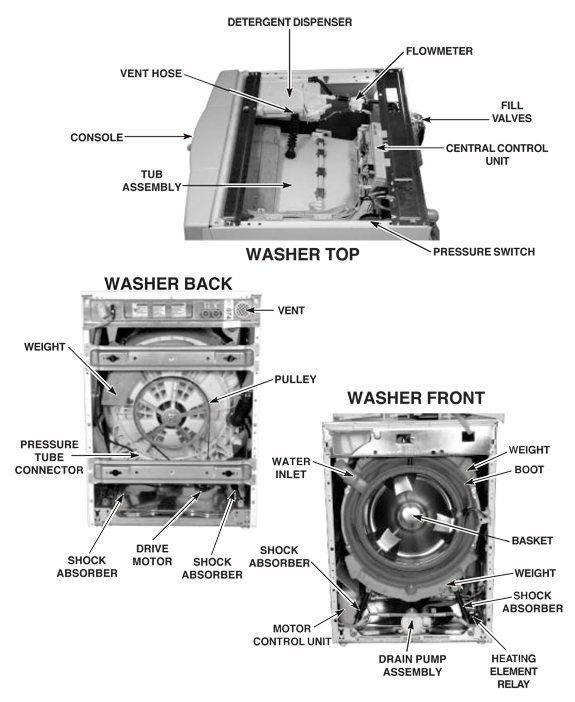
Solving Spin And Balance Problems
Clothes that come out wet or washer that shakes are signs of spin or balance issues.
Causes Of Spin Problems
- Unbalanced load
- Washer not level
- Faulty motor or belt
How To Fix Spin Problems
1. Redistribute Clothes
Don’t overload or underload. Spread items evenly.
2. Level The Washer
Use a bubble level and adjust the feet until the washer is flat.
3. Inspect Motor And Belt
If the washer makes noise or doesn’t spin, the belt or motor may be faulty.
Example
If you wash heavy towels with small items, the load can become unbalanced. This makes the washer shake and stops spinning. Always mix items to balance the load.
Cleaning And Maintenance Tips
Regular cleaning keeps your washer running smoothly and prevents odors.
Steps For Cleaning
1. Clean Dispenser Drawer
Remove and wash with warm water. Use a brush for stubborn buildup.
2. Run A Cleaning Cycle
Use “Clean Washer” cycle with special tablets or vinegar.
3. Wipe Drum And Gasket
Mold can grow in rubber seals. Wipe with a damp cloth and mild cleaner.
4. Check Filter Monthly
Clean the filter every month to prevent blockages.
Maintenance Table
Here is a simple maintenance schedule:
| Task | Frequency | Estimated Time |
|---|---|---|
| Clean dispenser drawer | Monthly | 10 minutes |
| Run cleaning cycle | Monthly | 1 hour |
| Wipe drum and gasket | Weekly | 5 minutes |
| Check filter | Monthly | 15 minutes |
Troubleshooting Detergent And Dispenser Issues
If your washer doesn’t dispense detergent or softener, you may see code F30 or notice residue left behind.
Common Causes
- Dispenser drawer clogged
- Wrong detergent type
- Not enough water flow
How To Fix
1. Remove And Clean Drawer
Wash with warm water and scrub away buildup.
2. Use He Detergent
Only use High Efficiency (HE) detergent. Regular detergent creates too many suds.
3. Check Water Flow
Low flow can prevent proper dispensing. Clean hose screens.
Non-obvious Insight
Many users forget to remove the detergent drawer completely for cleaning. Hidden buildup inside can block dispenser function.
Addressing Steam Feature Problems
The steam cycle is popular for removing stains and allergens. If it doesn’t work, try these steps.
Steam Cycle Not Working
1. Check Water Supply
Steam needs extra water. Make sure both valves are open.
2. Select Correct Cycle
Only Some Cycles Use Steam. Try “sanitize” Or “allergen.”
3. Inspect Steam Generator
If steam never appears, the generator may need replacing.
Practical Example
If you select “Normal” cycle, steam may not activate. Always choose a cycle designed for steam cleaning.
When To Call A Technician
Some problems need professional help, especially if parts are faulty or codes won’t clear.
Signs You Need Help
- Repeated error codes
- No power or blank display
- Water leaks
- Burning smell
What To Expect
Technicians can diagnose and replace parts like control boards, motors, or pumps. Repairs usually cost $150–$400, depending on the issue.
Comparison: Whirlpool Duet Steam Washer Vs Other Models
Understanding how your washer compares helps you troubleshoot better. Here is a quick comparison.
| Feature | Duet Steam Washer | Standard Washer | Top-Loading Washer |
|---|---|---|---|
| Steam Cleaning | Yes | No | No |
| Sensor Technology | Advanced | Basic | Basic |
| Spin Speed | Up to 1400 RPM | 800–1200 RPM | 600–1000 RPM |
| Error Codes | Digital display | Lights/beeps | Manual |
| Water Efficiency | High | Medium | Low |
Duet Steam Washers offer more advanced troubleshooting, but also more complex problems.

Common Mistakes When Troubleshooting
Avoid these mistakes to prevent damage or wasted time:
1. Ignoring Error Codes
Always look up the code before trying to fix.
2. Skipping Basic Checks
Many people forget to check power or water supply first.
3. Using Wrong Detergent
Non-HE detergent causes too many suds and errors.
4. Forcing The Door Open
Never force the door; you can break the lock.
5. Not Cleaning Regularly
Dirty filters and drawers cause many issues.
Real-world User Example
Maria, a busy mom, noticed her Duet Steam Washer stopped mid-cycle and showed “F21.” She checked the drain hose, found a sock stuck, and removed it. The error cleared, and her washer worked again. This shows that small items can cause big problems—always check pockets before washing.

Extra Tips For Whirlpool Duet Steam Washer Owners
- Run a cleaning cycle every month to prevent mold.
- Keep the door slightly open between uses to air out the drum.
- Don’t overload; follow the capacity limits in your manual.
- Keep your manual handy; it lists error codes and troubleshooting steps.
- If you need replacement parts, use official Whirlpool parts for best results.
Frequently Asked Questions
How Do I Reset My Whirlpool Duet Steam Washer?
Unplug the washer for 1 minute, then plug it back in. This resets most minor faults and clears some error codes.
What Does The F21 Error Code Mean?
F21 means a drain problem. Check the drain hose, pump filter, and remove any blockages. If the issue continues, the pump may need replacing.
Why Is My Washer Not Spinning Properly?
An unbalanced load, washer not level, or faulty motor can cause spin issues. Try redistributing clothes and leveling the washer. If it still doesn’t spin, call a technician.
How Do I Clean The Detergent Dispenser?
Remove the dispenser drawer, wash it with warm water, and scrub away any buildup. Clean the inside area as well. Use only HE detergent for best results.
Where Can I Find More Information?
Visit Whirlpool’s official website or read the full manual for your model. For advanced troubleshooting, check Whirlpool Support.
Getting your Whirlpool Duet Steam Washer back in action doesn’t have to be difficult. By following these troubleshooting steps, most owners can solve problems quickly and safely. Remember to check error codes, maintain your machine, and avoid common mistakes. With a little care, your washer will keep your clothes clean for years to come.

