

Most Hunter Pro C issues can be fixed by checking power, wiring, and valve operation.
I have spent years installing and repairing irrigation controllers. This guide on Hunter Pro C Troubleshooting shares clear steps, real examples, and simple checks you can do right now. I explain why problems happen, how to diagnose them fast, and when to call a pro. Read on to learn reliable, tested fixes that save time and water.

36% off Today’s Exclusive Deals
Limited-time Exclusive Deals. Check current discount on Amazon.
Check Price on Amazon As an Amazon Associate I earn from qualifying purchases.
Source: bigirrigation.com
Common problems with Hunter Pro C Troubleshooting
Hunter Pro C Troubleshooting often starts with these common symptoms. Knowing these makes diagnosis faster.
Most frequent issues
- Controller shows no display or blank screen.
- Zones will not run or the controller skips zones.
- A zone runs but the valve does not open.
- Erratic schedules, lost programs, or wrong time/date.
- Constantly running master valve or pump start.
Each symptom points to a small set of causes. Work top to bottom: power, wiring, valves, then programming. This order saves time and avoids unnecessary parts swaps.
Source: yumpu.com
Quick basic troubleshooting steps for Hunter Pro C Troubleshooting
Start with simple checks. These often solve the issue within minutes.
Step-by-step quick checks
- Check the display and lights: Is the screen blank or dim? A blank screen often means no power.
- Verify transformer and fuse: Ensure the transformer is plugged in and the inline fuse on the controller is intact.
- Reset power: Turn the controller to OFF, remove power for 30 seconds, then restore power.
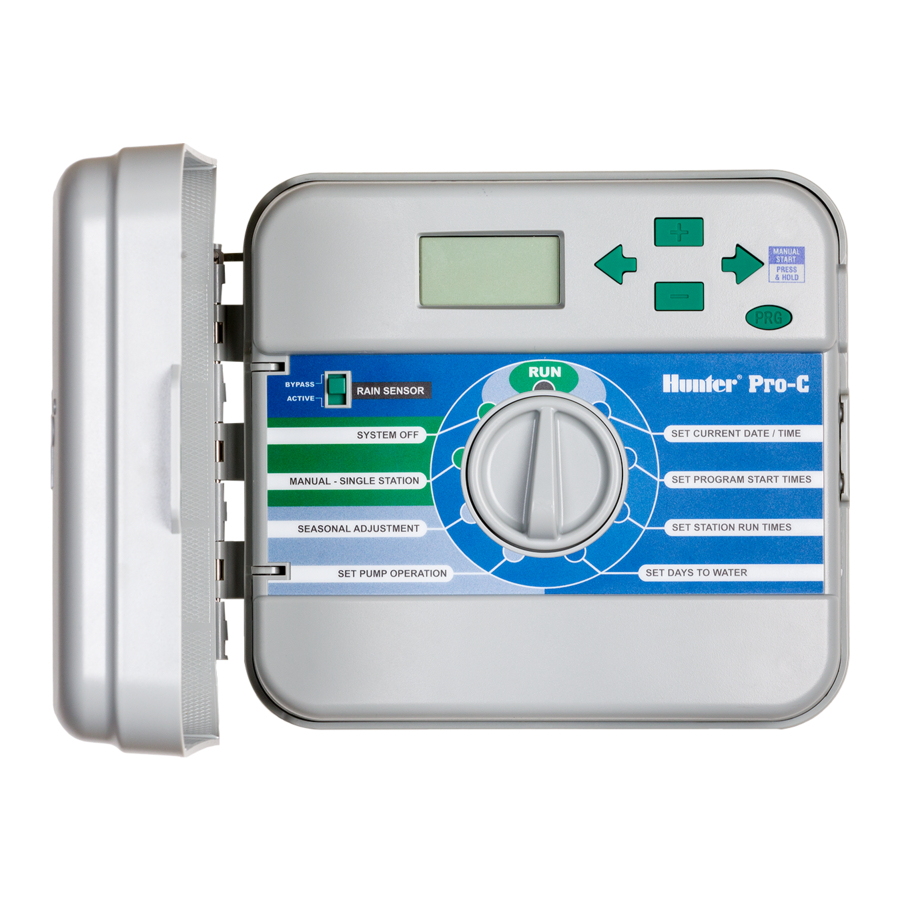
- Run a manual zone: Use the controller’s manual dial to start a zone. If it runs, programming or sensors might be the issue.
- Inspect sensors: Rain sensors or flow sensors can stop zones. Bypass them briefly to test.
These steps identify whether the issue is simple or needs deeper testing. Keep safety in mind when working with electrical parts.
Source: manualslib.com
Advanced diagnostics and tools for Hunter Pro C Troubleshooting
When basics fail, use tools and methods that find hidden faults.
Tools you may need
- Multimeter for voltage and resistance checks.
- Wire tracers or tone generators for broken wires.
- Small screwdriver set and needle-nose pliers.
Key advanced tests - Measure transformer output: You should see about 24 VAC across the transformer leads at the controller.
- Test solenoid resistance: Typical solenoid resistance often falls between about 20 and 60 ohms; an open or infinite reading indicates a bad solenoid or broken wire.
- Check continuity in wires: Trace from the controller to the valve to find opens or shorts.
- Use the manual valve test at the valve: Apply 24 VAC directly to the valve solenoid to confirm mechanical operation.
These diagnostics reduce guesswork. If voltage is correct and solenoid responds to direct power, the issue is likely wiring or the controller zone output.
Programming and scheduling problems in Hunter Pro C Troubleshooting
Software and settings cause many “operator” issues. Check the program before swapping parts.
Common programming faults
- Incorrect day/time causes odd run behavior.
- Start times overlap or seasons are wrong.
- Seasonal Adjust or percent settings reduce run time unexpectedly.
How to fix program issues - Confirm current time and day are correct.
- Review each program’s start times and station run durations.
- Check for active seasonal adjustment or rain delay.
- Use the controller’s program preview or run history to verify scheduled runs.
Small programming errors look like hardware failures. Verify settings first to save time.

Source: scribd.com
Valve, solenoid, and valve wire problems for Hunter Pro C Troubleshooting
Valves and their wiring are frequent culprits. They fail from wear, corrosion, or lawn work.
Symptoms and checks
- Valve clicks but does not open: Could be clogged diaphragm or low voltage.
- No click at the valve: No signal from controller or a broken wire.
- Valve opens manually but not from controller: Bad solenoid or weak transformer.
Practical steps - Listen for a click when the controller energizes the zone.
- Measure voltage at the valve: 24 VAC when zone is started indicates controller output works.
- Replace the solenoid if resistance is out of range or it fails direct power test.
Valves often fail slowly. Keep spare solenoids and keep connector tabs clean. Label wires during any work to avoid confusion later.

Source: stackexchange.com
Wiring and power issues in Hunter Pro C Troubleshooting
Wiring faults are common after grounds, mowers, and rodents interact with irrigation lines.
What to inspect
- Low or no voltage at the controller terminals.
- Loose or corroded screw terminals on the controller.
- Short circuits between station and common wires.
How to repair - Tighten and clean terminal screws.
- Repair damaged insulation and rejoin wires with waterproof connectors.
- Replace inline fuses and confirm transformer output.
Good wiring prevents intermittent faults. Use proper gauge wire and keep connections above ground where possible.

Source: youtube.com
Firmware, factory reset, and software updates for Hunter Pro C Troubleshooting
Software fixes are less common but can resolve odd behaviors.
When to reset or update
- Controller acts erratically after power surges.
- Corrupted settings or unknown errors persist after other fixes.
Safe reset steps - Note current programming before a factory reset.
- Perform a soft reset first: power cycle and check.
- Do a factory reset only if needed, then restore programs manually.
Firmware updates for some newer controllers can fix bugs. Back up programs and follow manufacturer instructions if you update.

Source: reddit.com
Preventive maintenance and tips for Hunter Pro C Troubleshooting
Preventive care reduces future troubleshooting needs.
Regular tasks to perform
- Inspect controller compartment twice a year for moisture or pests.
- Clean terminals and tighten connections annually.
- Run manual station tests each season to confirm operation.
- Winterize or drain the system in freezing climates.
Small habits prevent big problems. I once prevented a major outage by catching a rodent chew through the common wire during a routine check.
Troubleshooting checklist and step-by-step guide for Hunter Pro C Troubleshooting
Use this checklist to work methodically. It helps you stay focused and document fixes.
Ordered troubleshooting checklist
- Check controller display and lights.
- Verify transformer and inline fuse.
- Manual run a zone from the dial.
- Bypass sensors like rain switches.
- Measure 24 VAC at controller station outputs.
- Measure voltage at the valve when a zone is active.
- Test solenoid resistance and try direct power at valve.
- Inspect and repair wiring and terminals.
- Review programming, start times, and seasonal adjustments.
- Reset or update firmware only after backups.
Follow each step in order. This cuts repeated visits and unnecessary parts replacements.
Personal experience and lessons learned with Hunter Pro C Troubleshooting
I’ve fixed dozens of Hunter Pro C units. A few lessons stand out.
Lessons from the field
- Always check power first. Many calls end with a loose plug or blown fuse.
- Label wires at install. Future troubleshooting becomes fast and safe.
- Keep a spare solenoid kit and a basic tool bag in your truck.
A memorable job: a customer reported a non-working system. It was a single mouse-chewed common wire costing less than five minutes to fix. Small things matter.
Frequently Asked Questions of Hunter Pro C Troubleshooting
What should I do if my Hunter Pro C display is blank?
Check the transformer and controller fuse first. If the transformer reads about 24 VAC and the fuse is good, the controller may need repair or replacement.
How do I test a valve solenoid on a Hunter Pro C system?
Measure the solenoid resistance with a multimeter and apply 24 VAC directly to the solenoid to see if the valve opens. No click or infinite resistance means replacement likely.
Why does a zone stay on even when the controller stops it?
This suggests a stuck valve diaphragm, a faulty solenoid, or a shorted station wire. Isolate the valve and test voltage and solenoid directly.
Can programming errors cause zones not to water?
Yes. Incorrect start times, seasonal adjustments, or rain delay settings can prevent scheduled runs. Always verify program settings before replacing hardware.
When should I call a professional for Hunter Pro C Troubleshooting?
Call a pro if you find low voltage that you cannot safely trace, if wiring is buried and needs tracing, or if the controller board shows burnt components. Complex electrical issues merit trained help.
Conclusion
Hunter Pro C Troubleshooting becomes simple when you follow a clear process: check power, test wiring, verify valves, and then fix programming. Use the steps and checklist here to diagnose most issues quickly. Take action now: do the basic checks, run a manual zone, and label any repairs. If you found this helpful, subscribe for more irrigation tips, or leave a comment with your specific issue so I can help.

